Substack Agents / Automations
By The Agentic Review
Published: 2026-06-03
URL: https://theagenticreview.substack.com/p/how-to-build-a-substack-agent-in
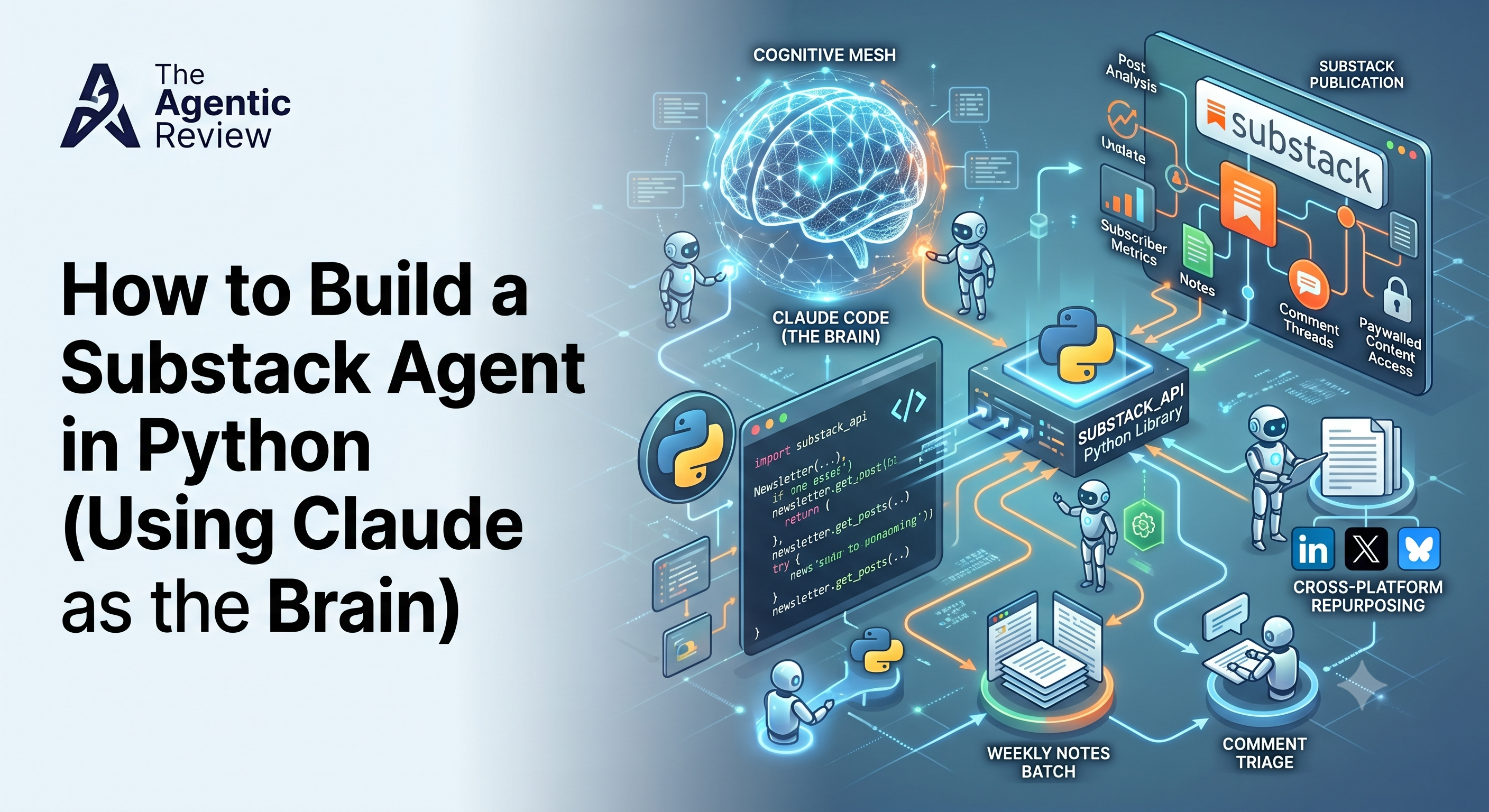
The unofficial substack\_api Python library gives you read access to almost everything that matters about your publication — posts, comments, analytics, subscriber recommendations, even paywalled content you own. Paired with Claude Code, it becomes a Substack agent that reads your work, finds patterns you can’t see, drafts Notes in your voice, and surfaces comments worth replying to. Here’s the complete walkthrough — installable in 20 minutes, with working code, the gotchas no other tutorial covers, and a clear-eyed read on what the library can and cannot do.
The Agentic Review is a reader-supported publication. To receive new posts and support my work, consider becoming a free or paid subscriber.
This article is the deep walkthrough of a susbtack agent implementation. By the end you’ll have:
- A working
substack\_apiinstall
- A Claude Code agent configured to use it
- Five concrete agent workflows you can run today
- An honest map of what the library does and doesn’t support
- A pattern for adding analysis layers Claude Code can call on demand
If you’ve never written Python: that’s fine. The point of using Claude Code as the brain is that you don’t need to write the Python. You install the library once, point Claude Code at it, and then talk to Claude Code in plain English about your Substack. Claude Code writes the code, runs it, and explains the results.
If you have written Python: even better. You can wire the library directly into your own agent loops with whatever framework you prefer.
Let’s start with the honest scoping, because this matters.
What substack\_api actually does (and what it doesn’t)
Most tutorials oversell what unofficial Substack libraries can do. I want to be precise.
substack\_api is a read-and-analyze library. It is not a publish library.
What you can do with it:
- Read posts from any public Substack publication (yours or others)
- Read your own paywalled posts (with cookie auth)
- Read comments and comment threads on any post
- Read user profile data, subscriptions, and recommendations
- Read chat threads from publications you have access to
- Search for posts within a newsletter
- Pull publication metadata (description, authors, stats)
What you cannot do with it:
- Publish new posts or Notes (the library has no publish methods)
- Schedule content
- Modify your publication settings
- Send emails to subscribers
- Trigger Substack’s own automations
This shapes what kind of “Substack agent” makes sense to build with it. The honest framing: this is a research-and-drafting agent, not an autonomous publishing agent. It reads your work, finds patterns, drafts content for you to publish. The publishing step stays human.
That’s actually a feature, not a limitation. Autonomous publishing on Substack would corrode the platform’s value (and your readers’ trust). What this library gives you is something more useful — a way to compound your own publishing through analysis and drafting that you still control.
Setup (15 minutes)
You need three things: Python, the library, and a way to talk to your AI agent.
Step 1 — Install Python (if you haven’t)
If you’re on a Mac, Python is preinstalled but old. Install a current version via python.org or via Homebrew:
brew install [email protected]
On Windows or Linux, grab Python 3.12+ from python.org or your package manager. The library requires Python 3.12 or newer.
Verify:
python3 --version
You should see Python 3.12.x or higher.
Step 2 — Install substack-api
pip install substack-api
Verify:
python3 -c "from substack_api import Newsletter; print('OK')"
If you see OK, you’re set.
Step 3 — (Optional) Set up cookie auth for your own publication
This step is only needed if you want to access your own paywalled posts or comment threads. For reading public posts, skip this.
To get your cookies:
- Open Chrome (or any browser) and sign in to Substack
- Open DevTools (Cmd+Opt+I on Mac, F12 on Windows)
- Go to Application → Cookies →
- Find the cookies
substack.sidandsubstack.lli
- Copy their values into a JSON file (call it
cookies.json):
[ { "name": "substack.sid", "value": "YOUR_SESSION_ID_HERE", "domain": ".substack.com", "path": "/", "secure": true }, { "name": "substack.lli", "value": "YOUR_LLI_VALUE_HERE", "domain": ".substack.com", "path": "/", "secure": true } ]
Keep this file private. Anyone with these cookies can act as you on Substack until they expire (usually 60-90 days).
Step 4 — Connect Claude Code
This is the interesting step. If you already have Claude Code installed (from my earlier guide on using it with Kimi K2.6 or Qwen), you’re ready to go. If not, install it from the Claude Code docs.
Open a terminal in a working directory where you’ll keep your Substack agent scripts:
mkdir ~/substack-agent cd ~/substack-agent claude
Claude Code is now running in that directory. Anything you tell it to do, it can do — including writing and running Python that uses substack\_api.
Your first Substack agent task (5 minutes)
Type this into Claude Code:
Write a Python script that uses substack\_api to fetch the last 20 posts from <sustack url>
and prints their title, date, and URL. Run it.
(Replace the URL with your own Substack.)
Claude Code will write something like:
from substack_api import Newsletter newsletter = Newsletter("https://theagenticreview.substack.com") posts = newsletter.get_posts(limit=20) for post in posts: metadata = post.get_metadata() print(f"{metadata['post_date'][:10]} {metadata['title']}") print(f" {post.url}") print()
It’ll run the script and show you the output: your last 20 posts, dated, titled, linked. About 8 lines of code to do what would take you 5 minutes of clicking around in the Substack dashboard.
That’s the baseline. From here, you build up.
Five agent workflows worth building
These are the workflows I actually run on my own publication. Each takes 5-30 minutes to set up with Claude Code as the brain. None of them publish anything autonomously — they read, analyze, draft, and let you decide.
Workflow 1 — “What patterns are in my own writing?”
The use case: you’ve published 30+ articles. You can’t easily see what topics you’ve covered, what formats worked, or where the gaps are. Substack’s own dashboard doesn’t help.
Ask Claude Code:
Fetch all my published posts using substack\_api. For each post, get the title, date, and content. Then analyze the topics covered, identify the three formats I use most often, and suggest five topic angles I haven’t covered that would fit my publication’s editorial voice.
Claude Code will write the fetch script, run it, then reason over the results. The whole thing takes 2-3 minutes for a publication with 30-50 posts. The output is genuinely useful — you’ll see patterns in your own work you couldn’t see in your dashboard.
The killer follow-up: ask Claude Code to save the analysis to a file so you can reference it later, or build on it next time you want to plan content.
Workflow 2 — “Weekly Notes batch from my recent articles”
The use case: you publish articles regularly. Each article contains 3-5 surprising facts, contrarian takes, or memorable lines that would make good Notes. Manually extracting them is tedious.
Ask Claude Code:
Fetch my last 3 published articles using substack\_api. For each article, pull the full content. Then draft 15 Notes total (5 per article) that pull surprising facts, contrarian observations, or memorable lines from each one. Match my editorial voice — practitioner-grade, no hype, no exclamation marks. Output the Notes as a numbered list I can review.
Claude Code reads your articles, finds the moments worth surfacing, drafts Notes you’d actually publish, and gives you a list you can edit. The “match my voice” instruction is what makes this useful — Claude has enough samples of your writing in the article content to model your style fairly well.
What you do with the list: review, edit the ones that need it, drop the ones that don’t fit, schedule the rest. Total time on your end: 15-20 minutes for a week of Notes content.
This is the single highest-leverage agent workflow I’ve built. It transformed Notes from a daily chore into a weekly batch.
Workflow 3 — “Which of my comments deserve real replies?”
The use case: Substack notifications dump every comment into the same stream. The substantive ones get lost. You miss reply opportunities that would have built real reader relationships.
Ask Claude Code:
Fetch the last 10 comment threads on my recent posts using substack\_api. For each comment, evaluate whether it’s a substantive engagement (a thoughtful question, a real critique, a personal story, a follow-up question I should address) versus a generic appreciation comment (”great post!”, “this is amazing”). Output a ranked list of comments that deserve a real personal reply, with the post URL and comment text.
The output is a sorted to-do list of replies worth writing. Generic praise comments still get a like (you do that manually). Substantive ones get real responses (you write those manually too).
Subtle but important: this workflow doesn’t draft the replies. It just surfaces which ones deserve them. The reply itself stays in your voice, written by you. That’s the line that keeps your community real.
Workflow 4 — “Cross-platform repurposing for a single article”
The use case: you published a great article. You should turn it into a LinkedIn post, an X thread, a Bluesky post, and a Substack Note. Doing this manually for each article eats an hour.
Ask Claude Code:
\*Fetch my most recent published article using substack\_api. Then draft:
- A LinkedIn post (200-300 words, professional tone, lead with the article’s thesis, include a call to read)
- An X thread (5-7 posts, each one tweet-sized, designed to land standalone if someone doesn’t expand the thread)
- A Bluesky post (1-2 posts, casual tone, more personal)
- A Substack Note (under 300 characters, hook-led, links to the article) Match my editorial voice across all of them.\*
Claude Code reads the article, drafts the four versions, and outputs them ready to copy-paste. 5 minutes instead of 60.
The output isn’t perfect. You’ll edit each one. But the cold-start work is done.
Workflow 5 — “What threads in my own back catalog should I pull on next?”
The use case: you’ve been publishing for a while. Your articles probably form clusters — recurring themes, callbacks between pieces, ideas you’ve only half-developed. You can’t easily see those patterns from inside the writing process. You need an outside view of your own work.
Ask Claude Code:
Fetch the full content of these three articles I’ve published using substack\_api:
- [URL of your most recent article]
- [URL of an earlier article on the same theme]
- [URL of the article where the thread first started]
Read all three carefully. Then: 1. Identify the editorial thesis that connects them (what argument am I building across these pieces?) 2. List the three strongest follow-up articles I haven’t written yet that would extend the thesis 3. For each follow-up, suggest a working title, a 2-3 sentence pitch, and the specific section in one of the source articles that hints at the topic but doesn’t fully develop it 4. Flag any internal contradictions or evolving positions across the three articles — places where my thinking has shifted or where two articles say slightly different things
Claude Code reads the three articles, identifies the through-line, and surfaces follow-up territory you can act on. The output is a focused content roadmap built from your own work, not vague suggestions about “topics in AI.”
The killer detail is the “internal contradictions” check. Writers evolve. Things you said 3 months ago might not be what you’d say today. Surfacing those evolutions deliberately is what separates a publication with a developing thesis from a stream of disconnected posts. You can either revise the older pieces, write a “what I changed my mind about” post, or update your future articles to reflect the sharper position.
All three are legitimate moves. Knowing the contradictions exist is what makes them moves at all.
This is the workflow I run quarterly. It’s the single highest-leverage editorial (rather than productivity) agent task in my stack.
The pattern worth copying
Notice what all five workflows have in common:
- They read, don’t publish. Every output is something you review and act on, not something the agent ships on its own.
- They use Claude Code as the brain. You don’t write the Python. You tell Claude Code what you want; Claude Code writes the code, runs it, summarizes the result.
- They compound your time. Each one takes 5-15 minutes of your review against 1-3 hours of manual work.
- They preserve your voice. The agent finds material; you decide what to do with it.
This is the right shape for personal automation. Not “AI takes over my Substack” — that’s bad. “AI does the boring research, drafting, and aggregation work; I make every published decision” — that’s good.
If you build only one workflow this weekend, build Workflow 2 (the weekly Notes batch). It has the highest ROI of any agent task I’ve automated.
The architectural pattern for advanced users
If you want to go beyond ad-hoc Claude Code conversations, here’s the architecture I actually use.
Layer 1: A reusable Python module. A single file (substack\helpers.py) with functions for the operations I do repeatedly — fetch\recent\posts, extract\content, get\comment\threads, summarize\_engagement. Claude Code imports this module and uses it.
Layer 2: A Claude.md file. A markdown file in my project directory that tells Claude Code what tools are available, what my editorial voice is, and what common workflows look like. Claude Code reads this on every session, so I don’t have to re-explain the setup each time.
Layer 3: Workflow scripts. Standalone Python scripts for the workflows I run regularly — weekly\notes.py, comment\triage.py, cross\publication\digest.py. Each is a few dozen lines, runnable from the terminal, output to a file or printed to stdout.
Layer 4: A scheduler. Cron jobs (on Linux/Mac) or Task Scheduler (Windows) that run the workflow scripts on schedule. Weekly Notes batch runs Sunday night. Cross-publication digest runs Friday morning. Comment triage runs daily.
The total stack is maybe 200 lines of Python. Claude Code wrote most of it. The result is a personal Substack assistant that runs while I sleep and gives me a 15-minute morning review session instead of three hours of scattered work.
You don’t need to build all four layers to get value. Start with Layer 1 + Claude Code conversations (no scripts, no scheduler). Add Layer 3 when you find yourself running the same prompt repeatedly. Add Layer 4 only when you want things to happen without you triggering them.
The gotchas no other tutorial covers
A few real-world issues you’ll hit:
1. Cookie expiration. Your Substack session cookies expire every 60-90 days. When that happens, every auth-dependent script will silently start returning incomplete data. The fix: refresh cookies.json every couple of months. Set a calendar reminder.
2. Rate limits. Substack’s private API enforces undocumented rate limits. If you fetch hundreds of posts in a tight loop, you’ll start getting errors. The fix: add time.sleep(0.5) between requests when iterating, or batch operations to once-per-day instead of once-per-hour.
3. Handle changes. Substack users can change their handle (URL slug). The library handles this with follow\redirects=True by default, but if you’ve cached URLs in old scripts, they might fail when someone renames. Use the User class with the was\redirected flag if this matters.
4. The library doesn’t have publish methods. I said this earlier but it bears repeating. If you ask Claude Code to “publish this Note to my Substack,” it will either fail or pretend (writing code that doesn’t actually do what you asked). Recognize this and design your workflows around it.
5. Paywalled content access is only for content you have legitimate access to. Using stranger’s cookies to scrape paywalled content from publications you don’t subscribe to is both against Substack’s terms and ethically wrong. The library makes it technically possible; that doesn’t make it okay. Use cookies only for your own content or content you’ve legitimately paid for.
6. API changes break things. Substack updates its private API occasionally. When that happens, the library might break until NHagar (the maintainer) patches it. Subscribe to the GitHub releases or pin a known-working version (pip install substack-api==1.1.3) if your workflows are critical.
What I’d actually do this weekend
If you’ve read this far and want to ship something:
Step 1 (15 minutes). Run through the setup section. Install Python, install substack-api, install Claude Code, get a terminal open in a working directory.
Step 2 (5 minutes). Run the first agent task — fetch your last 20 posts and print them. Just to confirm everything works.
Step 3 (30 minutes). Pick Workflow 2 (weekly Notes batch). Ask Claude Code to build it for your publication. Review the output. Note what you’d edit if you were going to publish those Notes.
Step 4 (10 minutes). Tell Claude Code what you’d change about the output. Refine the prompt. Try it again. The second iteration will be dramatically better than the first.
Step 5 (the rest of the weekend). Don’t build any more workflows. Use the weekly Notes batch for a week. See what you learn. Build the next workflow only when you know exactly what it needs to do.
The mistake I made early on was trying to build all five workflows in one weekend. They’re each more nuanced than they look, and the best version of each one only becomes clear after you’ve used it for a few weeks. Build one, use it, iterate, then add the next.
The bigger picture
The interesting thing about this stack isn’t the library, and it isn’t Claude Code. It’s the pattern — using an LLM agent as the orchestration layer for a tool that doesn’t have official AI integration yet.
substack\_api was built before LLM agents were a thing. It exposes Substack’s data; what you do with that data was historically up to you (which meant: nobody did much). Pair it with Claude Code, and you have something the library’s original author probably didn’t envision — a natural-language interface to your own Substack publication’s data, capable of analysis, drafting, and synthesis that compound across weeks.
This pattern generalizes. Any platform that has a Python library (official or unofficial) can be wired into Claude Code or another agent the same way. Your Spotify listening history. Your Strava workouts. Your Notion database. Your GitHub commits. Any of these become “agentic” the moment you point Claude Code at the library that wraps them.
The Substack version of this is just unusually high-leverage because writing publications compound through analysis and drafting in a way that other platforms don’t. Every post you publish makes the agent better, because the agent now has more of your voice to model from.
That’s the version of the AI thesis that reaches writers. Not “AI replaces writers.” Your AI, with deep access to your writing, helping you do more of your work. Locally, privately, on your terms.
The library is free. Claude Code is free (with your own API key). The combination is one of the highest-ROI weekends an active Substack writer can spend in 2026.
For more practitioner-level writing on agentic AI, small language models, and the workflows that actually ship — subscribe to The Agentic Review. New articles weekly. Paid subscribers get the full library of downloadable Claude Project bundles, the subscriber-only research agent in Telegram, and every future drop.
Jayas Jacob is a reader-supported publication. To receive new posts and support my work, consider becoming a free or paid subscriber.