Multi Agentic Orchestration
By The Agentic Review
Published: 2026-05-28
URL: https://theagenticreview.substack.com/p/how-to-build-your-own-multi-agent
Single agents are about to feel as quaint as single-page apps did in 2015. Multi-agent orchestration one agent that plans and delegates to specialized sub-agents just shipped in Claude, in Microsoft Copilot Studio, and across half the agentic AI stack this quarter. Almost nobody is explaining what it means for knowledge workers who don’t code. Here’s the practitioner’s guide, with three tiers ranked by how much control you actually want.
Jayas Jacob is a reader-supported publication. To receive new posts and support my work, consider becoming a free or paid subscriber.
If you’ve been following The Agentic Review for the last few months, you’ve now seen the building blocks.
You’ve seen what MCP does the standard that lets agents connect to your tools. You’ve seen what local agents like Hermes do the persistence layer that turns chat sessions into compounding capability. You’ve seen what skills do the encoded procedures that survive across conversations.
The next layer up is the one that ties all of this together: multi-agent orchestration.
In April 2026, Microsoft shipped agent-to-agent (A2A) communication in Copilot Studio. Anthropic shipped multi-agent orchestration in Claude Managed Agents. Google’s A2A protocol the standard most of these implementations use went from 50 partners in 2025 to over 150 organizations by April 2026. Gartner is now projecting that 65% of enterprises are deploying multi-agent systems in 2026, up from 12% in 2024.
That trajectory is happening in production. But almost nobody is explaining the practical version of it what a multi-agent workflow actually looks like for a knowledge worker who doesn’t write code, and how to build one this week.
This is that article. By the end you’ll know:
- What “multi-agent” actually means in 2026 (it’s not just hype)
- The three tiers of multi-agent setups you can use today, ranked by how much control you want
- A specific worked example you can copy
- The honest read on when multi-agent helps vs when it’s overkill
Let’s start with the conceptual shift, because it’s the part most coverage gets wrong.
What changed (and why “A2A” is actually important)
A single AI agent is what you’ve been using all year. You give it a task. It thinks. It calls tools. It produces output. Everything happens in one chat session, with one context window, with one personality.
This works fine for simple tasks. It breaks down on complex ones in a specific way: the context gets crowded. When one agent has to research a topic, draft an output, and review its own work, it’s juggling research notes, draft text, and critique notes simultaneously. The longer the task, the worse it performs. The agent starts forgetting earlier findings, contradicting its own drafts, and missing obvious gaps.
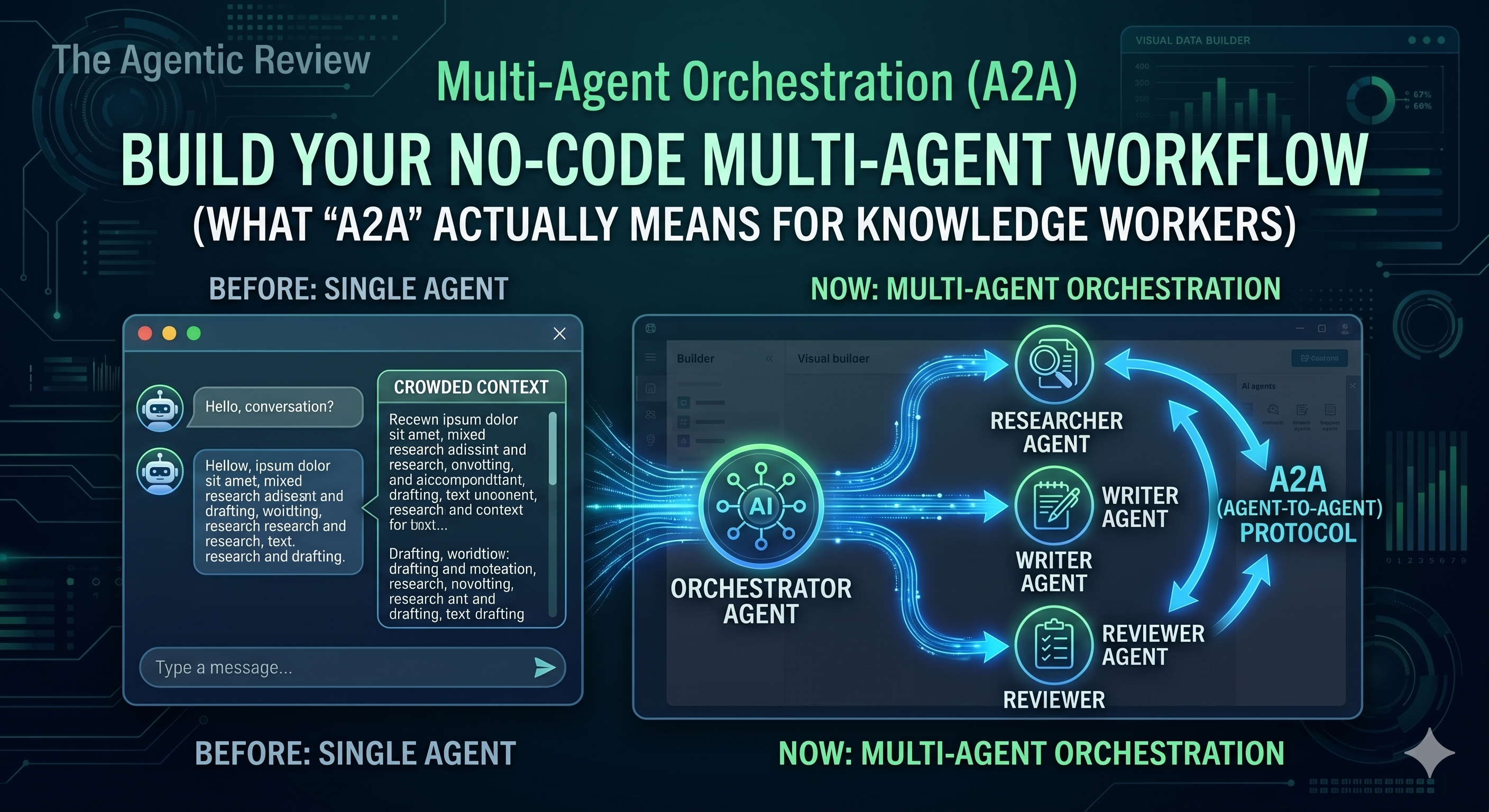
The multi-agent pattern fixes this by splitting the work across specialized agents typically an orchestrator that plans and delegates, plus worker agents that each handle one type of task with a clean context.
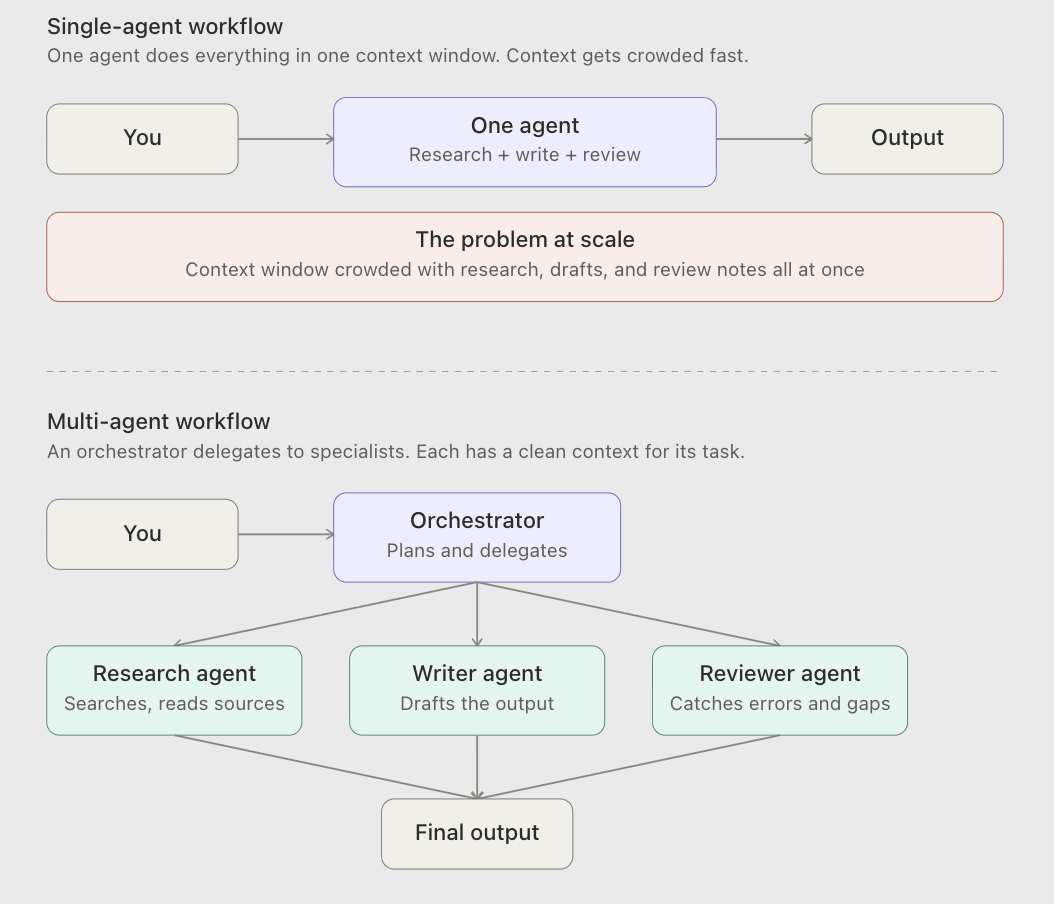
The shift is real but more subtle than it sounds. Multi-agent isn’t smarter than single-agent in the abstract it’s structurally cleaner. Each agent gets a context window optimized for its specific task. The orchestrator never has to read the full source material; the researcher never has to write the final draft; the reviewer never has to compose from scratch. Each one specializes.
A2A agent-to-agent is the communication standard underneath this pattern. Google launched the A2A protocol in April 2025. By April 2026 it had 150+ industry partners, 22K+ GitHub stars, and production deployments at ServiceNow, Workday, Microsoft, and Anthropic. It uses HTTP with JSON-RPC 2.0 for transport, and a concept called “Agent Cards” that lets agents discover each other’s capabilities.
The technical detail isn’t what matters here. What matters is the result: agents from different vendors, on different platforms, can now talk to each other and delegate work. The interoperability that MCP brought to agent-to-toolconnections is now extending to agent-to-agent connections. The plumbing is being standardized.
For knowledge workers who don’t code, this matters in one specific way: you no longer need to build the orchestration layer yourself. Multi-agent workflows are starting to ship as features inside the tools you already use.
The three tiers (pick based on how much control you want)
Here’s the part nobody is explaining cleanly. There are three different ways to do multi-agent today, and they require radically different amounts of effort.
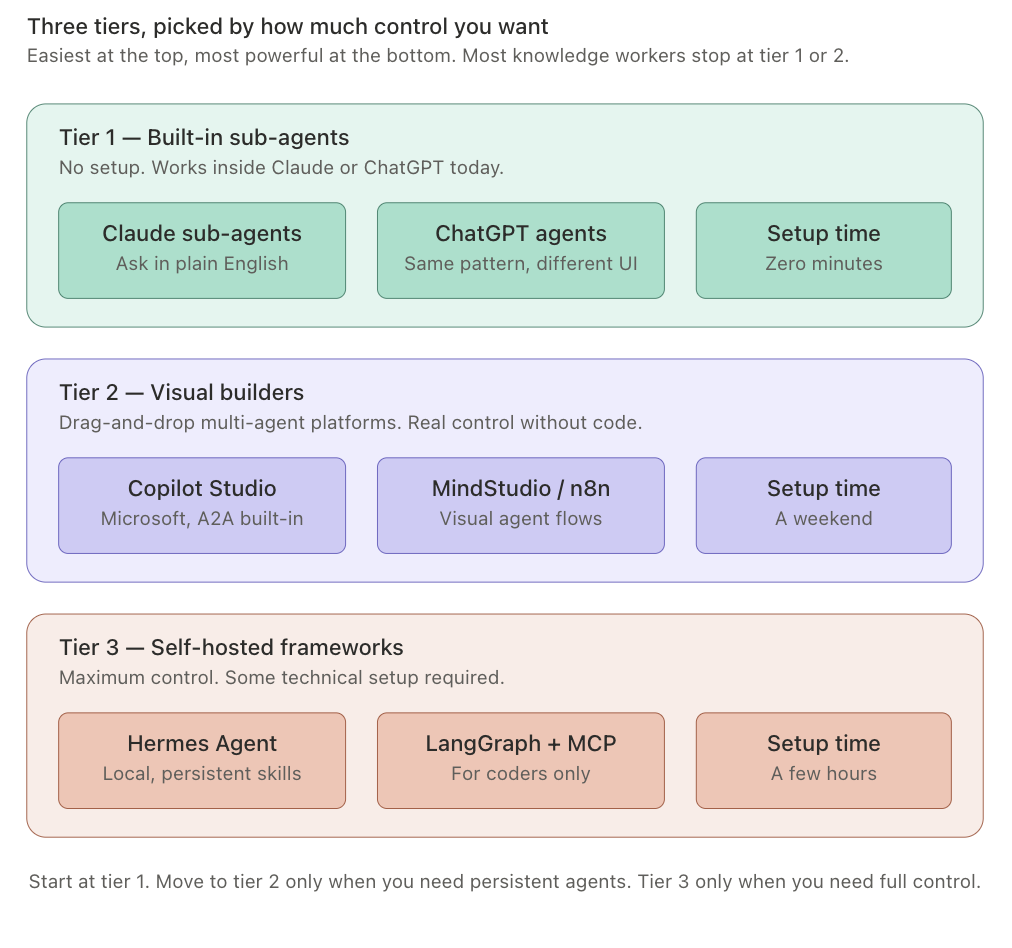
Most knowledge workers should stop at tier 1 or tier 2. Tier 3 only makes sense if you have specific control requirements that the other tiers can’t meet. Let’s walk through each.
Tier 1 Built-in sub-agents (zero setup)
The easiest way to use multi-agent workflows is to ask Claude or ChatGPT to do it for you, in plain English, inside a chat you’re already having.
This pattern has a specific name in Claude’s documentation: sub-agents. The way it works: your primary chat with Claude is the orchestrator. When you give Claude a complex task, it can spawn temporary sub-agents each with their own isolated context to handle specific pieces of work. The sub-agents report back to the primary agent, which synthesizes their output and gives you the final result.
You don’t need to install anything. You don’t need to configure anything. You just describe the structure of the work you want done.
A copy-paste prompt that triggers multi-agent behavior today:
I want you to handle this as a multi-agent workflow. First, spawn a research sub-agent to gather facts on [topic]. Then spawn a writer sub-agent to draft a [type of output] from those findings. Then spawn a reviewer sub-agent to critique the draft for accuracy and gaps. Synthesize their outputs into a final version.
That prompt works in Claude today on Pro and above. It also works in ChatGPT (with some quirks the orchestration is less clean than Claude’s). It works because both models have been trained on multi-agent patterns and can mimic them inside a single conversation, even without a formal multi-agent framework underneath.
What you’ll notice when you try it:
- The output is more thorough than what a normal prompt produces, because each “sub-agent” pass catches different things
- It takes longer (2-4x typical response time) because there are effectively three thinking passes
- The reviewer pass often catches errors the writer made which is the whole point
- You can ask follow-up questions like “the reviewer agent missed a point about X re-run the review with that in mind”
When to use it: Single-session work where you want higher quality than a normal prompt gives you. Research, writing, code review, analysis. Anything where “draft + critique” produces dramatically better output than “draft alone.”
When not to use it: Recurring workflows that need persistence across sessions. The sub-agents disappear when the chat ends. There’s no shared memory between today’s research session and tomorrow’s.
This is the tier most people should start at. Zero setup time. Try it tonight.
Tier 2 Visual builders (a weekend to set up)
If you’ve used Tier 1 enough to know you want persistent, recurring multi-agent workflows, the next step up is a visual builder. These are platforms that let you design multi-agent systems through drag-and-drop interfaces, with no code.
The three serious options in 2026:
Microsoft Copilot Studio As of April 2026, Copilot Studio supports A2A (agent-to-agent) communication natively. Agents can delegate tasks to each other, share organizational context, and coordinate multi-step work. You build agents through a visual interface, connect them to your Microsoft 365 data, and define which agents can delegate to which others.
The pitch: enterprise-grade governance, audit logs, deep Microsoft integration. The cost: requires a qualifying Microsoft 365 subscription, plus $18-21/user/month for Copilot Studio itself.
MindStudio A multi-agent platform built around A2A from the ground up. Supports 200+ models out of the box. The visual builder lets you create agents that delegate to each other and to external tools through MCP. Lower friction than Copilot Studio if you’re not already in the Microsoft ecosystem.
n8n with AI nodes A workflow automation tool that’s added AI-agent nodes to its visual builder. Cheaper than the others, self-hostable, and bridges traditional automation (Zapier-style triggers and actions) with agentic workflows. Best if you already use n8n for non-AI automation.
A specific multi-agent workflow worth trying in Tier 2:
A “weekly digest” pipeline. Research agent scans your subscribed RSS feeds and Slack channels for items in your areas of interest. Writer agent drafts a 400-word weekly summary highlighting the most important items. Reviewer agent checks the summary against your stated priorities and flags anything that looks important but wasn’t included. Output lands in your inbox every Friday afternoon.
That’s three agents doing three different jobs, running automatically on a schedule, producing a deliverable you actually want. You’d build it visually in Copilot Studio, MindStudio, or n8n in roughly an afternoon. There’s no code to write, but there’s real configuration work defining the inputs, scoping each agent’s job, testing the handoffs, iterating until the output matches what you actually want.
When to use it: Recurring workflows that need persistence and scheduling. The Morning Brief, Weekly Digest, monthly competitive scan, ongoing customer-feedback synthesis these are perfect Tier 2 use cases.
When not to use it: One-off tasks (Tier 1 is faster) or workflows that need full control over the model, memory architecture, and tool execution (Tier 3 territory).
Tier 3 Self-hosted frameworks (a few hours, more technical)
This tier is for readers who want maximum control. You’re running the orchestration yourself, on your own hardware, with your choice of models. The setup takes longer and assumes some technical comfort, but the result is something the previous tiers can’t give you: agents that are entirely yours, with persistent memory that doesn’t live on a vendor’s servers.
The two serious options:
Hermes Agent The framework I covered in detail two articles ago. Hermes natively supports multi-agent workflows through its planner-and-sub-agent architecture. You give Hermes a complex task; it decomposes the task; it spawns specialized sub-agents to handle each piece; it synthesizes the result. Sub-agents can write their own skills, which persist on disk and improve over time.
The full stack runs on your own machine, paired with a local model server (LM Studio or Ollama running Qwen 3.6 or similar). Setup is the 30-minute version I walked through earlier.
LangGraph + MCP For readers who genuinely write code. LangGraph is Anthropic-recommended for production multi-agent systems and gives you fine-grained control over agent state, handoffs, and checkpointing. The new pattern in 2026 is LangGraph orchestrating agents that each connect to MCP servers for tool access. This is what most production multi-agent systems at companies are being built on. Skip this entirely if you don’t code.
When to use Tier 3: Privacy-critical work (the data never leaves your machine), domain-specific fine-tuning (you’ve tuned your own model), regulatory work (you need a full audit trail of every agent decision), or research and experimentation (you want to see exactly how multi-agent systems work internally).
When not to use it: Anything that Tier 1 or Tier 2 can handle. The control you get in Tier 3 costs you setup time and ongoing maintenance that trade only makes sense if you genuinely need the control.
A worked example you can copy this week
Let’s make this concrete with a real workflow. Pick the tier you want to try, then follow the steps.
The workflow: a “research brief with critique” pipeline.
You give the system a topic. It produces a structured research brief with the standard sections (question, findings, sources, contradictions, what wasn’t found). Then a separate reviewer agent critiques the brief looking for missing angles, weak citations, unsupported claims, and bias. You get both the brief and the critique. Same topic, two different lenses on it.
This is dramatically better than a single-agent research brief. The reviewer catches things the writer missed because it’s looking at the finished brief, not building it up step by step.
Tier 1 version (in Claude, no setup):
Open a new Claude chat. Paste this prompt:
I want a research brief on [TOPIC]. Handle this as a multi-agent workflow.
Step 1: Research sub-agent. Search the web for current information on this topic. Read full sources, not just snippets. Cross-reference across multiple sources. Surface contradictions where they exist.
Step 2: Writer sub-agent. Use the research findings to produce a brief with these sections: Question, Findings, Sources, Contradictions and weak evidence, What I didn’t find. Cite specifically. Quote literally when wording matters.
Step 3: Reviewer sub-agent. Critique the brief from step 2. Look for: missing angles, weak citations, unsupported claims, bias, areas where the brief is too confident. Be specific. Don’t soften the critique.
Output both the brief and the critique. End with one recommended follow-up question I should ask to deepen the research.
Run it. You’ll get a brief plus a real critique plus a follow-up question. The whole thing takes 2-3 minutes. Cost is whatever your Claude subscription already costs you.
Tier 2 version (Copilot Studio or MindStudio):
The same workflow, built as a persistent agent pipeline. The advantage: you can schedule it to run automatically (every Monday morning on this week’s topic), feed it inputs through a form, or trigger it via a Slack command. Setup takes an afternoon. You’re building visual flows that wire up the three agent roles, defining the prompts for each, and testing the handoffs.
Tier 3 version (Hermes Agent):
The same workflow, running on your own machine. Hermes saves the procedure as a skill, so by the third or fourth time you run it, the agent is faster and more refined. The brief gets better over time because Hermes learns what you actually want from a “research brief with critique.” This is the version with the strongest compounding return but it requires the install and setup work from the Hermes article.
The honest read (when multi-agent helps vs when it’s overkill)
I want to be careful here because the hype around multi-agent is loud and the practical reality is more nuanced. Honest read:
Multi-agent genuinely helps when:
- The task has distinct phases (research → write → review) that benefit from clean context windows
- Quality matters more than speed
- The output will be used for something material (a decision, a deliverable, a publication)
- You’ll re-use the workflow regularly (so setup cost amortizes over many runs)
Multi-agent is overkill when:
- The task is short enough that single-agent context stays clean (most chat questions)
- Speed matters more than quality (real-time conversations, quick lookups)
- The task is genuinely one-off (you’ll never run it again)
- The added complexity creates more failure modes than it removes
The thing nobody says clearly: Multi-agent workflows are more complex to debug than single-agent ones. When something goes wrong, it’s harder to know which agent made the error. The reviewer might have caught the writer’s mistake but compounded a different one.
The researcher might have found contradictions but the orchestrator weighted them wrong. Debugging gets noticeably harder. Build multi-agent for tasks where the quality lift is worth that extra complexity not as a default for everything.
What this means for the next 12 months
A few directional predictions, with confidence levels stated honestly.
High confidence: Multi-agent will become the default for production agentic work. The pattern is too clearly better for complex tasks, and the platforms (Copilot Studio, Claude Managed Agents, MindStudio) are making it accessible faster than single-agent was originally. By mid-2027, single-agent will feel as quaint as single-page apps did in 2015.
Medium confidence: A2A will become the standard for agent communication, the way MCP became the standard for agent-tool connections. The Google A2A protocol has the partner support, the production deployments, and the working interoperability story. Competing protocols (AGUI, A2UI, ACP) exist but aren’t gaining ground as quickly. Bet on A2A.
Lower confidence: Most knowledge workers will personally build multi-agent workflows. This one I’m less sure about. The Tier 1 version (in-chat sub-agents) is trivial many will use it without realizing it’s multi-agent.
The Tier 2 version (visual builders) requires more discipline and setup than the average knowledge worker invests. The Tier 3 version is for a small minority. The plurality outcome is probably: most knowledge workers benefit from multi-agent through tools that ship it built-in, without ever consciously building one themselves.
What you should do regardless: Try Tier 1 this week. The single-prompt multi-agent pattern is genuinely useful and costs you nothing. If you find yourself running the same multi-agent prompt repeatedly, that’s the signal to graduate to Tier 2.
The bigger picture
The MCP article taught you what one agent can do with one tool. The “5 power workflows” article taught you what one agent can do with multiple tools. The Hermes article taught you what one agent can do with persistent memory.
This article is about what multiple agents can do together. It’s the next layer up the layer that turns “AI assistant” into “AI team.”
The teams that figure this out in 2026 will be the ones that built multi-agent fluency early. Most won’t. Most knowledge workers will continue using single-agent chatbots for tasks where multi-agent would produce dramatically better output, because nobody told them the multi-agent option existed or how to access it.
That’s the gap this article exists to fill. Try Tier 1 tonight. Move to Tier 2 when you have a workflow worth automating. Go to Tier 3 only if you genuinely need the control.
Multi-agent is real, it’s shipping, and it’s accessible. The hard part isn’t building it. The hard part is recognizing that you should.
For more practitioner-level writing on agentic AI and the downloadable Claude Project bundles, skills, and the subscriber-only Telegram research agent that compound across these workflows subscribe to The Agentic Review. New articles weekly. Paid subscribers get the full library.
Jayas Jacob is a reader-supported publication. To receive new posts and support my work, consider becoming a free or paid subscriber.