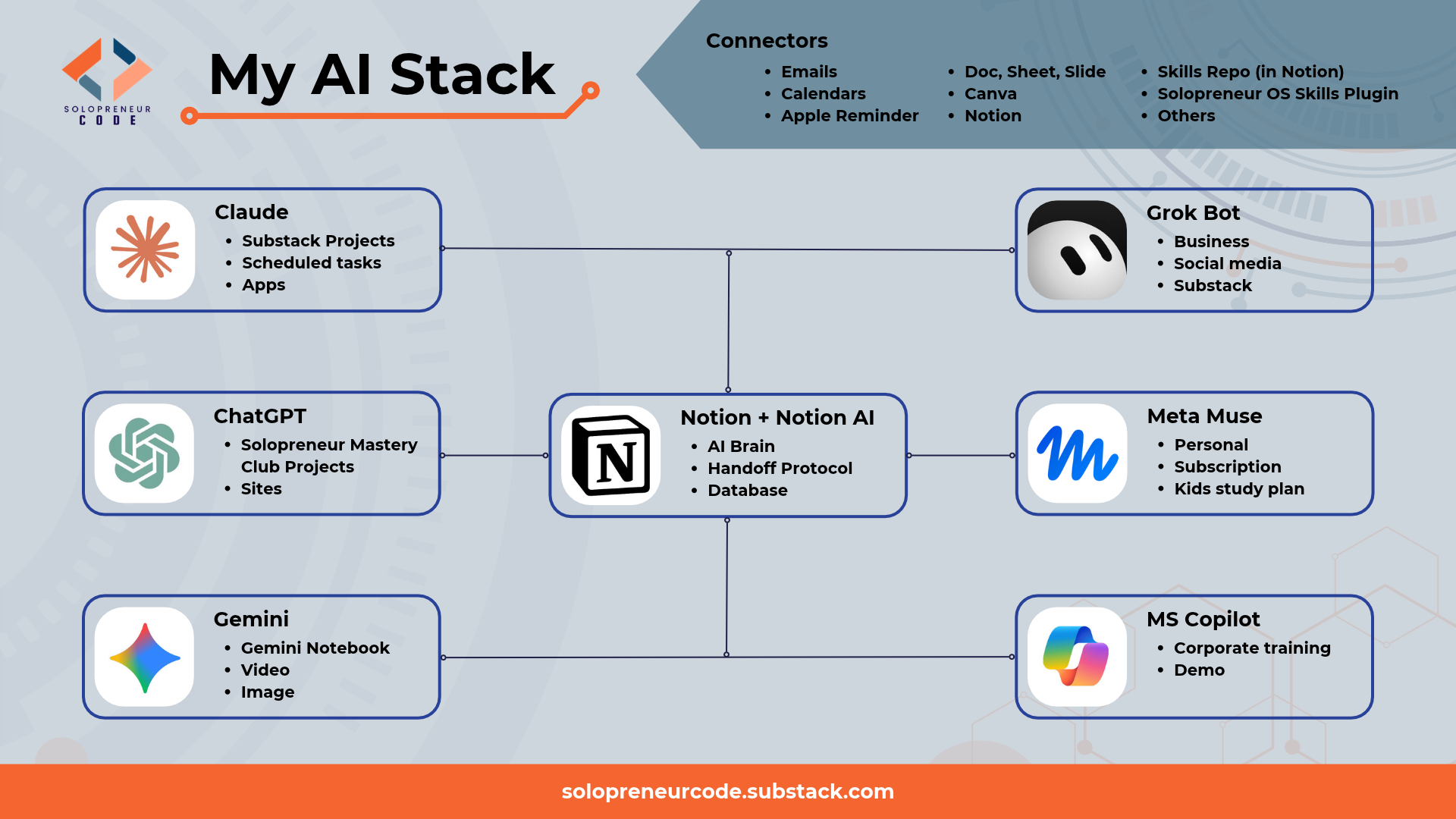
In this AMA, I talked about how I use Claude, ChatGPT, Gemini, Copilot, Grok Bot, Meta Muse and Notion as one system, without copy-pasting between them.
By Anfernee
Published: 2026-11-20
URL: https://solopreneurcode.substack.com/p/my-ai-stack-solopreneur
I pay for seven AI tools every month.
If you asked how many I need, I’d say two. Two tools would cover 90% of my work.
So why seven? I train corporate teams in Singapore, the UK, Malaysia and Indonesia, and I teach on whatever tools their staff use. That keeps me fluent in all of them.
The tools aren’t the interesting part. The interesting part is how I got seven AIs to share one brain, pass work to each other and finish tasks while I’m away from my desk.
I walked through the whole setup in my last Substack Live. Here’s the written version.
Why I pay for seven AI tools
Most of my plans sit on the lowest paid tier, Plus or Pro. The exception is Grok Bot, where I’m on a '“Super” plan at about USD$100 a month.
For each corporate client, I tailor my training to how their company works. That means I need hands-on time with every major model, not just the two I’d pick for myself.
So each tool earned a specific job.
What each tool does for me
Claude: Substack projects, scheduled tasks and apps
Claude was my first paid AI subscription. When Claude launched Projects, I built my Substack work inside them, and it has stayed there ever since.
Claude also runs my scheduled tasks. And I use Claude Code to build apps. I’ve built more than 10 so far.
ChatGPT: Solopreneur Mastery Club and Sites
I used ChatGPT early, but on the free plan for a long time. Today it holds every project and workflow for Solopreneur Mastery Club, my paid community.
My favourite feature is Sites. Whenever an idea hits, I build a website or a dashboard with it. For building websites, it’s one of the best options right now.
Gemini: Notebook, video and image
I spend more time in Gemini Notebook, formerly NotebookLM, than in Gemini itself. I also use Gemini for video and image work.
I used to teach Gemini Gems in my trainings. Google has since phased out Gems in favour of skills, so I converted all my Gems into skills.
Microsoft Copilot: corporate training and demos
70% to 80% of my corporate clients use Copilot. So I use it too, mostly to teach and demo.
Copilot is catching up with the rest. Claude and ChatGPT both sell enterprise plans, but I don’t see either of them overtaking Microsoft inside big companies. My view: no AI tool gets deep into the corporate market without going through Copilot.
Grok Bot: business, social media and Substack
Grok Bot handles my business tasks, social media and Substack Notes.
On my phone, I prefer Grok Bot and Muse over Claude and ChatGPT. Both work through a text chat, so tasks get done faster on mobile. Claude and ChatGPT do the same jobs, but they feel clunky to me on a phone.
Meta Muse: my personal workflows
Muse is my newest addition. I added it late because it only became available in Singapore recently.
I moved my personal workflows here from Grok Bot. Muse tracks my subscriptions and tells me which ones I use and which to cancel. It also runs a study plan for one of my three kids, who sits a major exam next year.
Goal setting and feeds make Muse a good fit for personal use.
So the split is simple: Muse for personal, Grok Bot for business.
The problem with running seven AI tools
Around May or June this year, I hit a wall.
Work done in Claude stayed in Claude. To move it to ChatGPT, I had to:
- Ask Claude to write a handoff document.
- Download it.
- Upload it to ChatGPT.
For a whole project, I had to download every file and upload each one again.
This happened a lot because I kept hitting Claude’s usage limits. Waiting 4 to 5 hours for a reset while ChatGPT sat idle drove me mad.
Fix 1: AI Brain, one memory for every tool
So I built AI Brain, a page in Notion that only my AIs use. Every tool reads it to see what the others have done.
If ChatGPT stops halfway through a task, I open Claude and ask it to check AI Brain. Claude sees where ChatGPT stopped and picks up from there.
AI Brain has 3 databases:
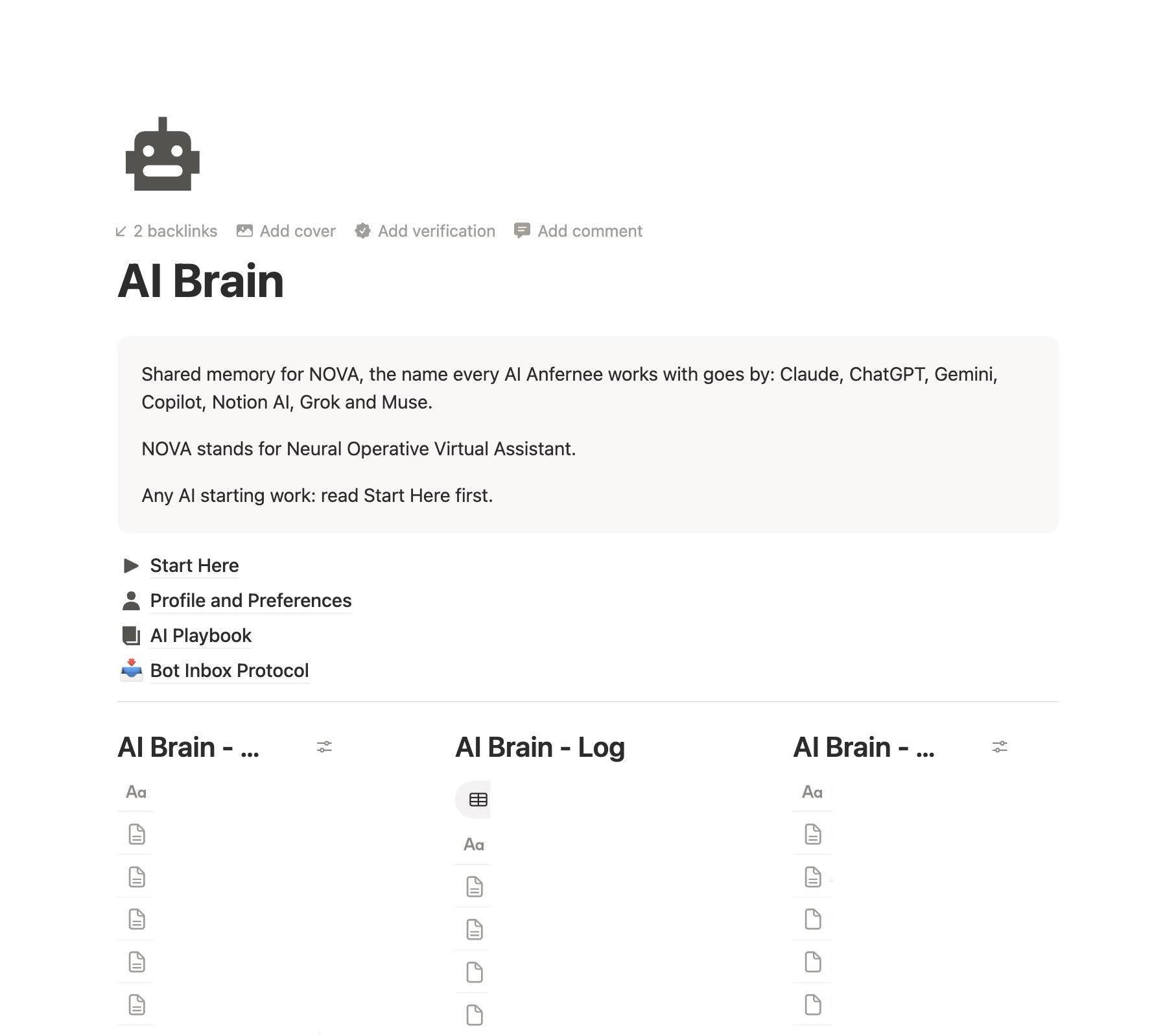
- Log. When an AI finishes meaningful work, it writes an entry. Every month, the entries get rolled up into one short summary (September rollup, October rollup and so on), so the log stays easy to read.
- Projects. Every log entry links to a project. When an AI picks up a task, it reads only that project’s history, not the whole log. Less reading means fewer tokens, and fewer tokens means lower cost.
- Bot Inbox. This is where the AIs pass work to each other. More on this below.
The page also holds instructions, an AI playbook and my profile and preferences, so every tool knows how I like to work.
Fix 2: The Bot Inbox, AIs delegating to AIs
In early October, I hit the same wall again. This time it was Grok Bot’s limits.
Knowing what the other AIs did wasn’t enough anymore. I wanted them to hand tasks to each other on purpose, without me in the middle.
Here’s an example. Grok Bot is building a website for me, and I also need a competitor analysis and a slide deck. Running all three in Grok Bot would burn through my limit. So Grok Bot hands the competitor analysis to Claude, ChatGPT or Gemini. That AI does the work and hands the result back. Out of a 5-step task, Grok Bot might delegate 3 steps.
The Bot Inbox works like email for AIs. Each handoff includes:
- What needs doing
- The context
- Who it’s for
- The expected output
The receiving AI picks it up, reads the brief and starts. When it finishes, it posts the result back and marks the item Done. If it gets stuck, it bounces the item back as Needs review, Change requested or Question. Once an item is Done, it comes to me and the AIs stop touching it.
This is the only way my AIs talk to each other, and they do it while I’m away.
My favourite moment so far: Grok Bot decided Claude’s scheduled task instructions were incomplete. It posted a note in the Bot Inbox telling Claude to update them. Claude agreed and did it. I wasn’t involved at all.
Skills repo: build a skill once, use it in every tool
Notion also holds my skills repo. Any skill created in Claude, ChatGPT, Gemini, Grok Bot or Muse gets saved there automatically.
If Claude builds a skill for a Substack task and Grok Bot later needs it, Grok Bot pulls it from Notion. I never rebuild the same skill for a different tool.
If you’re a paid subscriber of Solopreneur Code, you already have my Solopreneur OS skills plugin. It holds the 17 skills I use to run my business, from lead gen and digital product creation to analysis and my weekly reflection.
What it took to build
The first setup took about 4 hours. Fine-tuning took another 2 days, and I still tweak it.
I use Notion because I already work there, and I like opening the brain to check on it myself. I tested GitHub and Obsidian too, and Google Drive also works. Pick the tool you already live in.
- One question from the Live: Terrence asked if Grok could be the brain instead of Notion.
- My answer: If Grok Bot is the only AI you use, yes, keep everything there. I need Notion because seven tools have to read from and write to the same place.
Watch the full walkthrough
This post covers the setup. The replay shows it.
In the recording, I open my Notion AI Brain on screen, walk through the Log, Projects and Bot Inbox, and show a real handoff between Grok Bot and ChatGPT. You also get the full Q&A.
I run these Ask Me Anything Lives on the third Wednesday of every month, Singapore time. Subscribe so you catch the next one live.
What’s next
I’m turning this into a plug-and-play version you set up for your own stack, on Notion or whichever tool you use. Paid subscribers will get it first.
In the meantime, reply and tell me: how many AI tools do you pay for, and do any of them talk to each other?
FAQs
Q: Do I need seven AI tools to build this?
A: No. I run seven because I train corporate clients on all of them. Two tools cover 90% of my own work. The AI Brain idea works with two tools as well as with seven.
Q: Why Notion and not Obsidian or GitHub?
A: I already work in Notion, so I check the brain without switching apps. I tested Obsidian and GitHub and found little difference. Pick the tool you already use every day.
Q: How long does the setup take?
A: About 4 hours for the first version and 2 days to fine-tune it. Expect to keep adjusting the instructions as you see how your AIs behave.
Q: Won’t the log get too long for the AIs to read?
A: The monthly rollups solve this. Each month gets compressed into a short summary, and every entry links to a project. An AI reads only the project it needs, which saves tokens and cost.
Q: If I only use one AI, do I need a separate brain?
A: No. If you live in one tool, keep your memory and context there. A shared brain matters once two or more tools need to know what the others did.
Thank you , , and many others for tuning into my live video! Join me for my next live video in the app.
Get more from Anfernee in the Substack app
Available for iOS and Android
You’re doing everything. But nothing is moving?
You are doing everything. But nothing is moving.
That is not a motivation problem.
Most solopreneurs are learning from everywhere and getting nowhere. Too much information. No clear system connecting effort to results.
You have everything it takes. You just do not have a clear system yet.
That is what paid subscribers get. Every system, playbook, prompt, and template. All inside the Premium Vault.
You’ll also gain access to this amazing tool I’ve built: Solopreneur OS for Claude: The complete operating system that is built to run your one-person business.
All for $79/year. That’s $6.58/month.
Upgrade now and unlock the Premium Vault worth thousands of dollars.
The Premium Vault holds the secret behind posts like this one, including the tools and resources I use to build the one-person business I love.
Thanks for reading! Ready for the next step?
Let’s crack the growth equation and build a thriving one-person business on your terms!
Anfernee