Create a [visual term] of [subject]. Show [details]. Use [viewpoint, layout or style]. Include these exact labels: [labels].
By Anfernee
Published: 2026-11-10
URL: https://solopreneurcode.substack.com/p/136-visual-prompt-shortcuts-for-ai-image-generation
I typed /explodedview BMW M3 into ChatGPT. Then I asked for a metallic orange G80 with detail.
It gave me the image below.
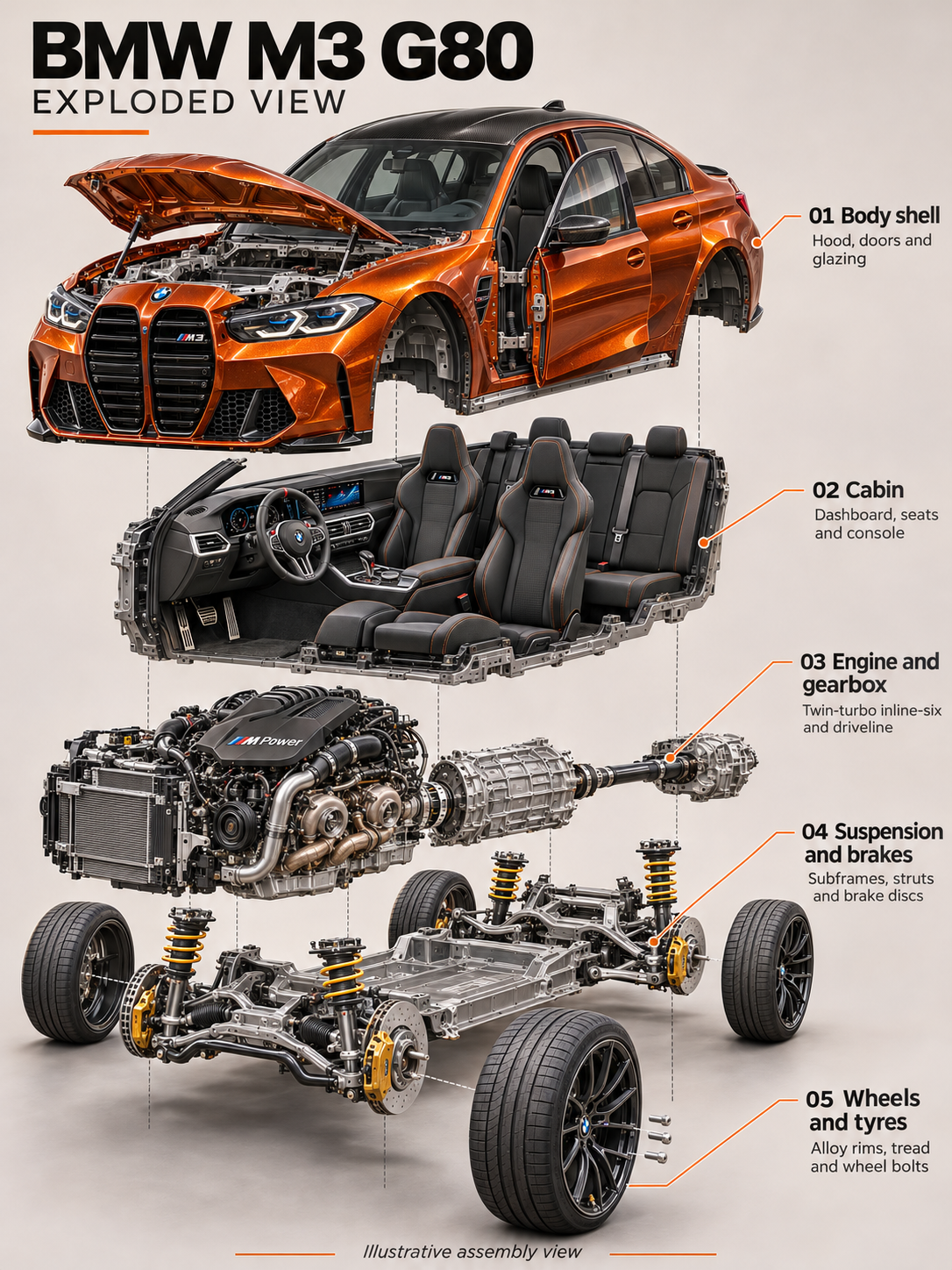
You can see the body shell lifted off the cabin, the gearbox pulled away from the engine, and the wheels separated from the brakes. It even drew the wheel bolts.
That got me thinking.
How many other visuals could I ask for? Hmm…

I put together 136 visual prompt shortcuts.
Think /timelineview to show how events unfolded, /mindmap to connect ideas, or /visualcheatsheet to turn a topic into a one-page guide.
The pattern is simple. Name the visual you want, then give it a subject.
Use these to specify the format, viewpoint, composition or style you want.
The slash tags are optional labels after I did some test on my own since our LLMs are getting smarter and knows what we want.
The terms beside them are the words to put in your prompt. Entries marked “descriptive” use an everyday label for an effect or layout rather than a specialised term.
Use this pattern
Create a [visual term] of [subject]. Show [details]. Use [viewpoint, layout or style]. Include these exact labels: [labels].
Example
Create an /explodedview of a manual coffee grinder in three-quarter perspective. Separate the handle, lid, body, burr assembly and grounds cup along their assembly axis. Use a white background and five numbered callouts.
- ChatGPT Images, Gemini and Adobe Firefly accept descriptive text. Use the term with spaces, such as “exploded view.”
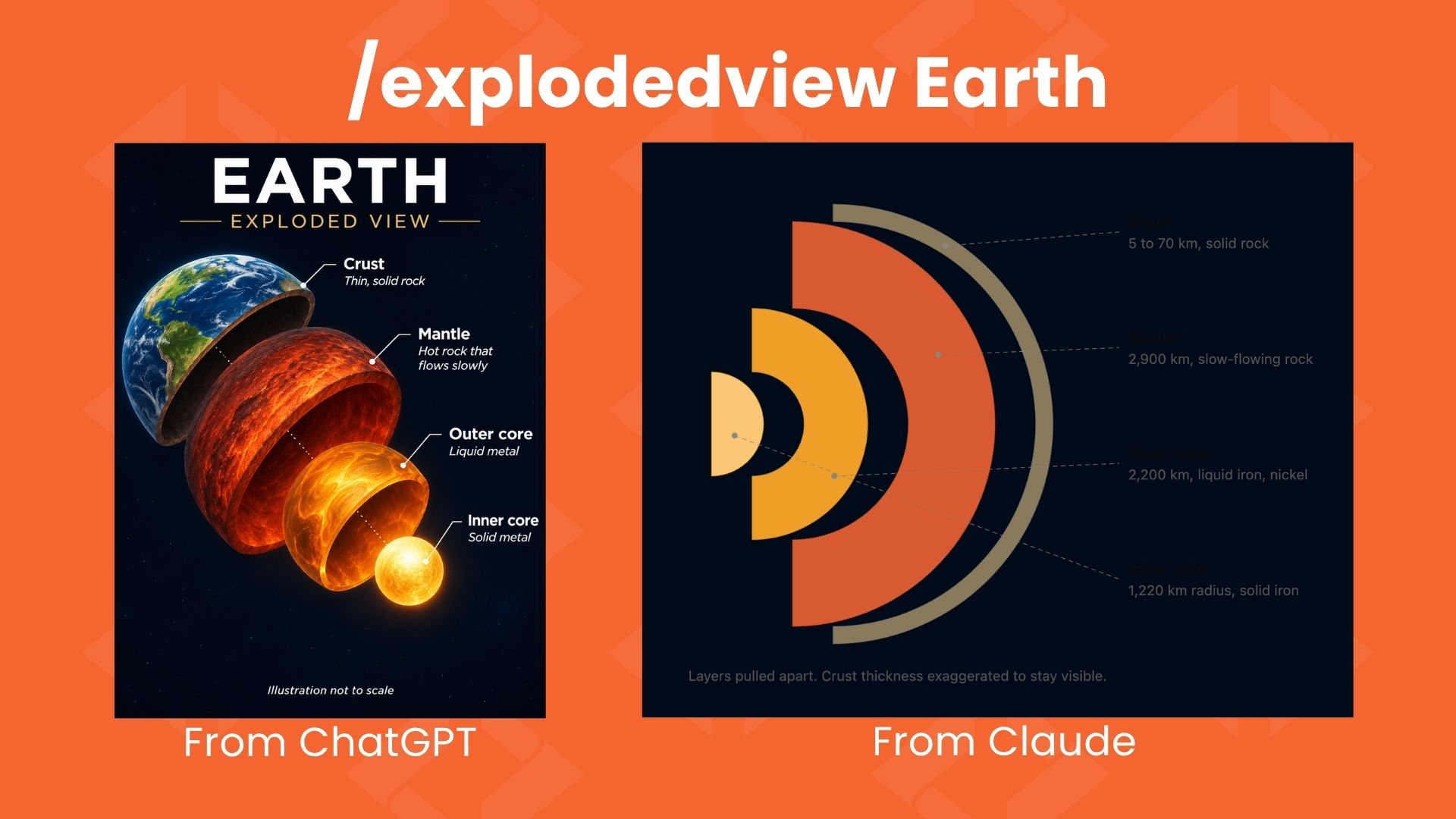
- You can use Claude as well, but you’ll need to manually download the specific skill. In this case, you will need to download a skill that will generate exploded view. So unless you only have access to Claude, use another LLM.
- On Midjourney web, type the description into the Imagine bar. On Discord, select its built-in /imagine command and enter the description in the prompt field.
- These are visual directions. Outputs vary by model and by prompt. Individual labels were not tested across tools.
- For diagrams with exact relationships, supply the steps or data and request editable Mermaid, SVG or a spreadsheet chart. For technical drawings with exact geometry, work from the underlying drawing or CAD model.
Five copy-and-paste starters
/anime-explainer Romeo & Juliet— Retell the story in six black-and-white manga panels.
/timelineview US Civil War— Arrange selected events in chronological order with dates and short captions.
/explodedview pyramids— Use the Great Pyramid of Giza as the subject. Separate major structural elements in a schematic view and label the chambers and passages using a supplied reference.
/mindmap jobs in healthcare— Branch from healthcare careers into patient care, diagnostics, public health and administration.
/visualcheatsheet high school physics— Make a one-page study guide for one unit. Use supplied formulas and one labelled example.
Technical illustration
/explodedview· Exploded view. Separate components along their assembly paths./cutaway· Cutaway illustration. Remove a portion of the exterior to reveal the interior./crosssection· Cross-section. Show what intersects a specified cutting plane./xray· X-ray-style illustration. Suggest transparency so internal structures show through./blueprint· Blueprint-style drawing. Use a technical line drawing with supplied dimensions and notes./patentdrawing· Patent-style drawing. Use line art, numbered callouts and multiple views./assemblyguide· Assembly guide. Show how parts fit together in numbered steps./orthographic· Orthographic views. Show aligned front, side and top views without perspective./materialstudy· Material study. Show textures, finishes, joints and surface details./schematic· Schematic diagram. Use symbols and lines to explain functional connections.
Business and education
/infographic· Infographic. Explain one topic with a clear visual hierarchy./visualcheatsheet· Visual cheat sheet. Fit key instructions and examples on one page./flowchart· Flowchart. Map actions, branches and decisions./decisiontree· Decision tree. Route answers to outcomes or recommendations./systemmap· System map. Show relationships among actors, tools and information./swimlane· Swimlane diagram. Assign workflow steps to distinct roles or teams./mindmap· Mind map. Branch ideas from one central topic. Alias:/mindspace-map. Example:/mindspace-map jobs in game development. Branch into design, art, engineering, audio and testing./timeline· Timeline. Arrange events in chronological order. Alias:/timelineview./comparison· Comparison graphic [descriptive]. Show options against shared criteria./dashboard· Dashboard mockup. Arrange supplied metrics in one visual. Request a working dashboard separately.
Perspective and scale
/isometric· Isometric projection. Show three axes with equal foreshortening and parallel lines./diorama· Diorama. Stage a scene as a miniature model./topdown· Overhead view. Look straight down at the subject./flatlay· Flat lay. Arrange objects on a flat surface and show them from above./firstperson· First-person point of view. Show a scene through the subject’s eyes./macro· Macro photography style. Show small details at high magnification./zoomsequence· Multi-scale sequence [descriptive]. Show the subject at progressively closer scales./scalelineup· Scale comparison [descriptive]. Compare sizes against a shared reference or scale./panorama· Panorama. Show a wide, continuous scene./onepointperspective· One-point perspective. Use one vanishing point for receding parallel lines.
Visual storytelling
/storyboard· Storyboard. Plan a sequence of shots or scenes as panels./comicstrip· Comic strip. Tell a story with panels and optional dialogue./beforeafter· Before-and-after comparison. Keep the viewpoint consistent while showing a change./fourpanel· Four-panel layout [descriptive]. Divide an idea into four visual beats./splitworld· Split-screen composition [descriptive]. Place contrasting settings or outcomes side by side./dayinlife· Day-in-the-life sequence [descriptive]. Show key moments from morning to evening./contactsheet· Contact sheet. Arrange a series of small frames in a grid./characterturnaround· Character turnaround. Show the same character consistently from several angles./visualmetaphor· Visual metaphor. Represent an abstract idea with a concrete scene./doubleexposure· Double exposure. Superimpose two images. A scene inside a silhouette is one option.
Product and marketing
/producthero· Product hero shot. Make one product the focus of the composition./mockup· Product mockup. Place supplied artwork on a screen, cover or other object./packaging· Packaging concept. Show a box, label or wrapper as a design proposal./boxset· Box set mockup. Present products or digital resources as a coordinated collection./unboxing· Unboxing sequence. Reveal what’s included in the order it would be opened./brandboard· Brand board. Display the supplied colours, type, imagery and graphic elements together./moodboard· Mood board. Collect visual references that convey a creative direction./poster· Poster. Build a single composition around a headline and focal point./carousel· Social carousel. Break an idea into slides that advance one point at a time./advariants· Ad concept variations [descriptive]. Show several visual treatments for the same offer.
Illustration and print styles
/papercut· Paper-cut illustration. Use layered paper shapes and visible cut edges./claymation· Clay animation look. Use hand-shaped clay forms. For a still, ask for a frame in this style./lowpoly· Low-poly style. Use simplified geometry with visible facets./pixelart· Pixel art. Build the image on a visible pixel grid./risograph· Risograph print look. Suggest layered spot colours, ink texture and optional misregistration./woodcut· Woodcut print look. Suggest a relief print with bold carved lines./cyanotype· Cyanotype look. Use deep blue tones and pale silhouettes or highlights./embroidered· Embroidery effect. Render shapes using visible thread and stitches./stainedglass· Stained-glass style. Build the image from coloured panes separated by dark leading./fieldguide· Field-guide illustration. Present specimens or details as an annotated reference plate.
More technical and spatial views
/detailview· Detail view. Enlarge one selected area to show features that are hard to see in the main view./sectionalperspective· Section perspective. Combine a cutting plane with a perspective view of the space./obliqueprojection· Oblique projection. Show the front face without foreshortening and draw depth along slanted lines./floorplan· Floor plan. Show a building level as a horizontal section viewed from above./elevation· Architectural elevation. Show one vertical face of a building without perspective./siteplan· Site plan. Show a building in relation to boundaries, access and surrounding features./wireframe· 3D wireframe. Show the edges of a 3D model without filled surfaces./partsdiagram· Parts diagram with callouts. Point to and identify individual parts with supplied labels./twopointperspective· Two-point perspective. Use two vanishing points for horizontal edges./threepointperspective· Three-point perspective. Use a third vanishing point for vertical edges, as in a tall-building view.
Camera angles and framing
/wideshot· Wide shot. Show the subject in its wider surroundings./extremewideshot· Extreme wide shot. Let the surroundings dominate the frame./mediumshot· Medium shot. For a person, frame roughly from the waist up./closeup· Close-up. Fill the frame with a face, object or meaningful detail./extremecloseup· Extreme close-up. Isolate a small feature, such as an eye or dial./overtheshoulder· Over-the-shoulder shot. Frame past one person’s shoulder toward the subject./lowangle· Low-angle shot. Place the camera below the subject and look up./highangle· High-angle shot. Place the camera above the subject and look down./dutchangle· Dutch angle. Tilt the camera so the horizon appears slanted./twoshot· Two-shot. Frame two people together in a single shot.
Lighting and photographic effects
/rimlighting· Rim lighting. Highlight the edges of the subject with light from behind or to the side./backlighting· Backlighting. Place the main light behind the subject./sidelighting· Side lighting. Light from one side to reveal form and texture./silhouette· Silhouette. Show a dark outline against a brighter background./chiaroscuro· Chiaroscuro. Use strong contrast between light and dark to model form./highkey· High-key lighting. Use a bright tonal range and low lighting contrast./lowkey· Low-key lighting. Let dark tones dominate and illuminate selected areas./bokeh· Bokeh. Emphasise the appearance of out-of-focus areas, often with soft highlights./motionblur· Motion blur. Show movement through directional streaking or smearing./longexposure· Long-exposure look. Suggest time passing through light trails or blurred movement.
More art and design treatments
/watercolor· Watercolour. Use transparent washes, soft edges and visible paper texture./gouache· Gouache. Use opaque, matte paint and clearly defined shapes./inkwash· Ink wash. Use diluted ink to build tonal washes./stippling· Stippling. Build shading with varying densities of dots./crosshatching· Cross-hatching. Shade with overlapping sets of lines./halftone· Halftone. Simulate continuous tones with a pattern of dots./linocut· Linocut print look. Use carved shapes and bold areas of ink./collage· Collage. Assemble cut or torn elements into one composition./photomontage· Photomontage. Build one composition from multiple photographic elements./screentone· Screentone look. Use repeating dot or line patterns for shading, as in manga.
Product design and web layouts
/wireframemockup· UI wireframe. Show screen structure and component placement with minimal styling./landingpagemockup· Landing-page mockup. Show a page concept with the headline, offer and main action./deviceshowcase· Device mockup [descriptive]. Present supplied screens in phone, tablet or laptop frames./editorialspread· Editorial spread. Lay out a two-page magazine or book composition./bookjacket· Book jacket concept. Show a front cover, spine and back cover with supplied copy./styleframe· Style frame. Use a finished sample image to establish the visual direction of a video./designsystemsheet· Design system reference sheet [descriptive]. Show sample components, colours and typography together./iconset· Icon set. Create a family of icons with consistent scale, stroke and spacing./comparisoncard· Feature comparison card [descriptive]. Fit a small side-by-side feature comparison into a shareable graphic./explainerpanel· Explainer panel [descriptive]. Pair one illustration with a short label and one takeaway.
Structured diagrams and data
/sequencediagram· Sequence diagram. Show interactions between participants in time order./statediagram· State diagram. Show permitted states and the transitions between them./journeymap· Customer journey map. Map stages, actions, touchpoints and pain points./serviceblueprint· Service blueprint. Link customer actions to visible and behind-the-scenes service work./ganttchart· Gantt chart. Show tasks as horizontal bars on a time axis./sankeydiagram· Sankey diagram. Show flows with widths proportional to the supplied quantities./treemap· Treemap. Show hierarchical values as nested rectangles sized by quantity./heatmap· Heatmap. Use colour to encode values across a grid or spatial field./quadrantchart· Quadrant chart. Position items against two criteria split into four regions./smallmultiples· Small multiples. Repeat the same chart format across categories for comparison.
Visual learning and study
/anime-explainer· Manga explainer. Teach a topic or retell a story in sequential manga panels. Example:/anime-explainer Romeo & Juliet./handwritten· Handwritten study notes. Use a notebook layout with brief notes and labelled sketches. Example:/handwritten Newton’s three laws. Include one everyday example per law./make-sticky-notes· Sticky-note board. Give each note a single idea or action. Example:/make-sticky-notes how to validate a digital product. Use six actionable notes./studyguide· Visual study guide. Combine a short explanation, worked examples and practice questions. Example:/studyguide fractions. Use shaded fraction bars, two worked examples and three questions./misconceptioncheck· Misconception comparison. Put a common misunderstanding next to the correct explanation. Example:/misconceptioncheck why Earth has seasons. Use a diagram on each side./visualglossary· Illustrated glossary. Pair each term with a plain-English definition and illustration. Example:/visualglossary AI agent terminology. Make six cards, including tool call, memory and human approval./label-the-diagram· Diagram-labelling worksheet. Use numbered arrows and blank labels. Example:/label-the-diagram a bicycle drivetrain. Provide a separate answer key./spot-the-error· Error-finding worksheet. Introduce one deliberate mistake and explain the correction separately. Example:/spot-the-error a simple electrical circuit. Show the corrected circuit on the answer sheet./workedexample· Visual worked example. Show the reasoning in steps. Example:/workedexample break-even point for a digital product. Use supplied numbers, show the formula and round up to a whole sale.
Maps, history and scenario explainers
/historicalmap· Historical map. Plot places and routes within a specified period. Example:/historicalmap the Silk Roads. Label selected cities and distinguish land and sea routes with a legend./whatif-panels· Counterfactual comparison panels. Change one condition and show what follows. Example:/whatif-panels Earth without axial tilt. Compare how sunlight reaches Earth with and without its present tilt./mystery-reveal· Setup-and-reveal sequence. Show the observer’s view first, then show the hidden mechanism. Example:/mystery-reveal how a magician forces a card. Pick one specific method and depict it in two panels./museumlabel· Museum exhibit panel. Pair an object or photograph with a short verified caption. Example:/museumlabel an early Singapore street photograph. Use the supplied photo and caption and point out three visible details./archaeology-reconstruction· Archaeological reconstruction comparison. Pair a present-day view with a reconstruction. Example:/archaeology-reconstruction Pompeii before and after. Show the same site and identify inferred features./casefile· Illustrated case file. Show what’s known, what’s missing and what needs to happen next. Example:/casefile an insurance claim with missing information. Use fictional documents and questions a claims handler should ask./alternate-endings· Branching outcome comic. Give two stories the same starting point and show the effect of a different choice. Example:/alternate-endings a customer support chatbot handling a refund. Compare guessing with checking the policy and escalating.
References
You’re doing everything. But nothing is moving?
You are doing everything. But nothing is moving.
That is not a motivation problem.
Most solopreneurs are learning from everywhere and getting nowhere. Too much information. No clear system connecting effort to results.
You have everything it takes. You just do not have a clear system yet.
That is what paid subscribers get. Every system, playbook, prompt, and template. All inside the Premium Vault.
You’ll also gain access to this amazing tool I’ve built: Solopreneur OS for Claude: The complete operating system that is built to run your one-person business.
All for $79/year. That’s $6.58/month.
Upgrade now and unlock the Premium Vault worth thousands of dollars.
The Premium Vault holds the secret behind posts like this one, including the tools and resources I use to build the one-person business I love.
Thanks for reading! Ready for the next step?
Let’s crack the growth equation and build a thriving one-person business on your terms!
Anfernee