Discover which digital products sell today, from AI systems and business workspaces to expert playbooks, code assets, and creator tools.
By Anfernee
Published: 2026-09-07
URL: https://solopreneurcode.substack.com/p/the-modern-digital-product-stack
AI can make a generic planner, printable, or spreadsheet in seconds.
Buyers now pay for tools that handle harder work: tested AI systems, specialized operating tools, expert knowledge, and assets that are ready to use.
This guide covers the modern digital product stack and how to choose what to build next.
Unstuck your one-person business with the FREE Solopreneur Success Hub. You get this comprehensive command center for building and scaling a successful one-person business even as a Free Subscriber.
I created this all-in-one toolkit to build and grow my one-person business and it saves me 20+ hours a week.
This is definitely something I wish existed when I first started.
Now, it’s yours… FREE!
More information about the Hub here.
Access My Solopreneur Success Hub
The early promise of digital products was simple: make something once and sell it forever.
That promise still holds, but the product itself has changed.
Anyone can create a basic planner, generic checklist, or set of obvious prompts faster than ever. Most of the AI tools can now produce a first draft in minutes. Having a file to sell no longer makes that file worth buying.
People will still pay to save time but they now expect the product to do more of the work for them.
They want tested instructions instead of loose ideas. A workspace that already matches their workflow. A decision tool that turns messy inputs into a clear next step. Specialist knowledge for a real situation. An asset they can use today and improve over time.
For a solopreneur, that’s an opportunity.
Although large teams can produce more, a focused solopreneur can make something more specific and much closer to the buyer’s actual problem. Your judgment, process, and experience can become a product that helps someone act.
The modern digital product stack has five parts:
-
AI systems,
-
Operational workspaces,
-
Specialized code and no-code assets,
-
High-signal knowledge, and
-
Media production tools.
Each one creates value in a different way. Here’s how they work and how to decide what belongs in your product business.
Table of Content
-
The shift from downloadable information to usable systems
-
AI systems and prompt libraries
-
Operational dashboards and workspaces
-
Specialized code and no-code assets
-
High-signal knowledge and curation
-
-
-
How to choose the right digital product to build
-
A practical product stack for a solopreneur (example)
-
How to package a modern digital product
-
Common mistakes that weaken digital products
-
Build the product that removes real work
The shift from downloadable information to usable systems
Older digital products often sold access to information.
A buyer paid for a PDF, template, spreadsheet, or video course because making it from scratch would take time.
That value still exists, though the standard is higher now, much higher. And you’ve guess the reason by now, Generative AI.
With AI, Information is abundant. First drafts are cheap. Generic output is immediate.
A modern digital product earns its price by shortening the path between a problem and a useful, transformed result or outcome.
A strong product might:
-
Make a hard decision easier
-
Replace hours of setup
-
Encode a proven sequence
-
Reduce avoidable mistakes
-
Adapt its guidance to the buyer’s situation
-
Organize several tools into one process
-
Turn specialist judgment into a system the buyer can use again
Take a list of writing prompts and compare it with a content system.
The list gives the buyer ideas. The system gathers the right inputs, picks an angle, creates a draft, checks the result, and prepares it for publishing. One leaves the buyer with more material to review. The other gives them a path to completion.
The closer your product gets someone to the finished result or final outcome, the stronger it becomes.
1. AI systems and prompt libraries
Prompt products still have a market, though the market is shrinking fast.
A list of one-line commands offers little protection because the buyer can generate another list with the same AI tool.
A useful prompt system includes decisions, context, a sequence, examples, and quality checks that took real work to develop.
What belongs in a strong AI product
A modern AI product can have:
-
A clear use case and defined user
-
An intake step that collects business context
-
A prompt sequence instead of one isolated command
-
Different instructions for different situations
-
Examples of good inputs and outputs
-
A review rubric for catching weak results
-
Reusable context or memory files
-
Instructions for making the system part of a regular workflow
The logic around the prompt creates the value.
A sales prompt library for freelance designers should reflect their sales cycle, buyer objections, project scope, and follow-up process. A generic instruction to “write a sales email” won’t offer the same help.
Examples from the Solopreneur Code Premium Vault
Several products in the Premium Vault fit this category.
-
The Solopreneur Success Prompt Library packages prompts for a defined audience.
-
Prompts Generator helps users create better prompts for new situations.
-
The Hook + Content Generator applies AI to a recurring production task and produces a clear output.
-
The Solopreneur Diagnostic Matrix goes further. Diagnosis involves more than generating content. It helps the user read a business situation and find the constraint that needs attention.
How to make an AI product better
Build it in layers:
-
Start with the prompt that creates the main result.
-
Add an intake section that improves the input.
-
Turn it into a sequence for the whole task.
-
Include examples and failure cases.
-
Add a quality-control checklist.
-
Show the user how to repeat the process next week.
Now the buyer has reusable, working system, not a loose prompt.
2. Operational dashboards and workspaces
A blank template leaves the system design to the buyer.
An operational workspace just works with everything already set up. It has the right databases, fields, views, instructions, and review routines for a particular kind of work.
Good workspace products have a point of view. They tell the user what to capture, what to ignore, and what to review. The process is visible from the start.
What buyers need from a workspace
A useful workspace answers practical questions:
-
Where does new information go?
-
What should I work on next?
-
How do projects connect to tasks, content, customers, or revenue?
-
Which view should I open each morning?
-
How will I know whether the system is working?
-
What can I archive or delete?
A pretty dashboard can attract attention. A working operating system shows us where the money is.
Examples
An example of a really useful dashboard that I built for myself would be the Offer Signal Board.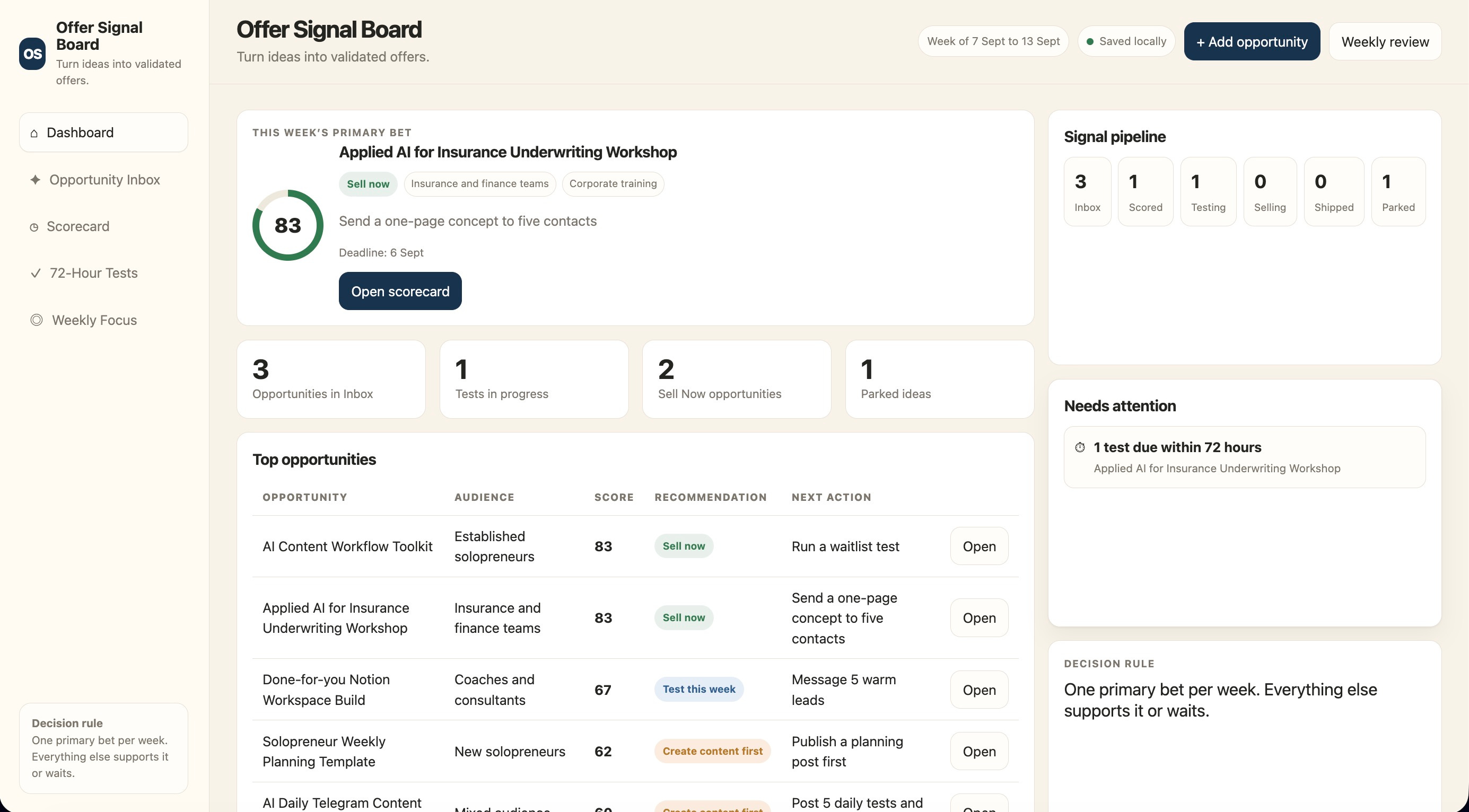
It is a decision tool for solopreneurs, freelancers, and independent professionals who need to choose what deserves attention each week.
You score an opportunity across five practical questions:
-
How painful and urgent is the problem?
-
What proof shows that people want it?
-
Can it lead to revenue within 30 days?
-
Can the work become a reusable asset?
-
Can you run a meaningful test within 72 hours?
How to build a workspace people keep using
Design it around a cadence, not a collection of pages.
A strong system might include:
-
A daily view for focused action
-
A weekly review that reveals drift
-
A project view that connects work to outcomes
-
A small set of clearly defined statuses
-
Templates for repeated processes
-
A short setup path with an early win
Use the fewest parts needed to make the workflow complete. Every extra database, property, and dashboard adds to the buyer’s setup work.
3. Specialized code and no-code assets
Some buyers need a working component, not another lesson.
This category includes
-
software boilerplates,
-
website sections,
-
automations, scripts,
-
integrations, and
-
no-code workflows.
The buyer gets to skip repetitive technical work and lowers the risk of a bad setup.
Examples include:
-
A Next.js starter with authentication, payments, and account management already configured
-
Framer sections built for a specific conversion goal
-
An n8n workflow that captures leads, enriches records, and sends a personalized follow-up
-
A script that turns customer interviews into tagged research notes
-
A webhook connector for two tools without a native integration
-
A calculator embedded on a sales page
Specificity matters here.
“Automation templates for business” is broad.
“A client-onboarding automation for solo brand designers using Tally, Notion, Gmail, and Stripe” tells the buyer exactly what it solves.
Package the working result
The asset file alone isn’t enough. A code or no-code product should also give the buyer:
-
A clear requirements list
-
A short installation path
-
A diagram of the workflow
-
Test data or a sandbox example
-
Help with common failures
-
Safe customization instructions
-
A record of dependencies and update expectations
The code may be the engine. Documentation, defaults, and examples turn it into a product.
The Premium Vault currently leans more toward AI tools, knowledge products, and templates. That leaves room to expand. One great example is my Solopreneur OS for Claude - 17 skills covering all five layers of a solopreneur business.
Every time you open Claude, you re-explain your business from scratch.
Your niche. Your voice. Your offers. Ten minutes lost before it writes a single useful word.
Solopreneur OS for Claude fixes that.
One setup interview. Then 17 skills across five layers, covering positioning, content, sales pages, launches, and every email sequence your business runs on, all reading your profile before every output.
Validate → Build → Sell → Follow Up → Review.
One system, one voice, one business.
4. High-signal knowledge and curation
Broad information products compete with free content and AI-generated summaries.
Specialized knowledge still sells when the creator has done work the buyer doesn’t want to repeat.
That might mean testing, comparing, organizing, verifying, or turning experience into a practical sequence.
The buyer pays for judgment, your judgement.
Strong formats for these knowledge products
Useful formats include:
-
Detailed playbooks for one outcome
-
Teardowns that explain why something works
-
Curated databases with clear inclusion criteria
-
Decision trees for a difficult choice
-
Field guides for a specific role or market
-
Benchmark collections with context
-
Case studies that reveal the process, trade-offs, and mistakes
A good knowledge product puts a boundary around the problem. It doesn’t try to teach everything.
“How to grow a business” is too broad.
“How to validate and price your first digital product before building it” has a clear result and finish line.
Examples
The Solopreneur Success Playbook: The Ultimate Guide to Building a Profitable One-Person Business with Digital Products covers a broad journey for a defined business model and audience. It’s free to read, check it out :)
The Art and Science of Pricing Digital Products: A Creator’s Guide helps with a specific decision that affects revenue. How to Choose the Right Social Media Platform for Your Business is a decision guide because it helps the reader compare options instead of giving them another list of channels.
How Solopreneurs Win with AI sit in the curation layer. Their value can come from selecting useful ideas, putting them in a solopreneur’s context, and showing how the pieces fit together.
Make the knowledge usable
Every section of a guide should lead to a decision, an action, or something completed.
After a pricing lesson, the reader might set a pricing range, choose a value metric, or draft a test offer.
The reader should be able to point to what they finished.
5. Media production assets
Creators publish in several formats, and production creates recurring friction. Media assets reduce that work with reusable building blocks.
This category includes:
-
Video hook templates
-
Caption systems
-
Editing presets
-
Motion graphics
-
Audio transitions and sound packs
-
Thumbnail systems
-
Brand design tokens
-
Carousel templates built around repeatable story structures
A generic pack competes on volume and style. A stronger one solves a production problem for a particular creator or platform.
A set of “50 video templates” may be easy to browse and hard to use.
A “weekly educational short-form system for consultants” can include five script structures with matching shot lists, caption styles, editing notes, and calls to action.
What buyers pay for
Different product formats often provide the same four benefits.
-
A shorter path to a result - The product cuts research, setup, or repetitive work. The buyer reaches a useful output sooner.
-
Better decisions - A matrix, calculator, comparison guide, or diagnostic helps the buyer choose with more confidence. A poor choice may cost time or money.
-
Context - The product understands the buyer’s role, limits, tools, and desired result. A small product made for a specific situation can beat a large generic bundle.
-
Repeatability - The buyer can use the product again. A recurring workflow often has more practical value than a one-time download because it becomes part of how the buyer works.
Your product promise should name the work it removes and the result it helps create.
How to choose the right digital product to build
The list of possible products is endless but we have limits.
Use this six-step filter before you build.
Step 1: Find an expensive recurring problem
Look for a problem that costs the buyer time, money, missed opportunities, or mental effort.
Recurring problems make good products because the pain returns. Content creation, lead follow-up, product validation, client onboarding, pricing, and weekly planning all repeat.
Ask:
-
How often does the problem come up?
-
What happens when the buyer ignores it?
-
What workaround do they use now?
-
Why is that workaround frustrating?
Step 2: Choose a narrow buyer
“Creators” is a market. “Newsletter writers selling paid subscriptions” is a buyer you can design for.
A narrow buyer helps you pick the examples, language, tools, and defaults. It also makes the promise easier to understand.
You can expand once you have evidence that the first version works.
Step 3: Define the completed outcome
Say what the buyer will have after using the product.
-
Weak outcome: understand content strategy.
-
Stronger outcome: leave with a 30-day publishing plan, four content pillars, and the next eight posts outlined.
The completed artifact gives the product a finish line.
Step 4: Pick the smallest format that can deliver it
Don’t build software when a spreadsheet can prove the idea. Don’t record a six-hour course when a focused playbook and workshop can produce the outcome.
Match the format to the job: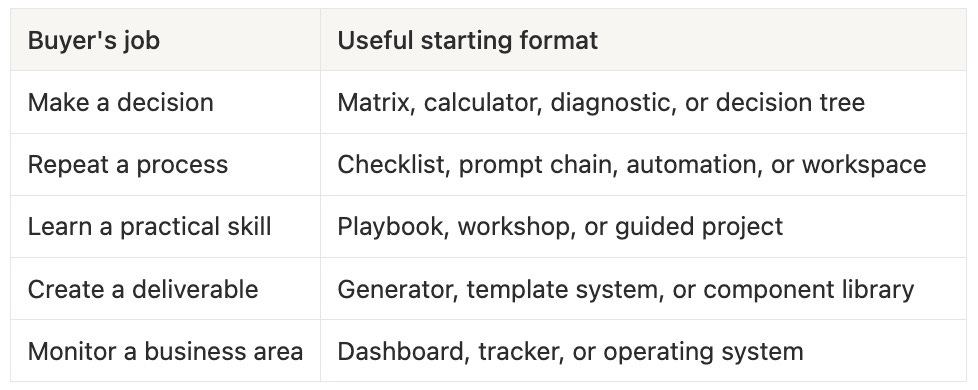
The smallest useful format lowers the risk of building the wrong thing and gets the product into real hands sooner.
Step 5: Add your judgment
Your advantage comes from decisions you’ve already learned to make.
-
Add the sequence you follow.
-
Include the trade-offs.
-
Show the common errors.
-
Give users a sensible default when they don’t know what to choose.
A template is harder to replace when it carries some form of contextual knowledge and experience.
Step 6: Design the next layer
The first product can work on its own and still lead into a larger stack.
One possible progression:
-
Free checklist or diagnostic
-
Paid template or prompt system
-
Full workspace or implementation kit
-
Workshop or guided sprint
-
Membership with ongoing tools and support
The Solopreneur Code Premium Vault already uses this model.
It combines prompt libraries, courses, detailed guides, tools, and templates in one paid subscription.
Each item solves a specific problem.
Together, they support the wider job of building a profitable one-person business.
A practical product stack for a solopreneur (example)
You don’t need to build every category. Choose a stack that suits your skills and gives the customer a clear path.
Here’s one example.
-
Entry product: diagnosis - Create a scorecard or matrix that helps the buyer find the real constraint.
-
Core product: implementation - Offer the tool that helps the buyer solve the problem they found.
-
Expansion product: operating system - Combine several tools into a repeatable workflow.
-
Continuity product: access and support - A membership can keep the stack current and give buyers a reason to return.
The Premium Vault does this by keeping products from several categories under one subscription. New guides, workshops, prompts, and tools make the collection more useful over time.
Each product can lead to the next. The buyer chooses according to the current problem instead of facing a random catalogue.
How to package a modern digital product
A useful product can still fail when the buyer doesn’t understand it or can’t get started.
Build the package around activation.
Give it a clear promise
State the user, problem, and completed result.
A useful formula:
For [specific buyer] who needs [specific job], this product helps you create [completed result] without [main source of friction].
Keep the promise close to what the product can reliably deliver.
Create a five-minute first win
The buyer should be able to open the product and do something useful quickly.
That could mean:
-
Completing a short diagnostic
-
Generating one usable output
-
Importing a ready-made workflow
-
Seeing today’s priorities
-
Choosing a recommended path
An early result builds confidence and teaches the product through use.
Include a start-here path
Tell the buyer:
-
What to open first
-
What information to prepare
-
Which steps to complete
-
What a good result looks like
-
What to do next
They shouldn’t have to reverse-engineer your folder structure.
Show real examples
Examples make abstract instructions concrete. Include completed templates, sample outputs, before-and-after comparisons, or a short walkthrough.
Match them to the buyer you named.
A product for consultants should sound like consulting work, use realistic client situations, and respect the limits of a small service business.
Define support and updates
AI tools, no-code platforms, and software dependencies change.
Tell buyers what you plan to maintain and what falls outside the product’s scope.
Clear boundaries reduce confusion for everyone.
Common mistakes that weaken digital products
-
Selling volume instead of usefulness
-
A bundle of 1,000 prompts sounds large. The buyer still has to find the right one, customize it, judge the result, and decide what to do next
-
A smaller guided system can solve more of the problem.
-
Building before validating the job
-
Interest in a topic doesn’t prove demand for a product.
-
Test the promise first. Offer a manual version. Run a workshop. Sell a small pilot. Watch where users get stuck before adding more parts.
-
Choosing a familiar format
-
Creators often default to an ebook, course, or Notion template because they know how to make one.
-
Start with the buyer’s job. A decision problem may call for a calculator. A repeated process may need automation. A complex setup may need a guided service before it can work as a self-serve product.
-
Adding features that don’t improve the result
-
More pages, prompts, modules, and bonuses can make a product look bigger while making it harder to start.
-
Check whether each part helps the buyer finish the promised job. Remove anything that adds choice without progress.
-
Ignoring maintenance
-
Products tied to software can break. Links change. Interfaces move. AI models behave differently over time.
-
Choose a maintenance burden your business can handle. Document the dependencies and make updates easy to apply.
Build the product that removes real work
The market still has room for digital products, but it cannot be the same old things.
A useful modern product carries more of the execution.
It gathers the right context, guides the steps, helps the buyer make decisions, and produces something they can use.
-
Choose a recurring problem you understand.
-
Package the process you already follow.
-
Start with the smallest format that can deliver the result.
-
Add tools, automation, or support after the first version proves itself.
The Solopreneur Code Premium Vault has examples across the stack:
-
the Solopreneur Diagnostic Matrix for diagnosis,
-
the Solopreneur Success Prompt Library for guided AI use,
-
the Business Model Canvas Notion Template with 900+ Prompts for structured planning,
-
the Solopreneur Success Playbook for applied knowledge, and
-
the Solopreneur Success AI Toolbox for broader implementation.
Pick one problem.
Build the shortest credible path to the result.
Put it in front of a real buyer before making it bigger.
That’s what makes a digital product worth paying for now.
You’re doing everything. But nothing is moving?
You are doing everything. But nothing is moving.
That is not a motivation problem.
Most solopreneurs are learning from everywhere and getting nowhere. Too much information. No clear system connecting effort to results.
You have everything it takes. You just do not have a clear system yet.
That is what paid subscribers get. Every system, playbook, prompt, and template. All inside the Premium Vault.
You’ll also gain access to this amazing tool I’ve built: Solopreneur OS for Claude: The complete operating system that is built to run your one-person business.
All for $79/year. That’s $6.58/month.
Upgrade now and unlock the Premium Vault worth thousands of dollars.
The Premium Vault holds the secret behind posts like this one, including the tools and resources I use to build the one-person business I love.
Thanks for reading! Ready for the next step?
Let’s crack the growth equation and build a thriving one-person business on your terms!
Anfernee