Plus GPT-6.2 Astra and GPT-6.2 Sol and Gemini 4 Carbon
By Simon Willison
Published: 2026-11-17
URL: https://simonw.substack.com/p/running-the-full-server-side-datasette
In this newsletter:
- Running the full server-side Datasette Python app in the browser with service workers and Pyodide
- GPT-6.2 Astra and GPT-6.2 Sol and Gemini 4 Carbon
Plus 6 links, 1 quotation, and 13 releases(!)
Sponsor message: Pair the Dynatrace MCP Server with prepackaged agent skills so your AI assistant can query live observability data, correlate symptoms with specific lines of code, and verify fixes. Read the blog for a step-by-step walkthrough that traces an 89-second response time back to its database root cause.
Running the full server-side Datasette Python app in the browser with service workers and Pyodide - 2026-11-17
Datasette Lite is my port of the Datasette Python application to run directly in the browser using WebAssembly and Pyodide. I’ve released a complete rewrite of Datasette Lite using service workers, and it’s now almost indistinguishable from the real server-side application.
You can now do all of the following, using a carefully crafted URL to lite.datasette.io:
- Load client-side Datasette to browse any SQLite database, JSON file, CSV file or SQL script
- Select a released version of Datasette to load from PyPI
- Load a specific commit, tag, or branch name from the Datasette GitHub repository
- Pick from over 100 versions of SQLite to use with Datasette
- Install additional Datasette plugins from PyPI or URLs to wheel files, including JavaScript visualization tools
The ability to load specific Datasette references, plugins, and SQLite versions makes this a fantastic tool for linking to demos of work-in-progress features or bug reproductions, without needing to spin up a full web server to serve that demo.
As an example, consider the following URL:
<https://lite.datasette.io/?install=datasette-maplibre&url=https://gist.githubusercontent.com/simonw/39fa5d399465766039549912e2b3d291/raw/f6dfba99a75cbb8b5d9386223220eb52272767ee/demo.db&metadata=https://gist.githubusercontent.com/simonw/39fa5d399465766039549912e2b3d291/raw/f6dfba99a75cbb8b5d9386223220eb52272767ee/metadata.yml#/demo/capitalsandcountries%23map=0/4.2/180&color=continent>
Follow that link and, after a short loading screen, you’ll find yourself on a page that looks like this:
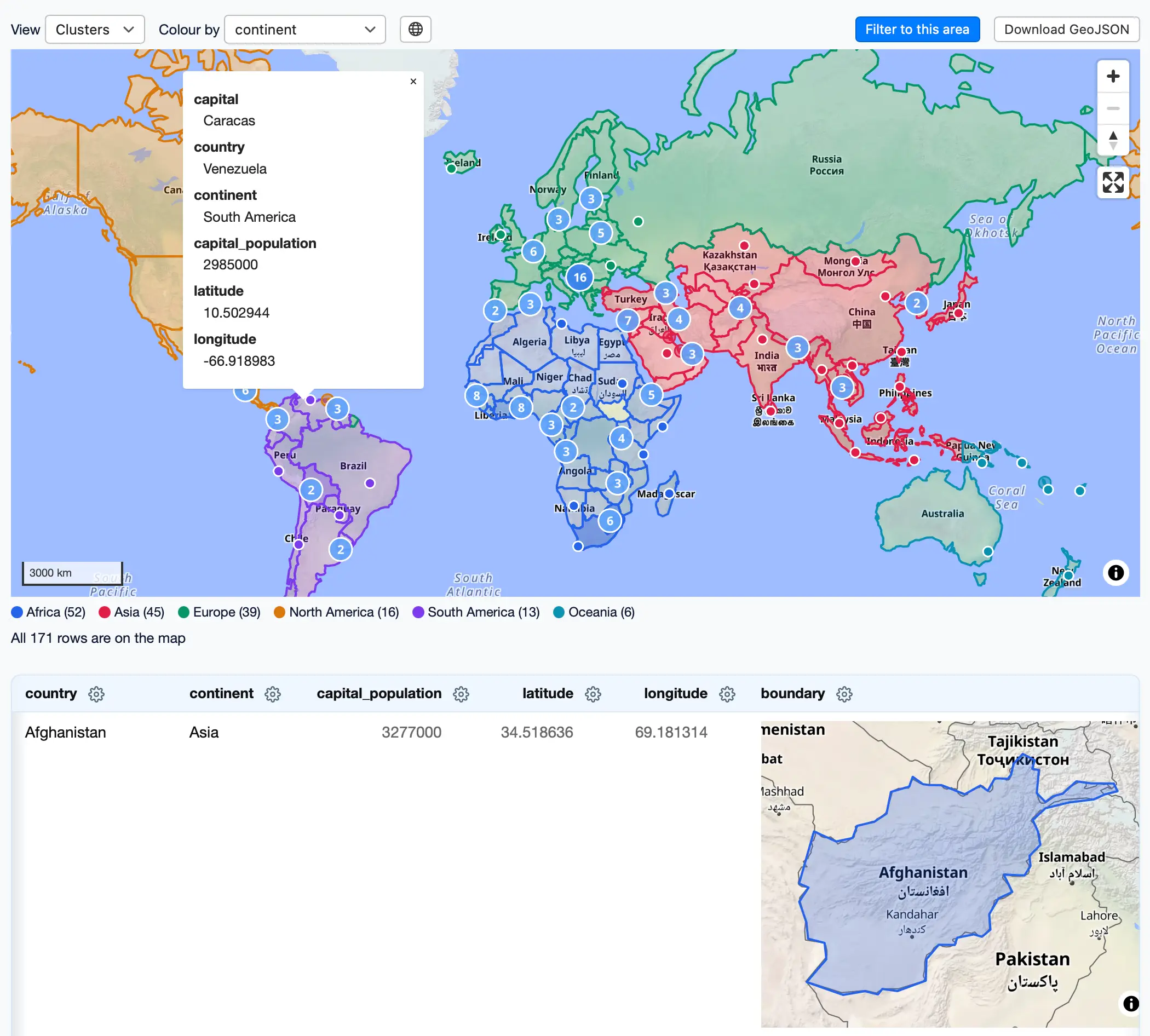
That’s Datasette running the new datasette-maplibre plugin, loading up a database of GeoJSON shapes of countries and displaying both a combined map and individual boundary maps in a table.
Let’s break down that URL to see what it’s doing:
https://lite.datasette.io/
?install=datasette-maplibre
&url=https://.../demo.db
&metadata=https://.../metadata.yml
# /demo/capitals_and_countries%23map=0/4.2/180&color=continent
The ?install=datasette-maplibre installs that additional plugin from PyPI. You can pass &install=... as many times as you like to load more plugins.
&url=https://.../demo.db loads that SQLite database from the provided URL. These URLs need to have open CORS headers - I host files like this in Gists, because they provide an easy way to get open CORS headers on a web-hosted file.
&metadata=https://.../metadata.yml loads this metadata.yml file. The metadata file adds HTML descriptions to various tables, and to the Datasette homepage. Visit that homepage here for a guided tour of the other features of that plugin, all defined in the metadata file.
#/demo/capitals\and\countries%23map=0/4.2/180&color=continent is a fragment hash that turns into a location within Datasette - here it’s loading the /demo/capitals\and\countries SQL view, then appending another fragment hash to it (%23 is a URL-encoded #) which tells the map plugin to zoom to a certain location and to set the color of the shapes on the map based on the continent column in the data.
That URL is doing a lot of work! I wrote more about this trick for building URL-addressable software in URL-addressable Pyodide Python environments last year.
The full set of supported URL arguments is described in the Datasette Lite README.
I’ve already started using Datasette Lite as part of the Datasette development process. Here’s a recent issue describing a pagination bug - I posted a comment there demonstrating the old, broken behavior and the new fix using links to Datasette Lite:
Demo of the bug - click next and the second page is empty.
Here’s that same page with the bug fixed (running on 1.0a43).
How this works, using service workers
Datasette Lite is not a new project. I launched the first version back in 2022, originally as a bit of a joke (running server-side apps in the browser is pretty funny) but one that quickly started proving its value.
The problem with that initial version is that it was a hack. It worked by running Datasette in a Pyodide web worker, simulating requests through that stack, then injecting the resulting HTML back into the top level page using innerHTML.
This worked for basic Datasette, but meant that any feature that used JavaScript failed to work, because script tags in innerHTML don’t execute, and the web worker tricks it used failed to load additional JavaScript or CSS files.
The new version takes a completely different approach based on Service Workers. These allow JavaScript to intercept HTTP requests for new pages and resources and serve them from client-side code instead.
Datasette Lite registers a service worker for the entire lite.datasette.io domain. The parent page then creates an iframe that sends requests for Datasette pages to URLs that look like this:
/app/aa94e6851595/ # the homepage (HTML)
/app/aa94e6851595/data/places # a table page (HTML)
/app/aa94e6851595/-/static/navigation-search.js # (JavaScript)
/app/aa94e6851595/-/static/app.css # (CSS)
Those are regular Datasette URLs, but with a /app/aa94e6851595/ prefix. What’s that about?
The /app/<session>/ prefix is necessary because of multiple tabs.
Consider the URL above, which loads the demo instance with the datasette-maplibre plugin. That URL defines a full, custom Datasette instance. You might have that one running in a tab, then one of my other demo links running in another.
The service worker for lite.datasette.io is shared between all of those tabs. If it routed to a single instance of Datasette then every tab would share that underlying instance, no matter what plugins or other settings their URL attempted to configure.
Instead, the parent page generates a random session ID and uses it as a prefix for all of the subsequent hidden asset and page loads. The service worker can then use that session ID to route those requests back through the parent page to a web worker running a dedicated Datasette instance for that particular session.
(We still need a web worker because Pyodide in a service worker would not be able to maintain state beyond around 30 seconds, depending on the browser. There are a lot of moving parts here!)
I had Claude Fable 5.2 generate several SVG diagrams to help explain this. Here’s my favorite of those, now embedded in the Datasette Lite README:
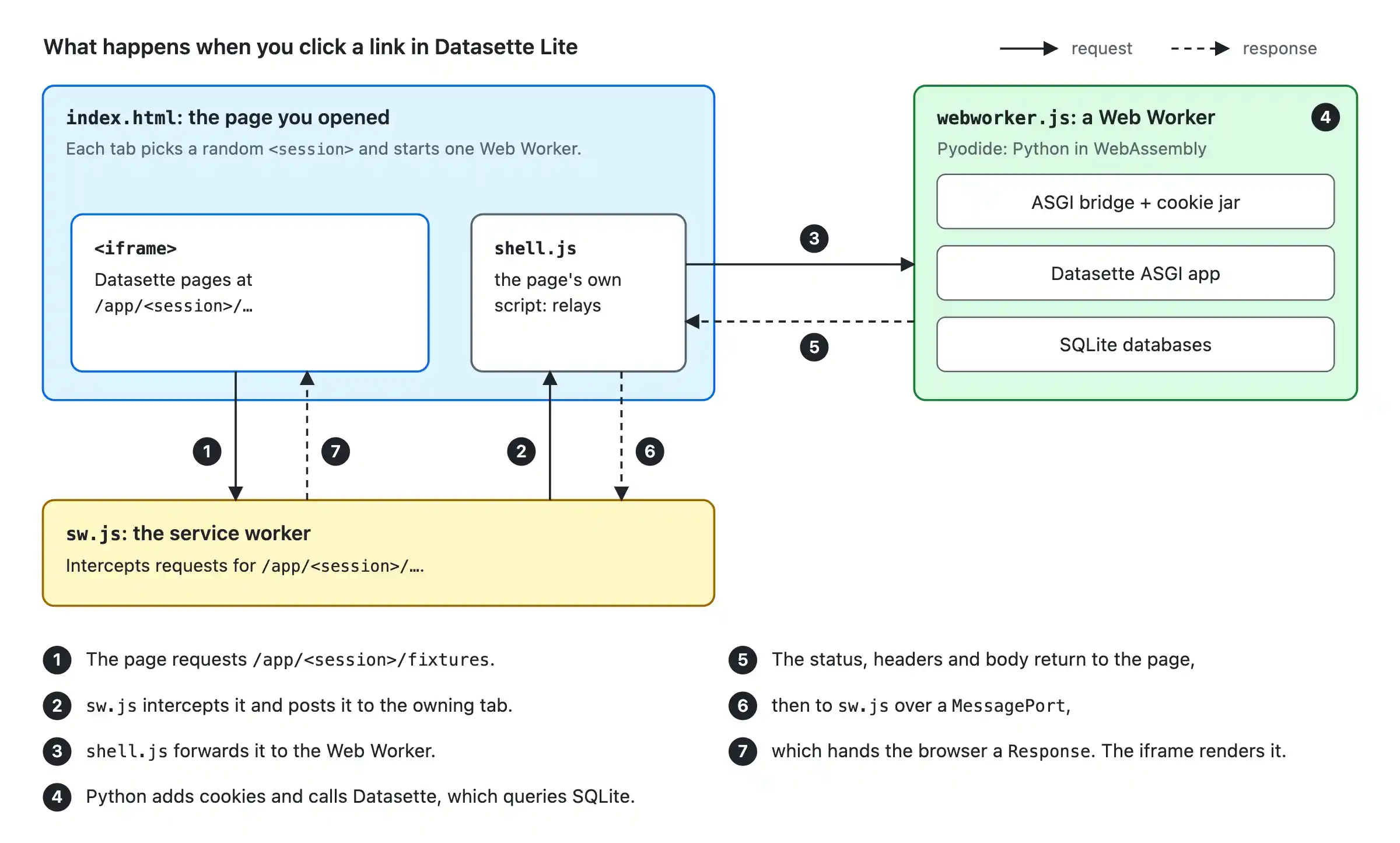
This system started life back in May as an AI research spike generated using Claude Opus 4.8. It wasn’t until November (and Claude Fable 5.2) that I felt familiar enough with how it all works to confidently ship it to production!
Bonus feature: pick your version of SQLite
I added this feature last night as an off-shoot of investigating a potential bug in SQLite.
Datasette is meant to work against any released version of SQLite since 3.25 (released in September 2018). There have been 87 further releases since then.
Being able to fire up Datasette against a specific version of SQLite is really useful for demonstrating new SQLite features and debugging weird issues.
In the past I’ve used various tricks to get different SQLite versions running with Python on my Mac, but it’s not a trivial process.
WebAssembly is perfect for this. I can load up a custom SQLite build entirely in my browser, test it there, then discard it when I close my tab.
datasette/pysqlite3-wasm-wheels is my new repository which contains WebAssembly compiled Python wheels for pysqlite3 for 163 different SQLite versions. Each version gets a file with a name like this:
pysqlite3-0.6.2-3.54.1-cp314-cp314-pyemscripten\2026\0\_wasm32.whl
That’s for SQLite 3.54.1, the most recent version.
Datasette Lite now takes a special ?sqlite= URL parameter, which will accept a version number like 3.54.1, resolve the path to the corresponding wheel file, then fetch that wheel and install it into the Pyodide environment and configure Datasette to use it.
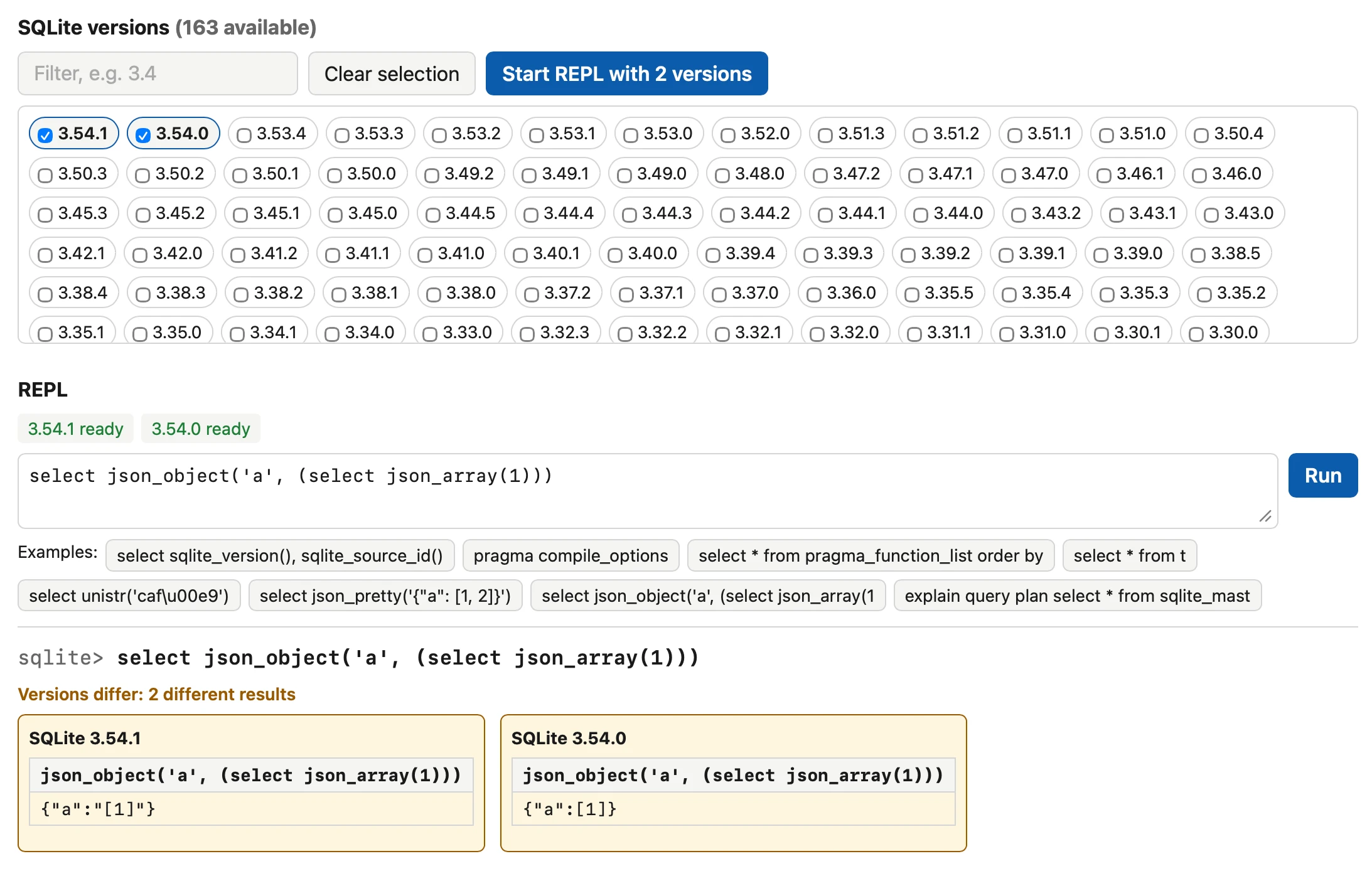
Once I’d built the wheels, I decided to have Claude Fable 5.2 build me this bonus tool))) for comparing a SQL query across any selected versions of SQLite. Here’s an example showing how select json\object('a', (select json\array(1))) differs between SQLite 3.54.0 and 3.54.1:
This should work for every other Python app, too
Nothing about how Datasette Lite works is unique to Datasette. Almost any Python application should be able to pull the same trick - running entirely in the browser using WebAssembly and Pyodide, as a cheap way to provide preview environments, demonstrate features, and recreate bugs.
C and Rust extensions used to be a blocker for this kind of thing, but any good coding agent can compile those to Pyodide-compatible WebAssembly now. You can even publish them to PyPI as of PEP 783 in April 2026.
One catch is databases. SQLite is no problem at all, but running PostgreSQL or MySQL in WebAssembly, while possible, is still a path less trodden.
I’d love to see WebAssembly preview environments like these become a common pattern across the Python ecosystem.
Link 2026-11-17 GPT‑6.2 Astra and GPT‑6.2 Sol:
OpenAI:
We’re introducing GPT‑6.2 Astra, our new frontier model for your hardest projects, and GPT‑6.2 Sol, our efficient, versatile model for everyday work.
They’re available in the API as gpt-6.2-astra and gpt-6.2-sol. I shipped LLM 0.38 with support for the new models.
6.2 Astra is 80% of the price of 6 Astra - $8/MTok input and $40/MTok output, the same price as Claude Fable 5.2 (which was also 80% of its predecessor). 6 Astra and Fable 5 were both $10/$50. The cached price is an even bigger discount - $0.40/million compared to $1/million for the older model. This is great news for longer running agentic sessions.
GPT-6.2 Sol is the same $2/$10 price as 6.1 Sol and 6 Sol - which are half the price of GPT-5.6 Sol ($4/$20).
Here are the pelicans for GPT-6.2 Sol and for GPT-6.2 Astra. The 6.2 Astra max pelican looks like this:

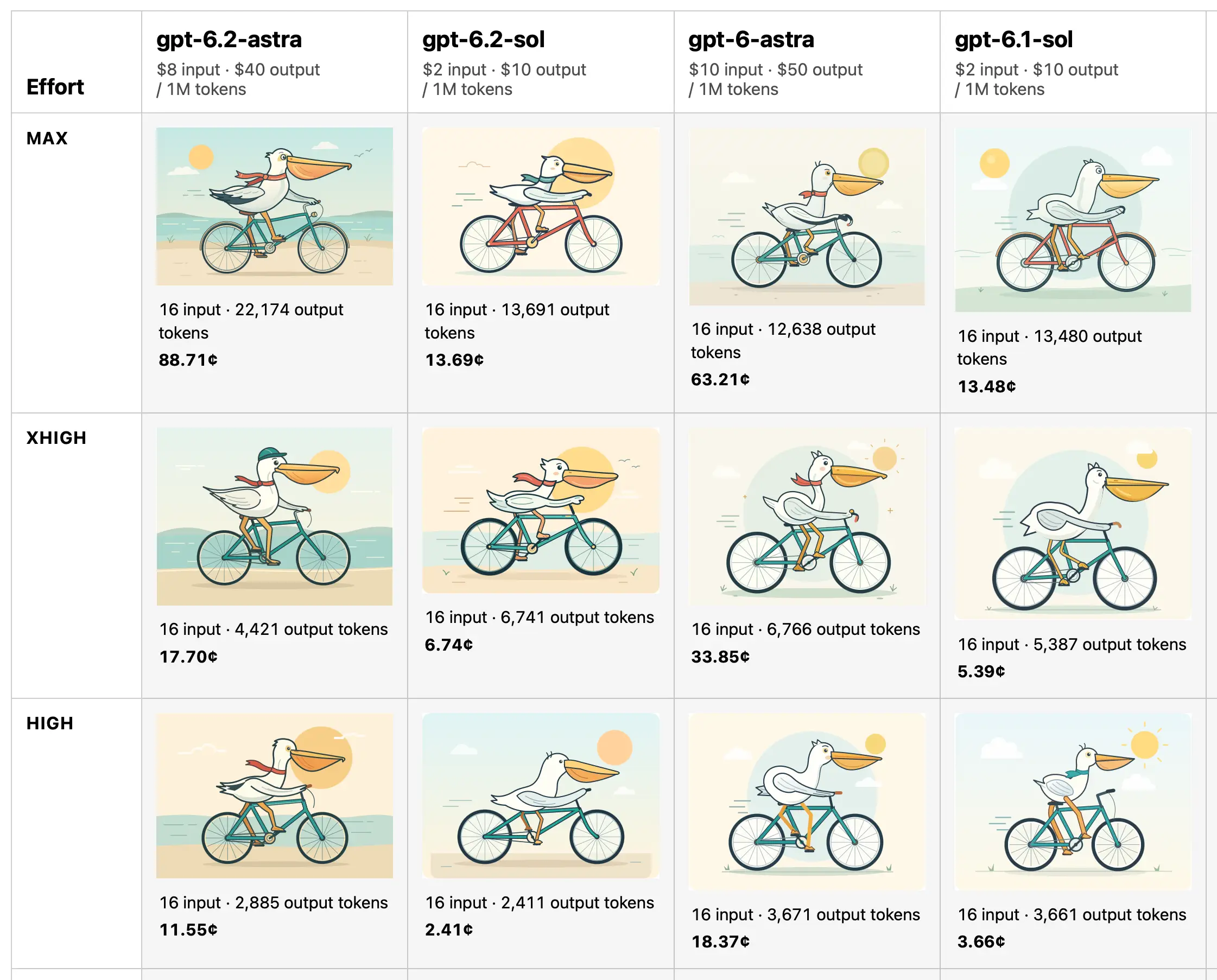
I have a full comparison grid here, but here’s how the high/xhigh/max pelicans compare with the previous Sol and Astra releases:
I also ran my most recent benchmark prompt against the two models, using “Ultra’ effort levels in the Codex CLI:
Make a three js animation where yonkers stands up as a big mech (cool stand up motion) and stomps around manhattan and queens and Brooklyn, use openstreetmap mapping dataHere’s Sol and here’s Astra. Neither of them did a good enough job of morphing Yonkers into a big mech, at least in comparison to Claude Fable 5.2 and Gemini 4 Carbon.
This video showing the Astra and Sol animations playing out at the same time:
I created that video using GPT-6.2 Astra (Ultra) in the Codex desktop app by prompting:
https://static.simonwillison.net/static/2026/yonkers-gpt-6.2-astra-ultra/index.html and https://static.simonwillison.net/static/2026/yonkers-gpt-6.2-sol-ultra/index.html are two videos of the same thing by two different modelsI need a video of the first 10 seconds where the top half of the video plays the first and the bottom half plays the secondI need an overlaid label of "GPT-6.2 Astra" on the top half and "GPT-6.2 Sol" on the bottom half. These labels should be tastefully positioned.Make the video square and 2000x2000 pixelsThen later:
OK make it 20sHere’s the exported transcript.
The buzz around these new models is mixed at the moment. Astra 6.2 isn’t scoring quite as high as Fable 5.2 on various benchmarks, and I’ve seen a few complaints that its communication style can be confusing. Theo Browne’s review (in the form of a feedback letter he sent OpenAI during pre-release) has this useful example:
When this model is working on long tasks, it can pull in a lot of subagents and manage them pretty well. It will then proceed to randomly ask you some weird internal implementation detail bullshit that you could not under any earthly circumstance understand, much less have input on.
I sent “/goal make a new level for Outer Wilds”. 2 hours in, it’s “blocked” because it wanted to ask me “does r24’s reviewer write it’s clips to 24\g521.mp4 or 24\p11.mp4?”
Link 2026-11-17 External sandboxes for coding agents:
I’ve been exploring new ways to sandbox code that is executed by agents, with a focus on making it safer to try out local models without worrying that a mistake or prompt injection attack might cause them to take damaging actions on a machine.
I worked on this project with Prime Radiant, the AI research lab behind Superpowers and other projects.
My post on the Prime Radiant blog introduces the external sandbox pattern, where code executed by the agent runs inside a dedicated sandbox while the agent itself lives outside of that sandbox.
To demonstrate this pattern we’ve released three sandbox server implementations:
- external-sandbox-v86 runs a Node.js server which then uses v86 to run Alpine Linux inside WebAssembly.
- external-sandbox-container is a Python web server which runs the sandbox in Alpine Linux inside an Apple Containers instance.
- external-sandbox-quicksand is another Python web server, this time using Microsoft’s Quicksand sandboxing library, which bundles QEMU and Alpine Linux in a Python package!
Each of these implementations offers the same localhost API. You can then configure Pi, Claude Code, or Codex to send API calls to that sandbox any time they want to execute code.
The sandboxes also include an optional HTTP/HTTPS allow-list proxy, so you can control exactly which hosts your agent’s code is allowed to communicate with - plus a credential replacement mechanism to make authenticated API calls without sharing a secret with the agent. Here’s the UI you can use to reconfigure that proxy while the sandbox is still running:
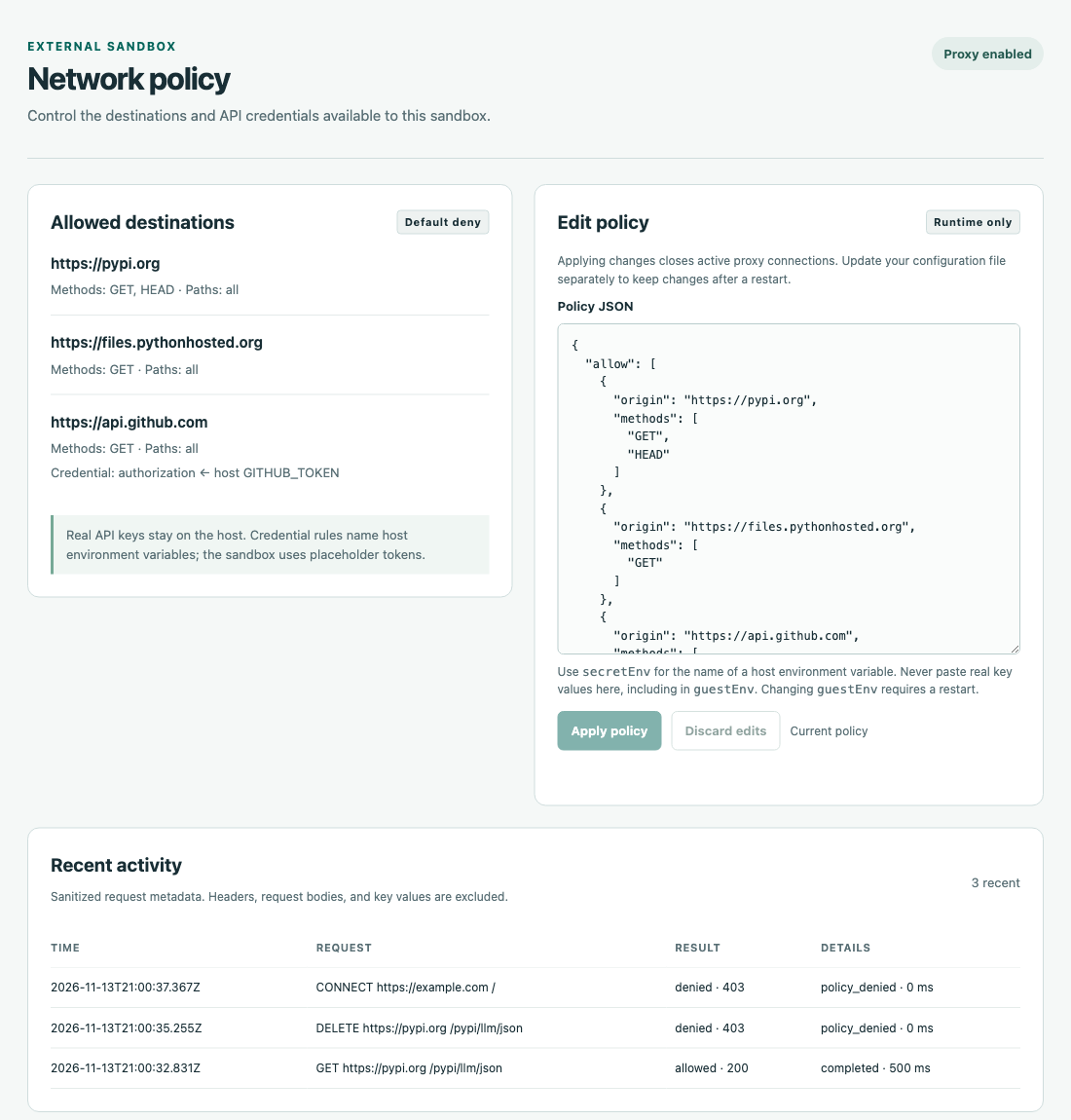
I continue to be fascinated by the challenge of safely running untrusted code. This external sandbox pattern provides a neat way to experiment with different approaches.
Release: llm-gemini 0.36
Gemini 4 Carbon was announced two weeks ago for “a subset of cyber defenders”, but today it’s available to everyone else.
This is Google’s best ever Gemini, priced at $2/million input and $10/million output at launch (that’s GPT-6.1 Sol / Claude Sonnet 5.5 prices) but scheduled to double in price to $4/$20 on December 1st (same as Opus 5.5).
Here are three pelicans for the low, medium and high thinking efforts (it defaults to medium). This is the pelican I got for high:

Gemini pelicans have all been great for a while now, so I also tested it out using Google’s Antigravity IDE with a prompt I first tried with Claude Fable 5.2 yesterday:
Make a three js animation where yonkers stands up as a big mech (cool stand up motion) and stomps around manhattan and queens and Brooklyn, use openstreetmap mapping dataHere’s the HTML result (I had to prompt “build that into a standalone HTML file” to get a version with no external dependencies). I then screen-captured that as a video:
Update: Huh, just saw this on YouTube (and tweeted by Google CEO Sundar Pichai):
Using Google Antigravity’s /swarm feature, Carbon built an open-world 3D game where you explore Google’s Mountain View campus as a pelican riding a GBike — coordinating subagents to model 3D assets in Blender from Omni and Nano Banana references, build the browser game in Three.js with WebGL shaders, and pair procedural Web Audio sound effects with Lyria music.
Here’s the playable version in AI Studio.
Link 2026-11-11 Anthropic’s IPO roadshow video:
Anthropic kicked off their IPO roadshow yesterday, and their roadshow video has some previously unreleased information about how their business works.
The section on “Approach to compute” with co-founder Tom Brown is particularly interesting, describing how Anthropic train and serve Claude across AWS Trainium, Google TPUs, NVIDIA GPUs, and AMD GPUs.
I’m not sure why there’s no official video transcript, but here’s one that I extracted using MacWhisper. Highlights below:
We train and serve Claude now across all four major chip families. That’s only possible because early on we made an unconventional bet on a multi-chip strategy. At the time, many people thought that running AI models on different chips wasn’t worth the effort. Each chip needs its own tailored software stack and inference stack, which is expensive and difficult to build. We’ve now been doing it for years, and we’ve gotten incredibly good at it. [...]
As an example, this year, we started working with AMD GPUs for the first time. In the past, bringing on a new chip platform took dozens of engineers months of work This time, we had Mythos try it out. It got Claude running on AMD in just three days, with basically no human intervention. Claude ported or wrote almost 100% of the kernels. [...]
The second driver of our compute advantage is our rate of discovery of compute multipliers. We focus on total effective compute, which is the multiplicative product of physical capacity times the compute multipliers that we discover. Each one we discover makes our pool of total effective compute bigger. For example, say you need 100 units of compute to train a model of a certain intelligence. A 4x compute multiplier means you can use 25 units of compute to train the exact same model. Or you can use those hundred physical units to train an even more intelligent model that would have previously required 400 units.
Compute multipliers create a competitive advantage for us that’s hard to replicate. They build on each other. Each new multiplier we discover has a positive effect on the multipliers before it. They stack. We believe that this can accelerate even further as we approach recursive self-improvement. Claude will be able to discover compute multipliers entirely by itself, allowing the number of compute multipliers to grow faster and faster.
We got a hint at Anthropic’s multi-chip strategy last September in their postmortem of three recent issues, where they described bugs that affected just their TPU deployments.
Release: llm 0.37.2
Fixes a security issue reported by Daniel de Araujo in GHSA-v9h7-jj4g-f862 and GHSA-r639-rr7r-x72w.
LLM has a mechanism called extra-openai-models.yaml - now managed by the new-in-0.37 llm openai endpoint addcommand - for using LLM with OpenAI-compatible API endpoints from other providers.
Daniel reported two ways this could accidentally send your configured OpenAI API key to one of those providers: if the key named by api\key\name had never been stored, or if a responses: true model was run with -o chat\_completions 1.
Link 2026-11-11 Browse tools.simonwillison.net by tag:
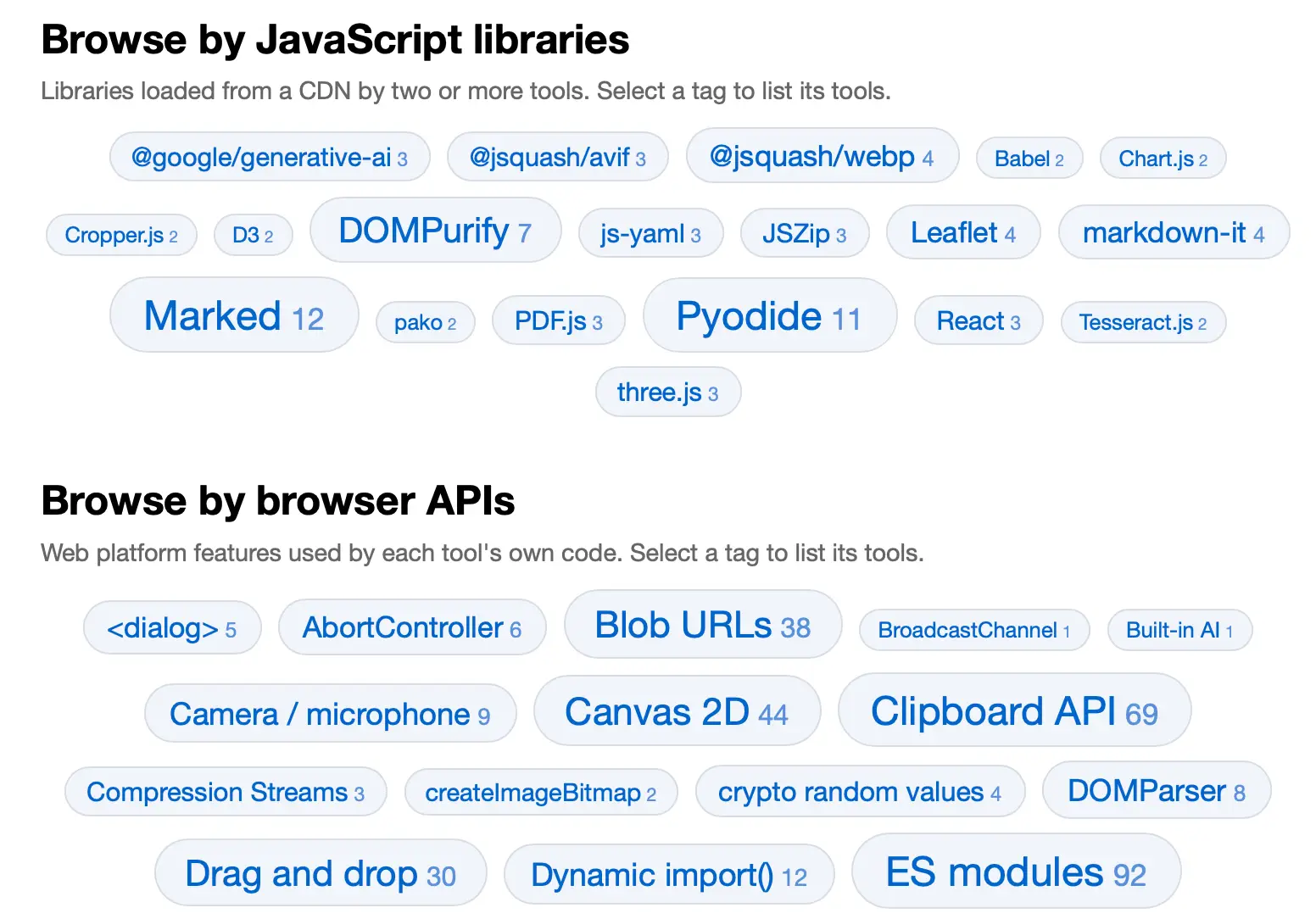
I’ve been wanting a better way to browse my collection of vibe-coded tools (244 and counting) for a while. I had a few Fable 5.2 credits left over before my weekly reset so I set it to work using tree-sitter to analyze the code for JavaScript APIs, libraries, and web API hosts used by each tool.
The homepage now features tag clouds for browsing by each of those categories of tag:
Link 2026-11-11 aws-emulator:
Finally, an official emulator from AWS to run tests against a local clone of their many different services without having to provision a paid API key to do so.
It’s written in Rust by a huge swarm of agents - 29,684 commits in the first three weeks of the project. Swaminathan (Swami) Sivasubramanian wrote about how it came to be in a guest post on Werner Vogels’ blog.
It currently requires Docker to run on macOS or Windows. I’m hoping they fix that in the future - it would be great if you could download a single binary and use that as part of a standard test suite in other languages and on other platforms.
Link 2026-11-11 Gemini Decisions API:
Google join Jev and OpenAI in the decision model category with “Gemini Decision 1”. This new model API is almost identical to Jev: it supports the same three types of questions (yes/no, choice, and rubric-scoring) and even reuses Jev’s term “Noul” for a yes/no question.
It’s priced the same as the GPT-6 Luna decision model: 10 cents per million input tokens, and output is free. Jev remains the cheapest of the three, at 4.2 cents per million.
Jev is text (and JSON) only. OpenAI can handle text and images. Gemini Decision 1 is fully multi-model: it covers text, images, audio, video, and PDFs.
I tested it against video by passing these questions to it along with my Yonkers stomping robot video file:
dragon: Does this video have a dragon in it?
robot: Does this video have a robot in it?
france: Is this video set in France?
usa: Is this video set in the USA?
Jev and OpenAI both return 1.0 or 0.0 for yes/no questions, but Gemini insists on being a little less confident than that:
{
“dragon”: {
“type”: “yes_no”,
“probability”: 0.04976021841520312
},
“robot”: {
“type”: “yes_no”,
“probability”: 0.9234055387792485
},
“france”: {
“type”: “yes_no”,
“probability”: 0.08329171353166241
},
“usa”: {
“type”: “yes_no”,
“probability”: 0.9230459995157706
}
}
Release: llm-gemini 0.37
Google launched Gemini 4 Hydrogen today - the lowest cost member of the Gemini 4 family.
It’s actually not too far off the price of its much bigger siblings, Carbon and Argon. I’m finding Gemini 4’s pricing really confusing. Here’s the pricing scheme:
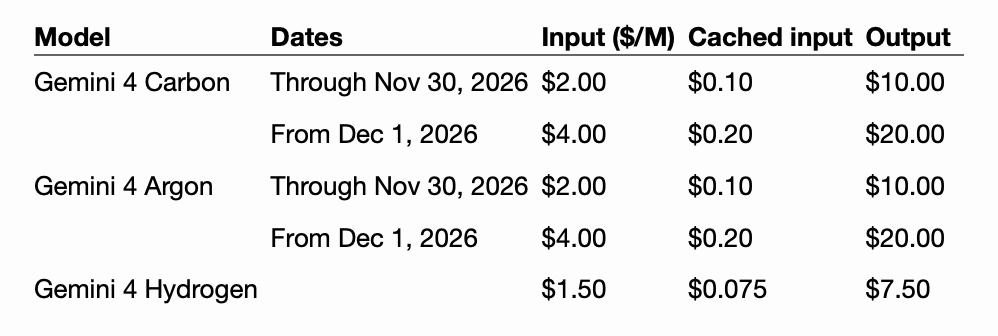
Carbon and Argon are the same price, and both are scheduled to double in price on December 1st. If they’re the same price, why have two different models? Google says that Argon “delivers Gemini 4 intelligence with faster responses and lower token spend per turn compared to Gemini 4 Carbon” - so it may be priced the same, but it will use less tokens per task.
Hydrogen, supposedly the cheap model, is currently only a 25% discount on its more capable peers. The Hydrogen price will make more sense after December 1st, when it will represent a 75% discount. It’s still considerably more expensive than Claude Haiku 5.5 and GPT-6 Luna - they’re both $0.10/$0.50, so Hydrogen is 15x that.
I had Hydrogen generate some pelicans. Here’s a full comparison grid showing the pelicans for all three members of the Gemini 4 family at their three supported effort levels:
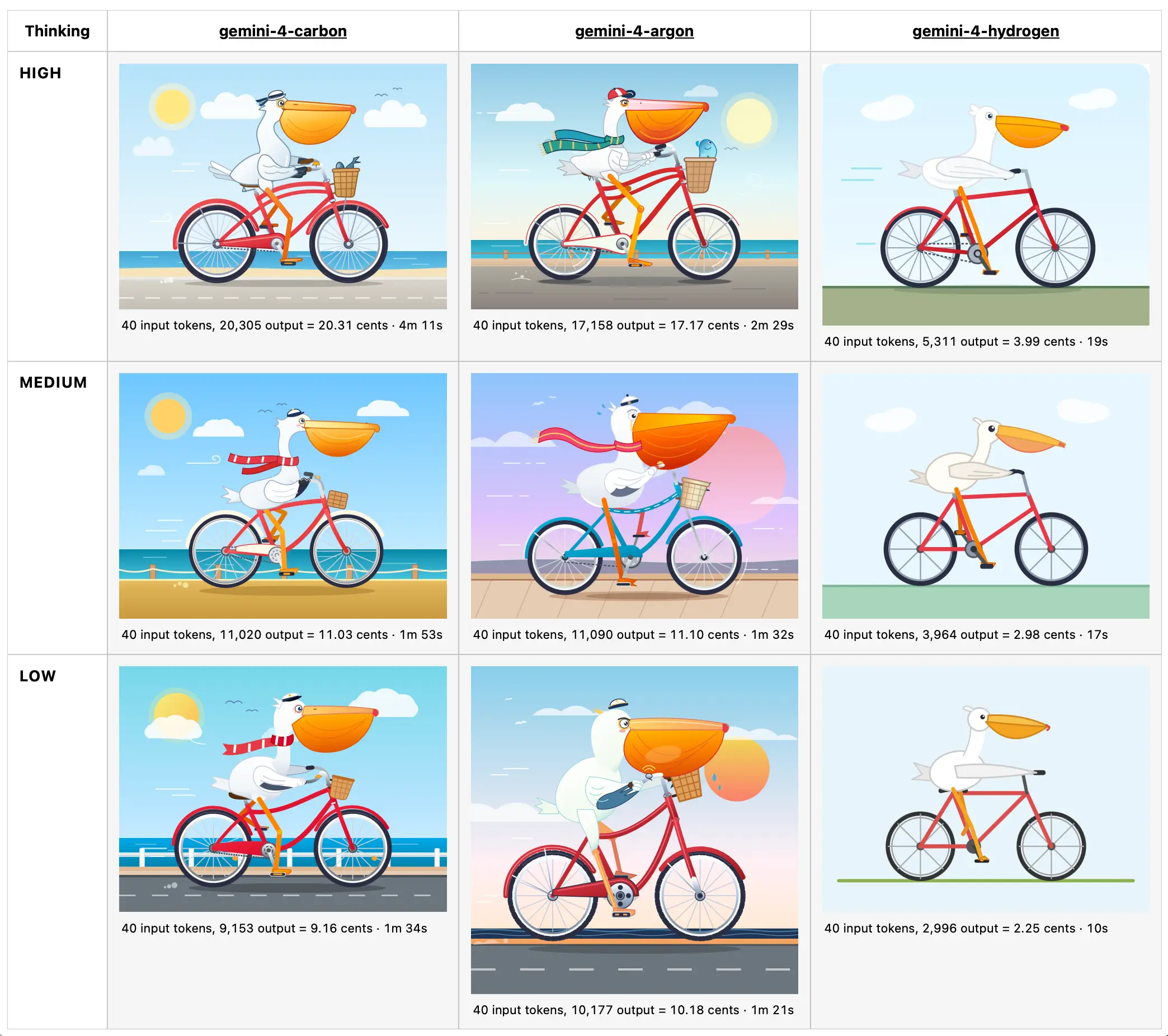
Considering how close they are in price, the difference in pelican quality for Hydrogen is quite stark.
Here’s how Google describe Hydrogen’s intended position in their mix of models:
In real-world software development, while teams rely on frontier models like Carbon and Argon for deep architectural judgment when designing systems or untangling subtle bugs, they still need a fast, disciplined execution model for writing code, running tests, and verifying changes. Hydrogen is built to stand on its own as a model for everyday work — or to pair with Carbon and Argon as the high-efficiency execution engine in multi-model workflows.
Most notably, Hydrogen is the new free tier model, and is the model that will power AI features in Google Search.
Release: datasette-leaflet 0.3
OpenStreetMap have a very reasonable policy that hits to their hosted tile server should send a referrer header. Datasette table pages used the Referrer-Policy: no-referrer HTTP header, causing plugins that loaded tiles from OpenStreetMap to violate that policy.
datasette-leaflet is the plugin that loads a bundled Leaflet so other Datasette plugins can depend on it. It now sets the referrer policy on the tile requests themselves to strict-origin-when-cross-origin, passing the host but not the full path to the page.
Release: datasette-cluster-map 0.19
One of the oldest Datasette plugins, and still one of my favorites. It now works with Datasette 1.0a42, and depends on the new datasette-leaflet to ensure OpenStreetMap tiles are requested with a referrer header.
Here’s a map of power plants owned by California’s PG&E, also demonstrating Datasette’s recently redesigned facets:
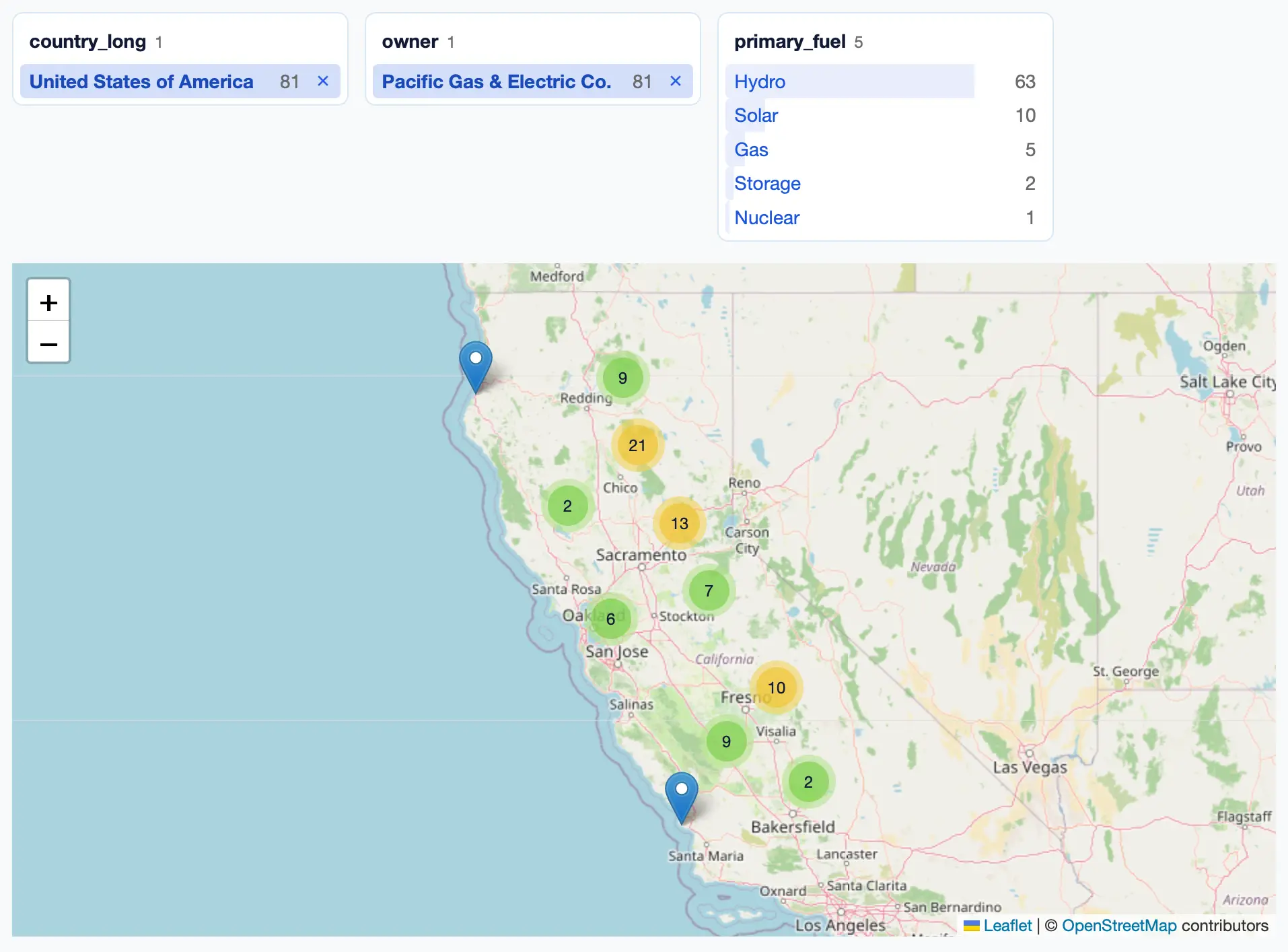
Release: datasette-vega 0.7
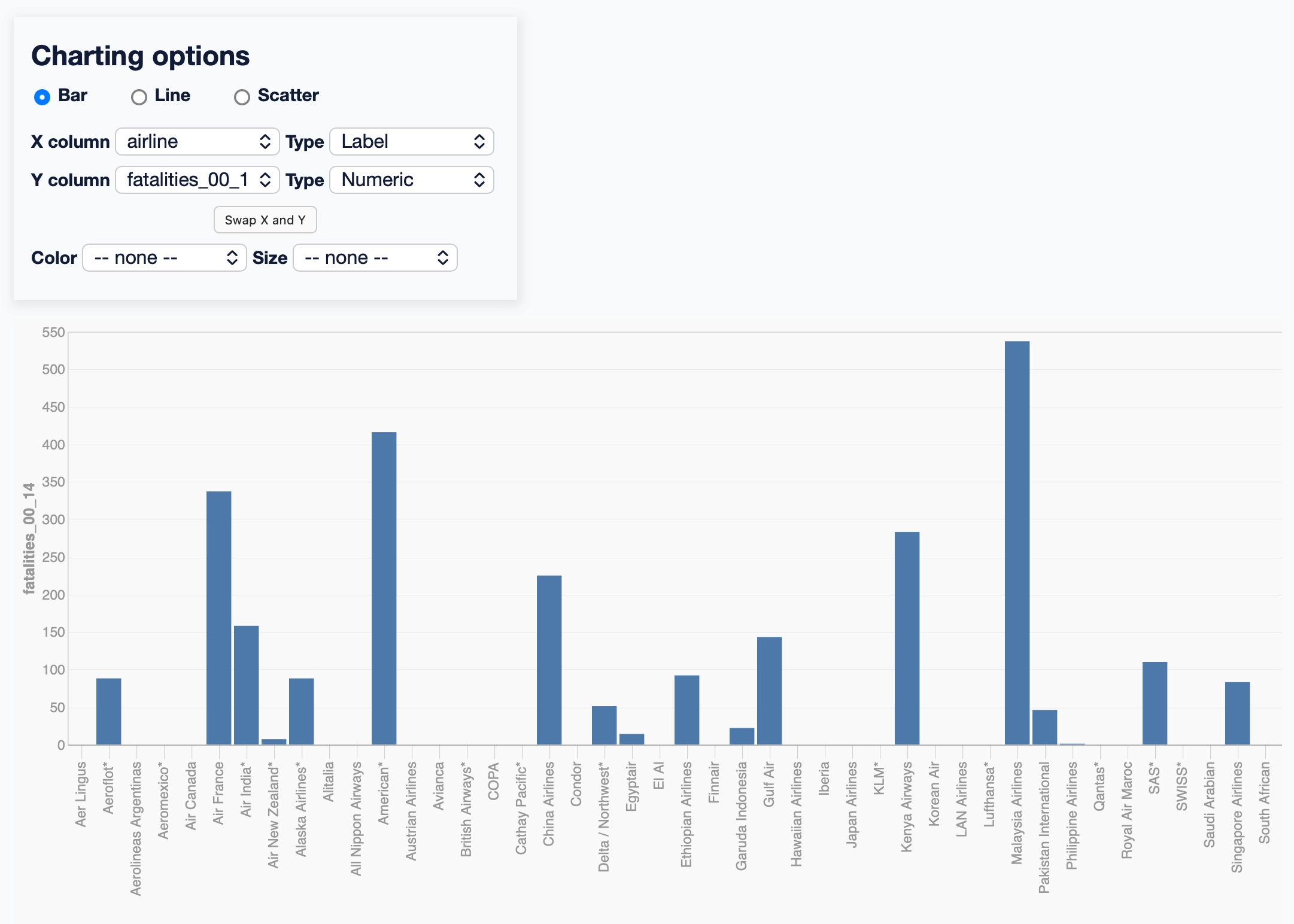
A new release of Datasette’s longest untouched plugin, for rendering charts (using Vega-Lite) against data in a table or custom query. The last release was in July 2018!
I finally bumped it for compatibility with the latest Datasette alphas, plus some cosmetic tweaks to make it work better with Datasette Lite.
(Datasette Lite just gained the ability to run JavaScript plugins like this! I’ll write more about that soon.)
Since it works with Datasette Lite, the live demo in the README now links to this demo on Datasette Lite.
Release: datasette-llm 0.1a11
datasette-llm is the intermediate plugin for Datasette that supports configuring LLMs for use with other Datasette plugins.
This release adds support for OpenAI-compatible endpoints, so you can configure Datasette to use an LLM hosted anywhere that talks the OpenAI pseudo-standard web protocol.
This means that if you’re running local models with LM Studio or Ollama or llama.cpp (which just hit v1.0.0) you can run Datasette via uvx like this:
wget https://datasette.io/content.db
uvx --with datasette-agent datasette
--root --secret 1
-s plugins.datasette-llm.default_model '{
"model": "lmstudio-qwen",
"model_name": "qwen/qwen3.8-27b",
"api_base": "http://localhost:1234/v1"
}' content.db
And you’ll get a local server running a Datasette Agent instance powered by your local model!

Release: datasette-agent 0.6a0
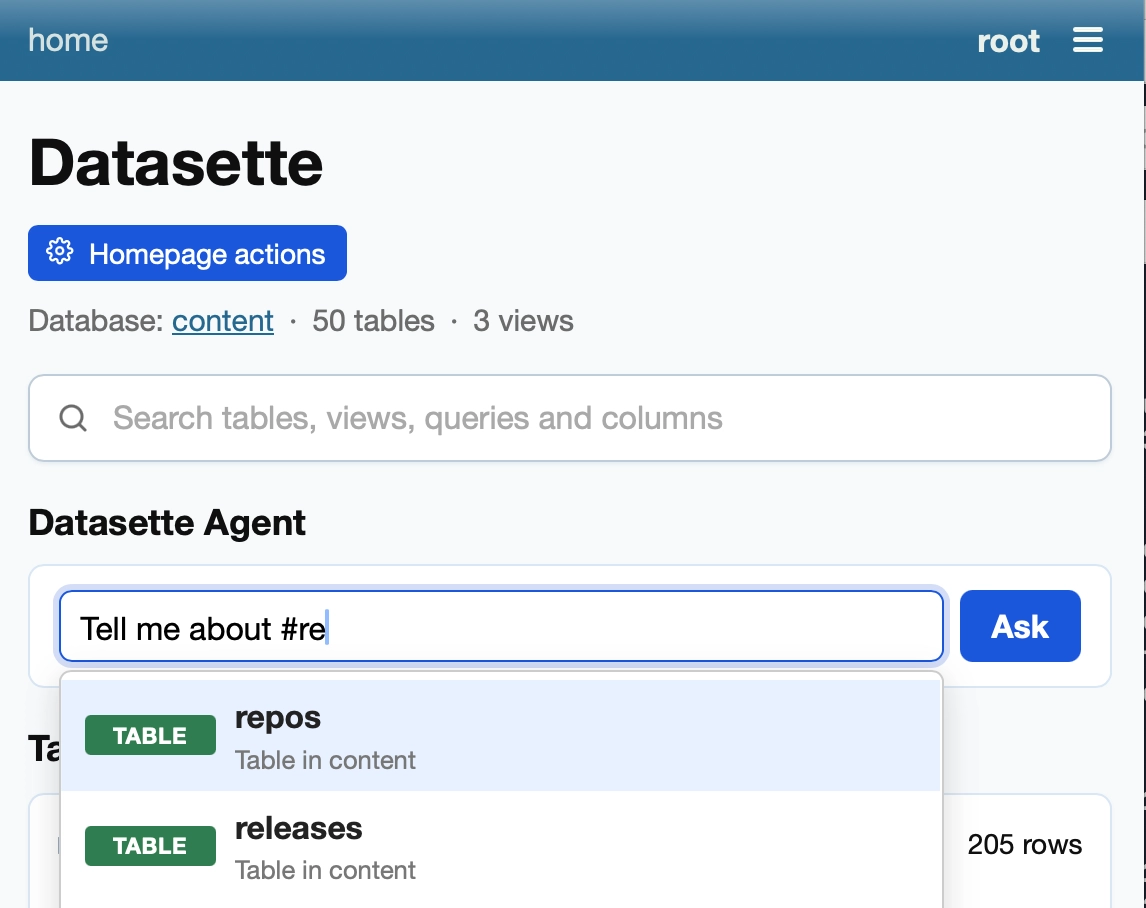
Accumulated small fixes for Datasette Agent, my agent plugin for Datasette that lets you ask questions about your data. Most notably, it now adds an agent prompt directly to the Datasette homepage, with support for hash-mentions of tables and queries:
Release: datasette-apps 0.4a0
Datasette Apps are sandboxed HTML and JavaScript applications that live inside Datasette - think Claude Artifacts, but these ones can run SQL queries against your data.
0.4a0 adds support for linking: you can link to an app with #fragments in the URL and the app can see and use those, plus supported URL schemes are reported back to Datasette Agent so it can help write apps that link to each other.
This means you can have e.g. an app that shows details about a specific record, and a completely separate app that searches those records and links to their representations in the first app.
Release: datasette 0.65.6
I backported a minor security fix from 1.0a43:
Fixed a security issue where a database registered usingadd\_database(db, name=..., route=...)with a route that differs from its name could be downloaded from/<route>.dbby actors who were denied access to it. [...]
Release: datasette 1.0a43
I’ve been leaning hard into Claude Fable 5.2 to help knock things off the 1.0 milestone, which is now 53% complete.
The biggest 1.0 item in this release is streaming support for output renderers - the built-in TSV and CSV export mechanisms now use this as well, and plugins can register themselves as capable of streaming every row in a table in one go via the new Response.stream() method.
There are a couple of security fixes, one of which I deemed deserving of a GitHub advisory: private stored queries could be exposed, granting access to the title and SQL of the query (but not allowing that query to be executed).
There are dozens of smaller improvements. The row page JSON representation finally has a design suitable for 1.0. A new <datasette-copy-button> Web Component provides copy-schema in various places. JSON in columns on the row page can be pretty-printed. There’s a new DatasetteModal.confirm() JavaScript utility method. Plus dozens of bug fixes, including contributions by Zihan Dai, Peter Olkhovets, Ilya Khalafi, and Ankita Advitot.
The feature I’m most excited about is a pretty tiny one: I’ve added CSS multi-page view transitions to Datasette! Here’s the commit - key CSS is as follows:
/\* Enable cross-document view transitions,
for anyone without prefers-reduced-motion \*/
@media (prefers-reduced-motion: no-preference) {
@view-transition {
navigation: auto;
}
}
/\* .facet-results should morph from old position to new \*/
html:active-view-transition .content > .facet-results {
view-transition-name: facet-results;
}
/\* So should a .table-wrapper, provided it contains .rows-and-columns \*/
html:active-view-transition .table-wrapper:has(> table.rows-and-columns) {
view-transition-name: rows-table;
}
With that in place, navigations within Datasette - still staunchly a multi-page application - feel more like an SPA. This works on Safari and Chrome at the moment and I believe supports for Firefox is due to land in Firefox 162 on December 8th 2026 (seeing as they are no longer feature-flagged in Firefox Nightly.)
Release: datasette-maplibre 0.1a0
The first new Datasette geospatial plugin in quite a while! This one combines the excellent MapLibre GL library with OpenFreeMap, the free vector map server operated by Zsolt Ero (you should sponsor Zsolt on GitHub.)
I built most of this with a single prompt to Claude Fable 5.2:
Look at datasette-cluster-map and datasette-leaflet-geojson plugins, then look at ~/dev/tools/openfreemap-demo.html - then build a brand new Datasette plugin that uses maplibreGL and openfreemap and combines the features of those other two plugins - but be creative and think outside the box for other useful features the plugin might have“Be creative and think outside the box” resulted in a few neat ideas - my favorite is that it displays SVG previews of GeoJSON shapes, then loads a WebGL preview only when they scroll into view.
I also had Claude build a comprehensive demo which works in the latest Datasette Lite, so you can visit this link to load the plugin and a demo database in your browser via Pyodide and WebAssembly.
I like this demo page showing both GeoJSON shapes and lat/lon points on the same map:
Release: llm 0.37.3
A bug fix release for LLM, mainly to cover a problem with the most recent Homebrew package of the software.
Homebrew now ships the latest SQLite, 3.54.1, which includes a fix that broke LLM’s logging code.
Short version: in SQLite 3.54.0 the following SQL:
select json_object('a', (select json_array(1)))
Returns this:
{"a":[1]}
But in 3.54.1 the same query returns this:
{"a":"[1]"}
According to D. Richard Hipp:
That was a bug fix. Per the documentation, (SELECT json\_array(...)) returns SQL text, not JSON. Hence the 3.54.1 behavior is correct and 3.54.0 was a bug.
The workaround looks like this:
select json_object('a', json((select json_array(1))))
Quote 2026-11-17
A little copying is better than a little dependency.
If you find this newsletter useful, please consider sponsoring me via GitHub. $10/month and higher sponsors get a monthly newsletter with my summary of the most important trends of the past 30 days - here are previews from Julyand August and September.