Plus Qwen3.8-Flash-Next and Tencent Hy4
By Simon Willison
Published: 2026-08-31
URL: https://simonw.substack.com/p/understanding-chatgpt-work
In this newsletter:
-
Understanding ChatGPT Work
Plus 6 links and 1 quotation and 1 release
Sponsor message: Static code review has a ceiling. It can reason about what the code says. It can’t tell you what it does. TREX (which stands for “Test, Run, Execute”) is Greptile’s response to that ceiling: an execution layer built directly into code review. Try it for free.
Understanding ChatGPT Work - 2026-08-30
OpenAI announced ChatGPT Work on July 9th, and have been furiously iterating on it ever since. It is an extraordinarily confusing and very powerful product. Here’s what I’ve figured out about it so far.
ChatGPT Work is actually two products
The more interesting version of ChatGPT Work is the one that runs in the cloud. This can be accessed via chatgpt.com or through the ChatGPT mobile apps. Let’s call it Work Cloud.
If you install the ChatGPT desktop app - the app that used to be called Codex - you gain access to a thing called ChatGPT Work that can access files and run programs directly on your computer. Let’s call that one Work Local. This one feels more like regular Codex re-skinned to be less intimidating to non-software-developers.
For the rest of this article I’m going to talk exclusively about Work Cloud.
Work is for paid subscribers only
Right now, ChatGPT Work (in both flavors) is available only to $20/month and up subscribers. Free users and $8/month Go users do not have access.
Work has features that aren’t available in Chat
The interface for accessing Work is a tab selector, which presents it as an alternative to Chat:
The obvious question is when should I use Chat, and when should I use Work?
OpenAI’s official answer to that question is:
Use Chat when you want an answer, explanation, brainstorm, or short draft. Use ChatGPT Work when you want ChatGPT to complete a task with a clear outcome, such as a brief, deck, analysis, recurring update, workflow, or file you can review and use.
I find that almost entirely useless, because I’ve been using regular ChatGPT Chat for all of those task categories for years!
The better question then is what features does Work have that are missing from Chat?
After extensive experimentation I think I’ve mostly figured that out:
-
Options to use Luna and Terra in place of Sol
-
A code execution environment with Internet access
-
-
A persistent filesystem shared between sessions
-
The ability to publish ChatGPT Sites
-
The ability to run sub-agent sessions with Sol, Luna, and Terra
-
Scheduled prompt automations (may be in ChatGPT Chat too)
Model selection
In Work, you get the option to pick GPT-5.6 Sol, Luna, or Terra, each with Light, Medium, High, Extra High, Max, or Ultra reasoning levels. You can also pick GPT-5.5 at Light, Medium, High, or Extra High.
These look to be the same models that are available through the OpenAI API.
Chat offers a different selection: 5.6 Instant, Medium, High, Extra High, and Pro (actually Extra High and Pro are only available for $100/month+ subscribers - $20/month subscribers cap out at High). It doesn’t explain if those are Luna or Terra or Sol (I’m assuming Sol?). 5.6 Pro appears to be exclusive to Chat, with no equivalent in Work.
My current understanding from using Codex is that Ultra is a special mode that more eagerly delegates to sub-agents.
I believe ChatGPT Work sessions are billed against your Codex allowance, while ChatGPT Chat Sessions get their own, separate allowance. This may help explain the model availability differences.
Code execution with Internet access!
As a long-time fan of the Code Interpreter pattern - pioneered by OpenAI in 2023 - this is by far the most exciting feature of ChatGPT Work (Cloud) for me.
The code execution environment can now talk to the rest of the internet!
ChatGPT Chat can’t do this - if you ask it to install additional software packages or interact with websites or APIs that access will be blocked by the container proxy.
(Weirdly, back in January it grew the ability to install packages, but that doesn’t seem to work any more. I wish they had better changelogs!)
Claude’s equivalent container has allowed restricted internet access since it launched last September. Claude can install packages from PYPI and NPM and clone repositories from GitHub. But that is about it: the allowlist of domains is very short.
ChatGPT Work allows a whole lot more than that. It can be configured with a specific list of allowed domains, but the default appears to be open to all.
This makes Work an incredibly useful tool. You can have it clone GitHub repositories, install their dependencies, then use them to interact with the rest of the web!
A full, headless Chrome browser
Another killer feature of ChatGPT Work is the browser tool. ChatGPT Work can launch a full Chrome instance, load websites, fill out forms, and take screenshots.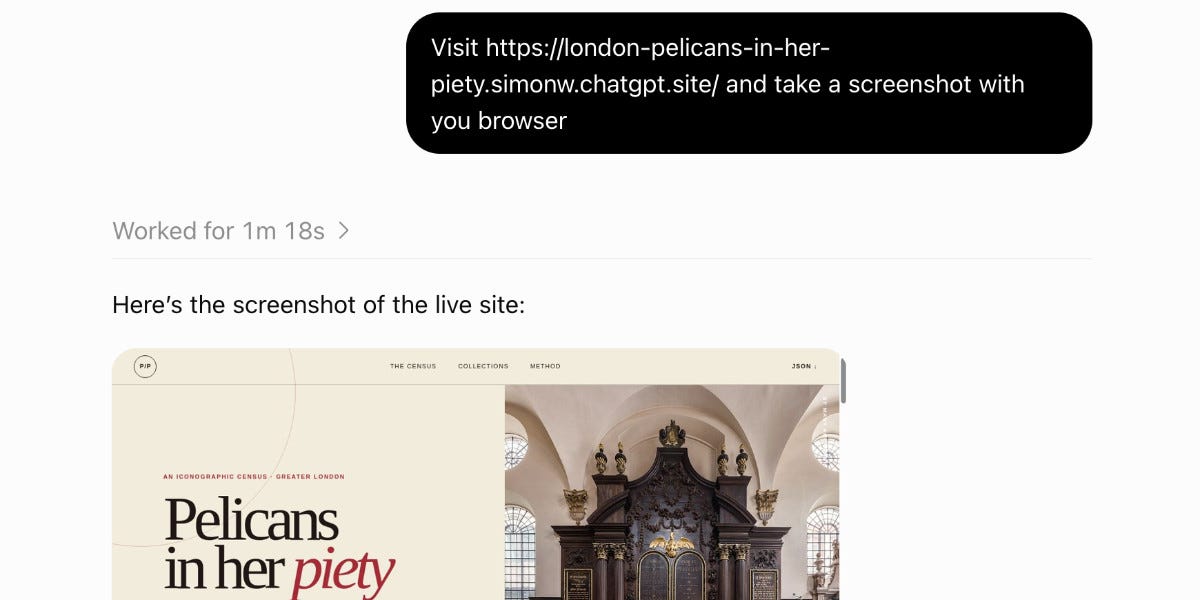
If a site requires sign in the browser can prompt you to take over and enter both passwords and 2FA codes, without round-tripping those credentials through the model itself.
It can even run JavaScript against the DOM of loaded pages. I prompted:
Load simonwillison.net in your browser and extract the headings using JavaScript
ChatGPT Work fired up a browser instance and ran the code:
await tab.playwright.evaluate(() => {
return Array.from(document.querySelectorAll(”h1,h2,h3,h4,h5,h6”), heading => ({
level: heading.tagName.toLowerCase(),
text: heading.innerText.trim().replace(/\s+/g, “ “),
id: heading.id || null
}));
});
This feels a lot like my shot-scraper javascripttool, only now I can access it on my phone!
A persistent, shared filesystem
ChatGPT Chat gets a fresh filesystem for each chat session. These cannot be accessed from any other session.
In ChatGPT Work each session gets its own scratch folder - named something like /workspace/scratch/e00a0a017944 - but each of those are persisted across sessions, so you can access files from previous chats. I have 171 folders in /workspace/scratch right now!
As far as I can tell that /workspace volume is mounted to all Work sessions that are currently running - file edits from one can be instantly seen by the others. They don’t seem to share the same process space though, and localhost servers running in one can’t be accessed from another.
ChatGPT Sites
ChatGPT Work has the ability to build and deploy entire websites, using Cloudflare Workers. These can have HTML and JavaScript and can run server-side features too, including stateful features on top of Cloudflare D1 and R2.
Here’s a simple site I built with this feature:
london-pelicans-in-her-piety.simonw.chatgpt.site
My prompt was:
Figure out all of the places in London with a pelican in her piety, then turn that into a JSON file and build a ChatGPT sites site about them
(A pelican in her piety is a fascinating piece of medieval Christian imagery - once you know about them you’ll find them all over the place.)
These sites default to being private to the user that created them, but you can make them public and (on team plans) share them with other specific individuals.
Sub-agents with Sol, Luna, and Terra
There’s not much to say about this one. ChatGPT Chat can’t run sub-agents. ChatGPT Work can. This is very much a power-user feature: if you are running a complex project that can benefit from multiple parallel agents working together, Work can do that.
Scheduled prompt automations
Another feature that seems to have migrated from regular ChatGPT to ChatGPT Work at some point. You can prompt ChatGPT Work like this:
run a search to see if Waymo have announced a launch date for Half Moon Bay every day at 8am
This will schedule a prompt to run on that frequency. These prompts can decide that nothing interesting has happened, or they can decide to notify you of some new information.
Update: Actually this seems to work in ChatGPT Chat as well.
It’s still worth noting here though, as it can be used in conjunction with other ChatGPT Work exclusive features. You can set a scheduled task to update a ChatGPT Site on an hourly basis, for example.
Is this safe?
An open question for me right now is how safeall of this stuff is.
My lethal trifecta model warns about the risks inherent in any agent system that combines access to private data with exposure to untrusted content and a way to communicate stolen information back to an attacker.
ChatGPT Work combines all three!
I’d love to hear more from OpenAI about how they protect ChatGPT Work sessions against prompt injection attacks. I expect their answer is the same auto-review mechanism as Codex.
OpenAI could make this a lot less confusing
Figuring this all out took way more work than it should have.
I think there are two key problems here:
-
OpenAI explain Work in terms of what it’s for, not what it actually does
-
OpenAI still insist on hiding their system prompts and tools descriptions
If the ChatGPT Work documentation included the exact system prompt and tool descriptions used by the agent I wouldn’t have needed to write this post.
A list of all the tools
Shortly after publishing this article I had an idea. I started a fresh Work session and prompted:
Build a site that lists every one of your tools - nearly grouped into categories - and for each one explain what it does. Try to exactly duplicate arguments and tool descriptions where possible. Design aesthetic should be technical docs, minimal flare
Here’s the site it built, which includes details of 223 registered tools - though 6 of those are from my own personal MCPs served via datasette-mcp.
And a whole lot of Skills
I noticed that the only browser-related tool in the list was web.run, which has methods for running searches, opening URLs, and clicking links, but didn’t look like the full story in regards to headless browser automation.
This made me suspicious that something was missing, so I told the ChatGPT Work session that built that tools reference site:
Add full copies of every skill to the website (separate pages linked to from the homepage)
It turns out ChatGPT Work uses a lot of skills - 44 in fact!
The control-browser skill explains how the browser works:
Run browser setup code through the Node REPL js tool. In this environment the callable tool id typically appears as mcpnode_repljs. [...]
The ability to interact directly with the browser is exposed through the browser-client runtime via the agent.browsers.* API. Before trying to interact with it, you MUST emit and read the complete documentation returned by await browser.documentation() in one go.
So I told Work:
Add the full output of await browser.documentation() to the bottom of the /skills/control-browser page
And now you can read that on /skills/control-browser as well.
A few more interesting Skills:
-
documents for creating .docx files
-
imagegen with tips on creating images with the image_gen tool
-
pdf for both reading and rendering PDFs
-
Spreadsheets for manipulating .xlsx, .xls, .csv, .tsv
-
sites:sites-building for creating ChatGPT Sites
-
openai-docs for answering questions about itself
-
data-analytics:build-dashboard for building data dashboards
Link 2026-08-24 Your executable is a SQLite database:
Farid Zakaria describes a neat Linux pattern for creating a SQLite database file that can be directly used as an executable binary.
The trick sets the SQLite file format’s 4-byte application ID (68 bytes into the file) to SELF, standing for Structured Executable & Linkable Format. The various components of the ELF executable format are then arranged into a number of different SQLite tables, using this schema.
Their self-exec interpreter (C code here) can then extract and execute the necessary pieces.
You can additionally use a Linux mechanism called binfmt_misc to teach the kernel to execute that any time it encounters an executable matching that binary pattern. Farid uses NixOS here, but without NixOS I think registration looks something like this:
printf '%s\n' ':self:M:68:SELF::/usr/local/bin/self-exec:' \
> /proc/sys/fs/binfmt_misc/register
Release: llm-anthropic 0.27
This release of the Anthropic plugin for LLMmainly provides compatibility with the recently released anthropic v1.0.0 Python library, which switches from httpx to httpx2. OpenAI made the same change in their v3.0.0 release two weeks ago.
Anthropic provide this migration guide for upgrading to 1.0, so I prompted Fable 5 in Claude Code with:
Upgrade to anthropic>=1 - read https://raw.githubusercontent.com/anthropics/anthropic-sdk-python/refs/heads/main/MIGRATION.md and get the tests passing
Here’s the resulting PR.
Link 2026-08-25 EVE Online: The Move to Python 3 Begins!:
EVE Online has been one of the most interesting case studies in Python at scale for over twenty years now.
They’ve been running on Stackless Pythonsince their launch in 2003, and their last major upgrade was 16 years ago, to Stackless Python 2.7 in 2010.
Their upgrade to Python 3 will start using the futurize script against 2.4 million lines of code, followed by careful manual review of the ~20,000 places where Python 2 and 3 behavior differ - for example 1 / 2 is 0 in Python 2 but is 0.5 in Python 3.
There’s nothing in this announcement about how they plan to replace Stackless, but at their conference last year they presented Scheduling in Carbon: Leaving Stackless Python Behind describing how they replaced Stackless in the Carbon engine for their more recent game EVE Frontier, using their (now open source) carbonengine/scheduler library.
Quote 2026-08-26
The fact that AI wrote 1M LOC and then refined it over the course of the next couple of months to produce a reliable piece of software that is currently running on millions of developer machines is absolutely mind blowing. And you can say, “well it’s not that impressive because they had an oracle to compare against, so it was simple to go from one language to another”, but I think that’s selling this entire thing short. If you can build a verification system and give proper direction, AI can produce a highly complex, highly sophisticated piece of software and it can continue to refine it until it just works.
Paul Dix, The end of programming
Link 2026-08-26 Qwen3.8-Flash-Next:
Another open weights model from Qwen. This one is “a multimodal MoE model that also serves as an early preview of the architecture used in Qwen4”.
It’s pretty big: 125B tokens, but only 6B active which means it gets a significant performance boost.
I’ve been trying it out on a DGX Spark using these Unsloth quantized models. I’m still exploring the model - so far I’ve tried the 72.5GB UD-IQ1S one (producing these pelicans) and the 78.9GB UD-Q2K_XL (producing these).
My favorite so far was this xhigh reasoning effort one from UD-Q2KXL:
Link 2026-08-27 Breaking Claude Code Opus 5 Auto Mode:
Anthropic are putting a great deal of faith in Claude Code’s auto mode for protecting their coding agent users against prompt injection attacks. They recently made that the defaultand have made bold claims about its effectiveness.
Johann Rehberger is one of the most credible prompt injection researchers active today. He found an attack against auto mode which he claims works 80% of the time, by tricking Claude Code into downloading and uncompressing a zip archive, then executing code that imports base64 without noticing that this will import and execute a local struct.pyfile extracted from the archive.
In a few cases auto mode directly prevented the agent from preventing harmful code from continuing to execute!
In a few runs Claude tried to terminate the malware process once it noticed the compromise, but Auto Mode denied the cleanup command.
Claude detects the compromise, but Auto Mode blocks its cleanup command
The safety mechanism itself can become part of the failure. The classifier allowed the creation of the malware process, but then it blocked the command intended to stop it!
I agree with Johann’s conclusion here: the only safe way to run agents if there’s any risk of attracting the attention of an adversarial attack is with a sandbox:
-
Run unattended coding agents in a container, VM or OS sandbox.
-
Restrict network egress.
-
Monitor your agents.
-
Do not expose home directories, SSH keys, cloud credentials,… to the agent runtime. [...]
Update 30th August 2026: On Lobste.rs hyperpape points out that this doesn’t fit the bill of a classic prompt injection attack because at no point are malicious instructions from the website accidentally followed by the LLM. They’re right: this is more of a confused environment attack where the nature of the environment that the agent is exposed to results in an exploit.
Link 2026-08-28 Just a rumour of a bug is enough to find a security exploit these days:
Anil Madhavapeddy is a professor of computer science at Cambridge and a core maintainer of the OCaml compiler. In this somewhat alarming post he reports that security issues in OCaml projects are seeing evidence of attempted exploits within minutes of patches being shared for discussion:
This normally takes a few days and a release within a week or two is reasonable. Within about ten minutes (!) this website was fielding probes for percent-encoded traversal sequences, indicating that automated watchers are keeping an eye on public repositories.
Modern coding agents have become so effective at finding flaws that the slightest hint at a new bug can be enough information for them to find it, something Anil has been able to demonstrate using his own agents, switching to DeepSeek V4 Pro when Claude Fable refused the task.
Anil points out that this rate of discovery appears incompatible with existing open source embargo practices for new issues. If an issue can become an exploit this fast, we need to figure out new processes for keeping our communities safe.
rclone maintainer Nick Craig-Wood confirms in the Hacker News comments that his project is seeing this problem:
In the first 10 years of the rclone project we received about 20 security disclosures through GitHub. We had to deal with over 40 in the last month! That has taken a huge amount of my time, even using AI tools to triage and come up with fixes for review.
The hit rate for those security disclosures is pretty good - about 75% of them have a nugget of something which needs looking at. [...]
GitHub assigns CVEs for the advisories. Before the AI apocalypse they took 2-3 days for an assignment but now it they are running at 3-4 weeks so I have to send the point releases out with CVE-PENDING in the changelog which isn’t ideal.
Link 2026-08-29 Introducing Hy4 Preview:
New open weight text input (no vision) LLM from Chinese company Tencent today: 770B total parameters, 49B active parameters, 1M token context window, 1.56TB on Hugging Face.
This is a big size increase from their previous Hy3 in July, which was 295B, 21B active, 256,000 context, 598GB.
I recently started using model chat templates to better understand their capabilities. Here’s Hy4’s chat_template.jinja on Hugging Face, which includes this section:
{%- if not reasoning_effort is defined %}
{%- set reasoning_effort = ‘high’ %}
{%- elif reasoning_effort not in [‘high’, ‘no_think’] %}
{%- if reasoning_effort is none %}
{{- raise_exception(’reasoning_effort error : None, should be no_think/high’) }}
{%- else %}
{{- raise_exception(’reasoning_effort error : ‘ + reasoning_effort + ‘, should be no_think/high’) }}
{%- endif %}
{%- endif %}
So it looks like there are just two reasoning effort levels: “high” (the default) and “no_think” (reason by disabled).
I tried my “Generate an SVG of a pelican riding a bicycle” prompt with the default high reasoning via OpenRouter and got this:
Quoting the reasoning trace:
[...] Let’s maybe add a helmet? It could improve riding theme, but may obscure head. Maybe a small cycling cap or helmet? The user didn’t ask; can add red helmet? Might be cute. But pelican with big beak; a helmet might obscure. Better maybe no.
Maybe add sunglasses? no.
Maybe add water? no.
It’s interesting how the reasoning trace uses slightly truncated English, presumably because perfect grammar isn’t useful or token efficient for hidden reasoning text.
If you find this newsletter useful, please consider sponsoring me via GitHub. $10/month and higher sponsors get a monthly newsletter with my summary of the most important trends of the past 30 days - here are previews from April and May and June.