The five stages ShipPost went through, from Ale's missing posts to a paid product
By Alessandro Magionami
Published: 2026-11-05
URL: https://shipwithai.substack.com/p/your-next-product-is-a-problem-you
Intro
Ale had a simple plan for promoting what we ship:
Post about it regularly on social media.
The plan kept failing in the same quiet way, one skipped day at a time. When he looked back at the gaps, they lined up with the days he had nothing ready to post. Pressing the button was easy; having something worth saying before the day started was the hard part.
That gap is where ShipPost, the product we now sell, started.
Most side projects start from the opposite end, with the question of what you could sell.
You pick a market, guess a pain, and build for a user you have never met. Weeks later the code works, but nobody opens it every week, including you. A product without a first user has no one to tell you what is wrong with it.
With a 9-5, you also have no spare evenings to find that out the hard way.
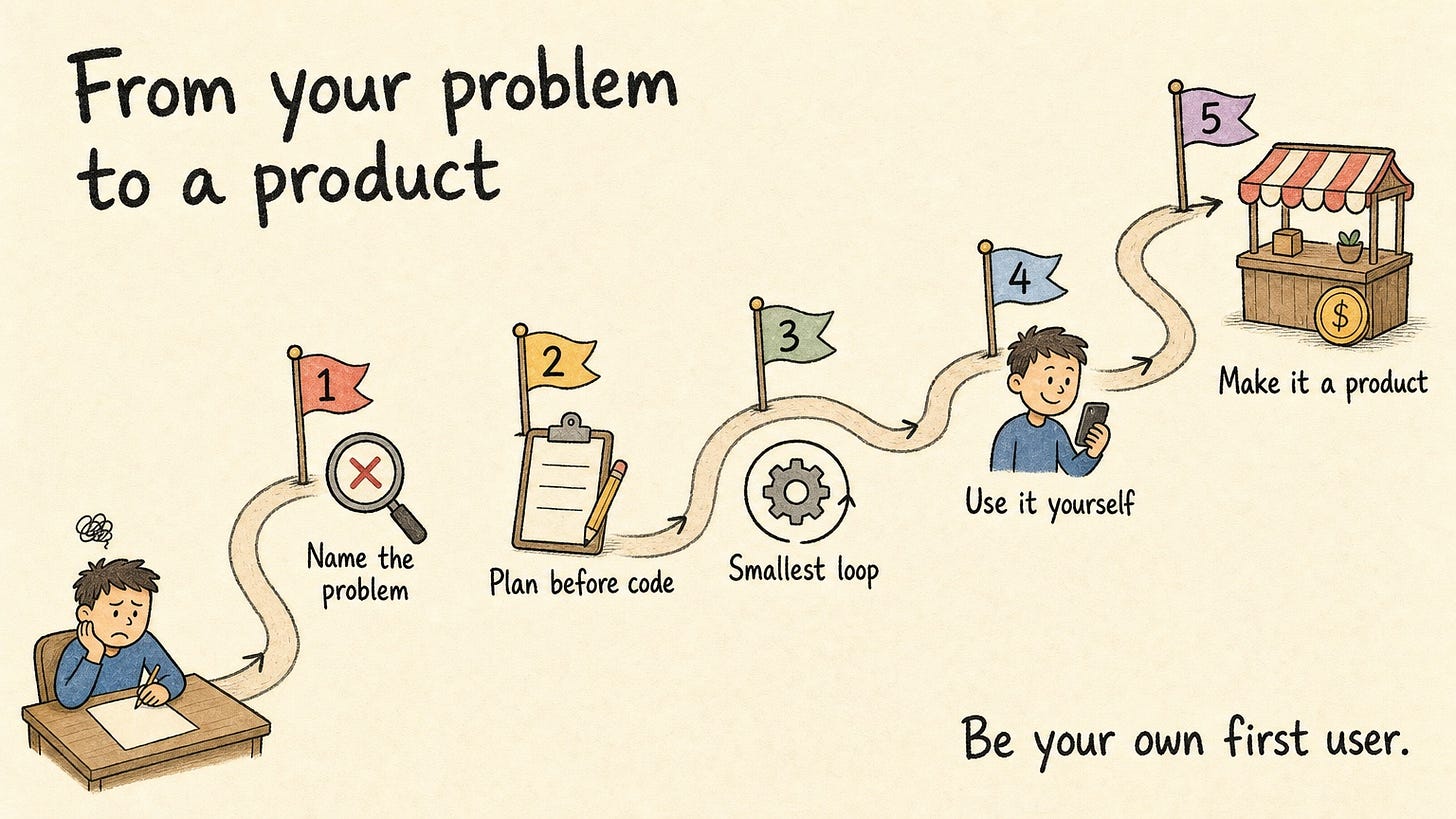
This post walks through the five stages we went through to turn Ale's problem into a product, with ShipPost's real dates as the example.
Each stage ends with the question that tells you whether you are ready for the next one. You also get a prompt that interviews you about a recurring problem and turns it into a one-page brief. We packaged that prompt as a free companion skill, so you can run the first stage tonight.
ShipPost is only the example here, and the process works for any problem you keep failing at.
Explanation
A product that starts from your own problem has one advantage nothing else gives you: a user who shows up every week.
You know when the pain hits and what you already tried. Customer interviews try to pull that out of strangers, and you get it for free. The risk is the opposite one: building something only you would ever want.
The five stages below use the advantage and give you a checkpoint for the risk.
For ShipPost, the whole path took seven months, from a repo full of planning documents in March to billing in October.
None of it was full-time, because both of us still have 9-5 jobs. The stages overlapped a little, but the order never changed. Each one answered a question the next one depended on.
Here they are, with the question that closes each stage.
Steps from a problem you have to a product
Step #1: Name the problem in one sentence
Start with the problem you keep failing at, written as one sentence that includes the moment it hurts.
Ale's sentence was about missed posts on the days he had nothing ready, not about posting tools or AI. Notice that it says nothing about a solution, which keeps every option open. A sentence like "I need an AI social media app" jumps straight to an answer and hides what is actually broken.
The question that closes this stage: can you say when it hurts, without naming a tool?
Step #2: Write the plan before the code
The first morning of the ShipPost repo, 16 March, produced only documents.
It produced research, a list of v1 requirements, a roadmap split into four phases, and a plan for the first phase, and only then the first line of code. That sounds slow for a side project, but it is the cheapest morning you will ever spend on it. Every requirement you write down is a feature you won't build by accident later, and every phase is a point where you can stop.
The question that closes this stage: does the plan fit in phases small enough to ship on evenings?
Step #3: Build the smallest loop that removes the pain for you
Your first version should remove the pain for one person, you, and do nothing else.
ShipPost's first milestone, shipped on 7 August, did three things: generate 28 posts from your sources, schedule them across seven days, and deliver each one to Telegram at its slot. Billing came two months later, and the landing page was still a plan in September. The loop was small enough to finish on evenings and real enough to use the following week.
The question that closes this stage: did the pain stop for you, at least on the days you used it?
Step #4: Use it on your own work until you trust it
This is the stage most side projects skip, and the one that tells you whether you have a product.
Running the tool on your own work every week shows you what it gets wrong, what you still fix by hand, and what you would never let it do. For ShipPost, that last point became a rule: it drafts and schedules posts, but you read each one and press Post yourself. When we decided on 8 September to turn it into our next product, the reason we wrote down was that "it already works and serves our own newsletter cadence".
The question that closes this stage: would you be annoyed if the tool disappeared tomorrow?
Step #5: Decide what makes it a product
A tool becomes a product when you write down what it will and won't do for strangers, and what they pay for it.
ShipPost's first product rule was the guardrail from stage 4: no auto-posting, because it protects the author's attention and quality, and we believe platforms may penalise automated publishing. Our first price guess was €4.99 a month, and we dropped it after measuring what one real weekly batch costs to generate. The plan became €19 a month or €190 a year, and billing shipped on 9 October.
The question that closes this stage: can you explain your price with what the product costs you to run?
A Problem You Have -> A One-Page Product Brief With AI
The hardest stage to do alone is the first one, because your own problem feels too obvious to write down.
You know it so well that you skip the details a builder needs, like when it happens and what you already tried. An agent is good at the opposite job, asking one plain question after another until the details come out. So we turned the first stages into a skill that interviews you and writes the result as a one-page brief.
It's called problem-to-product, and it lives in the same Ship With AI marketplace as our other skills.
The skill has three modes, one for each stage you can't do by building: BRIEF for the problem, PLAN for the documents, and LOG for using your own tool.
BRIEF asks about one problem at a time and never suggests a solution before the problem is clear. If you use another agent, the skill is a plain folder, skills/problem-to-product, that you can copy into any tool supporting the Agent Skills standard. In Claude Code, the two commands below install the whole ship-with-ai plugin, and problem-to-product is one of the skills inside it.
You don't need to name the skill afterwards, because asking in plain words is enough to trigger it.
/plugin marketplace add Ship-With-AI/skills
/plugin install ship-with-ai@ship-with-ai-skills
Steps to go from a problem to a brief with an agent
Step #1: Let the agent interview you about the problem
Open a session in an empty folder and ask, in plain words, for help turning a problem you keep hitting into a product brief.
The skill asks one question, waits for your answer, and only then asks the next one. It pushes back when you answer with a solution, like "I need an app that posts for me", and asks what happens on the day the problem hits. That pushback is where the useful details come out, the same way Ale's problem turned out to be about having nothing ready.
Here is the core of the interview, straight from the skill's own file.
Your goal is a one-page product brief, not a solution.

Rules:
- Ask one question at a time. Wait for the answer before the next one.
- If the user answers with a solution ("I need an app that..."), ask what happens on the day the problem hits instead.
- Never suggest a product, tool, or feature until the brief is written.

Cover these in order:
1. The moment: when exactly does the problem hurt? Ask for the last time it happened.
2. The cost: what does the user lose when it happens (time, money, missed work)?
3. What they tried: tools, habits, workarounds, and why each one stopped working.
4. Fixed: what would a normal week look like if the problem were gone?
5. Smallest loop: the least they could build that removes the pain for them alone.
6. Manual on purpose: what must stay in their hands, even if it could be automated.
7. Before pricing: what they should measure while they use their own tool.
Step #2: Run PLAN mode before any code
Once the brief reads right, ask the skill to plan from it, and it switches to PLAN mode.
It writes the requirements with explicit non-goals first, then a roadmap of small phases, and stops for your approval after each document. The non-goals matter as much as the requirements, because they are the features you agreed not to build; ShipPost's "never auto-post" rule is this kind of line, unchanged since 8 September. Every phase must be small enough to finish in a few evenings, so stopping after any phase still leaves something that works.
Pricing and billing stay out of phase 1, because you haven't used your own tool yet.
Step #3: Keep a first-user log while you use your own tool
Once your first version runs, tell the skill what happened every time you use the tool on real work, and LOG mode adds a dated entry.
Each entry records what the tool got wrong, what you fixed by hand, and what you refused to let it do. After every fourth entry, it reviews the log and answers the stage 4 question with entries instead of a feeling. Things you refused more than once come back as proposed product rules, and things you always fix by hand become what to measure before pricing.
If the log goes quiet for two weeks, the review says so, and that is your answer too.
Conclusion
Your next product is probably hiding in a problem you keep failing at.
ShipPost started as one sentence about missed posts and went through five stages: name it, plan it, build the smallest loop, use it on your own work, then decide what makes it a product. Each stage ends with a question, and an honest answer tells you whether to move on. The companion skill covers the first stages tonight, and the first-user log shows you, week by week, whether you still use what you built.
If you won't use your tool every week, nobody else will either.
Pick one problem you hit at least once last week and run problem-to-product on it before Friday.
Don't pick the problem with the biggest market; pick the one that annoyed you most recently. Answer the questions with what actually happened, not with what you think a customer would say. Then read the brief and check the "I guessed these" list at the end.
If the brief describes something you'd use every week, you've found your first user.
PS: Reply with the one-sentence problem the skill helped you write. That sentence is the hardest part to get right, so it's the part we most want to read. If it still names a solution, we'll tell you what we'd ask next. We read every reply, and the ones with a brief attached get answered first. See you next Wednesday.
When you're ready, two more ways we can help:
1. ShipPost. A week of posts drafted from your newsletter and product page, delivered to Telegram at your slots. You still press Post.
2. StackMap. 450+ open-source AI repos, each with a human note on when to use it and when not.