Hire the org chart. Set the budgets. Ship five side projects in a day.
By Alessandro Magionami
Published: 2026-05-06
URL: https://shipwithai.substack.com/p/how-to-build-a-factory-from-your
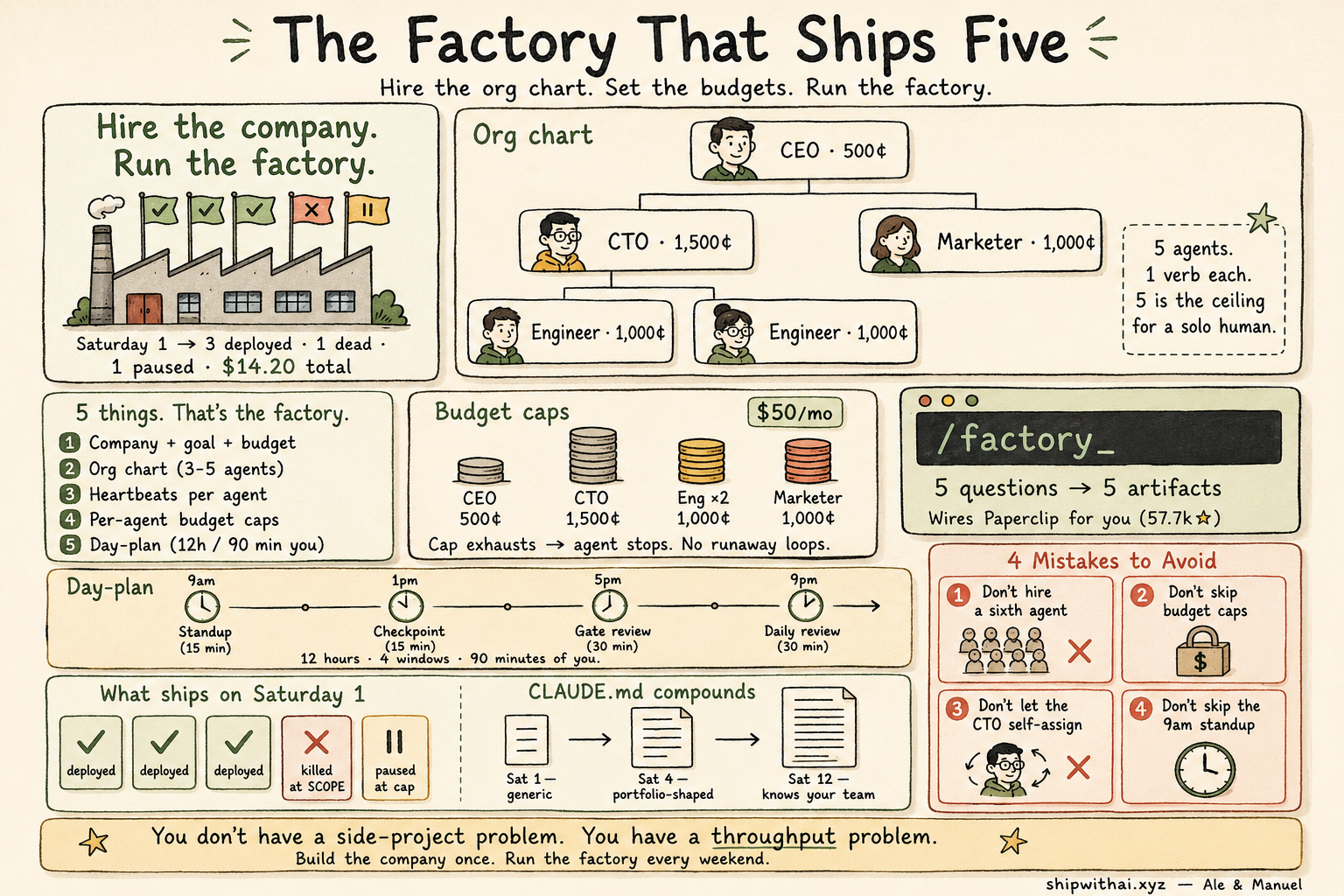
We hired our first AI company last Saturday.
By Sunday morning: 3 side projects deployed, 1 dead at SCOPE, 1 paused at budget cap. Total wall-clock: 11 hours across 5 agents in parallel. Total spend: $14.20.
Last week, we shipped one harness that ships one side project. One harness is one factory worker. To run more projects on the same Saturday, you don’t ship faster — you hire more.
Three weekends ago, we started a side project Saturday morning and abandoned it Sunday night. The harness gave us one shipped project per Saturday. The factory gave us three.
Same Saturday. Same human attention budget. Five times the surface area, three times the output.
Here’s what we figured out.
A harness is one worker. A factory is the company you put workers inside.
The factory is a control plane that runs multiple harnesses simultaneously. Each harness is the deterministic shape we wrote about last week. The factory adds the org chart, the budgets, the goal alignment, and the audit log on top, so you can hire five agents, point them at five projects, and trust that no one runs away with your API key.
Once you have it wired, your Saturday output stops being a single project and becomes a portfolio.
This isn’t a mass-shipping fantasy. It’s a 5-piece setup we’ll walk you through right now — and once you have it wired, it runs the same way every weekend.
(No fluff. No theory. Steps you can run tonight.)
What you actually need
Five things. That’s the factory.
→ A company with a goal and a monthly budget cap → An org chart of 3 to 5 agents with explicit reporting lines → A heartbeat schedule per agent (wake → check tickets → act → sleep) → Per-agent monthly budgets (enforced atomically, agent stops when cap hits) → A day-plan that maps your 12 hours of human attention across the org chart
Everything else is plumbing.
How to wire it
1. Define the company
The company is the container. One goal at the top, one budget across the whole thing.
We named ours Bedtime Story Co. with a single quarterly goal: “Ship 5 side projects to first-users by the end of May.” Monthly budget: $50 (5,000 cents in Paperclip’s units). Issue prefix: BTS. Every ticket inside the company carries that prefix and traces back to the company's goal.
If the company doesn’t have a written goal, the agents will generate work that pleases no one.
2. Build the org chart
Three to five agents. One verb each. Strict reporting lines.
- CEO, owns the company's goal, prioritizes the project queue, and has approval rights on every other hire
- CTO, owns architecture decisions across all 5 projects, reports to CEO
- Engineer × 2, each owns one or two side-project harnesses (
/autopilotruns from last week), reports to CTO
- Marketer, runs FIRST-USER stages, drafts launch messages across projects, reports to CEO
Five agents is the ceiling for a solo human. Six is too many to supervise on a Saturday. Four works if you fold the marketer into the CEO. Three works only if all three projects share a stack.
The CTO matters more than it looks. Without architectural memory across projects, every harness reinvents your stack.
3. Set the heartbeats
Each agent gets a heartbeat: a wake-check-act-sleep loop scheduled across the day.
The pattern we ship: wake on demand by default, scheduled wake at three calendar pulses, 9am standup, 1pm checkpoint, 5pm gate review. Between pulses, agents work async on their assigned tickets.
"runtimeConfig": { "heartbeat": { "enabled": false, "wakeOnDemand": true } }
wakeOnDemand: true means the agent wakes when you assign it a ticket or trigger npx paperclipai heartbeat run --agent-id <id>. No always-on loops, no surprise spend overnight.
Heartbeats replace the “20 Claude Code terminals open, nobody knows who’s doing what” pattern with discrete wake-act-sleep cycles you can read in a dashboard.
4. Cap the budgets
Every agent gets a monthly budget in cents. Cap exhausts → agent stops mid-task. No runaway loops.
Our split for $50/month total:
- CEO: 500 cents
- CTO: 1,500 cents
- Engineer × 2: 1,000 cents each
- Marketer: 1,000 cents
The CTO carries the biggest budget because the architecture review burns context. Engineers’ cap at $10 because the harness keeps each project bounded. Marketer caps at $10 because launch messages are small jobs.
If an engineer hits cap mid-feature, the ticket pauses with a budget\_exhausted status. You decide: top up, deprioritize the project, or kill it.
A budget that resets monthly without a cap on the run is just an unbounded loop with extra steps.
5. Write the day-plan
The day-plan is your calendar overlay. 12 hours, 4 windows, explicit handoffs.
- 9:00: Standup. Each agent reports {what shipped / what’s blocked / what’s next}. You triage: kill, continue, escalate. ~15 minutes.
- 9:15: Async work. Agents pick tickets and run. You don’t watch.
- 13:00: Checkpoint. Quick scan of the audit log + budget burn rate. Reassign blocked tickets. ~15 minutes.
- 13:15: Async work continues.
- 17:00: Gate review. Approve DEPLOY transitions across active projects. The hardest 30 minutes of your day.
- 17:30: Async work continues for 1-2 more hours.
- 21:00: Daily review. Read the audit log. Compute mortality (which projects shipped, which got killed, which paused at budget). ~30 minutes.
Total human attention: 90 minutes spread across 12 hours.
The day-plan is the only place your physical body shows up. The rest is the agents working in parallel.
The tool we use: Paperclip
You can wire this in any orchestrator that supports org charts + heartbeats + per-agent budgets. We use Paperclip, open-source MIT, 57.7k stars, the highest-traction reference in our wiki’s multi-agent class.
Their positioning is the post’s whole thesis, written by someone else first:
If OpenClaw is the employee, Paperclip is the company.
Install in one command:
npx paperclipai onboard --yes
Create a company with a goal and a budget:
curl -X POST "http://localhost:3100/api/companies" \ -H "Authorization: Bearer $PAPERCLIP_KEY" \ -H "Content-Type: application/json" \ -d '{ "name": "Bedtime Story Co", "issuePrefix": "BTS", "budgetMonthlyCents": 5000 }'
Hire your CTO:
curl -X POST "http://localhost:3100/api/companies/$COMPANY_ID/agent-hires" \ -H "Authorization: Bearer $PAPERCLIP_KEY" \ -H "Content-Type: application/json" \ -d '{ "name": "CTO", "role": "cto", "title": "Chief Technology Officer", "reportsTo": null, "capabilities": "Owns architecture across all side projects", "adapterType": "claude_local", "adapterConfig": { "cwd": "/abs/path/to/portfolio", "model": "claude-opus-4-7", "dangerouslySkipPermissions": true, "maxTurnsPerRun": 1000, "timeoutSec": 1800 }, "runtimeConfig": { "heartbeat": { "enabled": false, "wakeOnDemand": true } }, "budgetMonthlyCents": 1500 }'
Model picks: Opus 4.7 for CEO + CTO (architecture + prioritization need the reasoning), Sonnet 4.6 for engineers + marketer (execution + drafting are fine on the cheaper lane, matches Paperclip's own "cheap" model profile).
Repeat for the engineers and the marketer. Reports-to wires the org chart. Adapter type connects each role to the runtime that does the work — claude\_local for Claude Code, openclaw for OpenClaw, bash for deterministic scripts.
Trigger the first standup:
npx paperclipai heartbeat run --agent-id $CEO_ID
The CEO wakes, reads the company goal, sees zero open tickets, and creates 5, one per side project, then assigns them to the engineers. The engineers wake on assignment, each fires a /autopilot run inside their project directory, and you watch from the dashboard.
By 5pm, three projects are at the DEPLOY gate. You approve two, reject one with feedback. By 9pm: two live URLs, one paused at budget cap, one killed at SCOPE because the engineer flagged it as undeliverable in the time available.
(Yes, the rejected one came back with the right scope after one revise round. Yes, the killed one was the right call, the engineer caught a stack incompatibility we would have eaten 6 hours debugging. Yes, the budget-paused one resumed Sunday morning and shipped by noon.)
Yesterday: dragging n8n nodes, debugging connections, JSON typos at midnight. Counted the Saturday hours you’ve burned on it?
That’s the real bill. It doesn’t show up on your cloud invoice. It shows up as Sundays you didn’t ship.
Autom8n skips it. Type the workflow in plain English. Get the n8n JSON in 5 minutes, with a guide so you actually understand what’s running. The first one needs a tweak. The fifth saves you a Saturday.
The /factory skill
We packaged the whole 5-piece factory into a Claude Code skill.
Install once (two commands: once for the marketplace, once for the plugin):
# Cross-agent (Claude Code, Codex, Cursor, Gemini CLI, Copilot, +35 more)

npx skills add Ship-With-AI/skills --skill autopilot --skill factory

# Or Claude Code native (two commands, plugin marketplace)

claude plugin marketplace add Ship-With-AI/skills /plugin install ship-with-ai@ship-with-ai-skills
Then, in a fresh directory:
/factory
Five questions: the company goal + the monthly budget + 3-5 side-project ideas + your stack defaults + the day-plan start time.
Then five things in one pass.
What the skill produces
✦ Artifact 1: a Paperclip company
The skill installs Paperclip if you don’t already have it, creates a company with your goal and monthly budget cap, and prints the company ID + dashboard URL.
You don’t need to learn Paperclip’s API. The skill wires it for you.
✦ Artifact 2: an org chart of 3-5 agents
Roles, titles, reporting lines, adapter configs. The skill defaults to CEO + CTO + 2 engineers + 1 marketer for 5 projects, CEO + 2 engineers + 1 marketer for 3 projects.
Each agent’s prompt template is pre-wired with the company goal in its system prompt. Goal drift stops at the org chart.
✦ Artifact 3: heartbeat schedules + per-agent budgets
wakeOnDemand: true for every agent, plus three scheduled pulses at 9am / 1pm / 5pm. Per-agent budget caps split from your monthly total.
The skill prints the budget split as a table so you can adjust before approving.
✦ Artifact 4: a day-plan calendar
A 12-hour calendar overlay with the four human-attention windows (standup / checkpoint / gate review / daily review) marked. The skill writes it to day-plan.md in your portfolio root.
You ignore the calendar at your peril. The factory ships when human attention is timed.
✦ Artifact 5: one new rule appended to your portfolio CLAUDE.md
After the day, the CEO reflects on what the company did and didn’t ship, and appends one new rule to the portfolio-root CLAUDE.md under ## Lessons.
Day 1: generic CLAUDE.md. Saturday 4: portfolio-shaped. Saturday 12: knows your full stack and your full team better than you remember it.
That’s the compounding asset. Everything else is one Saturday’s output.
The 4 mistakes we made (so you don’t have to)
1. We hired six agents instead of five. The sixth was a “research” agent that produced no shipped work and burned $4 a Saturday. We killed it after three weekends. Five is the ceiling for one human supervisor. Past five, every additional agent costs more than it ships.
2. We skipped the per-agent budget caps “for the first run.” Within four hours, an engineer in a tool-use loop had spent $22 on one feature. Cap every agent before the first heartbeat. No exceptions.
3. We let the CTO assign tickets to itself. The org chart broke down within an hour because the CTO bypassed the engineers and “just did it faster.” Cleanup took longer than the architecture would have. Lock reporting lines: the CTO reviews engineering work, doesn’t replace it.
4. We skipped the standup on the first Saturday. Without the 9 am triage, blocked tickets stayed blocked all morning. By 1 pm, two engineers were waiting on the same architectural decision the CTO never made. The 15-minute standup is the highest-leverage block of the day.
The reframe
You don’t have a side-project problem. You have a throughput problem.
One harness ships one project per weekend. One factory ships three. The math is the same, same Saturday, same attention budget, but the surface area you can put under contract changes.
Build the company once. Run the factory every weekend.
If you’re a developer reading this and feeling nervous about hiring agents to ship without you, you’re reading the moment wrong. Solo devs who own the org chart are about to run portfolios that used to take teams. Coding just got cheap. Operating the company just got valuable.
Hire the org chart.
Set the budgets.
Run the factory.
Now go ship five.
— Ale & Manuel
PS. Reply and tell us what shipped from your factory's first run. The best three portfolios get featured in a follow-up.
And whenever you are ready, there are 2 ways I can help you:
*1. AI Side-Project Clarity Scorecard (Discover what’s blocking you from shipping your first side-project)
- NoIdea (Pick a ready-to-start idea created from real user problems)*