Stop wasting hours re-explaining stuff your AI should already know.
By Alessandro Magionami
Published: 2026-04-17
URL: https://shipwithai.substack.com/p/stop-being-your-ais-context-manager
Hey there,
You open Claude Code on a Saturday morning to keep shipping your side project.
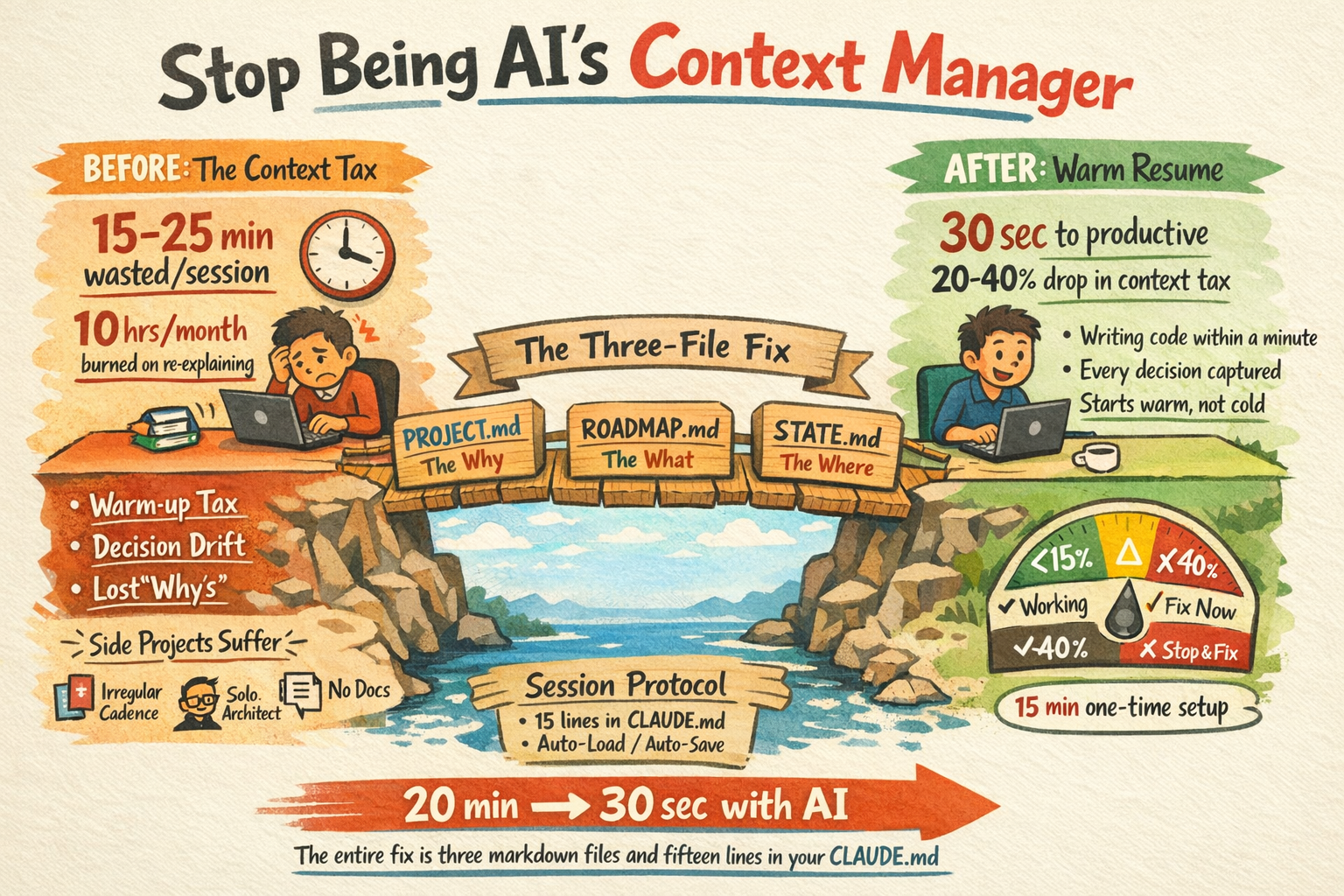
Before you write a single line of code, you spend fifteen minutes re-explaining the folder structure, the style guide, and the three decisions you made last weekend. We’ve watched this pattern kill more side-project momentum than any deployment issue, auth bug, or CSS nightmare combined. Every new session starts cold, so the context you carry in your head gets retyped, paraphrased, and half-forgotten each time you sit down.
That’s a tax, and most developers don’t realize they’re paying it.
The fix isn’t a cleverer prompt or a better memory feature — it’s moving the context out of your head and into files the AI reads automatically.
We call this persistent context, and it turns every new session from a cold start into a warm resume. In this post we’ll show you why you’re paying the tax, give you the exact CLAUDE.md sections that eliminate it, and hand you a skill to measure your own number. You’ll walk away with two tangible assets: a session protocol your AI reads on its own, and a diagnostic that tells you exactly where your time is going.
By next Saturday morning, that fifteen-minute warm-up should take thirty seconds.
This isn’t theory we read somewhere — it’s the workflow we use on every side project in this newsletter.
We’ve measured the before and after across dozens of sessions, and the pattern is consistent: persistent context cuts re-explanation time by 20 to 40 percentage points on the very first session after setup. The entire fix is three markdown files and fifteen lines in your CLAUDE.md, which takes about fifteen minutes to set up. You don’t need a new tool, a plugin, or a framework — you need files your AI can read.
The setup starts in the next section, right after we show you what the tax actually looks like up close.
Yesterday, building an n8n workflow meant opening the docs, dragging nodes, debugging connections, and hoping it would work.
Today it means: describing what you want in plain English and getting a complete, ready-to-deploy workflow in minutes, with a full guide so you actually understand what’s running.
Autom8n just went live.
The gap between “I have an automation idea” and “it’s running in production” just got a lot smaller.
Why Your AI Forgets Everything Every Monday
Your AI coding assistant has no memory of yesterday’s session, last week’s decisions, or the conventions you set three projects ago.
Every new session begins with an empty context window, which means the only thing carrying your project forward is you — retyping, re-explaining, re-orienting. We’ve measured this on our own side projects, and the pattern is consistent: roughly 15 to 25 minutes of every session goes to re-establishing context before any real work happens. You become the human bridge between sessions, which sounds fine until you realize you’re spending a quarter of your coding time as a context manager instead of a builder.
The tax shows up in three specific ways, and it hits hardest when you’re working alone.
What re-explaining actually costs you
Cost #1: The warm-up tax you pay every session
The warm-up tax is the fixed cost you pay at the start of every session before you can write productive code.
You point Claude at your project structure, re-explain your stack choices, and list the conventions it should follow — decisions you’ve already made and explained before. On a solo side project, this routinely runs 15-20 minutes per session, which is most of a short evening after you’ve put the kids to bed. The tax is fixed per session, so it hurts more the more frequently you sit down to work — a daily 20-minute warm-up burns 10 hours a month.
You can’t code your way out of this by working harder; you have to restructure the session itself.
Cost #2: Decision drift between sessions
Decision drift is what happens when you re-explain the same choice slightly differently each session and Claude follows your new wording instead of the original decision.
You said “use Postgres” last week and “use the main database” this week, and now the AI is proposing SQLite because it sounds simpler for a quick script. We’ve watched this exact pattern produce three different folder structures in a single side project across two weeks of work. The codebase ends up encoding your memory gaps rather than your architectural intent, which is a bug that’s almost impossible to debug after the fact.
Drift only stops when decisions live in a file Claude reads, not in a sentence you paraphrase.
Cost #3: Lost “why”s that never come back
The worst cost is the one you don’t notice: the reasons behind decisions, which evaporate the moment the session ends.
Six months later, you look at a file and see “Redis-backed queue” with no record of why you rejected the in-memory alternative that would have been simpler. We’ve opened old side projects and found code that looked wrong by current standards, only to slowly remember a constraint that justified the original choice. Without the “why” captured somewhere, future-you and future-Claude will either rewrite the working code or accidentally reintroduce the bug that prompted the original decision.
A single line of recorded reasoning saves hours of archaeology later.
Why the tax hits hardest on side projects
Reason #1: Weekend-only cadence keeps context frozen
Side projects run on irregular, low-frequency sessions — a Saturday here, a Tuesday night there, nothing for two weeks.
The gap is long enough that your own memory has decayed by the time you sit back down. We’ve had three-week gaps where we couldn’t remember whether we’d finished the payment webhook or just started it. Claude, having no memory at all, is even more lost, so both of you begin every session from zero.
Weekend-only cadence makes persistent context more valuable, not less, because your own brain can’t fill the gap either.
Reason #2: Solo architect role means no team to fall back on
In a company codebase, context is distributed — a senior engineer remembers why you picked Kafka, the README captures the deployment flow, the Slack history has the reasoning.
On a solo side project, you are all three of those roles combined, and when you forget, nobody else can remind you. We’ve lost entire architectural decisions because the only record was a conversation with Claude three weeks ago. The solo role compresses decades of team coordination into a single fragile brain.
Writing context into files is the team documentation you’d normally inherit.
Reason #3: No team docs or wiki to anchor the “why”
Most side projects don’t have a wiki, an onboarding doc, or an ADR folder, because writing those feels like corporate overhead you escaped.
The result is that your documentation is whatever you happen to remember, which drifts with every passing week. We’ve worked on projects where the only record of a critical decision was a comment in a pull request we couldn’t find later. Persistent context files close this gap with the minimum viable documentation a solo project needs.
Two or three markdown files cost less than an hour to write and save that hour back every single week.
20 Minutes of Re-explaining -> 30 Seconds With AI
The fix is persistent context — project decisions, current state, and conventions stored in markdown files your AI reads automatically at session start.
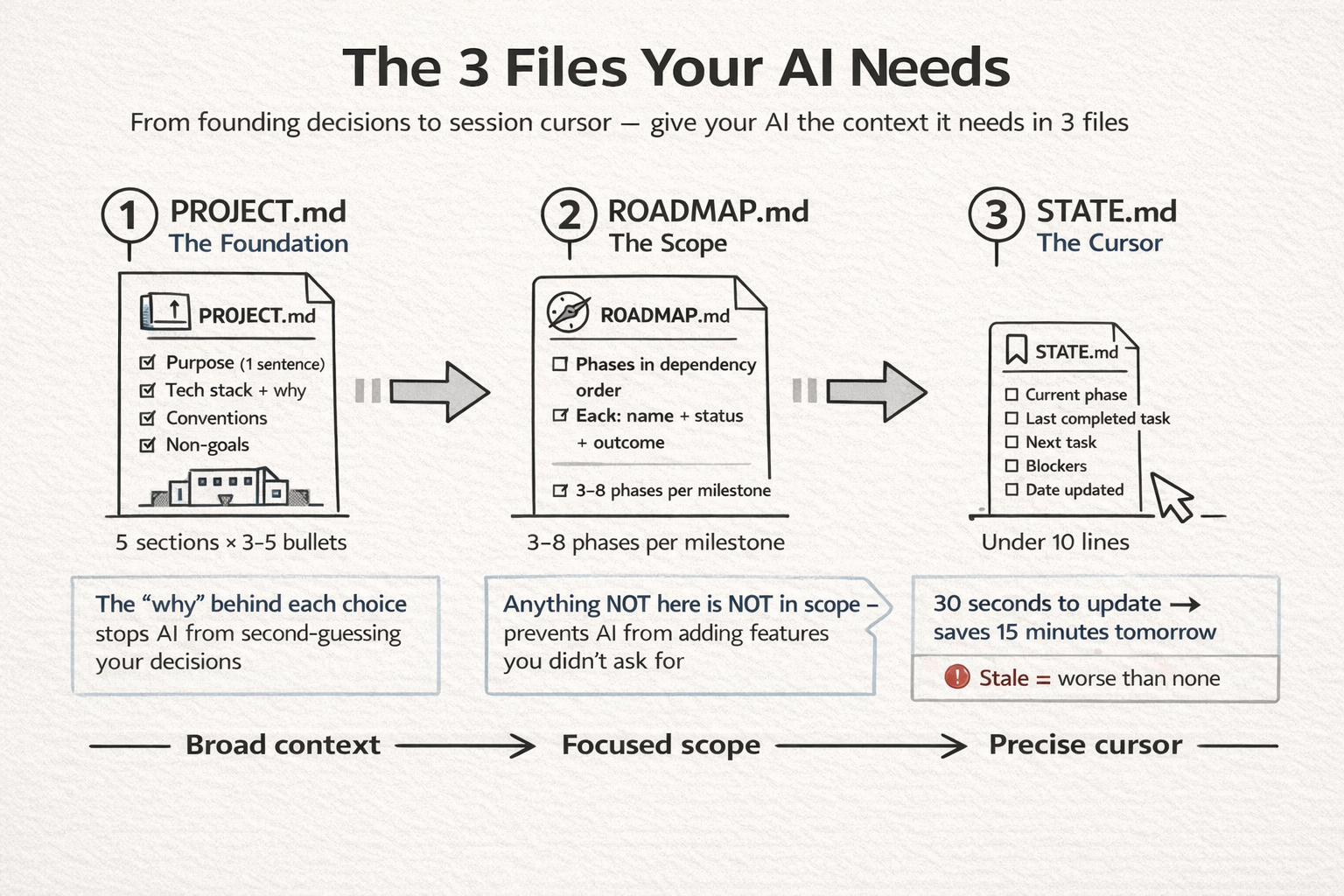
You don’t need a framework, a plugin, or a special tool to make this work. Three files in your project root — PROJECT.md for decisions, ROADMAP.md for scope, and STATE.md for session state — give Claude everything it needs to skip the re-explanation phase entirely. Below, we’ll show you what goes in each file, give you the CLAUDE.md sections that wire them together, and hand you a diagnostic skill to measure whether it’s working.
The whole setup takes fifteen minutes, and it pays back on the very next session.
What goes in each file
File #1: PROJECT.md captures the founding decisions
PROJECT.md is the onboarding doc for your AI — the file that answers “what are we building and why” so you never have to say it again.
Include your project’s purpose in one sentence, the tech stack with a brief reason for each choice, the conventions the AI should follow, and a non-goals section listing things explicitly out of scope. We keep ours to five sections of three to five bullets each, which fits on one screen and loads in a fraction of the context window. The most valuable part isn’t the stack list — it’s the “why” behind each choice, because that’s what stops Claude from second-guessing your decisions.
A good PROJECT.md is the file you wish existed when you opened someone else’s repo for the first time.
File #2: ROADMAP.md scopes what you’re shipping next
ROADMAP.md lists the phases of your current milestone in dependency order so the AI knows what’s done, what’s in progress, and what’s ahead.
Each phase gets one line: a name, a status, and a one-sentence description of the outcome it delivers. We typically have 3 to 8 phases per milestone, each representing one or two sessions of focused work. The file doubles as a scope boundary — anything not in ROADMAP.md is explicitly not in scope, which prevents Claude from helpfully adding features you didn’t ask for.
When someone asks “what’s left to ship,” ROADMAP.md is the answer.
File #3: STATE.md is your session cursor
STATE.md is the smallest and most important file — it tells Claude exactly where you stopped and where to pick up.
Include the current phase name, the last completed task, the next task to start, any blockers or open questions, and the date you last updated it. We keep ours under ten lines, and we update it as the last action before closing the terminal. A stale STATE.md is worse than no STATE.md, because Claude will confidently resume from the wrong point.
Updating this file takes thirty seconds and saves fifteen minutes tomorrow.
Now that you know what the three files hold, here’s the part that makes it automatic.
Add the following sections to your project’s CLAUDE.md — Claude Code reads this file at the start of every session, so the protocol fires without you typing anything. The session opener tells Claude to load all three files and summarize where you left off before writing a single line of code. The session closer triggers on a natural phrase like “done for today” and updates STATE.md with what you completed, what’s next, and any decisions worth capturing.
Copy these lines into your CLAUDE.md and your next session starts warm.
Here’s how the two halves work together: the opener eliminates the warm-up tax by loading context before you say a word, and the closer eliminates decision drift by capturing every choice before you close the terminal.
You don’t have to remember to re-explain anything, because the protocol does it for you. You don’t have to remember to save your progress, because the closing phrase triggers it automatically. The files hold the knowledge; the protocol holds the discipline; and you hold nothing in your head between sessions.
That’s the whole point — your brain stops being the bridge:
## Session Protocol

### On session start

Read PROJECT.md, ROADMAP.md, and STATE.md before doing anything. Summarize where we left off and what task is next. Don't start coding until I confirm.

### On session end

When I say "done for today" or "wrap up", update STATE.md with:

- What we completed this session

- What task is next

- Any decisions we made and why

If any decision affects the project long-term, add it to the relevant section in PROJECT.md.
That’s the entire fix — fifteen lines that turn every cold start into a warm resume.
The protocol handles the warm-up tax and decision capture automatically, but you still need a way to know whether it’s actually working. The skill below measures your context tax: the percentage of each session that goes to re-explanation instead of building. Save it to ~/.claude/skills/context-tax/SKILL.md and Claude Code picks it up on the next session, no restart required.
Type /context-tax at the end of any session, and the skill reads the transcript, classifies every turn into context work or feature work, and produces a breakdown table showing exactly how much time went to re-explaining instead of building. Run it at the end of three different sessions — a fresh Saturday session, a mid-week session, and one where you’re returning to a project after a break.
The three numbers together tell you where your context tax is highest and whether the persistent-context setup is paying off.
Your context-tax number tells you exactly where to focus next.
Under 15 percent means your setup is working — run the skill once a month to confirm the number holds and hasn’t drifted upward. Between 15 and 40 percent is the classic solo-dev range where persistent context pays back the fastest; your top costliest moments almost always come from codebase\_explanation, which means PROJECT.md alone will fix most of it. Above 40 percent means most of your session is going to non-feature work, and you should stop coding until the three files are in place.
Any number above 20 percent means persistent context will pay back within your next two sessions.
Common mistakes when setting up persistent context
Mistake #1: Writing novels instead of notes
The first instinct is to document everything, which produces a PROJECT.md so long that Claude spends tokens parsing it instead of using it.
We’ve seen developers copy entire architectural docs into their planning folder and wonder why sessions feel slower, not faster. The goal is minimum viable memory, not maximum documentation — five sections of three bullets each beats five pages of prose. A good PROJECT.md fits on one screen, and a good STATE.md fits in ten lines.
If you can’t skim the file in thirty seconds, neither can Claude.
Mistake #2: Forgetting to update STATE.md at session end
The whole system collapses if STATE.md goes stale, because the cursor it provides is what makes the resume experience work.
Developers who skip the one-minute end-of-session update find themselves back in re-explanation mode the next time they open Claude Code. We treat updating STATE.md as the last step of any session, before closing the terminal, the same way you’d save a file before quitting. The CLAUDE.md session protocol handles this automatically when you say “done for today,” which removes the discipline requirement entirely.
Forgetting once is fine; forgetting habitually erases the tax savings.
Mistake #3: Hiding “why”s in code comments instead of PROJECT.md
The reason your code does what it does belongs in PROJECT.md, not scattered across inline comments future-you will never find.
We’ve watched developers leave a “had to use X because Y” note in a file that got refactored three times, losing the note with the last rewrite. Comments disappear with the code, but PROJECT.md is a stable home that survives every refactor. Claude reads PROJECT.md at session start, so a decision documented there influences every subsequent suggestion — a comment in one file influences nothing.
Centralize the reasoning, decentralize the code.
Mistake #4: Treating PROJECT.md as a one-time write
The first version of PROJECT.md covers the decisions you can articulate in an hour, but projects evolve and so do the reasons behind them.
A stack choice that made sense in week one might get replaced in month three, and the old PROJECT.md will actively mislead Claude if you don’t update it. We revisit PROJECT.md at the start of every milestone and strike through decisions that are no longer true rather than deleting them, because the history itself has context value. Treating PROJECT.md as living documentation is the discipline that keeps the tax low over a project’s full lifetime.
One re-read every month or so is enough to catch drift before it compounds.
Mistake #5: Skipping the planning step to “move faster”
The instinct on a Saturday is to skip ROADMAP.md and just start coding, because scoping feels like overhead that delays the real work.
We’ve timed this on our own projects and found that sessions starting with a scoped plan finish the same amount of feature work as sessions with no plan, but with half the context tax. The plan acts as a forcing function that keeps Claude on-task and keeps you from explaining the same detour three times when the AI wanders off-scope. Without a plan, the session’s context tax is higher because you’re navigating in real time instead of following a map you wrote when you were thinking clearly.
Ten minutes of planning at the start of a session routinely saves twenty minutes of re-orienting during it.
We manage all of this with an open-source framework called Get Shit Done — GSD for short.
GSD is a set of Claude Code skills that creates and maintains the three files, manages the session lifecycle, and enforces the planning discipline across months of real development. It handles everything from the initial project interview to session resume to phase-by-phase execution with atomic commits. We’ve built every side project featured in this newsletter using GSD, and the numbers we cite in this post come from real sessions running it.
But GSD is one way to manage persistent context, not the only way — the three files and the CLAUDE.md protocol work on their own, with any workflow, in any AI coding tool that reads project files.
Conclusion
The next Saturday morning you open Claude Code, the gap between “new session” and “productive” should feel noticeably different.
Claude reads PROJECT.md, ROADMAP.md, and STATE.md on its own thanks to the session protocol, and you’re writing code within a minute instead of fifteen. Run /context-tax at the end of that session and compare the number to your first measurement — in our experience it drops by 20 to 40 percentage points on the very next run. Every session after that compounds the savings, because the three files get richer while the re-explanation tax gets smaller.
Measure it once, fix it once, and stop being your AI’s context manager — start being its partner.
The setup is fifteen minutes of writing three files and adding fifteen lines to your CLAUDE.md.
The payoff is every session after that starting warm instead of cold, every decision captured instead of forgotten, and every Saturday morning spent building instead of re-explaining. You’ve been doing the context management work by hand this entire time — now let the files do it for you. The three-file fix works whether you adopt a framework or just write the markdown yourself.
Stop onboarding your AI every weekend and start shipping with it.
Now go build!
— Ale & Manuel
PS. If this series changed how you ship, we’d love to know. Reply to any issue, or share it with a developer who’s still stuck on their first side project.
And whenever you are ready, there are 2 ways I can help you:
*1. AI Side-Project Clarity Scorecard (Discover what’s blocking you from shipping your first side-project)
- NoIdea (Pick a ready-to-start idea created from real user problems)*