How I use Claude Code cloud sessions to add tools to my website, and why it costs less than I expected.
By Ilia Karelin
Published: 2026-10-25
URL: https://prosperinai.substack.com/p/claude-code-cloud-sessions
Hi Brian,
Don’t know about you, but I’ve been pretty much exclusively using Claude Code in my terminal. Although now the Claude Code app looks very good, I am still thinking about moving some of my work there.
But about a month ago, Anthropic gave us cloud session credits because the cloud sessions officially became available and out of research preview:
Just a caveat here, I believe the claiming closed on Oct. 7, so you can’t claim it anymore.
But I finally claimed it...and I am loving it.
I know that a lot of people like to work locally, but there are a lot of benefits to starting your sessions in the cloud.
For me, the big deal was about trust. It was like a ladder for me, but in reverse.
I got comfortable working locally pretty fast, and then it took me a little bit to get used to the remote control. Now, it’s the cloud session with access to GitHub, but with Opus 5.5, I am feeling comfortable about it.
Hopefully, after this post, you will understand what cloud sessions are for, the tradeoffs, and how to properly set them up - with a short video!
In a 4 and a half minute video behind the paywall, I talk about how much it cost me to run it, how it did it, my custom skill, and the setup.
Let’s do it!
What Are Cloud Sessions?
A cloud session is Claude Code running on someone else’s computer. You give it a task, and it works on a copy of your GitHub repo, then results come back as a branch or a pull request.
You can use it in 4 different ways:
- Claude.ai/code in the browser
- Claude app on your computer
- Claude mobile app
- Claude CLI
Whenever you send out a task, Anthropic starts a fresh machine for you, clones the repo, and GitHub access is limited to only your repo that is attached, and the network setting controls the rest. I will talk a little bit about that later in this post and the video.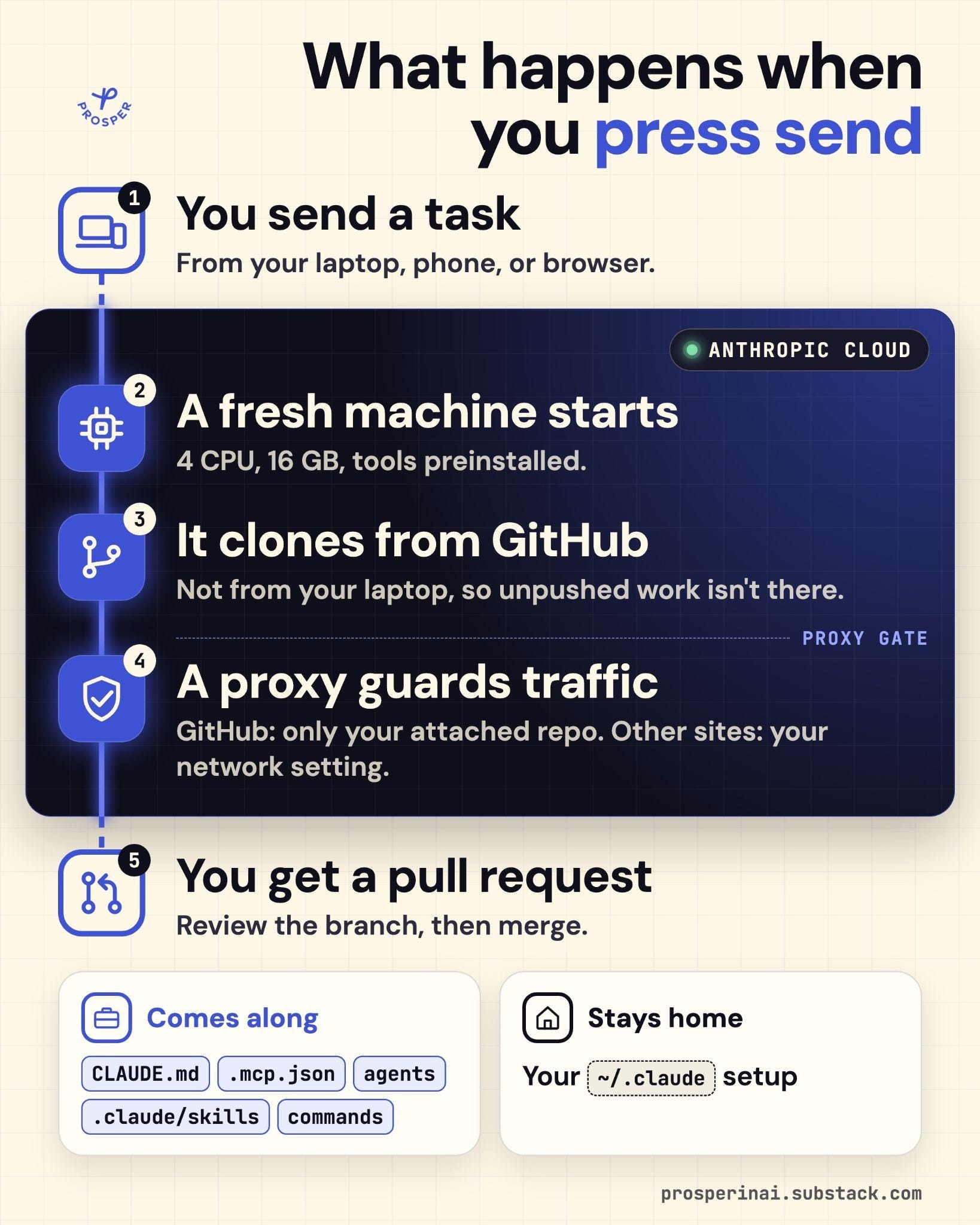
I would suggest you look through this infographic a little bit more in depth, because there are some important notes that I mentioned in there.
With the remote control that I mentioned in the beginning, it’s basically doing the work while I watch on my phone, but my laptop HAS to be active and not closed. With cloud sessions - it’s not required.
Do You Even Need Them?
The answer here is - not always.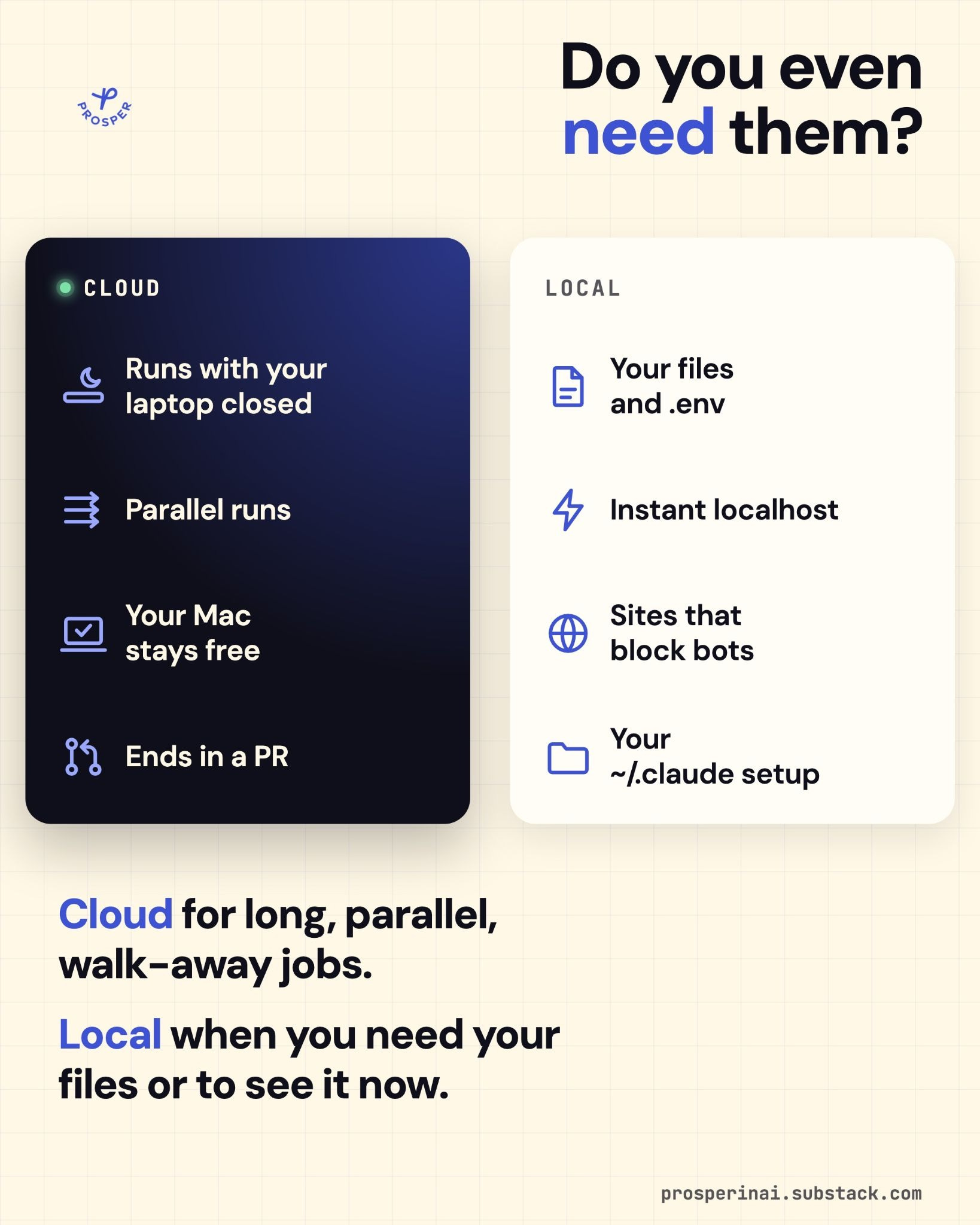
Local still makes sense for a lot of work. But a cloud session pays off if a job is long, and can run alongside other jobs, or something that you want to start and be able to walk away from.
The cloud makes sense when the work isn’t critical and you know what the end result would be. When I added a tool to Prosperinsoss.com, Claude pushed everything to a branch. And nothing was half finished on a laptop, it was good to go.
But some of the stuff I do is I want to see the difference right away. For example, UI/UX stuff. It doesn’t make sense to use cloud when I want to see the results immediately, because different keys live in different spaces and databases, etc. Cloud machines obviously don’t have access to it, so you have to run it locally.
How To Set Them Up
Here’s the video walkthrough for you on how to set it up: