Simple explanations of both, plus the exact point one stops being enough.
By Ilia Karelin
Published: 2026-08-25
URL: https://prosperinai.substack.com/p/loop-engineering-graph-engineering-guide
Let’s think about the CI pipeline for a minute.
When you push a commit, the process starts running. Then, let’s say 3 tests failed. You read them, fix the code, and decide to push again. That same process runs again. You get the green light and your task is complete.
This process is called closed-loop control. When someone or something produces an output, it gets measured against a target. If a flaw is found, congratulations, you just found your next action.
With coding agents, the process is more or less similar. In the CI pipeline example, the AI agent would write the code, run it, then read all the failures and fix it. That would be done without your intervention.
If you’re not in any “auto mode“, then you would write a prompt, read the output and then decide if it’s good or not. If not, you would write another prompt, read the output and decide again.
It’s the same concept, but you are controlling the flow in the middle.
You verify if the workflow was done correctly, so it makes sense for you to manually close it.
Loop Engineering can solve this problem, I will show you how below.
Problems That Loops Can Solve
You are removing yourself as a potential bottleneck. If you go back and forth with Claude or any other model, you would be the one who a LLM would wait on to make a decision. With loops, LLM runs the sequence of steps while you’re in the meeting or doing something else.
Nowadays, everyone wants to automate manual tasks, and we’ve become a bit more lazy in checking things manually. With loops, instead of only checking the first few times, and then start missing things here or there, the loops with smart LLMs will allow you to delegate it.
Some problems aren’t so obvious. Everything might be working and the site is live, but the data that visitors see is not right. On the backend of things, there is nothing that told that data is “correct”. But if you know what “correct” looks like, the loops will thrive in it.
To continue with our 3’s, the loops have 3 parts to it: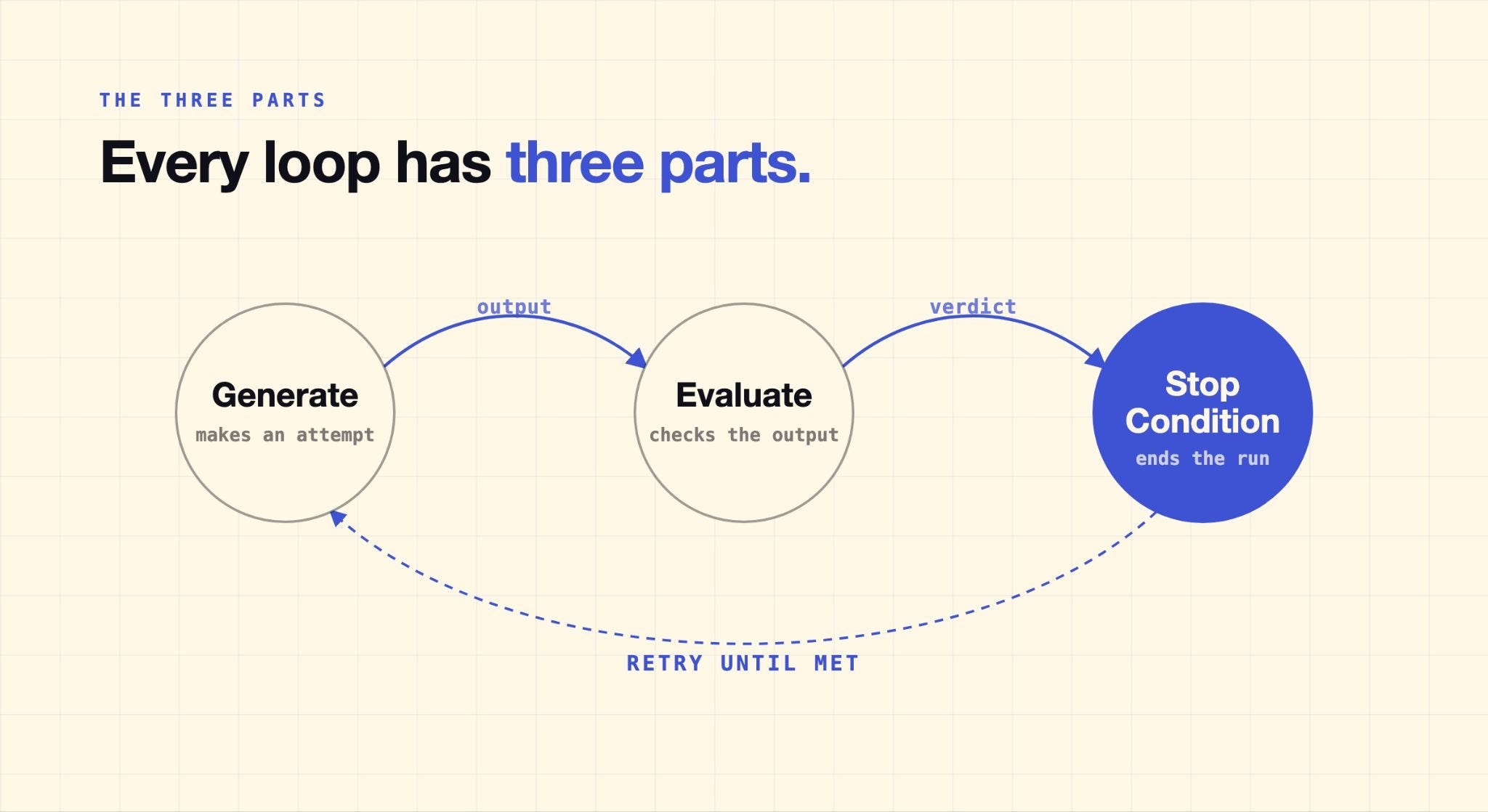
The generate step can create a function, run some code, or simply write a commit message.
The evaluate step grades the output against whatever threshold you set for your “end goal”.
The stop condition does what it says. Once the runs meet that threshold, it stops running the loop.
You get these 3 right and you will have yourself a successful loop. AI Automations have only one or two of these pieces, but some people consider those as loops, and it not 100% correct.
I will explain why down below.
What Is A Loop?
We got 3 main types of “AI automation” out there:
-
A prompt. An LLM gets an input from you, but then YOU check if the response satisfied you or not. This one is called open loop.
-
A workflow. It’s an open loop with extra steps. It might retry a failed step or can have a branch with conditions on it, but these steps were decided ahead of time. For example, you lint, then you build, then deploy. Each step goes after the next one almost automatically.
-
A loop. It closes it. The biggest difference here is that the system evaluates its own output against a target, then decides on its own whether to try again.
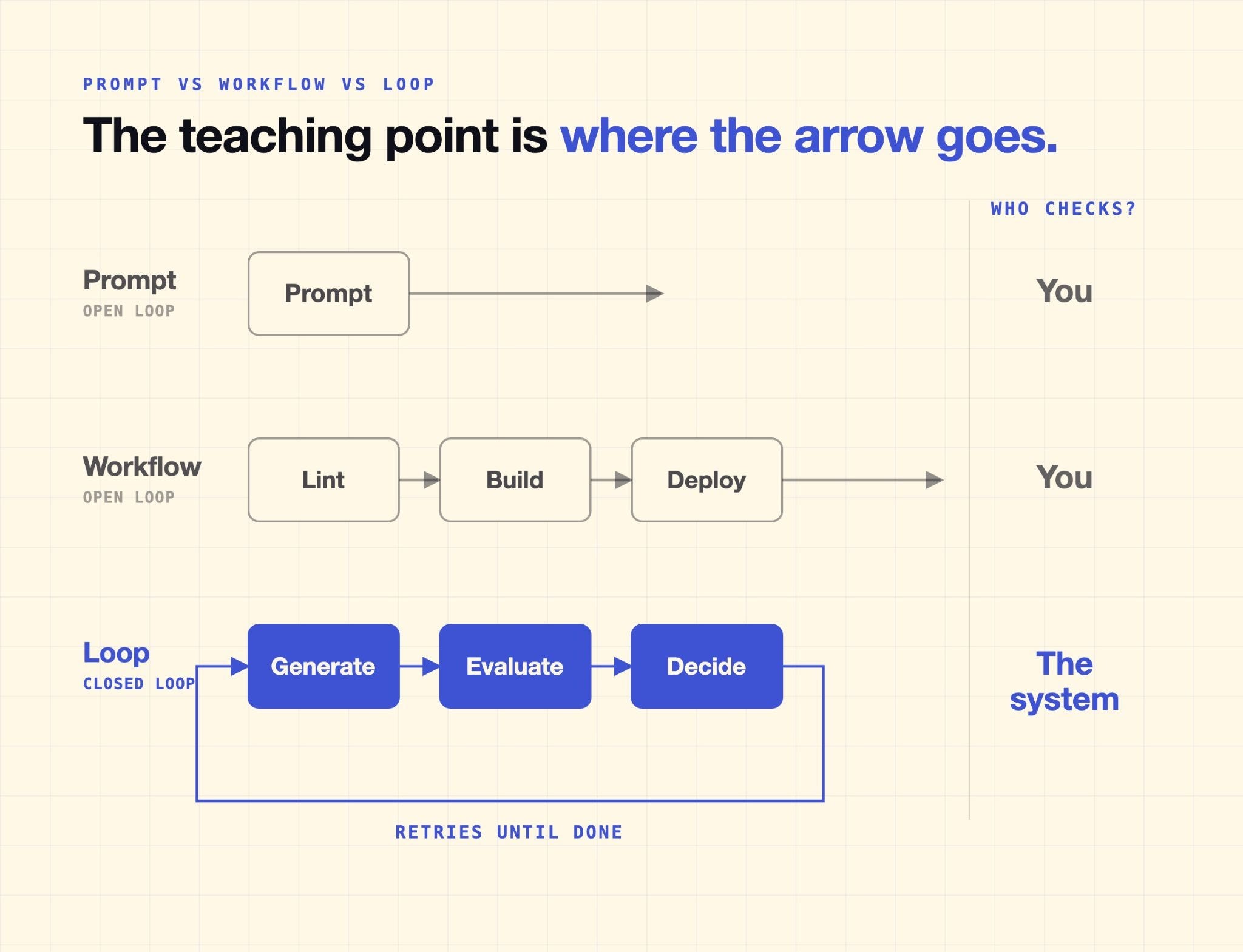
With the quality of models that we get on a regular basis now, these loops can run without your supervision. Between “generate” and “done” steps, there’s no need for you to check anything.
With loop engineering, you essentially are doing it on purpose. You decide what “done” means and how evaluation step would look like, and set up the retry steps so the system completes the loop without you constantly checking the output.
Models are now incredibly smart to understand your goals and what looks right vs. what doesn’t. Models are now also much more efficient so running loops would save you a lot of manual work.
Here’s an example of how loop runs on my own website:
Now, let’s go through the “why” of all of this works.
The One Condition That Decides Your Loop’s Success
As I’ve mentioned previously, if you want to have a good loop, you need to state the “done” condition before you write anything in the “generate” step.
A good first question to ask yourself when you’re creating your first loop: can you describe the exact criteria an output has to meet to pass clearly enough that someone else could apply the check without asking you?
If the answer is “yes”, those criteria are your evaluation step. Those should be in your loop.
If the answer is “no”, keep doing the task by hand for a while. For each output, write down whether it passed in your opinion and exactly why. If you do it enough times, you will begin to see the reasons why, and those can become the criteria for passing the “done” criteria.
The Downsides Of Loops
A loop has one goal and it also needs to have multiple ways to stop running circles if something prevents it from achieving the goal.
Things like separate exits for max iterations, timeouts, budget limits, unrecoverable errors, maybe even a human intervention are very helpful in setting up the proper guardrails for your loop.
Whatever tasks you have in a loop, they all have to funnel into one success condition. If 2 tasks fight against each other, then the “evaluate” step would struggle, and loop’s quality would go down.
Loop can’t tell you that you’re going down the wrong path.
Sure, it shows you that you haven’t hit the goal yet, but if you didn’t set it up correctly and the approach is wrong, it just goes again and again through the wrong approach. Although, the agent loops, depending on what they are looking at, can adjust. With simple loops (like the one I showed you earlier), they cannot do that.
As people started to see that loops need to become better, something new was created.