Claude Automation: Routines vs /loop vs Desktop Tasks
The Claude Automation Map - one question picks the right tool every time.
By Ilia Karelin
Published: 2026-04-22
URL: https://prosperinai.substack.com/p/claude-routines-tasks-loop
I’ve had a brain-dump processor running as a Claude Desktop scheduled task for about a month now. Every morning it reads my Notion dump page, sorts the ideas into the right categories, and writes the outline and the potential of it. It works well.
Then Claude Routines shipped, and I started wondering: could I move it? Should I? Routines run in the cloud whether my laptop is open or not, which sounds like a strict upgrade. It isn’t. The three schedulers aren’t a power ranking. They answer the same question. You just need to know what each one does, where it fits, and how to pick between them for the task in front of you.
As of April 2026, Claude Code has three of them: “/loop”, Desktop scheduled tasks, and Routines. Each one does something the other two can’t. Pick wrong and you feel it within a week.
Claude Code “/loop”: When You’re in the Session
The slash command “/loop” runs a prompt on repeat inside your current Claude Code session. Open session, task running in the background, you keep working.
Here’s the simplest possible version:
/loop 1m Say hello and tell me the current time
Basically, what this means is that every one minute, it sends a new message in the session. Claude parses the interval, creates a cron job, runs it, and tells you when the next fire is. You watch it tick over and over.
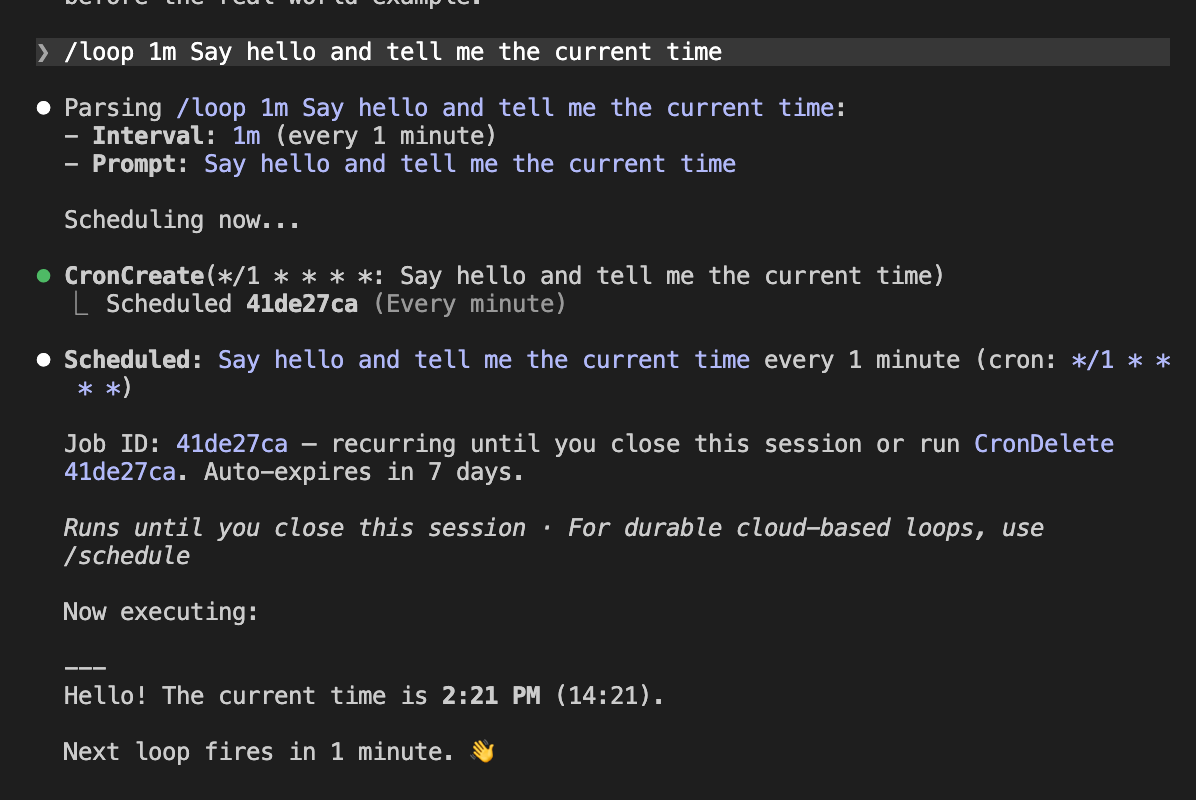 \Claude Code running /loop 1m “Say hello and tell me the current time”\
Two things to notice in that output. First, the italicized note: “Runs until you close this session. For durable cloud-based loops, use /schedule.“ That’s the line that separates “/loop” from the other two schedulers in one sentence. Second, the seven-day auto-expiry. “/loop” is for short-lived repetition, not background automation.
Stopping a loop is just as simple, you have to pass the Job ID to delete:
/loop delete 41de27ca
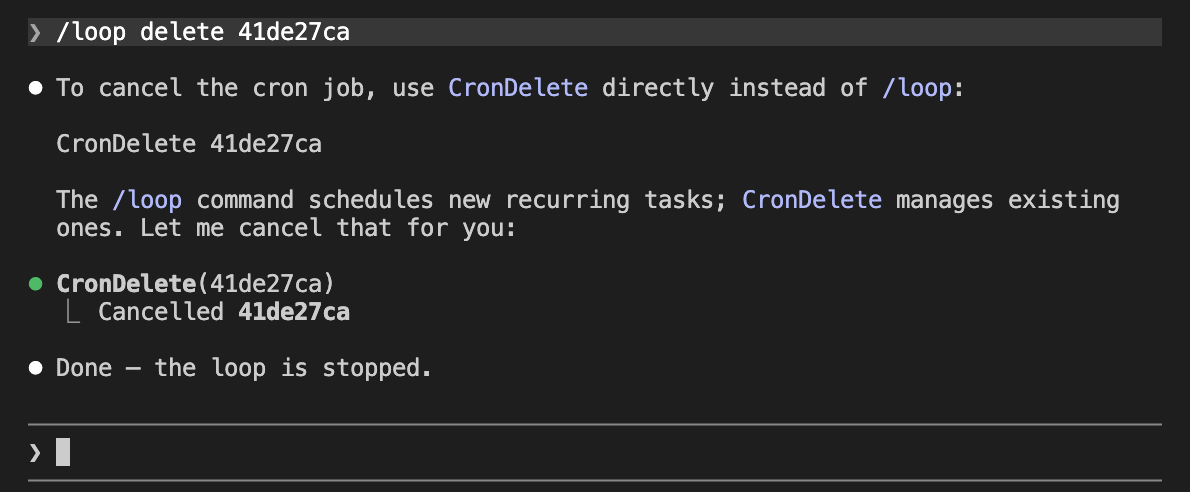 \Claude Code response to /loop delete - Claude explains that CronDelete manages existing jobs, calls CronDelete, confirms and replies “Done - the loop is stopped.”\
One more thing worth knowing: the prompt inside “/loop” can be anything a normal Claude Code prompt can be. A plain instruction, a slash command, one of your skills. “/loop 30m /quick-edit” works. So does “/loop 1h use the prosper-write skill to suggest what I should write next”. Whatever your session already knows how to do, “/loop” can run on a timer.
Where Claude Code “/loop” wins:
- Polling something you’re waiting on, could be a long generation, a file sync, a build
- Periodic check-ins while you work on something else
- One-off reminders
- If you need something in that particular session context
- Running a skill or slash command on a timer inside your current session context
Where it loses:
- The session dies, the loop dies. Start a new conversation and everything clears.
- Seven-day expiry on recurring tasks. Fine for the week you’re polling a deploy. Wrong for anything that’s supposed to stick around.
- Jitter to prevent hitting Anthropic’s API at the same time Timing is approximate. A job scheduled for 9:00 might fire at 9:06.
If you close your laptop and expect the loop to still be running when you come back, you already picked the wrong tool.
Claude Desktop Scheduled Tasks: At Your Machine, No Session Open
Desktop scheduled tasks) live inside Cowork. They run on your machine on their own schedule, independent of any open session. When the task fires, Cowork spins up a fresh session, does the work, and posts a notification when it’s done.
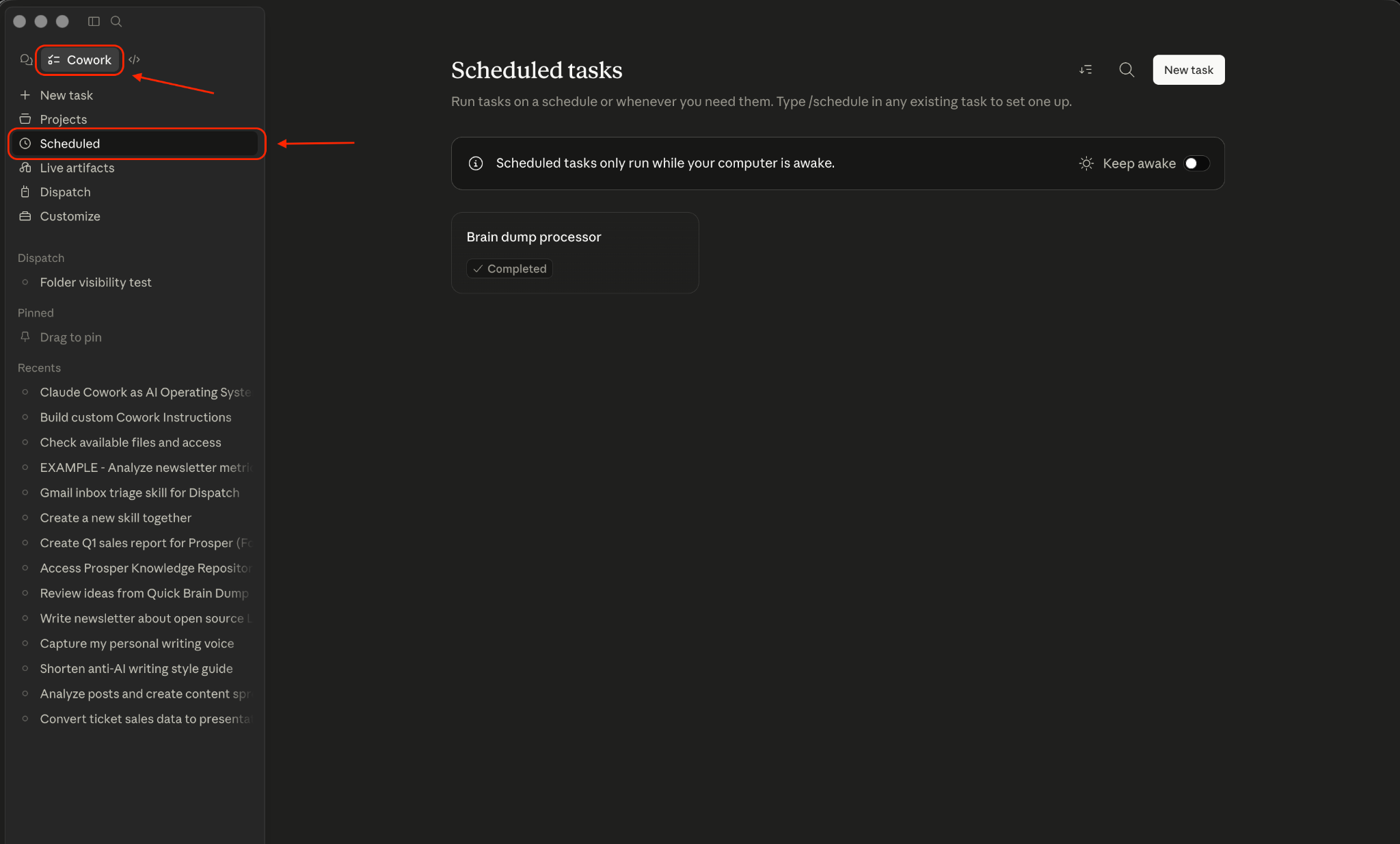 \Red arrows pointing to Cowork and then to Scheduled - showing the location of Scheduled Tasks\
This is the one that I’ve been using recently: brain dump processing.
Every morning, a Desktop task reads a Notion page called “Quick Brain Dump,” pulls everything I dumped into it from my phone, breaks the ideas into their proper categories, and writes them back into the right pages. I don’t open Claude Code for it. I don’t run a prompt. It just happens. Here’s a peek into how it looks like:
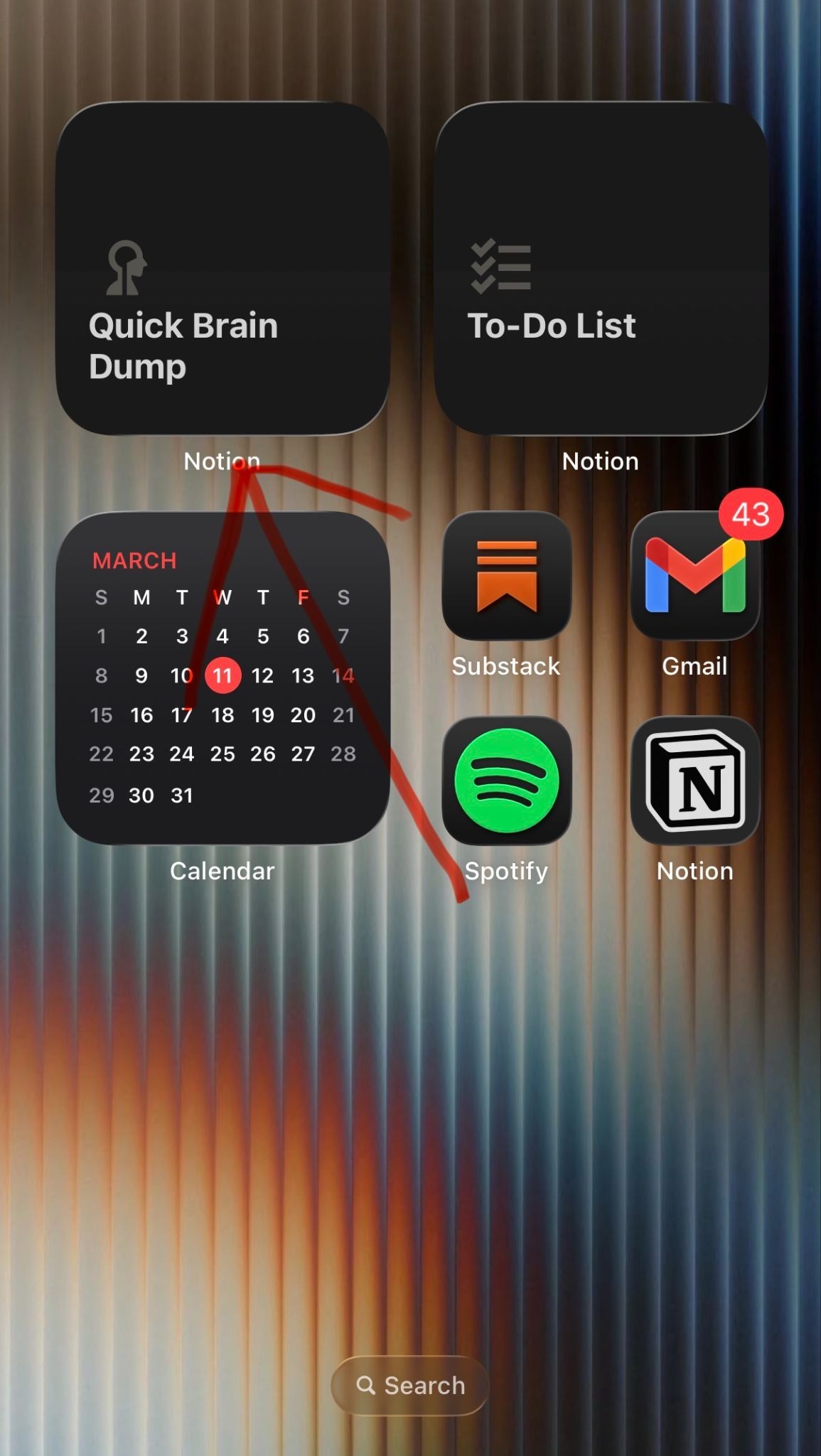 \Notion widget on iOS home screen\
End result in Notion:
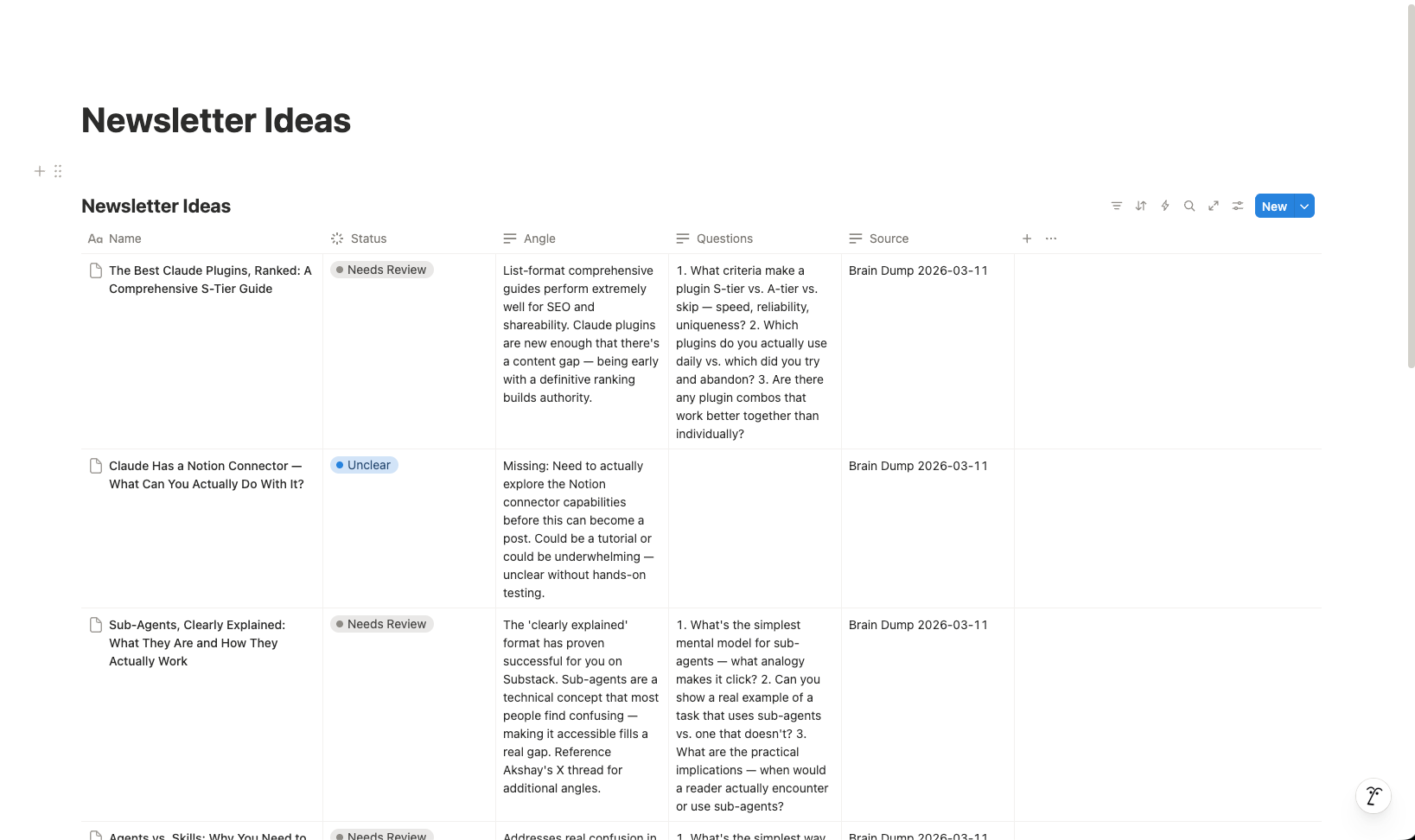 \Notion database that shows all my ideas broken down by angle and additional questions\
That’s the sweet spot for Claude Desktop scheduled tasks: recurring work that needs your local context, your files, your connectors, but doesn’t need you present to supervise it.
Here’s how my Scheduled Task looks like:
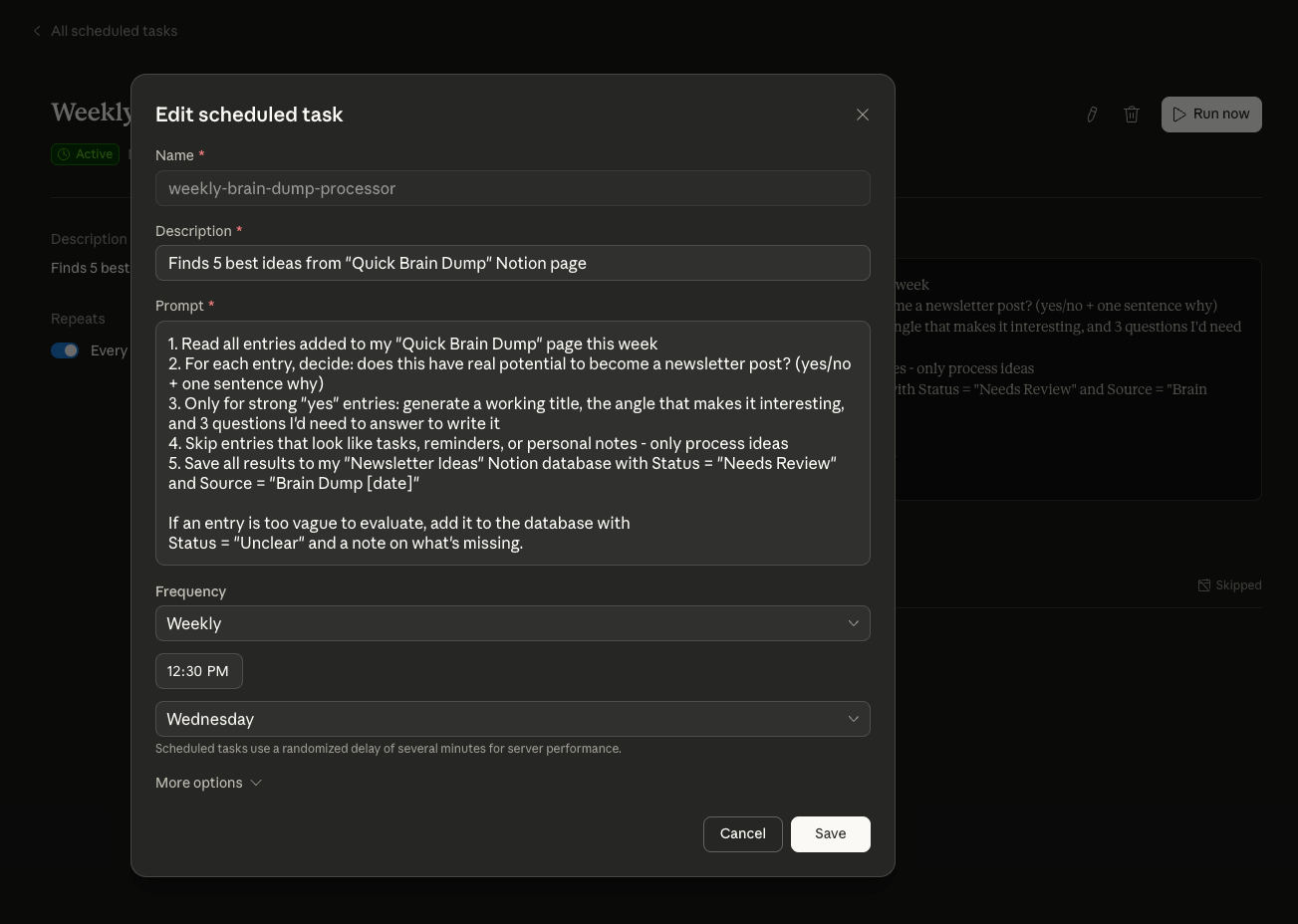 \Claude Desktop scheduled task configured to run weekly and process a Notion brain dump page via the Notion MCP connector.\
Where Claude Desktop scheduled tasks win:
- Recurring personal work on your own files: organizing notes, processing a brain dump, tagging screenshots in your Downloads folder
- Morning briefs from your inbox, calendar, or Notion, anything a connector already has access to
- Daily research or digest tasks that pull from your own setup (newsletters you save, email threads)
- Anything that needs your personal MCP setup or local files to work
Where they lose:
- Your machine has to be awake.
- One catch-up per missed task, and only for the most recent missed fire. If your laptop sleeps for three days, you get one run on wake, not three.
The trap with Claude Desktop scheduled tasks: they look reliable because they run “on their own,” but they quietly skip every time your laptop is asleep. If a skipped run would actually matter, this isn’t the right tool - that’s exactly what Routines are for.
Claude Routines: When You’re Not at Your Machine
Claude Routines can run in two places: on Anthropic’s cloud, or locally on your own machine. Pick “cloud” and it runs whether your laptop is closed, off, or on a plane, it doesn’t matter. The run happens. Pick local and you get access to your own files and setup, but it still only fires when your machine is awake.
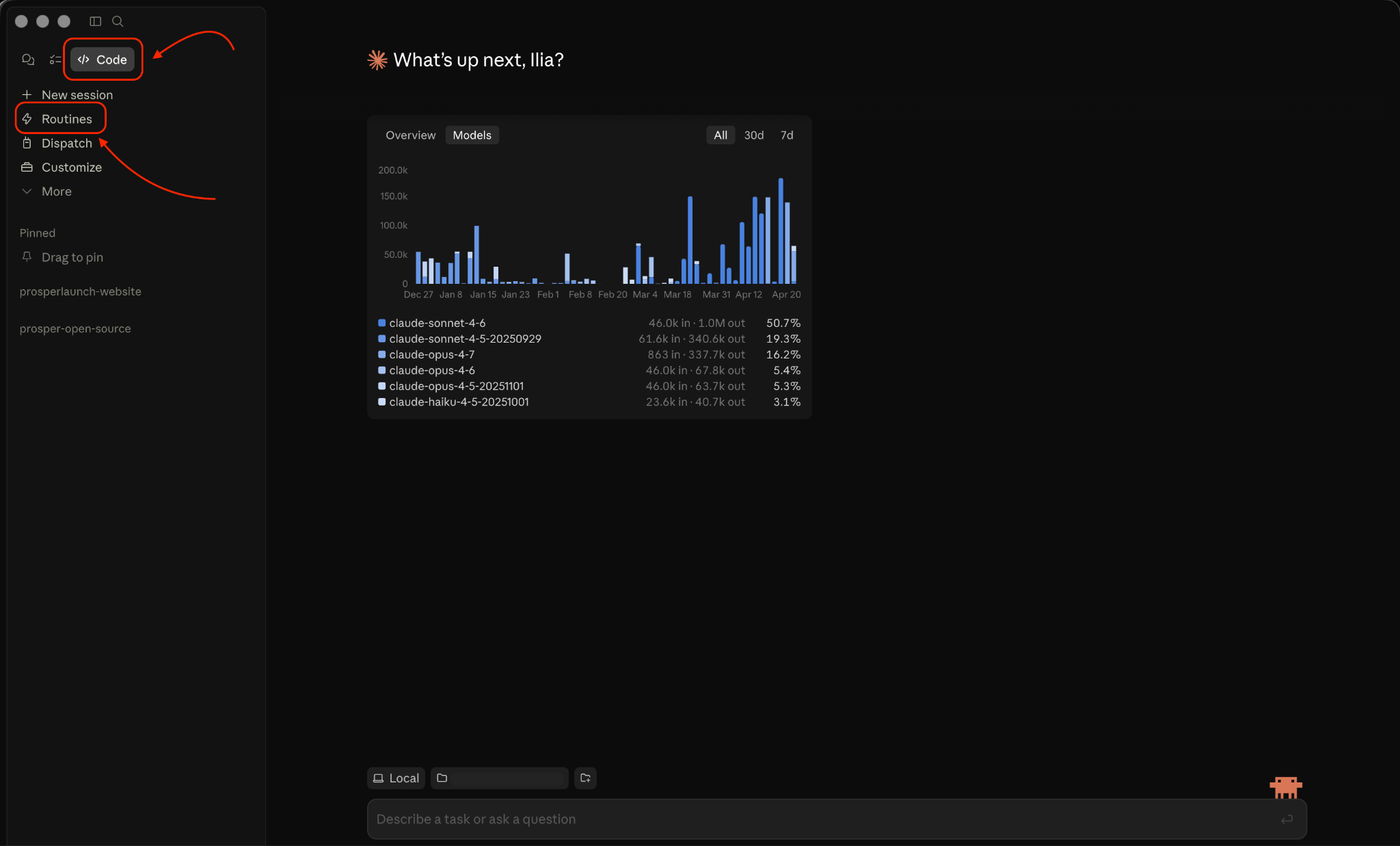 \Claude Code in Desktop, arrow pointing to “Routines” in the left sidebar\
The two modes matter because they change where Routines live. Cloud Routines are the unique thing, nothing else runs when your machine is off. Local Routines overlap with Desktop scheduled tasks on capability; the difference is the surface. Routines live in the Claude Code Desktop app and the web dashboard at “claude.ai/code/routines”. Scheduled tasks live inside Cowork and the Claude Code CLI.
They also do something the other two can’t: trigger on an external event. Schedule, sure. But also an HTTP POST to a per-routine endpoint, or a GitHub event like a PR being opened. One Claude Routine can stack all three triggers at once.
I’ve got my first Claude Routine running now. It’s scheduled overnight, talks to a connector, drops a digest into a place I’ll see first thing in the morning. It runs on Anthropic’s infrastructure, so my laptop being asleep doesn’t matter. It’s there when I check.
I’ll share the exact prompt, the setup steps, and what I got wrong in next post (potentially, this week). This one’s just the map.
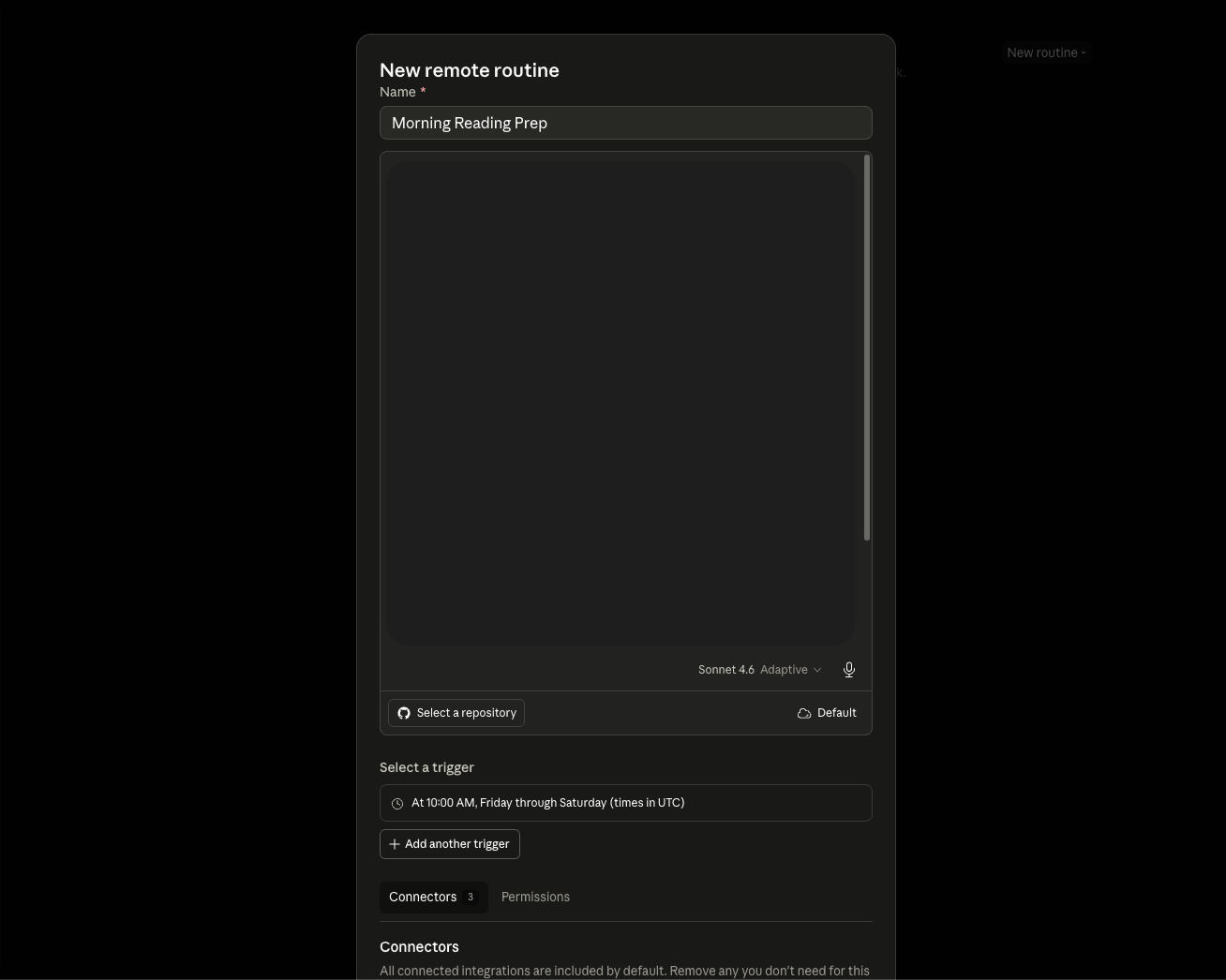 \Claude Routines desktop dashboard form with triggers, name, connectors and other settings\
Where Claude Routines win:
- Work that must survive your laptop being off (cloud)
- External triggers: webhooks, GitHub events, alerts from your monitoring tool
Where they lose:
Every Routine run pulls from the same usage budget as your regular Claude sessions. On top of that, there’s a separate daily cap of 5 Routine runs per 24 hours per account - you can hit the Routine cap before you hit the subscription cap. Check how many you have left in Settings → Usage.
Here’s a good decision matrix for you on when to choose each Automation:
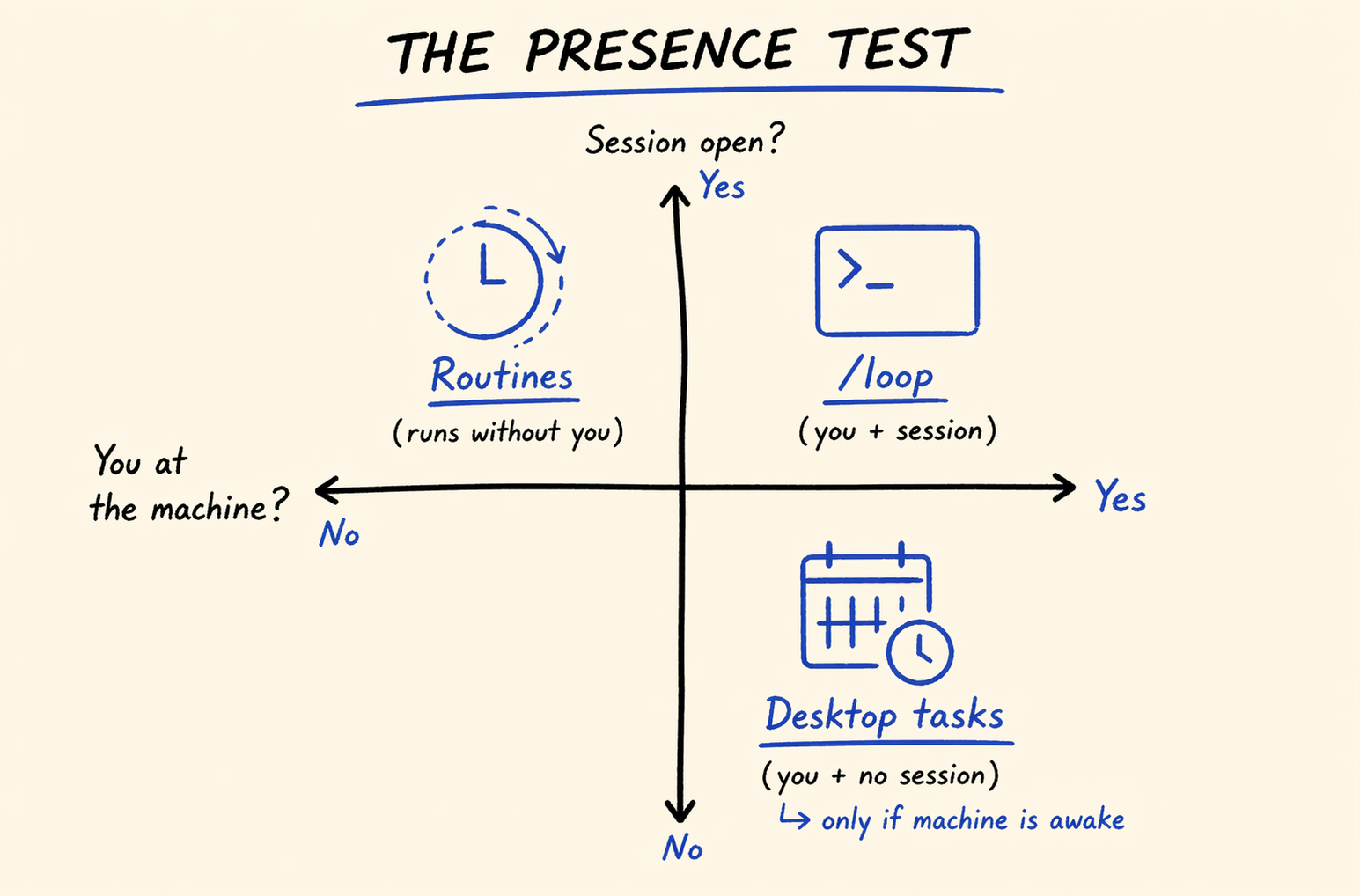 \Hand-drawn Presence Test diagram mapping Claude Code schedulers - /loop, Desktop scheduled tasks, and Routines against whether you’re at your machine and whether a Claude Code session is open.\
The One-Question Rule for Picking a Scheduler
Now you know what each one does. Here’s the frame I use to pick between them.
One question: will you be at your machine when this runs?
Three possible states, each with one tool that fits. Pick the wrong one and you feel it within a week.
- In a Claude Code session right now, want something to happen while I work on the side → “/loop”
- At my machine but no session open, want it to happen on its own using my files → Claude Desktop scheduled task
- Machine could be off, want it to happen whether I’m there or not → Cloud Routine
Screenshot that or just grab the decision matrix. Save it. You’ll pick correctly every time.
Related Prosper reading
A few recent Prosper posts worth your time:
- How I put Claude Code on Telegram: the setup that lets me brainstorm with my full project context from my phone.
- AI agent interfaces are converging: why Cowork, Codex, and Cursor all look the same now, and what that means for how you pick one.
- Claude Cowork: the AI operating system: my take on Cowork as the new surface most AI work will move into.
What’s next
Next post is going to be about Claude Routines. The 2-4 worth building first, the exact prompts I’m using, the advantages of Routines, the mistakes that burn your daily run cap, and the setup details that aren’t in the docs.
If you haven’t already, subscribe and keep an eye on your inbox. You don’t want to spin up your first Routine without reading it.
Thank you so much for reading this post,
Ilia
FAQ
Q: What’s the difference between Claude Routines and /loop?
Routines run on Anthropic’s cloud whether your machine is on or off, with a one-hour minimum interval. /loop runs inside your open Claude Code session and dies when the session dies. Use /loop when you’re actively working; use Routines when the work has to survive your laptop being closed.
Q: Do Claude Desktop scheduled tasks run when my laptop is asleep?\*
No. Desktop tasks need your machine awake and the Claude Desktop app running. If your laptop sleeps during a scheduled run, you get one catch-up execution on wake - for the most recent missed fire only, not every one you missed. If the run has to happen regardless of your laptop’s state, use a Cloud Routine instead.
Q: Which Claude Code scheduler should I pick for a daily recurring task?
If you’ll be at your machine when it fires, use a Claude Desktop scheduled task (one-minute minimum interval, full local file access). If the task has to run whether you’re there or not, use a Claude Routine (one-hour minimum, runs in the cloud, no local files).
Q: Can Claude Routines access my local files?
Depends on the mode. Cloud Routines run on Anthropic’s infrastructure against a fresh clone of your repo - your .env, uncommitted changes, and desktop scratch files aren’t available. Local Routines run on your own machine and can reach local files, but they need your laptop awake to fire. If the work needs local state and has to survive your laptop being off, neither option works - use a Desktop scheduled task and accept the sleep trade-off, or move the data into a cloud connector (Notion, Google Drive, Gmail) so a Cloud Routine can reach it.