You already know how to spec a product for a human engineer. Most stop doing it when the engineer is an AI.
By Elena | AI Product Leader
Published: 2026-05-23
URL: https://promptledproduct.substack.com/p/how-to-write-a-prd-that-works-for
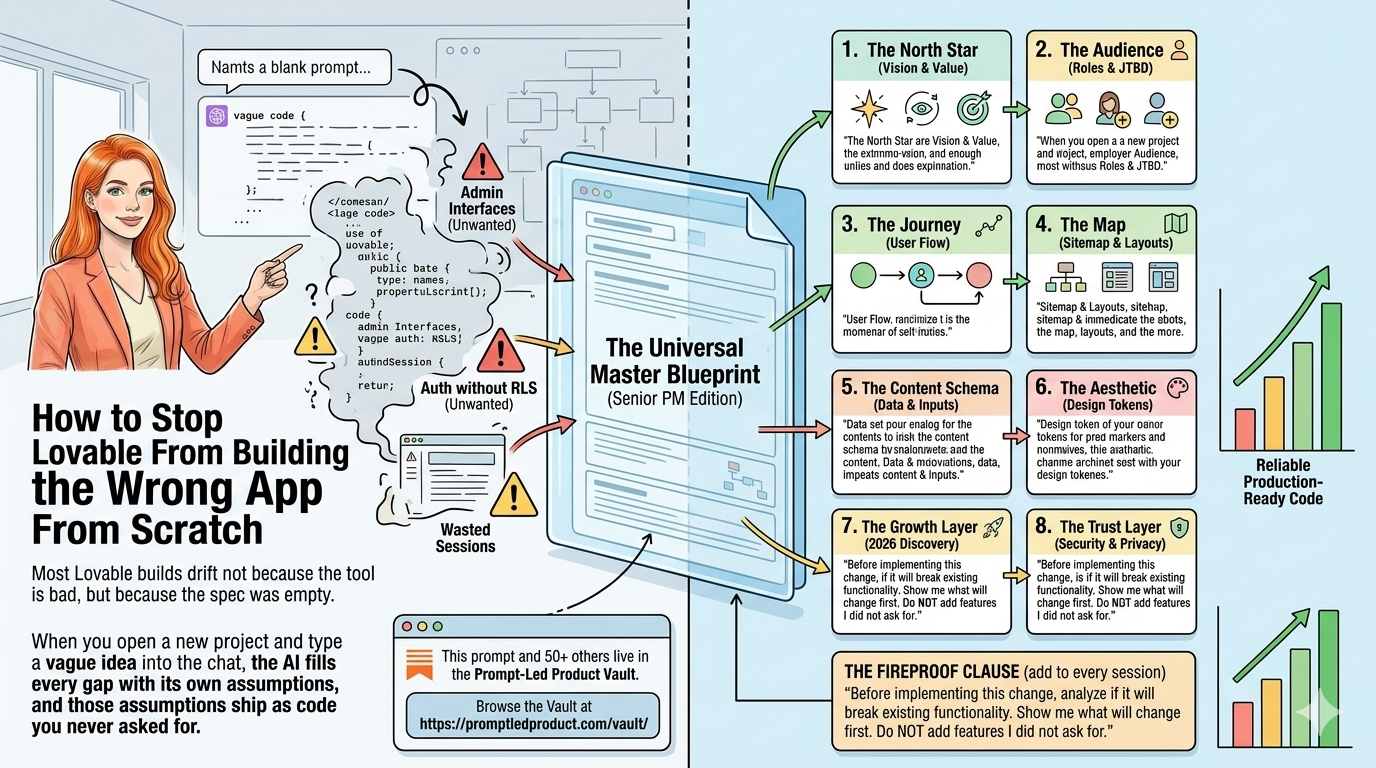
The spec is the job. Every PM reading this already knows that. You do not hand a human engineer a sentence and expect a working feature. You write a requirements document. You define the user, the permissions, the edge cases, the things the product should never do. You do this because it is the only way to get a predictable output from a capable builder.
Then those same PMs open Lovable, Bolt, Cursor, Replit, v0, or Claude Code and type one sentence. And the AI builds its best guess at what they meant.
GIANTY’s May 2026 analysis found that teams using AI coding tools see 3-5x faster task-level prototyping but only a 10% improvement in overall delivery velocity. The bottleneck was never the code. It was the architecture and spec that nobody wrote. The tools are fast. The missing input is the PM doing their actual job.
The Universal Vibe Coding Blueprint is the spec. Not a prompt technique. Not a Lovable hack. A product requirements document that AI builders can execute against, built in the same format a human engineering team would expect.
has collected PRD formats from top product teams that show exactly how much rigor goes into a well-written spec. That same rigor is what makes AI builders predictable. The discipline already exists in every PM’s toolkit — it just rarely travels into the first Lovable prompt.
When I stopped treating the Blueprint as a workaround and started treating it as my actual PRD for DraftKit, builds became predictable. Not faster. Predictable. Which, for anyone who has rebuilt the same component three times, is worth more.
The Prompt Logic
Every section in the Blueprint maps to a section you already write in a standard PRD.
The North Star is your product vision and success metric. The Audience section is your persona model and permission matrix. The Journey is your user flow with explicit logic gates. The Content Schema is your data model. The Trust Layer is your security and privacy requirements.
The difference between a PM who gets predictable AI builds and one who doesn’t is not which tool they use. It is whether they wrote the spec. Lovable, Bolt, Cursor, Replit, v0, and Claude Code all accept structured context. None of them require vague instructions. The vagueness is a habit.
has been writing about vibe coding for PMs this year and keeps returning to the same tension: the tools are accessible, but the PM who ships predictable output is always the one who wrote the spec first. The Blueprint is that spec.
The one section that has no equivalent in a traditional PRD is the Fireproof Clause at the bottom. Human engineers ask clarifying questions before they build.
AI tools do not, unless you wire that behavior into the prompt. The Fireproof Clause does that. It tells the tool to show you what will change before it changes anything and bans it from adding features you did not ask for.
Prompt-Led Product | For PMs Building in the AI Era is a reader-supported publication. To receive new posts and support my work, consider becoming a free or paid subscriber.
The Prompt
🛠️ The Universal Master Blueprint (Senior PM Edition) Instructions for Lovable / Bolt / Cursor / v0 / Replit / Claude Code: Act as a Senior Product Engineer. This is a technical specification for a high-signal build. Prioritize the User Flow, Constraints, and Privacy-First architecture.

1. The North Star (Vision & Value)

Project Vision: [Where do we want this to be in 6 months?] Core Goals: [e.g., Build authority, collect emails, automate a manual task.] Core Value Prop: [One sentence on the specific "win" for the user.] Success Metric: [The one functional thing that MUST be perfect.]

2. The Audience (Roles & JTBD)

Primary User: [Who are they? e.g., Non-technical founders.] Jobs to be Done: [What real-world task are they trying to finish?] Permissions: [Who can see what? Define Public vs. Private/Premium access.] The "Mustn'ts": [List what the user should NEVER be able to do. Include data access restrictions.]

3. The Journey (User Flow)

Step 1 (The Entry): User lands on [Page]. Show a clear, non-intrusive cookie and tracking consent banner if any analytics are active. Step 2 (The Hook): User interacts with [Element] to achieve [JTBD]. Step 3 (The Logic Gate): If [Condition], show [Result]. If [Restriction], show [Gate/CTA]. Step 4 (The Goal): User successfully completes [Action]. Data handling follows Section 8.

4. The Map (Sitemap & Layouts)

Routes: [List every URL: / , /dashboard, /privacy, /terms, /ai.txt, etc.] Layout Rules: "The Global Navigation and Footer appear only on [List Pages]. The [/ai.txt] route must be raw, unstyled text only." Legal Pages: "Generate /privacy and /terms pages automatically by scanning the app's data collection logic."

5. The Content Schema (Data & Inputs)

The Spreadsheet View: [List your data columns: Title, Category, Logic, Is_Premium.] Source Material: "Refer to the uploaded [File Name] for all copy. No AI-speak or filler content."

6. The Aesthetic (Design Tokens)

Theme: [e.g., High-signal Light Mode / Minimalist Engineering.] Tokens: Background: #FFFFFF; Primary: [Hex]; Borders: 1px solid. Nav Style: [e.g., Floating bottom dock with glass blur.]

7. The Growth Layer (2026 Discovery)

SEO: Author: [Name]. Meta title and description based on Core Value Prop. Agent Map: "Include JSON-LD for 'SoftwareApplication' and 'Person' in the head. Add a hidden sr-only div in the footer for AI agents to index."

8. The Trust Layer (Security & Privacy)

Tracking Transparency: State what is being tracked (e.g., Posthog, Plausible, or Google Analytics). Data Usage: Define exactly how user-submitted data is stored and processed. Automation: "Since this app uses [Specific Features], generate the automated Privacy Policy and Terms of Service pages that accurately reflect the code's data handling." THE FIREPROOF CLAUSE (include in every session): "Before implementing this change, analyze if it will break existing functionality. Show me what will change first.

Do NOT add features I did not ask for."
How to Run It
Paste the full Blueprint into the first message of any new session in Lovable, Bolt, Cursor, v0, Replit, or Claude Code. Fill in every bracket before you send. Do not include design requests or feature asks in this first message. Let the tool confirm the spec, then send your first feature request as a second message.
If you work in Cursor or Claude Code, save the completed Blueprint directly as your CLAUDE.md file. It persists across every session without re-entering it, so every new AI conversation starts with full product context already loaded.
One rule that applies across every tool: if you cannot fill in a bracket, you are not ready to build that section yet. That is the spec working the way a PRD is supposed to work.
Find More Prompts Like This
This Blueprint and 80+ other PM-ready prompts are in the Vault. Each card includes the full prompt, the logic behind it, and a plain-English implementation guide.
The Skill Was Already There
The PM who writes tight requirements for a human engineering team is the same PM who can get predictable output from an AI builder. The skill is identical. The only thing that changed is where you point it.
Write the spec before you open the tool, and the build becomes what you planned. Skip it, and you are paying credits to watch an AI guess at your product vision.
The Blueprint is not a new thing to learn. It is the spec you have been writing your whole career, reformatted for an engineer that does not ask clarifying questions.
Did you find this useful? Is this how you’ve been building? Let me know in the comments!