By Olga Safonova
Published: 2025-12-18
URL: https://olgasafonova.substack.com/p/can-you-just-search-the-wiki-for
Last week, a colleague asked me to look something up on our internal wiki. For them. Because apparently I’m faster at navigating it than they are.
I wish I was joking. Classic “let me google that for you” moment, except it’s 2025 and that wiki has 6500+ pages and a decent search.
So I did what any reasonable person would do: I spent a week building an MCP server so Claude Code could search the wiki instead of me. Problem solved. Colleagues can ask Claude Code now. I’m free.
This is my second MCP server in two weeks. December is officially “connect everything to AI” month. I might need an intervention. Or a Claude Code Max subscription as a Christmas present. Or both!
What I actually built
MediaWiki MCP servers already exist. I checked. But none of them did what I needed:
- ProfessionalWiki (⭐45) - TypeScript, ~12 tools, CRUD operations, OAuth2, npm install > <https://github.com/ProfessionalWiki/MediaWiki-MCP-Server>
- shiquda (⭐15) - Python, 3 tools, Search + read (archived), <https://github.com/shiquda/mediawiki-mcp-server>
- punkpeye/wikimedia (⭐9) - Python, 6 tools, Wikimedia APIs only, <https://github.com/punkpeye/wikimedia>
- entanglr (⭐1) - Python, 10 tools, Bot user auth, basic ops, <https://github.com/entanglr/mediawiki-api-mcp>
- Mine (⭐0 🥲 - so far?) - Go, 40+ tools, Everything below 👇, <https://github.com/olgasafonova/mediawiki-mcp-server>
I wanted broken link detection. Terminology checking against our brand glossary. Orphaned page finder. Markdown conversion with company colors. HTTP transport so it works with ChatGPT and n8n, not just Claude.
None of the existing servers had that all. So I built one. In Go. Because when a language is literally named “go,” the universe is telling you something. go build and off you go.
The security rabbit hole I didn’t expect
Here’s something that didn’t make it into my ProductPlan MCP article: security.
ProductPlan’s API is well-behaved. You authenticate, you get data, done. MediaWiki is... different. It’s a 20-year-old platform that powers Wikipedia. The API surface is massive. And my link checker tool needed to fetch arbitrary URLs to verify they still work.
Day 3, Claude Code flagged this: “Your link checker has no SSRF protection. Someone could use it to scan internal networks.”
Oh.
I’d built a tool that could be tricked into hitting http://192.168.1.1 or http://localhost:8080. Not great.
So I went down the security rabbit hole:
- SSRF protection: Link checker now blocks private IP ranges, localhost and link-local addresses
- Request size limits: Bodies capped at 2MB. No memory bombs.
- Input validation: Page titles get sanitized. No injection attempts getting through.
- Rate limiting per IP: HTTP transport won’t let one client hammer the server
- Security headers: CSP, X-Frame-Options, the whole paranoid checklist
Claude Code caught issues I would’ve shipped. Security scanning tools (gosec, govulncheck) caught more. Not glamorous work. But shipping a tool that could scan someone’s internal network? Not an option.
40 tools, one decision tree
With ProductPlan, I learned that too many tools confuse the AI. Started with 58, consolidated to 15. Lesson learned.
MediaWiki was different. I actually needed 40+ tools. The API is that complex. But I couldn’t just dump them on Claude and hope for the best.
So I spent hours ~~in the garden~~ on decision trees:
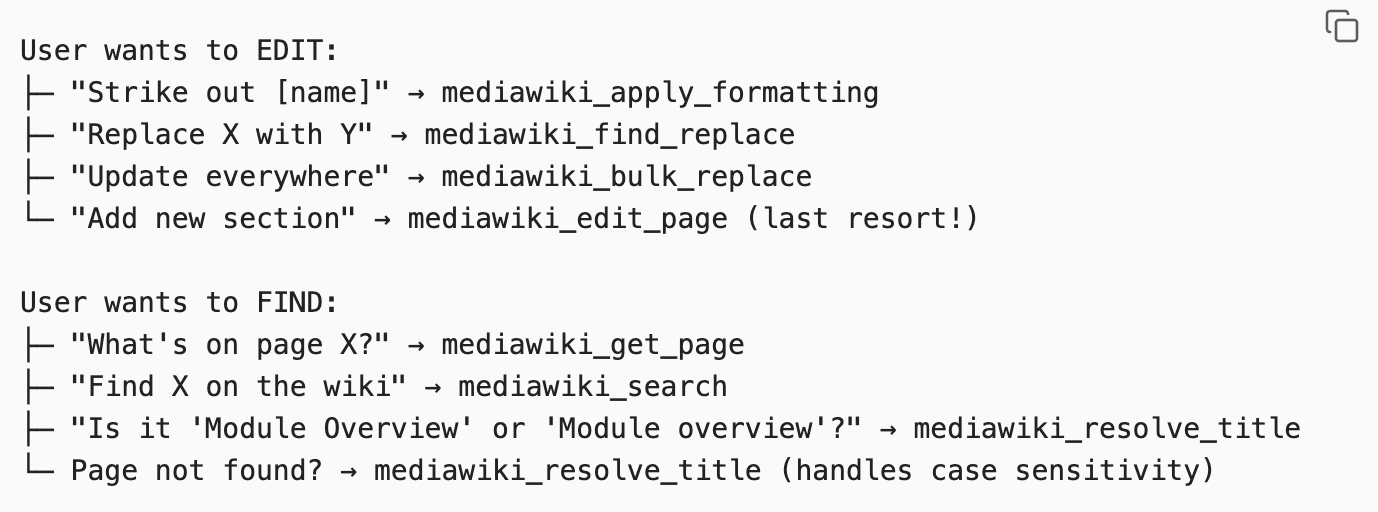
Plus example mappings, common mistakes to avoid, and our company wiki’s editing guidelines embedded directly in the server instructions.
This is what made the difference. Without guidance, Claude used the heavy mediawiki\edit\page for simple text changes, fetching and rewriting entire pages. With guidance, it picks surgical tools first. Neat!
Context engineering isn’t an afterthought. With ProductPlan, I learned this by breaking things. With MediaWiki, I applied it from day one.
What’s actually in those 40+ tools
Here’s the breakdown:
- Read operations (12 tools): search, get\page, get\sections, get\related, get\images, list\pages, list\categories, get\category\members, get\page\info, get\wiki\info, list\_users, parse
- Link analysis (5 tools): get\external\links, get\external\links\batch, check\links, find\broken\internal\links, get\backlinks
- Content quality (3 tools): check\terminology, check\translations, find\orphaned\pages
- Content discovery (2 tools): find\similar\pages, compare\_topic
- History (4 tools): get\revisions, compare\revisions, get\user\contributions, get\recent\changes
- Quick edit tools (5 tools): find\replace, apply\formatting, bulk\replace, search\in\page, resolve\title
- Write operations (2 tools): edit\page, upload\file
- File search (1 tool): search\in\file (PDFs and text files)
- Conversion (1 tool): convert\_markdown
Each tool has specific parameters, validation, and error handling. The find\replace tool alone has: page title, find text, replace text, preview mode, replace\all flag, regex support, and edit summary.
The README problem (17 rewrites later)
Two audiences: developers who want go build commands, and everyone else who wants it to “just work and read my mind too, thank you very much!”
The README went through seventeen rewrites. Seventeen. Each version got simpler. Or so I hope.
Rewrite 1: “Clone the repository, install Go 1.21+, run go build...”
Rewrite 17: Download. Paste three lines. Restart Claude.
Pre-built binaries for Mac (Intel + Apple Silicon), Windows, Linux. Platform-specific config examples. Troubleshooting section for the three things that actually go wrong.
The goal: someone who’s never opened a terminal should have this running in 5 minutes. I tested this on a colleague. Timed it. 4 minutes 23 seconds. Success.
(The irony of spending more time on docs than on several features combined isn’t lost on me - reminds me of a quote from old soviet cartoon “Wings, legs & tails“ - “it’s better to loose one day and then fly over in 5 minutes”).

What’s different from ProductPlan MCP
Two MCP servers in two weeks. Same tools, same approach, different lessons:
ProductPlan taught me: Context engineering matters. Too many tools break AI reasoning. Consolidate ruthlessly.
MediaWiki taught me: Security can’t be an afterthought. Corporate wikis handle sensitive data. SSRF protection, input validation, rate limiting. The unsexy stuff that keeps you out of trouble.
ProductPlan: 58 tools → 15 tools. Subtraction.
MediaWiki: 40+ tools, but with surgical decision trees. Addition with guidance.
ProductPlan: API is modern, predictable, well-documented.
MediaWiki: API is 20 years old, sprawling, occasionally surprising. Required more defensive approach.
Same pattern though: identify tool I use daily, get frustrated with context-switching, build a solution. Ship fast. Iterate based on real feedback.
The stuff I repurposed
The Markdown-to-MediaWiki converter? I built that three weeks ago as a CLI tool - <https://github.com/olgasafonova/md-to-mediawiki-plus>. Different project entirely. But when I needed wiki conversion in the MCP server, I just... ported it over. Added theme support (Tieto brand colors for internal docs, neutral for clean output, dark mode for wikis that support it).
Building things compounds. Today’s side project becomes next month’s feature.
7 days, 17 releases, 50 commits
Every commit co-authored with Claude Code.
Claude handled Go syntax I didn’t remember (or didn’t know - yet!), MediaWiki API lookups, security recommendations, test generation, and README rewrites 1 through 17.
I handled deciding what to build, testing against our actual wiki, prioritizing UX, writing the AI guidance, and hitting “publish release” way too many times.
I’ve written maybe 200 lines of Go before this project. All of it was copying examples from documentation and hoping they worked.
Claude Code made Go feel accessible. Not easy - I still don’t fully understand channels or goroutines - but accessible enough to build something real.
The pattern was always the same:
- Describe what I wanted in plain English
- Claude Code generates Go code
- I read the code, ask questions about parts I don’t understand
- Make adjustments based on testing
- Commit
By day 7, I could read most Go code without help. Writing it from scratch? Still no. But reading, modifying, debugging? Yes.
That’s the real story of “AI pair programming.” Not that the AI writes everything. But that it lowers the barrier enough to actually ship. Like a pair programming with a very fast developer who’s read every API doc ever written and never needs coffee breaks. Still feels surreal.
Try it
Open source, MIT license: <https://github.com/olgasafonova/mediawiki-mcp-server>
Works with any MediaWiki wiki: Wikipedia, Fandom, corporate installations. Claude Code, Claude Desktop, Cursor, VS Code + Cline, ChatGPT, n8n, Google ADK.
Setup: 5 minutes. Reading is free. Editing needs a bot password from your wiki admin.
If you have a wiki you’re tired of navigating manually - this might help. And if your colleagues keep asking you to “just search the wiki” for them - definitely try it. Redirect them to Claude or Cursor. Reclaim your time.