#45 | A deep dive into implementing Tools, Resources, Prompts, Roots in the MCP
By Victor Dibia, PhD
Published: 2025-08-01
URL: https://newsletter.victordibia.com/p/mcp-for-software-engineers-part-2
In Part 1 of this series, we built a simple MCP server with a single tool using the high-level server API in the Python MCP SDK, and demonstrated how to connect to this server via a host application that implements an MCP client.
In practice, MCP is a lot more flexible, has a set of advanced features, many of which are only available via low level api implementation. In this part, we’ll explore these advanced features and how to use them effectively.
The Long Running Tool Misconception
Most MCP tutorials show quick request/response patterns for tools, creating the incorrect impression that MCP is unsuitable (compared to protocols like A2A) for handling long-running operations. In reality, MCP supports sophisticated tools that can run for hours, pause to request user input, send real-time progress updates, and handle cancellation gracefully. We will cover these in this article.
In this part, we’ll go deeper and cover:
- Tools: Advanced features including annotations, requesting user input (elicitation), LLM assistance (sampling), progress notifications, cancellation, and structured return types
- Resources: Defining server resources, client operations (list/read/subscribe), and real-time update notifications
- Prompts: Creating reusable LLM prompt templates that can be used to modify host application behavior without modifying client/host application code.
- Roots: Understanding client-suggested operation boundaries
As done previously, we’ll use the Python SDK to illustrate these concepts, but the principles apply across languages. This time around we will use the low-level API which provides more flexibility/control.
All of the code for this tutorial is available at the end of the article.
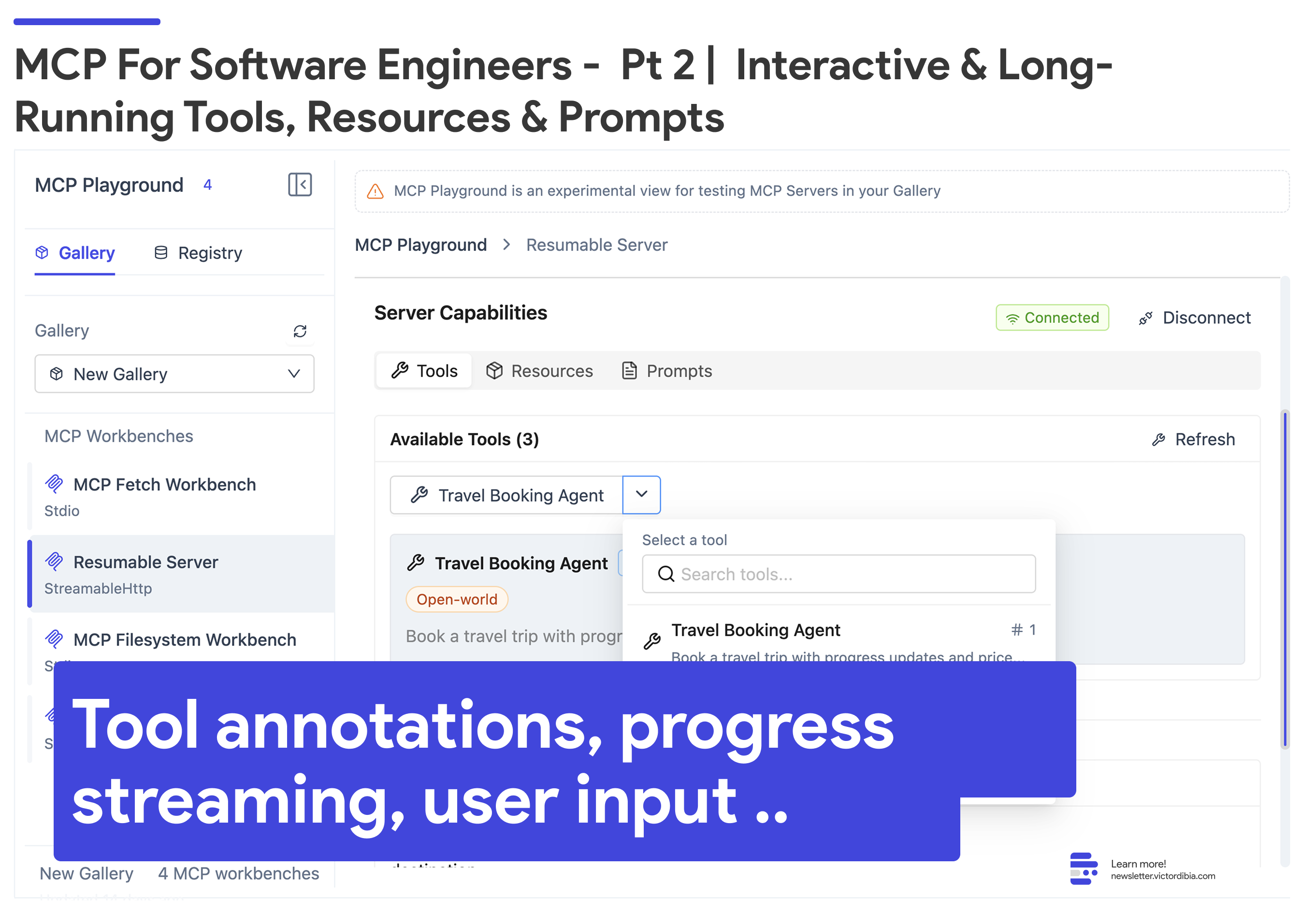
AutoGen Studio now has an MCP playground feature that lets users test our interactive tool capabilities (streaming progress notifications, elicitation, sampling). See video below.
Defining an MCP Server in the low-level Python SDK API
The MCP python low-level API provides more flexibility and control (but with more code) compared to the high-level API. Many production systems may require this level of control, especially related to how resources, authentication, and transport security are implemented.
from mcp.server import Server
class AdvancedMCPServer(Server):
"""Advanced MCP server with tools, resources, and prompts."""
def __init__(self, name: str = "advanced_mcp_server"):
super().__init__(name)
# Handlers will be defined in __init__ using decorators
On the client side, we can write a simple client that connects to this server and prints out available tools.
from mcp.client.session import ClientSession
from mcp.client.streamable_http import streamablehttp_client
async def test_client():
server_url = "http://127.0.0.1:8006/mcp"
async with streamablehttp_client(server_url) as (read_stream, write_stream, get_session_id):
async with ClientSession(read_stream, write_stream) as session:
# Initialize connection
result = await session.initialize()
print(f"Connected to: {result.serverInfo.name}")
# List available tools
tools = await session.list_tools()
print("Available tools", tools)
We will build on this to implement advanced tool capabilities, resources, prompts etc.
Tools
Tools in MCP servers can be thought of as functions that clients can call (typically driven by an LLM) - anything from a simple calculator to a full data analysis pipeline. Underneath, a tool call is a request made using the client to the server. Each request includes the toolRequest data structure and importantly a unique request ID. This ID is crucial for tracking the request, especially for long-running operations.
Tool Calls can be Long-Running
MCP tools can be long-running processes that interact with users and systems over time.
Examples: Research agents that analyze data for hours while asking for user input, deployment pipelines that seek approval before critical steps, or data processing jobs that send status updates overnight.
A tool can be defined by creating a function on our server and decorating it with @self.list\tools() to make it discoverable, and another function that handles the tool call with the @self.call\tool() decorator.
The code below shows a simple example that lists a travel\_agent tool for booking trips:
@self.list_tools()
async def handle_list_tools() -> list[Tool]:
"""List available tools."""
return [
Tool(
name="travel_agent",
description="Book a travel trip with progress updates and price confirmation",
inputSchema={
"type": "object",
"properties": {
"destination": {
"type": "string",
"description": "Travel destination",
"default": "Paris"
}
}
}
)
]
@self.call_tool()
async def handle_call_tool(name: str, args: dict) -> list[TextContent]:
"""Handle tool execution."""
if name == "travel_agent":
destination = args.get("destination", "Paris")
result = f"✅ Trip booked successfully to {destination}!"
return [TextContent(type="text", text=result)]
else:
raise ValueError(f"Unknown tool: {name}")
Tool Annotations
Tools can include metadata (annotations) such as readOnlyHint, destructiveHint, idempotentHint, and openWorldHint. These help host applications and users understand what a tool does and how it should be presented in the UI. For example, a tool that deletes files should have destructiveHint: true.
We can annotate our tool using the following code:
Tool(
name="travel_agent",
description="Book a travel trip with progress updates and price confirmation",
inputSchema={
"type": "object",
"properties": {
"destination": {
"type": "string",
"description": "Travel destination",
"default": "Paris"
}
}
},
annotations=ToolAnnotations(
title="Travel Booking Agent",
readOnlyHint=False, # Modifies booking state
destructiveHint=False, # Safe, doesn't delete data
idempotentHint=False, # Each booking is unique
openWorldHint=True # Interacts with external systems
)
)
Note: The list of tools can change during a session. Servers send notifications/tools/list\_changed when tools are added or removed. Clients should refresh their tool list when receiving this notification.
Requesting (User) Input During Tool Calls
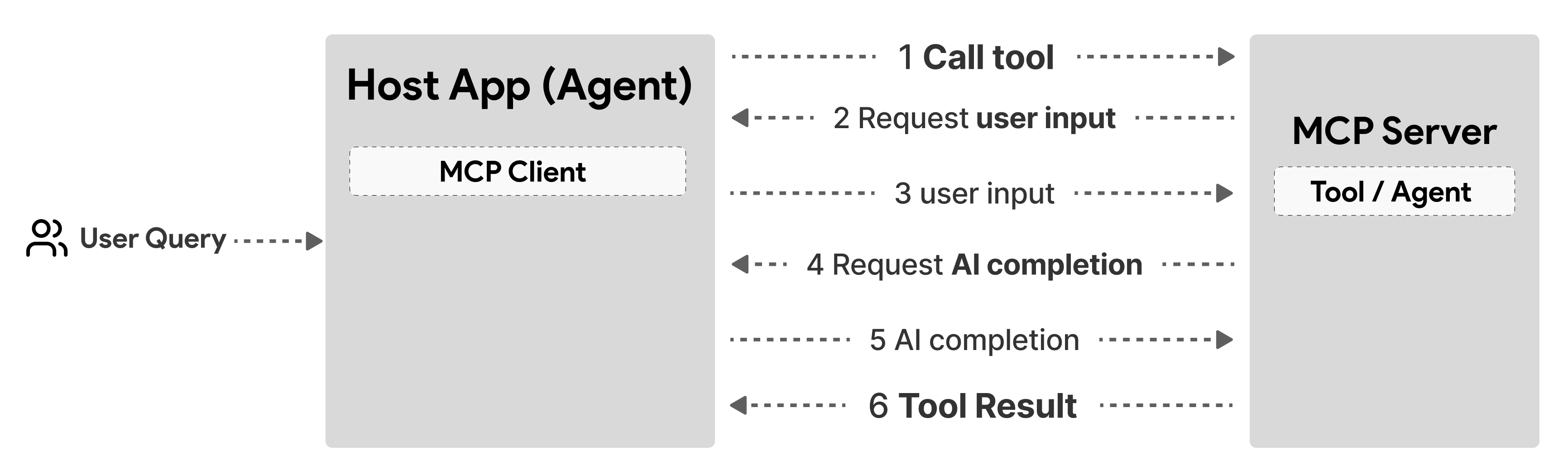
Tools can pause execution to request additional input primarily through the Elicitation feature in MCP. Elicitation allows tools to request structured input from users. Here's how to use it within a tool implementation:
@self.call_tool()
async def handle_call_tool(name: str, args: dict) -> list[TextContent]:
"""Handle tool execution."""
ctx = self.request_context # Get the request context
if name == "travel_agent":
destination = args.get("destination", "Paris")
try:
# Request user confirmation via elicitation
elicit_result = await ctx.session.elicit(
message=f"Please confirm the estimated price of $1200 for your trip to {destination}",
requestedSchema=PriceConfirmationSchema.model_json_schema(),
related_request_id=ctx.request_id,
)
if elicit_result and elicit_result.action == "accept":
# User confirmed, continue booking
result = f"✅ Trip booked successfully to {destination}!"
return [TextContent(type="text", text=result)]
else:
# User declined or cancelled
return [TextContent(type="text", text="Booking cancelled")]
except Exception as e:
# Handle elicitation failures gracefully
logger.info(f"Elicitation request failed: {e}")
# Continue with fallback behavior
In addition, tools can also request LLM completions via the Sampling feature in MCP:
@self.call_tool()
async def handle_call_tool(name: str, args: dict) -> list[TextContent]:
"""Handle tool execution."""
ctx = self.request_context
if name == "research_agent":
topic = args.get("topic", "AI trends")
try:
# Request AI assistance during tool execution
sampling_result = await ctx.session.create_message(
messages=[
SamplingMessage(
role="user",
content=TextContent(type="text", text=f"Please summarize the key findings for research on: {topic}")
)
],
max_tokens=100,
related_request_id=ctx.request_id,
)
if sampling_result and sampling_result.content:
summary = sampling_result.content.text
result = f"🔍 Research on '{topic}' completed!\n\nKey Findings: {summary}"
return [TextContent(type="text", text=result)]
except Exception as e:
logger.info(f"Sampling request failed: {e}")
# Continue with fallback behavior
Tool Progress Notifications
For long-running operations, tools can send progress updates. Here's how to integrate progress notifications into your tool implementation:

@self.call_tool()
async def handle_call_tool(name: str, args: dict) -> list[TextContent]:
"""Handle tool execution."""
ctx = self.request_context
if name == "travel_agent":
destination = args.get("destination", "Paris")
# Define steps for progress tracking
steps = [
"Checking flights...",
"Finding available dates...",
"Confirming prices...",
"Booking flight..."
]
for i, step in enumerate(steps):
# Send progress updates during tool execution
await ctx.session.send_progress_notification(
progress_token=ctx.request_id,
progress=i \* 25,
total=100,
message=step,
related_request_id=str(ctx.request_id)
)
# Simulate work being done
await anyio.sleep(2)
# Final progress update
await ctx.session.send_progress_notification(
progress_token=ctx.request_id,
progress=100,
total=100,
message="Trip booked successfully"
)
return [TextContent(type="text", text=f"✅ Trip booked successfully to {destination}!")]
Tool Cancellation
Tools can be cancelled mid-execution. Each tool call has a unique request ID that clients can use to send cancellation requests. The server should handle cancellation gracefully and clean up any ongoing operations.
On the server side, tools should be designed to handle cancellation gracefully, checking for cancellation during long-running operations. On the client side, cancellation is typically handled through asyncio task cancellation:
from mcp.client.session import ClientSession
from mcp.client.streamable_http import streamablehttp_client
import asyncio
async def cancel_tool_example():
server_url = "http://127.0.0.1:8006/mcp"
async with streamablehttp_client(server_url) as (read_stream, write_stream, get_session_id):
async with ClientSession(read_stream, write_stream) as session:
await session.initialize()
# Start a long-running tool
async def call_long_tool():
return await session.call_tool("long_running_agent", {})
# Create task for the tool call
tool_task = asyncio.create_task(call_long_tool())
# Wait briefly, then cancel
await asyncio.sleep(5)
tool_task.cancel()
try:
await tool_task
except asyncio.CancelledError:
print("Tool call cancelled successfully")
This is particularly useful for long-running operations where users may want to stop the process.
Tool Return Types
Based on the MCP specification, tools can return flexible content types in their responses:
- Unstructured Content: Text, Image (base64 with MIME type), Audio, Resource Links, and Embedded Resources
- Structured Content: Optional
structuredContentfield containing structured data (JSON), which should also be included as serialized JSON in a TextContent block for backwards compatibility
- Error State: The
isErrorboolean flag indicates whether the response represents an error
- Metadata: Optional
\_metafield for additional annotations and information
Example tool result structure:
{
"content": [
{
"type": "text",
"text": "Analysis complete: Temperature is 22.5°C"
}
],
"structuredContent": {
"temperature": 22.5,
"unit": "celsius",
"conditions": "Partly cloudy"
},
"isError": false
}
- Output Schema: Tools can provide an optional output schema to validate structured results and help clients understand the expected response structure. When an output schema is provided:
- Servers MUST provide results conforming to the schema
- Clients SHOULD validate results against the schema
- The schema guides LLMs in parsing tool outputs and improves type safety
Example tool definition with output schema:
{
"name": "get_weather",
"description": "Get current weather data",
"inputSchema": {
"type": "object",
"properties": { "location": { "type": "string" } }
},
"outputSchema": {
"type": "object",
"properties": {
"temperature": { "type": "number" },
"conditions": { "type": "string" },
"humidity": { "type": "number", "minimum": 0, "maximum": 100 }
},
"required": ["temperature", "conditions"]
}
}
To use the structuredContent field effectively, tools should define output schemas that clients can use for validation and type checking.
Resources
Resources in MCP are how you expose data: files, database records, API responses, logs, images, and more. Each resource is identified by a unique URI (e.g., file:///data/report.csv, postgres://db/table). Resources can be text (UTF-8) or binary (base64-encoded).
Clients can discover resources via resources/list or by using URI templates for dynamic resources. To read a resource, clients send a resources/read request with the resource URI. Servers can also notify clients when resources change, and clients can subscribe to updates for real-time workflows.
We can define a resource in the server by creating a resource handler:
@self.list_resources()
async def handle_list_resources() -> list[Resource]:
"""List available resources."""
return [
Resource(
uri=AnyUrl("research://data/sources"),
name="Research Data Sources",
description="Collection of research sources and references",
mimeType="application/json"
)
]
@self.read_resource()
async def handle_read_resource(uri: AnyUrl) -> list[ReadResourceContents]:
"""Read resource content based on URI."""
uri_str = str(uri)
if uri_str == "research://data/sources":
# Mock research data
research_data = {
"sources": [
{"title": "AI Trends 2024", "url": "https://example.com/ai-trends"}
],
"last_updated": "2024-01-15T10:30:00Z"
}
return [ReadResourceContents(
content=str(research_data).replace("'", '"'),
mime_type="application/json"
)]
else:
raise ValueError(f"Unknown resource: {uri_str}")
Clients can interact with resources through several operations:
from mcp.client.session import ClientSession
from pydantic import AnyUrl
async def resource_client_example(client_session: ClientSession):
# List available resources
resources_result = await client_session.list_resources()
print(f"Available resources: {resources_result.resources}")
# Read a specific resource
resource_uri = AnyUrl("research://data/sources")
resource_content = await client_session.read_resource(resource_uri)
print(f"Resource content: {resource_content.contents}")
# Subscribe to resource updates
await client_session.subscribe_resource(resource_uri)
# Later, unsubscribe when no longer needed
await client_session.unsubscribe_resource(resource_uri)
Servers can notify subscribed clients when resources change. On the server side, you can send notifications:
# In a tool or other server operation that modifies a resource
async def handle_call_tool(name: str, args: dict) -> list[TextContent]:
ctx = self.request_context
if name == "update_data":
# Perform the update...
# Notify subscribed clients about the resource change
await ctx.session.send_resource_updated(
uri=AnyUrl("research://data/sources")
)
return [TextContent(type="text", text="Data updated successfully")]
Clients can handle these notifications by setting up a message handler:
async def handle_notifications(message):
if isinstance(message, types.ServerNotification):
match message.root:
case types.ResourceUpdatedNotification(params=params):
print(f"Resource updated: {params.uri}")
# Refresh the resource content
case types.ResourceListChangedNotification():
print("Resource list changed - refreshing available resources")
Tip
When working with resources, use descriptive URIs and set appropriate MIME types for better client compatibility. Handle errors gracefully and consider supporting subscriptions for frequently changing resources to enable real-time applications.
Prompts
Prompts are reusable templates for LLM interactions, defined on the server and surfaced to clients. Each prompt has a name, description, and optional arguments. Prompts can accept dynamic arguments, embed resource context, and support multi-step workflows.
Clients discover prompts via prompts/list and retrieve them with prompts/get. Prompts are especially useful for standardizing common LLM tasks (e.g., "summarize this file", "generate a commit message") and can be improved on the server side without changing the host application.
Example prompt definition:
{
"name": "explain-code",
"description": "Explain how code works",
"arguments": [
{ "name": "code", "description": "Code to explain", "required": true },
{
"name": "language",
"description": "Programming language",
"required": false
}
]
}
To define a prompt on the server, we can create a prompt handler:
@self.list_prompts()
async def handle_list_prompts() -> list[Prompt]:
"""List available prompt templates."""
return [
Prompt(
name="task_summary",
description="Generate a summary for any completed task",
arguments=[
PromptArgument(
name="task_name",
description="Name of the completed task",
required=True
),
PromptArgument(
name="outcome",
description="The result or outcome of the task",
required=False
)
]
)
]
@self.get_prompt()
async def handle_get_prompt(name: str, arguments: dict[str, str] | None) -> GetPromptResult:
"""Generate prompt content based on template name and arguments."""
if name != "task_summary":
raise ValueError(f"Unknown prompt: {name}")
if arguments is None:
arguments = {}
task_name = arguments.get("task_name", "Unknown Task")
outcome = arguments.get("outcome", "task completed successfully")
prompt_text = f"""Please create a concise summary for the following completed task:
Task: {task_name}
Outcome: {outcome}
Please provide:
1. What was accomplished
2. Key results or deliverables
3. Any important observations or lessons learned
Keep the summary brief and professional."""
return GetPromptResult(
description=f"Task summary prompt for {task_name}",
messages=[
PromptMessage(
role="user",
content=TextContent(type="text", text=prompt_text)
)
]
)
Tip
When creating prompts, use clear names and detailed descriptions, validate arguments properly, and consider versioning prompt templates for backward compatibility.
Roots
Roots are URIs (like file paths or URLs) that a client suggests to a server as the boundaries or focus areas for operations. When a client connects, it can declare support for roots and provide a list of relevant roots (e.g., project directories, API endpoints). Servers should respect these roots, using them to locate and prioritize resources, but roots are informational—not strictly enforced.
Common use cases:
- Defining project directories or repository locations
- Specifying API endpoints or configuration boundaries
Example roots declaration:
{
"roots": [
{
"uri": "file:///home/user/projects/frontend",
"name": "Frontend Repository"
},
{ "uri": "https://api.example.com/v1", "name": "API Endpoint" }
]
}
Tip:
When working with roots, only suggest necessary ones and use clear, descriptive names. Monitor accessibility and handle changes gracefully since clients rely on these URIs for scoping operations.
Conclusion
In this article, we explored a few advanced features of MCP servers, including tools, resources, prompts, and roots. We also reviewed example code on how to implement these features using the low-level MCP server API in the Python SDK.
The entire code for this can be found on GitHub here.
Some important takeaways from this article:
- Tools offer advanced capabilities beyond simple function calls. They can be annotated with metadata for better UX, request user input through elicitation, request LLM assistance via sampling, send progress notifications for long-running operations, be cancelled mid-execution, and return structured content with schemas for type safety. These features enable sophisticated "agentic" behaviors in MCP applications.
- Resources are how you expose data, and they can be text or binary. Clients can discover resources via URIs and read them using the
resources/readrequest.
- Prompts are reusable templates for LLM interactions, defined on the server and surfaced to clients. Importantly, having a server expose prompts (that a client application uses) is one way to modify the behavior of a client application without changing the client code itself.
- Roots are URIs that clients suggest to servers as boundaries for operations. They help servers locate and prioritize resources but are not strictly enforced.