Five documented investigations into real software, and how to use what they reveal to build something of your own.
By Nate
Published: 2026-10-15
URL: https://natesnewsletter.substack.com/p/rea-reverse-engineer-anything
REA stands for Reverse Engineer Anything. It’s an open-source tool that gives AI coding assistants such as Codex and Claude Code a way to investigate existing software, including programs whose original source code you don’t have. You point your agent at an application or a supported browser session and ask how a particular feature works. REA supplies tools to inspect the code and behavior. Your agent uses those findings to explain the mechanism and help you build something of your own.
We’re digging into REA now because it has already passed 200,000 GitHub stars and sits at the top of GitHub’s daily trending page, enough momentum to warrant a closer look at what people can actually do with it.
A developer used REA to investigate QuickBooks Desktop and then built a local accounting application with its own transaction engine and reports. The project is called Ledger Reborn. Its author has published the investigation, including the comparisons used to check the new software.
What happened between looking inside QuickBooks and having another application that could do useful work?
That’s the part of software development that gets much more accessible when an AI can help you investigate an existing program. A feature you’ve used for years can open into a set of decisions: which records to keep, how to calculate a result, what should happen when something changes. Once you can see those decisions, you have a much better chance of describing what your own version needs.
If you’ve ever asked an AI to build something and then watched the result unravel as you tried to use it, this is a place worth spending time in. A convincing screen gives you very little information about what should happen next, what needs to be remembered, or which numbers have to agree.
In the video, I talked about the opportunity this creates for developers and people who don’t write code. But, where should you actually point REA? What should you ask? And what could you do with the answer? Let’s find out.
Here’s what’s inside:
- Ask a question you can finish. Name one behavior and the decision it informs, so the agent knows where to start and you know when to stop.
- Get REA connected and confirmed. Install it in Codex or Claude Code, then run one small inspection that proves the tools loaded.
- Turn a business rule into a spec. Use the Ledger Reborn investigation of QuickBooks to pin down one calculation and a check against sample data.
- See what has to survive a copy. Follow how Notion’s clipboard keeps block structure, then design copy and paste for your own editor.
- Point REA at your own app, your equipment, or an old program. Each investigation comes with a starting prompt and a check that tells you when the answer is wrong.
The five investigations below give us specific places to begin. Each comes from the REA team’s published work or a community account, and each has a starting prompt for your own investigation.
Paid subscribers get access to the full post, Nate’s Library MCP, and my Slack community!
LINK: [Nate’s Library MCP]
Your subscription now works inside your AI.
Nate’s Library MCP is a read-only MCP server that gives your AI direct access to my entire published content library. Connect once, and then the archive just shows up in your normal AI conversations. You ask your AI a question during your actual working session and it pulls from everything I’ve published to answer it.
Setup takes just a few clicks.
LINK: [Join the Slack →]
It’s where I’ll be sharing things between articles, where you can get help on builds in real time, and where the fastest conversations in this community are already happening. I’ll see you in there!
If you have any issues connecting to my MCP or Slack, please email [email protected].
How to make the looking useful
The most useful thing you can bring to REA is a question about work you understand.
You might know exactly what makes an invoice wrong, even if you couldn’t design the database behind it. Or perhaps moving a research note between tools keeps destroying a relationship you need. Your experience of the work tells you what to investigate before you know the technical language for the answer.
Start by describing one behavior and the decision you want to make about it. “Help me understand how this application handles a partial payment so I can decide how mine should work” gives an agent somewhere to begin. It also gives you a reason to stop: once you can explain the relevant records, the calculation, and the important exceptions, you have something to work with.
Then ask the agent to follow the information from the input, through the records and rules that change it, to the result. A button can take you into several parts of a program, and the connections between those parts often explain more than the button itself. Ask the agent to draw that path if a description leaves you struggling to hold it in your head.
At this point, your requirements can change. You started by wanting a feature. Now you can see a choice inside it that affects what you actually need. Perhaps an operation has to preserve a relationship between two records. Perhaps a value that looks like an ordinary number has a special meaning at the bottom of its range. Understanding the implementation gives you a more precise way to describe the behavior you want.
You still get to choose your own design. The application you’re studying was built for its users, its business, and its technical constraints. Ask which parts of its approach fit your situation. Ask what a smaller implementation could leave out. Code can show you what happens. The original team’s reasons may require documentation or remain unknown.
Finally, decide how you’d recognize a wrong answer. Give the agent an input with an expected result, or ask it to propose a comparison to inspect. If the explanation says two cases behave differently, try both. The point is to make the understanding useful enough that you can predict something and check it.
For someone who doesn’t code, that might produce a diagram, a clearer requirement, and a much better conversation with their AI builder. For a developer, the same investigation might produce a calculation or dependency they can implement immediately. Both people are doing engineering work: making informed choices about how a system should behave.
How to install REA and confirm it works
If REA already works in your coding agent, skip to an investigation below.
The prompts below go into a coding agent running on your computer, such as Codex or Claude Code. That agent needs access to the application files you want to inspect. Have it installed and signed in first, then follow the official REA setup guide.
Check Node.js. Open Terminal on macOS or Linux, or PowerShell on Windows, and run:
node -v
npm -v
REA supports Node.js 22.19+ within the 22 series, 24.11+ within the 24 series, or a stable version 26 or newer. Node.js 23, 25, and prerelease versions aren’t supported. Setup stops and tells you to install a supported version. If Node is missing or unsupported, the setup guide links to installation options. Reopen your terminal afterward and check again.
Connect your agent. Run:
npx rea-agents@latest setup
Choose the coding agent you use, review the proposed configuration changes, and approve them. Setup adds the connection and REA’s investigation instructions. Restart the agent when setup finishes.
Give it a real target. REA’s own README says it’s for analysis of software you own or are authorized to examine, and its disclaimer notes that a vendor’s license can restrict reverse engineering. For a local application, supply its full path and version. If you don’t know the path, give the agent the app’s name and ask it to locate the installed copy. The investigation should stay within that app. For a website, supply the exact page and the action you want to observe.
The extra tools depend on what you’re opening:
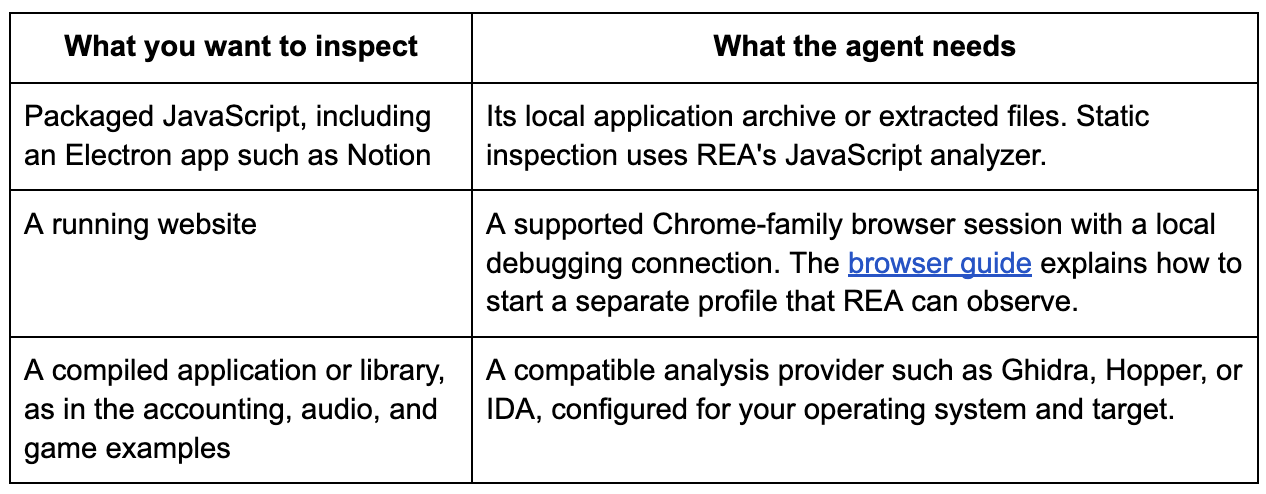
Have the agent check the requirements for your target. Ghidra, for example, also needs a compatible Java development kit. The native examples require more preparation than inspecting packaged JavaScript.
Check the connection with a small inspection. After restarting, give your agent the target and this instruction:
Use the REA tools available in this session to perform the smallest relevant inspection of this target: [application path or browser page]. Identify what you inspected and report one finding from the tool’s actual response. If a required connection or analysis tool is missing, explain that specific problem and the next setup step.
A successful response should identify your target and return an actual finding. With Notion and other Electron apps, that first finding may be an integrity warning about the app’s packaged native files. That’s how the app ships, not a broken setup. Tell the agent to continue with REA’s record-and-continue integrity policy. If the tools are missing, have the agent follow the connection troubleshooting instructions. A healthy configuration check alone doesn’t establish that the current agent session has loaded the tools.
Now pick one of the five investigations below and use its prompt. Replace the bracketed fields with your details. Each prompt aims for a small result you can understand before deciding how much further to go.
Build a business tool around rules you understand
Ledger Reborn is a useful place to start because accounting software has to maintain relationships across the work it records.
Consider a partial payment: some money arrives against an invoice, leaving a balance to collect. If you’re specifying an application, you need to decide what records that payment, how it relates to the invoice, and how the remaining amount is calculated. Those decisions affect what happens when someone corrects an entry or asks for a report later.
You can know that business process well without knowing how to design the software beneath it. Studying an existing implementation gives you something concrete to discuss with your agent.
In the Ledger Reborn investigation, the author used REA with Ghidra to study selected functions in the QuickBooks Desktop for Mac 2024 Trial. Those included inventory arithmetic, budget sign handling, reconciliation balances, and cash-basis branches. Ghidra is an analysis tool that helps turn compiled programs into something an investigator can examine.
The author then independently wrote a Python/SQLite application. Its documented synthetic workflow covers invoices, partial receipts, bills, inventory, bank matching, and period locks. A separate comparison reportedly matched three reports from an official sample company account by account. These are specific checks. They don’t establish complete company migration or readiness to run a real business’s books.
The lesson for a builder is in the sequence. An existing product supplied evidence about selected behavior. The author used that understanding while building a new implementation and checking its results. The investigation and the new application were separate pieces of work.
To apply that sequence to a smaller task, choose a rule whose correctness you can judge and describe the input and answer you expect. Use the investigation to fill in the parts you don’t understand yet. Then ask your agent to implement that rule in the context of your own application.
For an accounting investigation, start with one item’s inventory value. You’ll need the local application, a compatible native-analysis provider, and sample data you can use for comparison:
Target: [full application path, version, and operating system]. Sample data or report: [sample-company path or report].
I want to understand how this application calculates the inventory value of one item, so I can specify that behavior in my own tool. The relevant screen or report label is [label].
Confirm the target and the native-analysis tools available. Use REA to locate the relevant calculation, starting from that label or a related function. Follow only the inputs and dependencies needed to explain the result. If the label doesn’t lead to the calculation, tell me what additional information would help.
Return the inputs, the calculation you can establish, and the code locations supporting it. Propose one numerical check against the sample data, separating an expected result from anything actually observed in the running app. Stop with that explanation and check before building a replacement.
If you know the work well, you can also supply the awkward case that a generic build request might miss. Tell the agent about it. Ask how the investigated implementation handles it, then decide whether that behavior belongs in your version. Here, your experience can make the resulting software better.
Repeating the original native-software investigation requires the appropriate analysis setup. Or read the case study and explore the public reconstruction first. Use ordinary source-reading tools when the code you need is already available.
Find the design hiding inside a familiar feature
Notion gives us a smaller example with a surprisingly useful reveal.
When you copy a block, what do you think you’ve copied? The words are visible. Formatting may come along. But an editor can also need information about the block’s structure that ordinary text doesn’t express.
The published Notion investigation follows the desktop clipboard operation through the packaged application. Separate tests of cached editor modules reveal the arrangement behind richer copying: text and HTML go to the system clipboard, while structured block data is kept locally. An identifier in the HTML connects the two. On paste, a matching local entry restores the block data. A stale entry leaves the text and HTML.
The study identifies the desktop package as Notion 7.6.1 and the editor assets as a July 2026 capture. It documents package analysis and extracted-module tests, rather than a current live session in every version of Notion.
That little identifier changes how you think about the feature. A copy operation can preserve several representations of the same content, with different results depending on what the receiving application understands and can access.
If you’re building an editor, this gives you a much better design conversation. Decide what must survive a move: perhaps the visible words are enough, or perhaps their structure and relationship to a source matter too. Then ask what should remain usable when the richer information can’t be recovered.
Those are proposed questions for your own tool. The case study stops at the mechanism. It exposes something to reason about and adapt.
For your own investigation, start with the local desktop package. In an Electron app, the archive is often called app.asar. Your agent can help locate it within the app’s installation:
Target: this local Notion package, [full path and version], on [operating system]. I want to understand how a clipboard write travels from the page-facing API to the system clipboard.
Use REA’s JavaScript application analysis. Begin with a summary and inspect the relevant files. The published study uses the channel notion:clipboard:write. Check whether it exists in this version, then follow its wrappers to the receiving code. Read the implementation wherever the automated trace stops short.
Explain what’s passed at each step and cite the source locations. If matching editor code is available, follow how it restores structured block data and handles a missing local entry. Otherwise, identify that missing code. Finish with a short diagram and one proposed check. Distinguish inspected code from behavior observed while running the app.
Once you understand the mechanism, ask the question that connects it to your project:
Using the findings we established, help me design a copy-and-paste feature for my editor that preserves [the relationship or structure you care about]. Compare two approaches and recommend the simpler one for [my platform and constraints]. Build a small, separate demo with synthetic content. Check both a successful transfer and the fallback when the richer information is unavailable. Explain which choices come from our requirements and which were informed by the investigation.
This is one of the most useful things REA can do for a person building with AI. You can investigate the engineering behind a feature you recognize, then use what you learn to ask for a version suited to your work. The requirement becomes more precise because you see the choices inside it.
Look at what your application actually ships
You can also turn the investigation toward something you’ve built.
A team’s published account of inspecting its own production portal starts from a practical question: what can someone see and reach without logging in?
The portal used Next.js and Stripe. REA helped inspect the scripts and storage visible through a browser session, and the team later compared findings against source. The broader investigation found a concrete deployment problem: the login form was available over plain HTTP on the tunnel hostname. The team reports fixing it with Cloudflare’s Always Use HTTPS setting.
The report also describes a static analysis of downloaded JavaScript chunks that stalled. REA contributed to the investigation, and the team used more than one way of examining the application.
That sequence holds a lesson for builders. The files in your project describe what you intend to build. A visitor encounters the deployed system, including its hosting configuration and the code delivered to their browser. Inspecting that view gives you another way to discover a mismatch between intention and behavior.
Start with one page of your own application and one expectation about it. Perhaps you want to understand which scripts load before login or which browser storage keys appear. REA’s passive browser tools report selected metadata and key names, with storage values redacted. They need a connection to the browser, and an observation must begin before the action you want to capture.
Target: the signed-out page of my own application at [URL]. My expectation is [which scripts or storage keys I expect before login].
Help me open it in a separate Chrome-family browser profile that REA can observe through a local debugging connection. Confirm the selected page and signed-out state.
Arrange one reload during an active REA observation window, and tell me when to reload. After the page settles, use REA to record the page’s script inventory, available request metadata, and explicitly requested storage key names. Report what each capture actually covers.
Compare the findings with my expectation. Explain any discrepancy and propose one focused follow-up check. Keep conclusions limited to the page and observation window. An empty result should retain any capture limitations.
A clean observation of one page answers the question you asked about the session you inspected. Security is a much larger question. If the investigation finds an issue, the useful next step is a correction followed by another observation of the same behavior.
For anyone shipping applications with AI, that’s a practical habit to develop. Ask the agent to help you look at the delivered product. Give it a specific expectation to examine. Make the result actionable.
Understand the software controlling your equipment
The same curiosity can extend into hardware.
VSL-DSP is a Linux project for PreSonus AudioBox VSL equipment. Its maintainer credits REA and Ghidra, used through a LazyOwn integration, with findings from vendor control libraries. Those findings informed a decibel command and conversion functions for audio gain.
One detail is especially revealing: the investigated library treats decibel gain and negative infinity as separate domains with dedicated handling. The maintainer also states that the vendor’s mute command remains unknown. A numerical conversion doesn’t, by itself, tell you how every device command works.
This is unfinished compatibility work. The project documents code and tests, while hardware I/O fault testing remains open. Its account supports a story about understanding and implementing selected controls, with more validation still required.
For a technical reader, it provides another substantial place to use REA. Equipment has software conventions behind its controls: values, representations, commands, and special cases. Understanding one of those conventions can help you decide how to implement support for a device you own.
Device: [manufacturer and exact model]. Vendor software: [version and operating system]. Library to inspect: [full local path].
I want to understand the conversion between linear gain and decibels. Confirm that the available native-analysis tools support this library. Use REA to locate the conversion, read its constants, and investigate how the library handles zero and negative infinity, including any separate handler.
Return the supported formula or pseudocode with source locations, and identify any unresolved assumptions. Propose a small software-only test using an ordinary value and the boundary cases. Keep unknown device commands, including mute, explicit. End with what we’d need to establish before testing a control on hardware. Keep this investigation to the local library.
The interesting result might be a conversion function to implement and test. It might also be the discovery that you have only part of the protocol. Either result gives the next stage of the work a firmer starting point.
Recover behavior from an older program
DX-Ball, the Windows brick-breaking game, gives us a close look at what happens when the first answer isn’t enough.
The reconstruction project uses Codex and REA with Ghidra to investigate the original executable and express its behavior in readable C/C++. In the published sound-panning example, the question is how a brick’s horizontal position becomes a left-or-right sound value.
The initial pseudocode was incomplete. The investigation continued into the machine instructions, followed a caller, and read numerical constants. Those pieces supplied the information needed to reconstruct the calculation. The project reports that the resulting function agreed with the original across 3,205 comparisons and reproduced all 63 compiled bytes at the project’s October 7 checkpoint.
The first incomplete answer gave the investigator a reason to look elsewhere in the program. Following the caller helped explain what the function received. Reading the constants helped explain what it did with that input. The comparison then asked whether the reconstructed behavior agreed with the original. Each step answered a question left open by the previous one.
For a developer, this is a route into maintaining software whose original source isn’t available. Recovering a behavior in readable code creates something to examine, change, and build upon. Preservation, porting, and modification all depend on understanding enough of the old behavior to make deliberate decisions about the new version.
The DX-Ball repository documents a continuing reconstruction workflow, with original files and a particular toolchain required. The small function’s result is a concrete example within that larger project.
If you’re exploring this path, the sound-pan calculation gives your agent a precise first question. Supply an original executable you own and the reconstruction checkout. The repository documents the additional tools needed to compare them:
Original DX-Ball executable: [full path and version]. Reconstruction checkout: [full path]. My operating system is [OS].
Use REA to investigate how a brick’s horizontal position becomes the stereo sound-pan value. Confirm the original target and available native-analysis provider. Inspect the relevant function, its caller, and the constants it uses. Where the pseudocode is incomplete, examine the instructions.
Explain the calculation with references, then compare it with the recovered source in the checkout. Read the project’s comparison instructions and run the focused check if its required tools are available. Report exactly what ran and matched. If a prerequisite is missing, give the specific next step without claiming a passed comparison. Finish with the calculation, the comparison result, and any unresolved difference.
You can begin smaller than an entire game. A message can be an entry point. In a separate community experiment with bzip2, the author asked which function printed a particular message in a binary with its function names removed. They checked REA’s answer and call relationships against an unstripped build and source.
To narrow a difficult investigation, find something observable, then ask what produces it. The name of the function can come later.
Start with a question you can finish
Choose the story closest to something you want to do. You now have five different reasons to investigate: specify business behavior, understand a feature’s design, inspect a deployment, explore device compatibility, or recover an older program’s behavior.
The first session should end with an answer you can explain and a next step you understand.
With REA connected, you can use the same approach on another application you care about. Name the behavior and the decision it will inform, then let the agent help find a suitable starting point. Local application code has a boundary: it doesn’t automatically reveal the private implementation of a remote service.
Here’s a starting prompt. It asks you for the details it needs:
I want to understand one behavior in software I use, so I can make a decision about my own project.
Before you investigate anything, ask me for these, one at a time:
- The software’s name, version, and operating system.
- The full local path or exact browser page. Offer to help me find it.
- The one action, calculation, or interaction I want to understand.
- The decision I want to make, and what it would help me build, change, or understand.
Then use the REA tools available in this session. Identify a specific missing prerequisite if one prevents the investigation. If documentation or available source answers the question, start there.
Begin with the smallest useful inspection and follow the relevant code or observed action. Explain the inputs, changes, and result in ordinary language, with the important source locations or observations. Keep inspected code, observed behavior, and inference distinct.
Finish with a short explanation or diagram, the remaining unknowns, and one check that could reveal a mistake. State whether that check was actually run. Explain what the findings change about my original decision before proposing a build.
These prompts start investigations. The available target determines which questions can be answered. If the agent gives you a large report and you still can’t explain the behavior, narrow the request. Ask it to walk through one input from beginning to end. Ask where each important change happens. Ask it to draw the relationships if that would make them easier to understand.
For a small practice target, REA also publishes worked investigation guides, including an Electron application example. A compact target makes it easier to follow the whole path before moving into a large commercial package.
You can finish an investigation with a better requirement even if you haven’t built anything yet. Perhaps you now know what must survive a copy operation. Perhaps you can specify the records behind a payment. Perhaps you’ve found a deployment behavior you need to change. Each gives your next build request more substance.
If you’re ready to turn that understanding into your own application, my guide to building personal software is the companion piece to continue with.
And bring your investigation back to the community. Share the software you looked at, the question you asked, the detail that surprised you, and what it changed about your plans. I’d like to see which parts of the software you use every day become more interesting once you can look inside them.
Coming up
AI is making it easier to pretend you’re productive. More agents, more apps, more plans, and the business still hasn’t launched. I’ll walk through how to give agents assignments that move the work forward, how to tell which results deserve your attention, and how to stop recurring jobs once their purpose has passed. You’ll come away with a way to get your agents to tell you plainly when something doesn’t matter.
Related reading
- What if AI gets more superhuman and more uneven?: why the same AI could rebuild a 16,000-line program without seeing its code, and what that means for what you hand it.
- Nobody understands their own code anymore: why so much shipped code was never understood, and the fix.
- The vibe coding wall: how an AI agent deleted 2.5 years of customer data, and the five habits that would have stopped it.
- Taming the genie: how to read the code you just wished into existence: why reading code beats producing it, and how to trace what your AI built.
I make this Substack thanks to readers like you! Learn about all my Substack tiers here