So it turns out not everyone wants to use the same tools I do--which is actually the whole point. Here's why consistent architecture matters when building with AI.
By Nate
Published: 2026-01-19
URL: https://natesnewsletter.substack.com/p/50-people-ignored-my-tool-recommendations
There are four principles that separate people who successfully build AI systems from people who get stuck and give up. And I didn’t learn them from a textbook. I learned them last week from watching dozens of people build the same system in completely different ways.
Last week I posted a video about building a second brain without code. It got a lot of traction. And what happened next taught me more about how building actually works in 2026 than anything I could have figured out on my own. People took the architecture I described and implemented it in tools I’d never recommended. They hit walls I hadn’t anticipated and found ways through. They used AI not just inside the system, but to help them construct the system. And patterns emerged.
The second brain was the project. What we learned building it together is about how complex systems actually get constructed now—in a world where you have AI as a collaborator and community as a pattern library.
Here’s what’s inside:
- The four principles. One community member swapped out every tool I recommended and still got the same results. Another wrote a document that lets AI fix its own mistakes. These aren’t hacks—they’re a different way of thinking about what you’re actually building.
- Where people got stuck. Five specific failure modes that cost hours to debug—until someone in the community figured them out. Now you can skip straight to the fix.
- Inside the Zapier build. A walkthrough of my actual automation, with screenshots. Seeing the wiring helps more than any explanation.
- Five patterns pointing forward. The community builds revealed something about where all of this is going—including one approach that might make fixed dashboards obsolete.
Let’s start with the principles.
Subscribers get all posts like these!
Grab the prompts: Personalize Your Second Brain Build
The architecture is the same for everyone. Capture → classify → file → confirm → digest → fix. Those patterns work whether you’re using Slack or Discord, Notion or Obsidian, Zapier or a Python script you run manually on Sundays.
But how you build it is personal.
This kit forces you to design before you build:
- What should your second brain actually do? Not “capture everything” — what specifically is falling through the cracks, and what does “working” look like for you?
- What stack fits your reality? Your existing tools, your budget, your technical comfort, your work constraints, your volume. The stack that fits your life, not the one that sounds best on paper.
- Build your personalized guide. A step-by-step plan with exact database names, copy-paste prompts, and test messages — ending only when the loop actually closes.
- Stress test before you build. The five ways your plan will break in real life, and the enforceable rules that prevent each one.
Run them in order. Don’t skip ahead. If you leave blanks, the prompts will ask clarifying questions and stop — that’s by design. A confident recommendation built on missing inputs is worse than no recommendation at all.
The four principles
When I published the original video, I was specific about the stack: Slack for capture, Notion for storage, Zapier for automation, Claude or ChatGPT for intelligence. What I didn’t expect was how many people would completely swap out the components. And as I watched the builds roll in, patterns emerged. Not just in what people built, but in how they built.
The First Principle: Architecture is portable, tools are not.
The systems that work share almost nothing in terms of tooling but share almost everything in terms of structure. The principles I outlined in the first video—the dropbox, the sorter, the form, the receipt, the bouncer, the tap on the shoulder—those patterns showed up in every successful implementation regardless of what tools people chose.
One community member built their system using Discord, Obsidian, and MacWhisper. MacWhisper is a tool that transcribes audio locally on your Mac. Discord became their capture point instead of Slack. They set up a private Discord server with a thread-per-message structure and added timed prompts for morning planning and evening reflection. They connected MacWhisper to automatically process their Zoom recordings, send transcripts to Obsidian, and run a slash command that processes and files everything by project. The system even asks follow-up questions about next actions and waiting-for items.
Different tools, same principles. They have a dropbox, a sorter, a filing cabinet, and a tap on the shoulder. The implementation details are unrecognizable from what I showed, but the architecture is identical. Someone else built using Google Workspace and Google Chat because their organization requires PHI compliance, which means they have to follow specific rules about handling protected health information. Slack wasn’t an option. So they built a Python backend on Google Cloud with Google Chat as the interface and everything persisting back to Google Workspace. Again, completely different tools, identical architecture.
The implication here is profound. When you’re learning to build with AI, don’t memorize the tools. Learn the patterns. The tools will change. Zapier might not be the right choice for you. Notion might not fit your workflow. But the patterns—the dropbox, the sorter, the receipt—those are portable. Once you understand them, you can implement them anywhere.
The Second Principle: When you’re working with AI, principles-based guidance scales better than rules-based guidance.
One community member built their system using Claude’s computer use capability combined with Obsidian and a custom TypeScript agent. They have a custom agent running on a VPS, which is just a virtual server in the cloud, with remote access so they can connect to it from anywhere. And here’s the part that really caught my attention: they wrote an architectural best practices document that guides the coding agent through fixes when things go wrong.
Instead of hardcoding specific rules, things like “always format code this way” or “always check for these specific errors,” they wrote principles. Things like “use test-driven development,” “use dependency injection,” “don’t swallow errors.” The agent interprets those principles in context rather than following rigid rules.
This matters because AI systems are good at applying judgment in context. They’re not just pattern matchers executing if-then rules. When you give an AI a principle like “don’t swallow errors,” it can figure out what that means in a hundred different situations you didn’t anticipate. When you give it a rigid rule like “always log errors to this specific file,” it can only do that one thing.
The implication for building is this: when you’re writing prompts, when you’re creating guidelines for AI systems, when you’re designing workflows that AI will execute, lean toward principles over rules. Give the AI room to exercise judgment. You’ll get more robust systems that handle edge cases you didn’t think of.
The Third Principle: If the agent builds it, the agent can maintain it.
One of the most ambitious community builds came from someone who created what they call a meta agent framework. Instead of wiring up individual tools, they built an agent that coordinates between Claude Code, Codex, Copilot, and Goose, which are all different AI coding assistants. They implemented what’s called a writer-critic loop for reliability, where one agent produces output and another agent validates it, catching errors before they propagate. The agent can set up cloud infrastructure automatically. It generates user interfaces on demand.
And here’s the insight that really stuck with me: they said their goal was to enable the agent to set up the infrastructure rather than doing it themselves. Because if the agent sets it up, the agent understands it, which means the agent can self-correct and self-heal long after you’ve forgotten how the system works.
Think about what this means. When you build something yourself, you understand it deeply in the moment of building. Six months later, you’ve forgotten half of it. The configuration details, the edge cases you handled, the reasons you made certain choices—all of that fades. When an agent builds something with you, and you keep the conversation context, the agent can return to debug, extend, and maintain the system. The documentation is the conversation itself.
The implication is that when you’re building with AI, consider involving the AI in the construction process, not just the execution. Let it help you set things up. Keep the conversation. When something breaks in six months, you can come back to that conversation and the AI will have context that you’ve lost.
The Fourth Principle: Your system can be infrastructure, not just a tool.
Most people who built the second brain treated it as a personal productivity tool. Capture thoughts, file them, get digests, move on. But one community member saw something different. They built a hybrid database approach using Postgres for structured data combined with a vector database for semantic search. A vector database lets you search by meaning rather than exact keywords, so you can ask “what did I capture about customer onboarding?” and find relevant entries even if they don’t contain those exact words.
They built an API endpoint that lets other applications query into their second brain. They’re working toward a reusable SDK, basically a toolkit that other developers could use, so they can connect any application to their knowledge base. This is someone who saw the second brain not as a personal productivity tool but as infrastructure that other systems can build on top of.
Another builder went deep with Qdrant for vector search, Neo4j for graph relationships, and Postgres as the central system of record. They have multiple Claude agents coordinating with a layer they call “skills plus evidence” where generated content comes with built-in receipts showing what sources informed each output. This is clearly not a non-engineer build. But it demonstrates that the same architectural patterns scale from simple to extremely sophisticated. The principles don’t break when you add complexity.
The implication is that when you’re building something, ask yourself whether it’s a tool or infrastructure. A tool solves a problem. Infrastructure enables other things to be built. If you design with infrastructure in mind, you create leverage. Your second brain can power your daily digest, but it can also power your meeting prep, your email drafts, your project planning. The initial investment pays dividends across everything that connects to it.
Now let me add one more build that illustrates something different. One community member went minimalist. They’re using Notion’s mobile export feature as their capture mechanism. They capture thoughts on their phone, export to Notion, and Claude processes their inbox on a schedule and sorts everything to an outbox. The whole system is essentially inbox-outbox with AI processing in between. No Zapier, no complex automation chains. Just Notion and a scheduled Claude call.
Another builder swapped out Notion entirely for local YAML files. YAML is just a simple text format for storing structured data. They kept Slack as the capture layer because they’re in Slack all day anyway and it’s frictionless from their phone. But instead of using Zapier as the automation layer, they use Claude Code, which lets you have a conversation with Claude while it reads and writes files on your computer. The key difference is that their system is session-based rather than always-on. When they sit down to work, they spin up a Claude Code session that processes their inbox, runs the classification, writes to local files, and gives them the fix button in the same conversation.
These builds illustrate that you don’t need complexity to get the benefits. The principles work at every scale. Start simple. Add sophistication only when you feel the limitations. The architecture supports both.
How building actually works in 2026
Now here’s the pattern that emerged that I think represents something genuinely new about how building works in 2026—and I want to spend some time on this because I think it’s the most important thing I learned from watching the community.
The people who got their systems working fastest weren’t the ones who followed my tutorial most carefully. They were the ones who combined community knowledge with AI collaboration. They’d hit a wall, post in the Substack chat, get a pointer from someone who’d solved that problem, and then work with Claude or ChatGPT to implement the fix in their specific context.
One community member, Denyse, posted that she built the entire system in two hours by having Claude in the browser do it with her. She gave it the architecture document and told it to make a plan. But here’s what’s important. She wasn’t working in isolation. She’d already read through the community discussion. She knew what problems other people had hit. So when Claude proposed something that she’d seen fail for someone else, she could redirect. And when she got stuck on something genuinely novel, she posted in the chat and got help within minutes.
This is the new model. Community provides the pattern library. AI provides the implementation muscle. You provide the context and the judgment about what applies to your situation. No single piece is sufficient. The tutorial alone doesn’t adapt to your tools. The AI alone doesn’t know what problems other people have already solved. The community alone can’t do the detailed work of wiring up your specific automation. But combined, they’re extraordinarily powerful.
Let me make this concrete with how it actually played out.
When I published the original video, I structured it as a tutorial. Here are the steps. Here are the principles. Go build. That’s the format I learned, and it’s the format that YouTube rewards. But watching the community, I noticed that the tutorial was almost functioning as a shared vocabulary more than as a set of instructions. People weren’t following the steps in order. They were using the concepts—the dropbox, the sorter, the receipt—as a language to communicate with each other and with AI about what they were trying to accomplish.
Someone would post “my sorter is returning low confidence on everything” and immediately other community members knew exactly what layer of the system was failing. Someone would ask “should I build the bouncer as a separate Zap or inline?” and the question made sense without explanation. The principles gave us a shared mental model, and that shared model made collaboration incredibly efficient.
This is different from how building worked before. In the old model, you’d follow a tutorial, get stuck, search Stack Overflow for error messages, piece together solutions from fragments across the internet. The knowledge was scattered and the translation work was on you. In the new model, you have a community working on the same problem with the same vocabulary, and you have AI that can do the translation work of adapting someone else’s solution to your context. The friction drops dramatically.
I want to be specific about what that AI translation work actually looks like in practice. Say someone in the community posts “I solved the confidence threshold issue by adding a fallback classification step.” That’s useful information, but it’s not directly implementable in your system. In the old model, you’d have to figure out how to translate that concept into your specific Zapier configuration, your specific prompt structure, your specific Notion schema. That translation work is non-trivial and it’s where a lot of people get stuck.
In the new model, you take that community insight to Claude and say “someone suggested adding a fallback classification step when confidence is low. Here’s my current automation. How would I implement that?” And Claude can do the translation. It understands both the abstract concept and your specific implementation. It can generate the exact Zapier step you need, or the exact modification to your prompt, or whatever the implementation requires. The community provides the what. The AI provides the how. You provide the judgment about whether it actually makes sense for your situation.
And here’s what I think is the deeper point. The same AI capabilities that make a second brain work—classification, extraction, summarization, pattern matching—those same capabilities make this new kind of collaborative building possible. The AI doesn’t just operate inside the system you’re building. It helps you construct the system. It translates between what someone else did and what you need. It explains why something works, not just that it works. It’s a genuine thinking partner in the construction process.
Once you see this, you start to recognize that almost any complex workflow you need to create can benefit from this approach. Community for patterns, AI for implementation, your judgment for context. The combination compounds.
Where people got stuck
Now let me talk about where people got stuck. This section matters because these are the obstacles that the community discovered together. When someone hit a wall and posted about it, others chimed in with solutions. AI helped diagnose specific instances. And patterns emerged that apply to almost everyone building this system.
Even with AI assistance, even with detailed documentation, even with a community ready to help, there are specific failure modes that come up repeatedly. Understanding these in advance will save you hours of debugging. I’m going to walk through five of them.
The first major sticking point is Slack’s threading model. This seems simple until it isn’t. Every message in Slack has a unique identifier called a timestamp, which is abbreviated ts. But when you reply in a thread, your reply has two important values. It has its own ts, which is the reply’s unique identifier, and it has a thread\ts, which points back to the original parent message. When you’re building the fix automation, which lets users correct misclassified items by replying “fix: people” in the thread, you need to use the thread\ts from the fix reply to find the original message. Your Inbox Log stored the original message’s ts. So you’re matching the fix reply’s thread\_ts against the Inbox Log’s stored ts to find the entry that needs to be updated.
If you get this wrong, the fix automation silently fails. It looks for a record that doesn’t exist because you’re searching with the wrong identifier. And because Slack’s naming is confusing—ts sounds like it should be the only timestamp you need—this trips up almost everyone on their first attempt. This is exactly the kind of thing that’s hard to figure out alone but becomes obvious once someone in the community explains it.
The second major sticking point is Notion property names. Notion is case-sensitive and whitespace-sensitive when it comes to property names. If your database has a property called “Next Action” with a space and a capital A, you must reference it exactly that way in your automation. “next\_action” won’t work. “NextAction” won’t work. “next action” with a lowercase a won’t work. The record will be created, but the field will be empty, and you’ll spend an hour trying to figure out what went wrong.
My advice is to open your Notion database, screenshot the exact property names, and copy them character by character when setting up your field mappings. Don’t rely on memory. Don’t assume you know how you named something. Just copy exactly.
The third sticking point is Slack app scopes. When you create a Slack app, you need to specify what permissions it has, things like “can read messages in channels” or “can post messages.” For the second brain to work, you need scopes like channels:history, channels:read, chat:write, and if your inbox channel is private, you need groups:history and groups:read. Here’s what catches people. After you add new scopes, you must reinstall the app to your workspace. If you skip this step, your automation fails with “missing\_scope” errors even though you clearly added the scopes in the configuration panel. Slack requires reinstallation for scope changes to take effect. I’ve watched multiple people lose an hour to this.
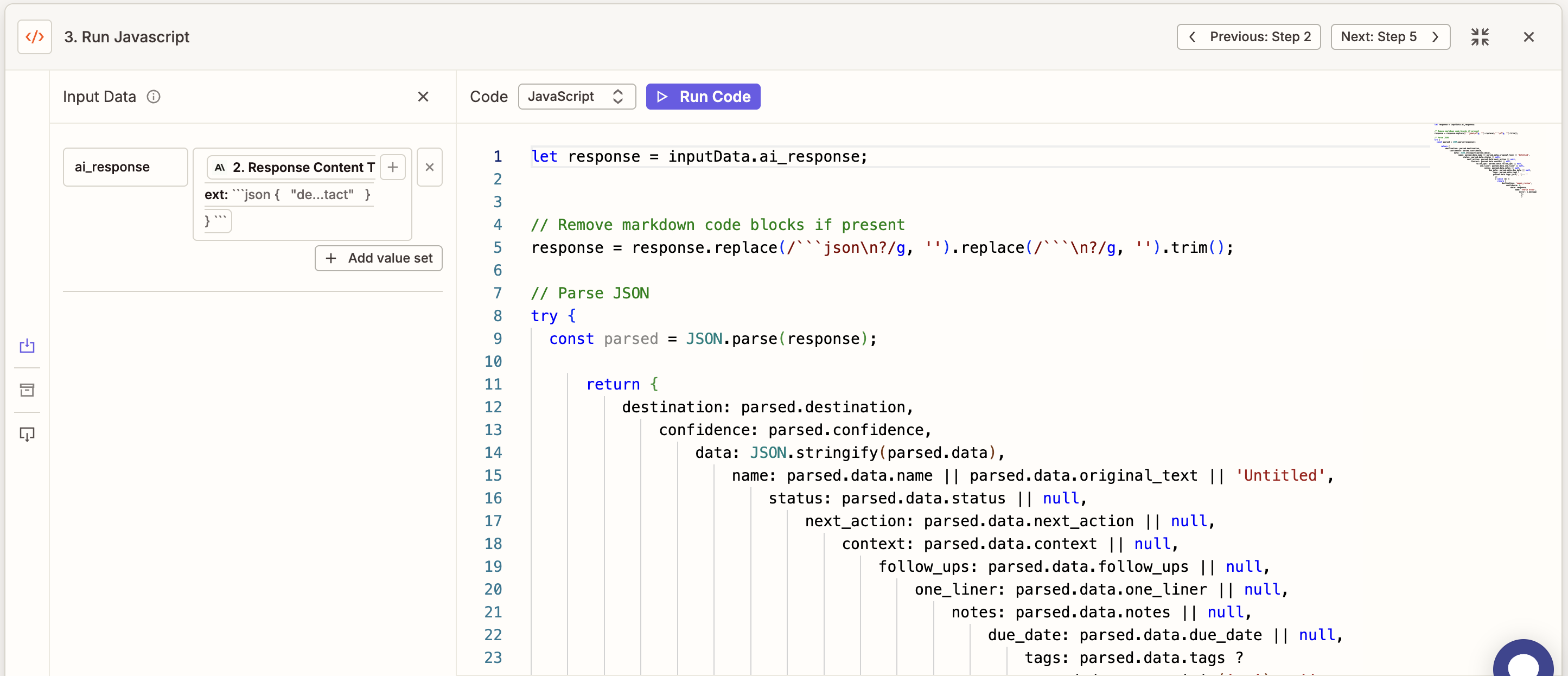
The fourth sticking point is the AI response format. When Claude or ChatGPT classifies your message, it needs to return structured data that your automation can parse, specifically JSON, which is a standard format for structured data. The system prompt tells it to return JSON only with no preamble and no markdown. But sometimes, especially with certain model versions or when the input is ambiguous, the AI will return something like “Here’s the classification:” followed by the JSON, or it will wrap the JSON in markdown code blocks. Your parsing step needs to handle this gracefully. The code step in the automation should strip any extra formatting and extract the JSON even if there’s text around it.
The fifth sticking point, and this one is subtle, is building the entire automation before testing any piece of it. The right approach is to build step one, test it, verify you see the data you expect. Then build step two, test it, verify the response looks right. Continue this pattern for each step. When you build everything at once and then test, and something doesn’t work, you have no idea where in the chain the failure occurred. When you test incrementally, you know the failure is in the most recent step you added.
These aren’t just debugging tips. They represent a way of thinking about system construction that applies far beyond second brains. Understand your data identifiers. Be precise with naming. Verify permissions after changing them. Handle messy input gracefully. Test incrementally. These principles make the difference between systems that work reliably and systems that feel fragile and unpredictable.
Inside the Zapier build
Now let me give you a quick tour of what the Zapier automation actually looks like when it’s built. I’m going to walk through this because several people asked for it, and because seeing the structure helps solidify the concepts we’ve been talking about.
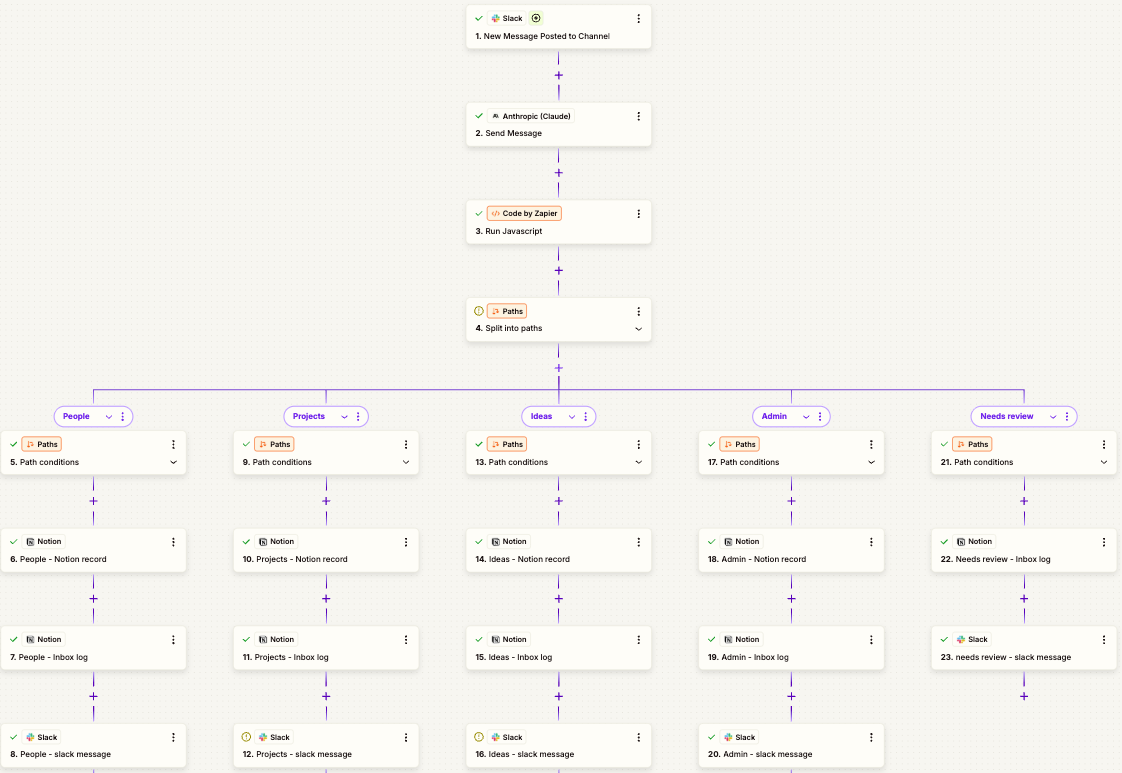
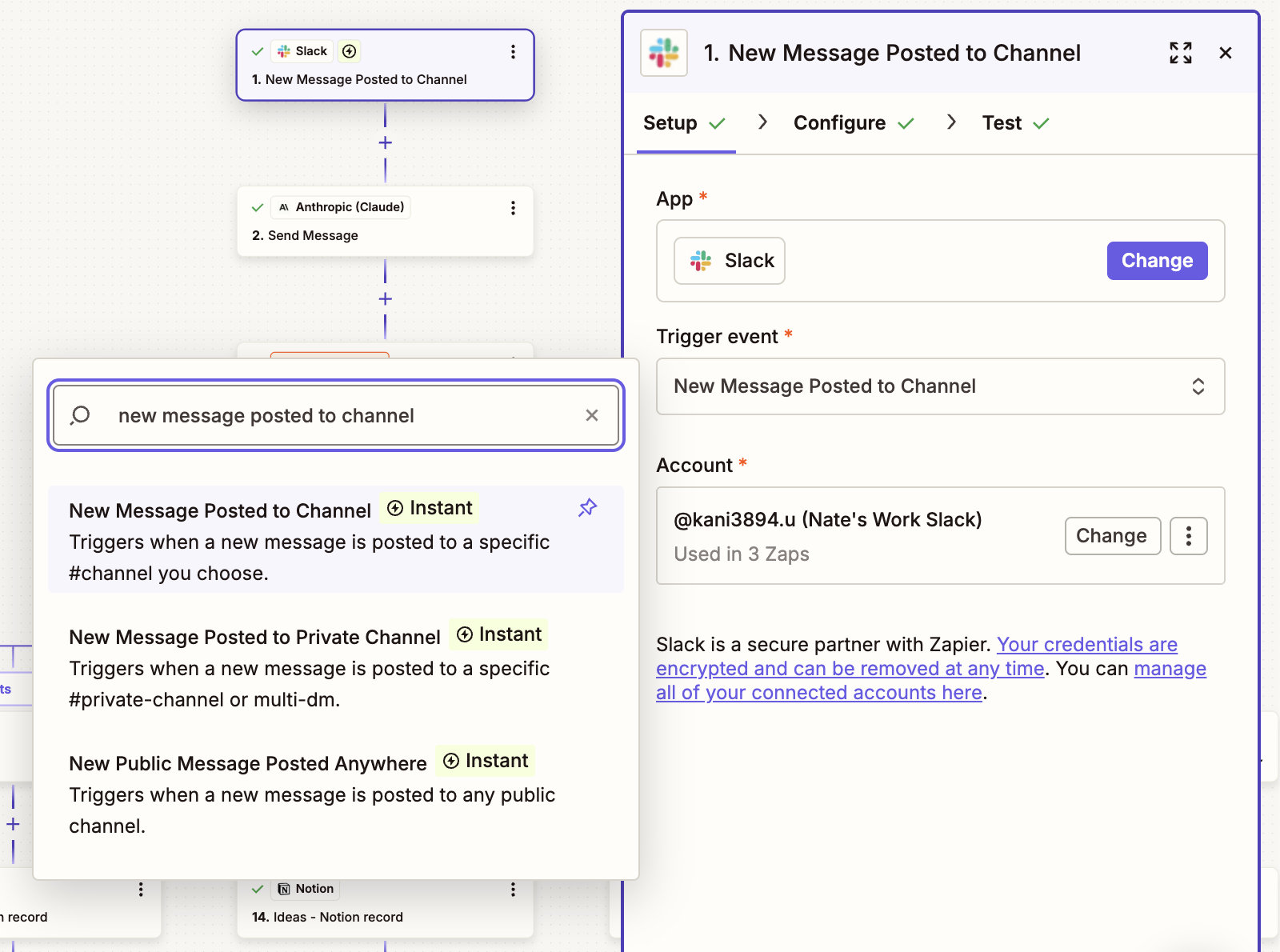
The flow starts with a Slack trigger. When a new message is posted to your SB Inbox channel, Zapier captures it. The trigger gives you access to the message text, the channel ID, the user who posted it, and critically, the ts which is the message’s unique identifier that we talked about in the debugging section.
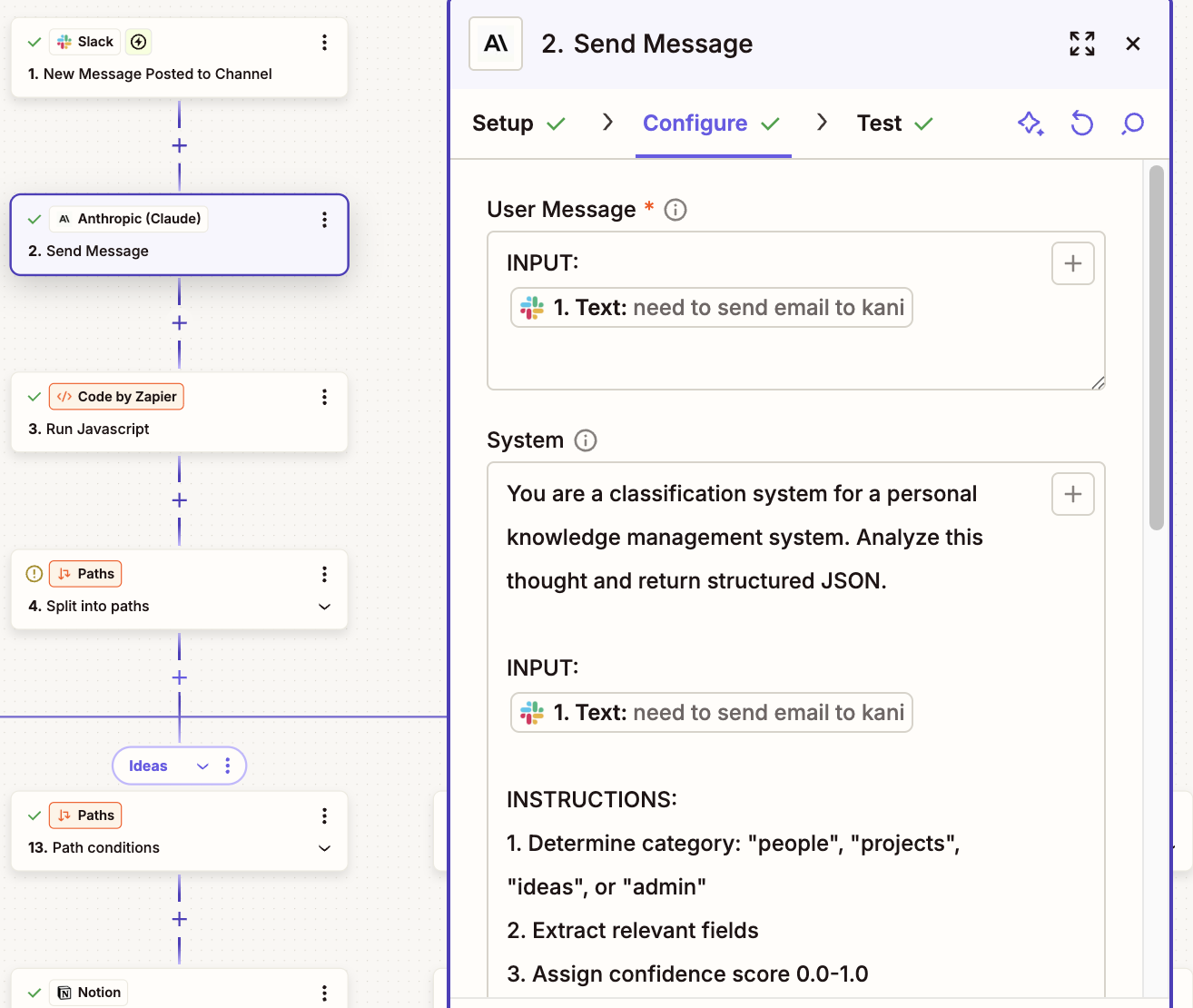
That message text goes directly to Claude via an API call. The Anthropic action in Zapier sends your classification prompt along with the raw message. The prompt specifies the JSON schema, tells Claude to classify into one of four categories, and asks for a confidence score.
After Claude responds, a Code by Zapier step cleans up the response. This step removes any markdown formatting, parses the JSON, and flattens the nested structure so each field is easy to reference in later steps. If Claude returns something malformed, the code step handles it gracefully and flags that the item needs review.
Then comes the routing logic. A Paths step checks the destination field from the parsed response. If it’s “people,” the flow goes down the People path. If it’s “projects,” down the Projects path. Same for Ideas and Admin. And there’s a fifth path for items that need review, which triggers when confidence is below your threshold or when something went wrong with parsing.
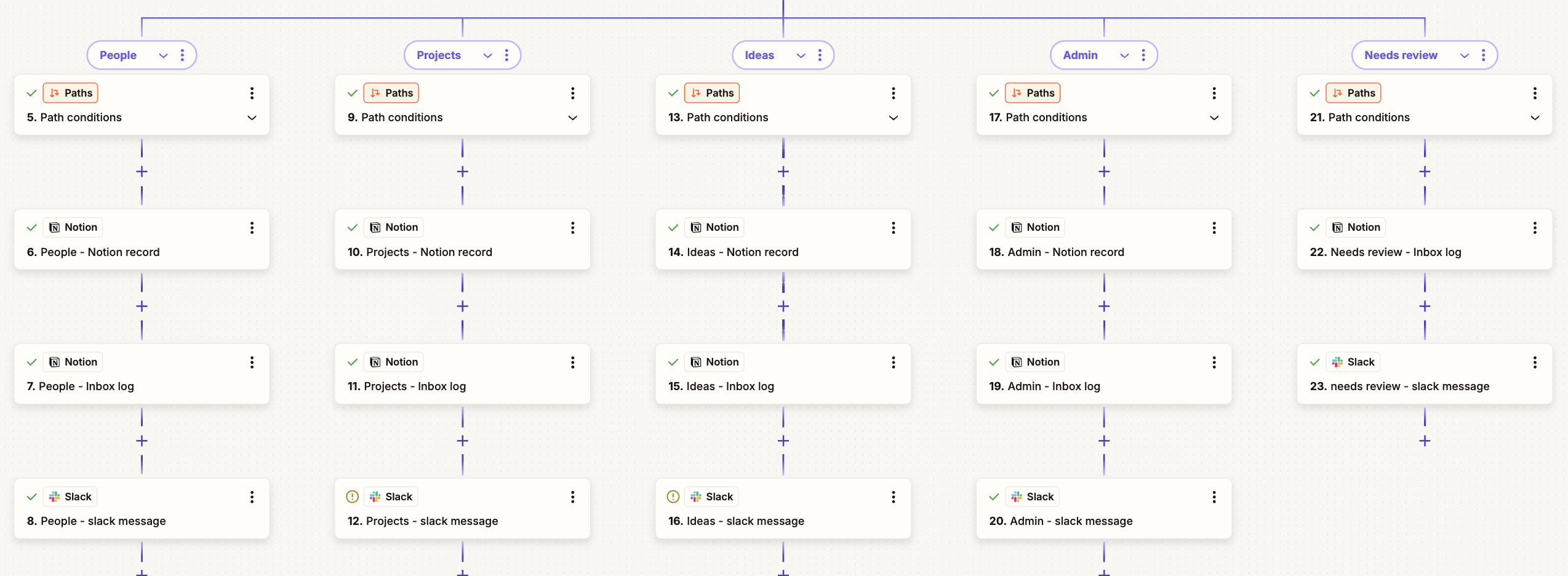
Each path does three things. First, it creates a record in the appropriate Notion database. The People path creates a record in People with name, context, follow-ups, and other fields populated from Claude’s structured response. Second, it creates an entry in the Inbox Log with the original text, where it was filed, the confidence score, and the Slack thread ts so you can trace back to the original message. Third, it sends a Slack reply in the thread confirming what happened. “Filed as People: Sarah Chen. Confidence: 0.87. Reply fix if I got it wrong.”
The Needs Review path works slightly differently. Instead of filing to a destination database, it logs the item with a “needs review” status and sends a Slack reply asking for clarification. “I couldn’t confidently classify this. Can you repost with a prefix like person: or project:?”
That’s the complete capture flow. One trigger, one AI call, one parsing step, and then five parallel paths that all converge on the same pattern: write to destination, log the filing, confirm in Slack.
The fix automation is a separate flow with its own trigger. It watches for threaded replies that contain “fix:” in the text. When someone replies “fix: people” to a message that was wrongly classified as a project, the flow parses the correction, looks up the original entry in Inbox Log using the thread\_ts, retrieves the original text, re-runs classification with the category forced, creates a new record in the correct database, updates the Inbox Log with the new destination and a “fixed” status, and replies confirming the correction.
The daily and weekly digests are scheduled automations. At your configured time, Zapier queries your Notion databases for active projects, people with follow-ups, and recent additions. It sends all of that context to Claude with a summarization prompt, and Claude generates a digest that gets delivered to your Slack DMs. The digest is constrained to be short and actionable. Top three priorities for today. One thing you might be stuck on. One small win to notice. Under 150 words. Designed to fit on a phone screen and take less than two minutes to read.
Five patterns pointing forward
Looking across all the community builds, I want to share five patterns that emerged. These point toward where this is all going.
First, Zapier has limitations that become apparent at scale. Zapier works great for straightforward flows, but it can’t handle loops, it can’t easily branch and reconverge, and the complexity grows exponentially when you try to add sophisticated logic. Several builders hit walls and switched to Claude Code, custom automation servers, or Python bots that give them more control over the flow. If you’re starting with Zapier and it works for your needs, great. But know that you might outgrow it, and the good news is that the principles transfer to more powerful systems when you’re ready.
Second, the storage backend matters less than you might think. People are successfully using Notion, Obsidian, local YAML files, Postgres with vector extensions, and Neo4j graphs. What matters is that the storage layer is writable by automation, readable by humans, and supports filtering. If you have an existing system that meets those criteria, you can probably adapt the second brain architecture to it rather than switching to Notion.
Third, capture interfaces should match where you already live. Slack works for people who are in Slack all day. Discord works for people who live in Discord. Google Chat works for organizations locked into Google Workspace. The frictionless capture principle means meeting people where they are, not forcing them into a new tool. If capturing a thought requires switching apps, you’re adding friction that will kill adoption.
Fourth, there’s an emerging split between session-based and always-on approaches. The Zapier flow I showed is always-on. Messages get processed automatically whether you’re engaged or not. The Claude Code approach is session-based. You process your inbox when you sit down to work, in conversation with the AI. Both patterns are valid. Always-on is better for truly offloading the mental overhead. Session-based gives you more control and the ability to ask questions during processing. Some people are building hybrid approaches where routine captures are processed automatically but complex items wait for a human-in-the-loop session.
Fifth, and this is where things get interesting, there’s movement toward agent-generated interfaces. Instead of building a fixed dashboard in Notion and hoping it serves your needs forever, some builders are generating UI on demand. When they need a particular view of their data, they ask Claude to create it. This is early and experimental, but it points toward a future where the interface adapts to what you need right now rather than being fixed at design time.
The larger pattern
Let me close with the larger pattern I see emerging.
The second brain was the project. But the way we built it together revealed something bigger about how building works now. And I think this matters beyond productivity systems, beyond automation, beyond any specific use case.
For 500,000 years, we’ve had roughly the same cognitive architecture. Four to seven items in working memory. Terrible at retrieval. Good at pattern recognition when patterns are in front of us. And for most of that history, when you wanted to build something complex, you either figured it out yourself or you found an expert to teach you. The knowledge transfer was slow and expensive. You’d apprentice with someone for years. You’d take courses. You’d read books and try to translate them to your situation. The gap between knowing that something is possible and being able to implement it in your context was enormous.
What’s different in 2026 is that the combination of community and AI changes the economics of building. Community creates a shared pattern library that evolves in real time. When someone figures out a better way to handle the confidence threshold, everyone benefits within hours. When someone discovers a failure mode, the whole community learns to avoid it. The knowledge isn’t locked in a book or a course. It’s alive and growing.
And AI provides the implementation muscle to adapt those patterns to your context. The gap between “I understand what someone else did” and “I can do the equivalent in my situation” used to be where most projects died. That’s where the friction was highest. That’s where you needed the most expertise. And now AI can bridge that gap. Not perfectly, not without judgment from you, but well enough that non-engineers can build systems that used to require professional developers.
You no longer need to be an engineer to construct sophisticated systems. You need to understand principles well enough to collaborate. You need to be able to describe what you want clearly enough that AI can help you build it. You need the judgment to know when a community pattern applies to your situation and when it doesn’t. But you don’t need to know how to configure every API call or debug every edge case. That’s what the collaboration is for.
And here’s what I’ve learned from watching this community. The principles are the real asset. The dropbox, the sorter, the receipt, the bouncer, the fix button. When you understand those patterns, you can implement them in any tool. You can debug when things break because you know what layer of the system is failing. You can extend when your needs change because you understand how the pieces fit together. You can have a productive conversation with an AI collaborator about architecture because you’re both speaking the same conceptual language. The principles give you leverage that no specific tutorial can provide.
The community proved that the principles are portable. People built in Discord, in Obsidian, in Google Chat, in custom Python systems. They swapped every component I recommended. The storage layer, the automation layer, the capture interface—all of it. And the systems work because the architecture holds regardless of tooling.
So here’s what I want you to take from this. If you’re building something, anything, in 2026, you don’t have to do it alone and you don’t have to follow tutorials step by step. Find a community working on similar problems. That community might be a Substack chat, a Discord server, a subreddit, a Slack group. The format matters less than the shared context. Learn the principles that govern the domain. Not the specific steps, the principles. The patterns that stay constant even when the tools change. Use AI to handle the translation work between what others have done and what you need. The AI isn’t replacing your thinking. It’s amplifying your ability to implement.
The combination compounds in ways that none of the pieces do individually. A tutorial gives you steps. A community gives you patterns. AI gives you translation. But together, you get something new. You get the ability to build sophisticated systems without years of specialized training. You get the ability to adapt other people’s solutions to your specific context. You get the ability to debug and extend and maintain systems over time because you understand them at the level of principles, not just procedures.
That’s how building works now. That’s what I learned from watching you build.
What to build next
If you haven’t built the second brain yet, the architecture document is still in the community chat. Start there. But don’t feel bound by the tools I used. Pick the capture layer that matches where you already live. Pick the storage layer you’re already comfortable with. Let AI help you wire it together. And when you hit a wall, post in the chat. Someone’s probably solved it.
If you’ve already built it, I’d love to hear what you’re extending it toward. Several people are already building on top of their second brain—using it as the foundation for automated meeting prep, email drafting, weekly reviews. The infrastructure-versus-tool distinction matters here. Once you have a system that captures, classifies, and retrieves, a lot of other workflows become possible.
And if you’re reading this and thinking about a completely different system you want to build—not a second brain, but something else entirely—the meta-lesson still applies. Find the community. Learn the principles. Use AI for translation. The combination works for any complex workflow, not just this one.
I’m genuinely excited to see what you build next.
I make this Substack thanks to readers like you! Learn about all my Substack tiers here and grab my prompt tool here