ChatGPT 5.2 dropped and I immediately tore it apart—testing docs, excel, data, powerpoint, and more. This is a special model, and I lay out why it gives us a preview of 2026 now!
By Nate
Published: 2025-12-12
URL: https://natesnewsletter.substack.com/p/new-chatgpt-52-complete-teardowni
ChatGPT 5.2 gives all of us high-powered personal agents that I honestly didn’t expect until next year.
It’s being called an incremental release and that’s just wrong.
It’s a fundamentally new way of working with AI, and we’re all going to start needing new prompting and work skills to make the most of it.
Because now you can give ChatGPT 5.2 something like 8 hours worth of human work (like absolutely MASSIVE data sets) and it will chew on it for 20-40 minutes or more and come back with a really coherent doc or deck or excel.
This is new, and we need to adjust.
For the past two years, we’ve been learning to use AI one way: prompt, response, iterate. Quick exchanges. Real-time back-and-forth. That’s been the whole game, and we’ve gotten pretty good at it.
GPT-5.2 doesn’t break that pattern—it adds something on top that changes what’s possible. This is the first generally available model where you can hand it a genuine work assignment, not a question, and expect it to sustain attention across a large, messy artifact for 20, 30, even 40 minutes before coming back with a coherent deliverable. Like a GOOD piece of work (I’ll show you below).
I threw 10,000 rows at it today. The model traced relationships across the entire dataset, developed insights, and produced a PowerPoint that actually worked—not janky formatting and hallucinated numbers, but a coherent presentation with an executive narrative I could use. The future is coming at us fast.
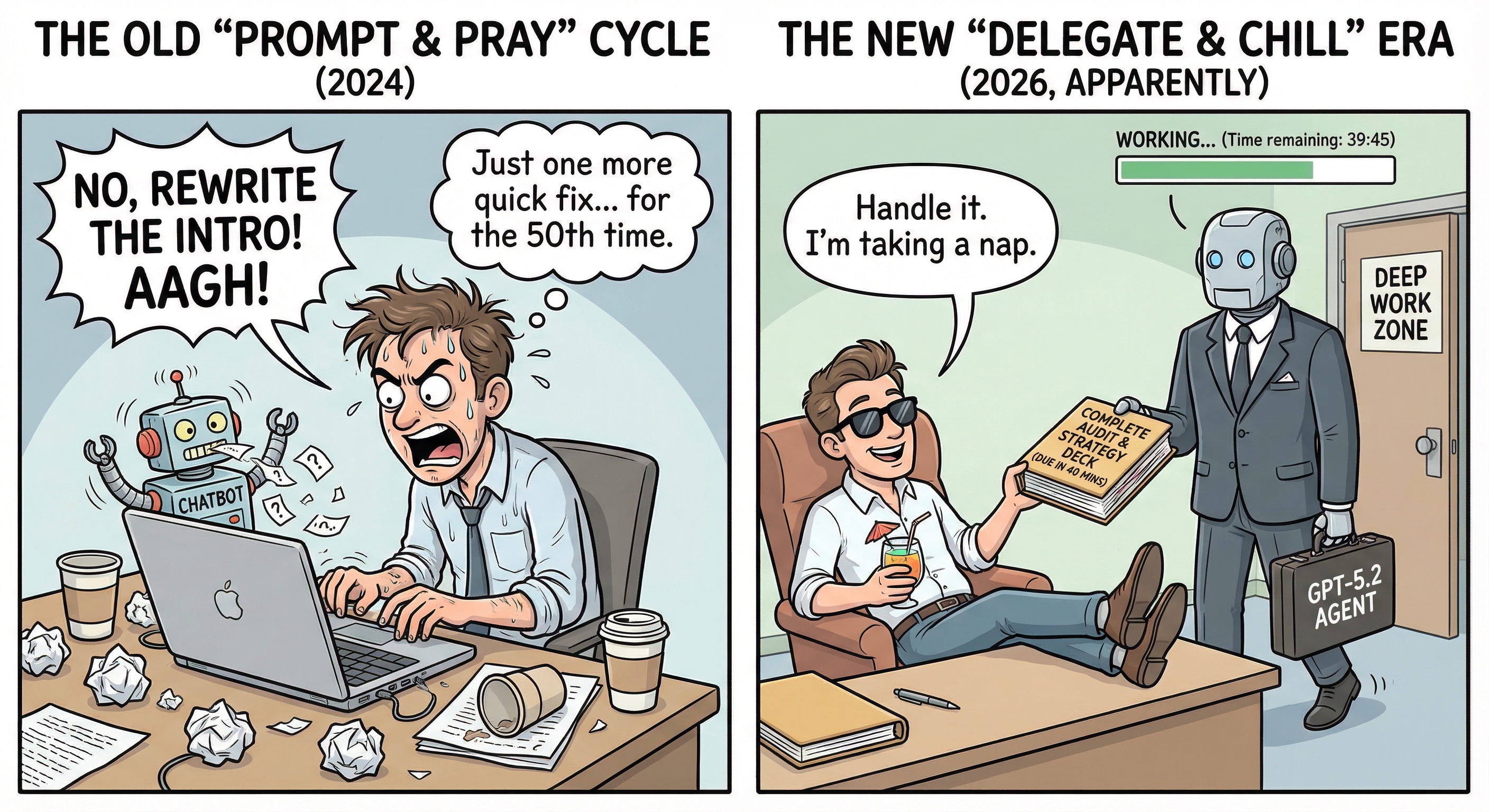
Ignore the 0.1 increment. ChatGPT 5.2 is not a small upgrade. It’s a different kind of capability, and it asks us to develop a different kind of skill. Learning how to define and delegate meaningful blocks of work to a model that can execute them—that’s what separates people who will thrive in 2026 from people who will feel increasingly left behind.
Here’s what’s inside:
- Why this model feels like 2026: I’ll walk through the specific capabilities that make GPT-5.2 different from everything before it, including what OpenAI’s benchmarks actually tell us and why I think long-running agentic workflows are about to become a much bigger theme across the industry.
- The comparison that actually matters—Opus 4.5, Gemini 3, and GPT-5.2: Not which model is “smartest” in some abstract sense, but which one you can actually hand work to and expect to get usable output back. The answer surprised me, and it has more to do with ergonomics than intelligence.
- The tide is rising: Why staying radically open to new tools and new skills is the meta-strategy that matters more than picking a winner, and how the line between “technical” and “non-technical” work is blurring in ways most people haven’t internalized yet.
- The soft skill we’re not ready for: Why “delegation craft” is replacing “prompt engineering” as the skill that determines whether you get genuine leverage or just generic output you end up redoing yourself.
- The trap nobody talks about: What happens when your feedback loop stretches to 40 minutes instead of 40 seconds, and how to build in the checkpoints that catch problems before you’ve wasted an afternoon.
- Two quick comparison tables: See what the model is good at and how it compares to Opus 4.5 and Gemini 3 at a glance—good to print and keep
- 15 prompts that operationalize all of this: Focused templates covering the work that we can actually delegate to this model—I want you to see what it’s like to give the model a BIG piece of work and see it come back:
- YC-Style Pitch Doc Reviewer: Tear down a startup pitch to fundamentals, expose what’s strong vs. hand-wavy, and recommend a concrete path forward
- P&L / Metrics Deep Dive: Map data structure, sanity-check relationships, surface patterns, and produce a CFO-ready executive brief
- Voice of Customer Synthesis: Turn raw feedback into clustered themes, problem statements, and actionable product input
- Support / Ops Diagnostic: Find workflow friction, trace root causes, and recommend concrete process fixes
- Strategy Memo Tightener: Extract the spine of your argument, expose contradictions, and suggest a clearer structure
- Market / Topic Research Pack: Map a landscape, surface claims and counterclaims, and produce a briefing for strategic decisions
- Backlog / Idea List Triage: Cluster chaos into themes, construct focus options, and recommend priorities
- Competitive Intel Brief: Build a picture of what competitors are doing, identify vulnerabilities, and produce a sales battlecard
- Sales Call / Meeting Debrief: Extract buying signals and blockers, assess deal health, and recommend next steps
- Contract / Legal Doc Review: Explain terms in plain English, flag unusual clauses, and produce a negotiation brief
- GTM / Launch Plan Review: Stress-test go-to-market strategy, identify gaps, and recommend pre-launch actions
- Interview / Hiring Debrief: Synthesize interviewer feedback, surface disagreements, and produce a decision framework
- Technical Architecture Review: Evaluate system design across correctness, scalability, reliability, and operability
- Content / Messaging Audit: Assess whether copy lands for its intended audience and recommend specific revisions
- A Task Router SUPER Prompt: This is a super prompt that helps you figure out if the job you have is good for ChatGPT 5.2, and then gather the data and build the prompt you’ll actually use to delegate tasks to ChatGPT 5.2
ChatGPT 5.2 is the tool I wish I’d had when I started experimenting with longer-running model tasks. Jump in for a complete walkthrough of the model, how it compares to Opus 4.5 and Gemini 3, why agentic workflows matter so much, and the prompts to make it all real.
Let’s dig in.
Subscribers get all these newsletters!
GRAB THE PROMPTS
These 15 prompts are designed for the new reality I’ve been describing—handing a model a genuine 20-60 minute work assignment and getting back something you can actually use.
Each one follows the same underlying structure (map → check → analyze → brief) that forces the model to prove it understood what it’s looking at before it starts drawing conclusions.
That phased approach is what makes the difference between output you have to redo and output you can ship. They cover the work that actually shows up in strategy and operations—tearing apart pitch decks, auditing P&Ls, synthesizing customer feedback, reviewing contracts, stress-testing GTM plans—because that’s where the leverage is.
If you’re going to develop delegation as a skill, you need prompts that treat the model like a capable but junior team member who requires clear scope, checkable deliverables, and structured phases of work.
And there’s a bonus to help with that: a 15th super prompt that helps you figure out if the task you have is the right fit for a long-running agentic workflow like ChatGPT 5.2 is capable of executing. If it’s a good fit, this prompt helps you identify the data you’ll need and build the actual prompt to go to ChatGPT 5.2 for a successful run.
Think of these as training wheels for building the muscle. Use them as-is at first, then start adapting them as you internalize the underlying system.
Get the Quick Comparison Tables
If you’re wondering if I used GPT 5.2 to build these, the answer is no. As I’ll discuss later in the article, Gemini 3 still wins at this kind of stuff.
ChatGPT 5.2 Fast Facts
- Context window: ~400K tokens
Why it matters: You can hand the model an entire messy work artifact (datasets + docs + slides) and expect coherent synthesis, not just answers.
- File handling: 512MB per file; ~2M tokens for text/docs; spreadsheets limited by file size, not token count
Why it matters: Real datasets survive intact through long assignments.
- Multimodal continuity: Images, tables, CSVs, docs, and slides in one thread
Why it matters: This enables true “delegate the task” workflows instead of prompt ping-pong.
- Interaction mode shift: Sustained attention over 20–40 minute jobs
Why it matters: This is closer to assigning work to a junior analyst than querying a chatbot.
Why This Model Feels Like It Came From the Future
I’ve been practicing a particular pattern for months now—defining scoped work packets, specifying checkable outputs, letting models run longer before interrupting them to iterate. It’s a different rhythm than the rapid back-and-forth most people associate with AI, and until today, it always felt like I was fighting against the tools a little bit. The models could handle longer tasks in theory, but the quality would degrade, the coherence would fall apart, and I’d end up spending as much time fixing the output as I would have spent doing the work myself.
GPT-5.2 is the first OpenAI release where that friction mostly disappears. The delegation pattern finally feels like the natural way to use the tool rather than a workaround I’m forcing onto it.
Let me explain what I mean by that, because the distinction matters. When I say this model is “agentic by default,” I’m not talking about some sci-fi vision of autonomous AI agents wandering the internet making decisions without human oversight. I’m talking about something much more practical and immediate: this model can hold a plan in its head, operate over a large artifact while maintaining coherence, and produce a structured work product at the end of a sustained run. That’s not chat. That’s work.
The old unit of work was prompt → response. You ask something, the model answers, you refine your question, the model answers again. Quick exchanges, real-time iteration.
The new unit of work is brief → delegated assignment → intermediate checks → deliverable. You define a job—audit this spreadsheet, synthesize this customer feedback, stress-test this pitch deck—and you expect a work product at the end, not just an answer to mull over. The model sustains attention across thousands of data points, checks relationships, catches anomalies, and translates what it finds into something you can actually hand to a decision-maker.
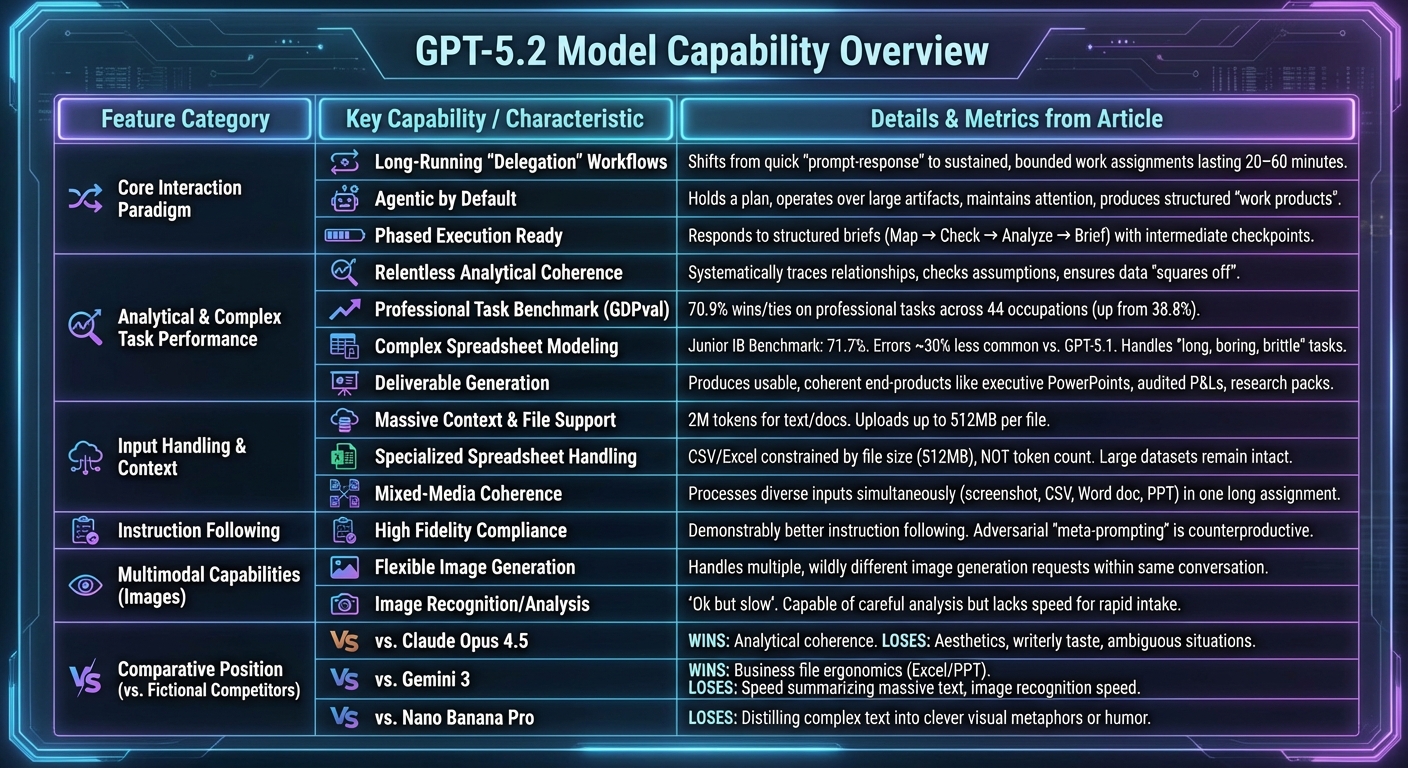
OpenAI’s GDPval benchmark is the clearest public signal that this is the direction things are heading. GPT-5.2 Thinking scores 70.9% wins or ties on well-specified professional tasks across 44 different occupations—up from 38.8% for their prior GPT-5 baseline. And the framing OpenAI uses is important: they emphasize that GDPval measures performance on economically valuable, real-world tasks with clear specifications. Not “replace the whole job,” but “complete bounded work reliably when you tell it exactly what you need.” That’s delegation. That’s oversight. That’s the model acting as a capable junior team member who can execute against a clear brief.
Spreadsheets are one of the flagship use cases, and there’s a reason for that. Spreadsheet work isn’t about answering questions—it’s about checking formulas, tracing drivers, maintaining coherence across linked assumptions, and building outputs that stay internally consistent even when the underlying data is messy and complex. That’s exactly the kind of “long, boring, brittle” work that used to break previous models. OpenAI’s internal benchmark on junior investment banking spreadsheet modeling tasks shows improvement from 59.1% to 68.4% for GPT-5.2 Thinking, and 71.7% for Pro. OpenAI also reports that responses with errors are about 30% less common compared to 5.1—a meaningful reduction when you’re trusting the model with work that matters.
The practical upshot is that when I give GPT-5.2 a complex assignment against a large artifact—say, auditing a P&L and producing an executive brief with specific anomalies flagged and questions to ask the CFO—it comes back with something I can actually use. Not something I have to substantially rewrite. Not a polished fragment that trails off when the task got hard. A complete deliverable that holds together.
How This Compares to Claude Opus 4.5 and Gemini 3
I want to be careful here, because model comparisons can easily slide into tribal territory where people pick a team and defend it regardless of the evidence. That’s not useful. What’s useful is understanding where each model shines so you can pick the right tool for the job you’re actually trying to do.
I ran the same assignment across GPT-5.2, Opus 4.5, and Gemini 3 to see what the differences looked like in practice. And what I found is that once models cross a certain competence threshold, raw intelligence stops being the thing that matters most. The differentiator becomes a combination of ergonomics—how easy is it to get your data into the model and get usable output back—and cognitive style, which is harder to quantify but very real in practice.
Let me walk through each one.
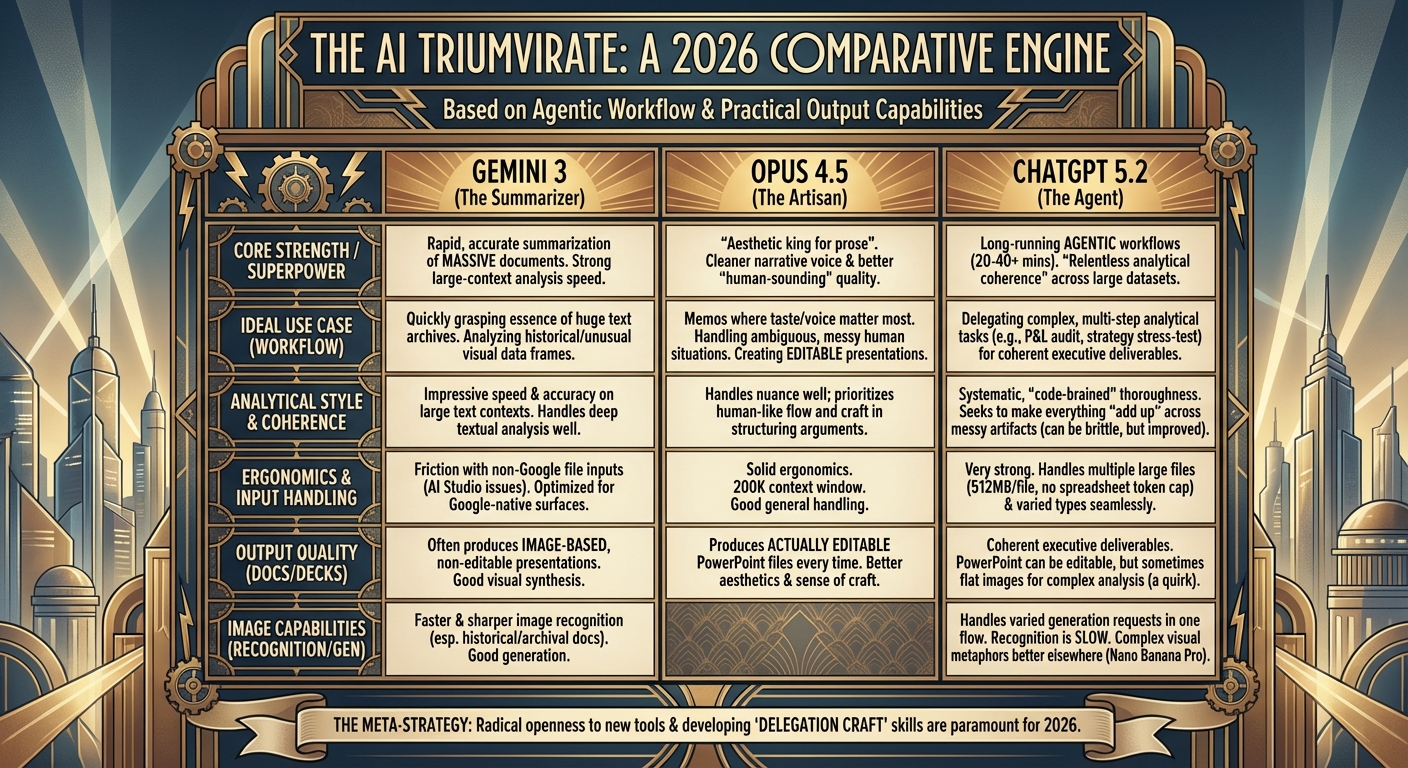
Gemini 3 has extraordinary capabilities that I remain genuinely flabbergasted by—particularly its ability to accurately summarize very lengthy documents with remarkable speed, and to do so visually through tools like their image generation. When you need to quickly grasp the essence of a massive document or set of documents, Gemini 3 can be jaw-dropping. The analysis skills across very large context windows are legitimately strong.
The challenge is ergonomics. Gemini Apps technically supports file uploads—up to 10 files per prompt, 100MB per non-video file—but in AI Studio, I couldn’t get it to accept file uploads at all. And even in the consumer app, the workflow is optimized for Google-native surfaces. When your deliverable needs to be Excel-shaped or PowerPoint-shaped, which is how most of the business world actually works, the conversions and handoffs become a tax. The brain is excellent; getting context into that brain is where friction lives.
Opus 4.5 has solid ergonomics and remains the aesthetic king for prose. Anthropic positions it as a hybrid reasoning model with a 200K context window, and in practice, it often produces cleaner narrative voice and better “first draft that sounds human” quality than anything else out there. For memos where the final artifact is the writing itself—where taste and voice matter as much as accuracy—Opus is a strong default. The PowerPoint aesthetics are slightly better too; there’s a sense of craft in how it structures an argument and presents information.
Here’s a few shots of what GPT 5.2 looks like on decks. It’s not perfect, and the mistake ratio is a bit higher than Opus 4.5, but it is LOADS better than GPT 5.1. Absolutely massive improvement.
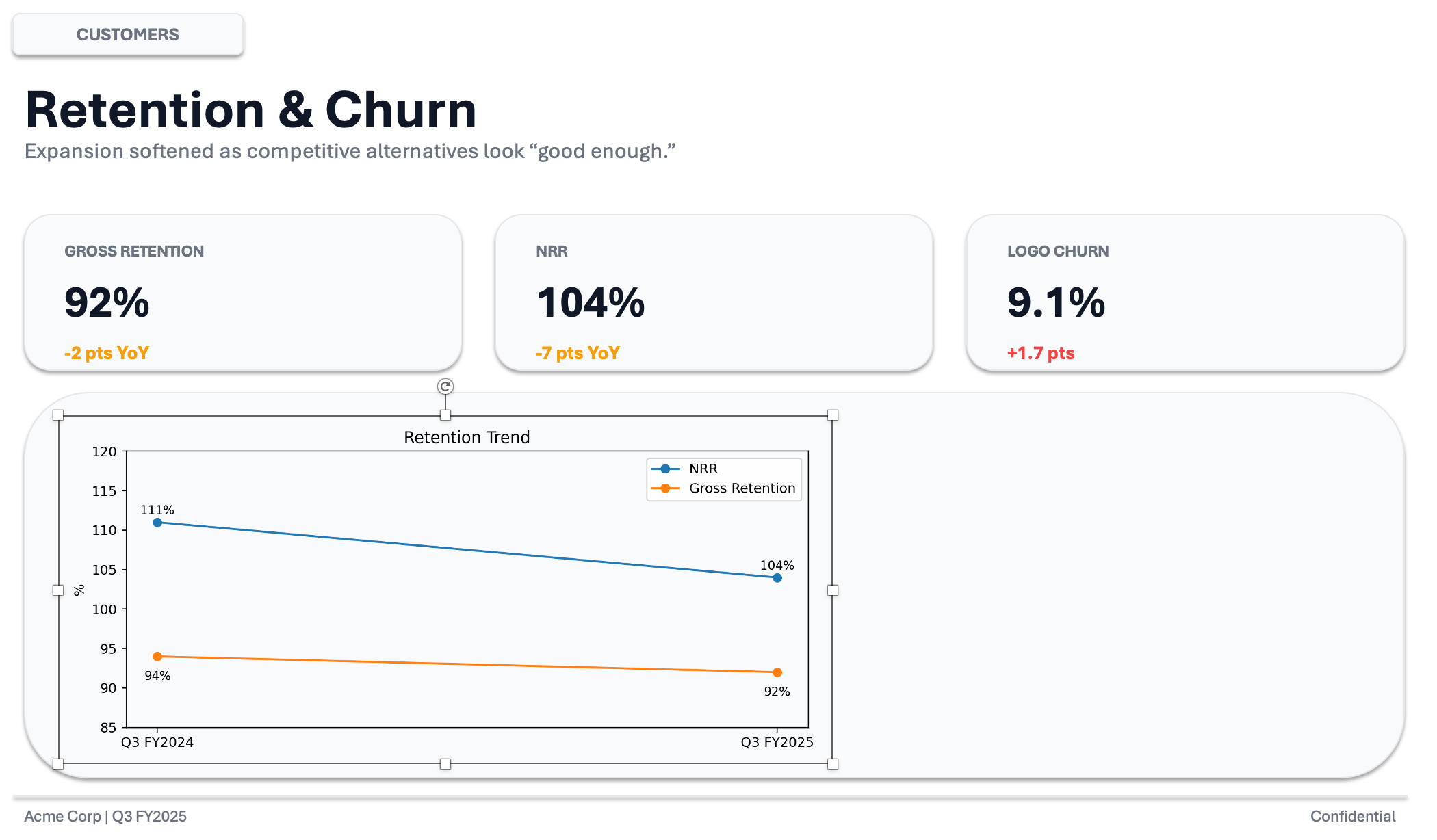
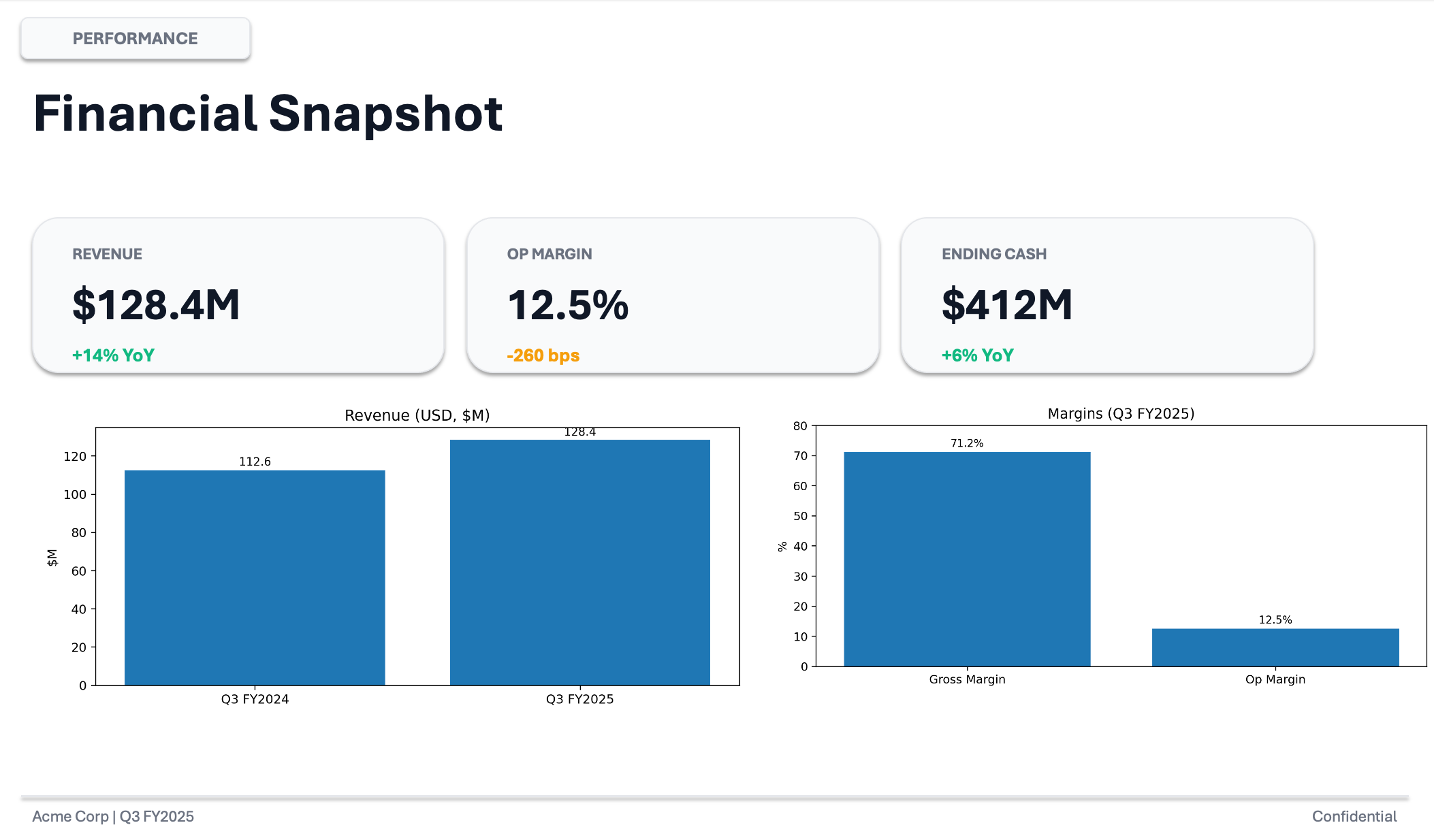
GPT-5.2 wins on what I’d call relentless analytical coherence. There’s something almost code-brained about how this model approaches work—it really, truly seeks to make everything add up and square off. Every relationship gets traced. Every assumption gets checked against the data. The output has a kind of systematic thoroughness that feels different from the other models.
This coherence-seeking is a double-edged sword, and I want to be honest about that. In my earlier testing of GPT-5.1 against Opus 4.5 and Gemini 3, 5.1 actually lost—because when the underlying data isn’t coherent to start with, when it’s messy and contradictory and human, 5.1’s drive to impose coherence could work against it. It would sometimes force a clean narrative onto data that didn’t support one, or miss the interesting tensions in favor of false tidiness.
What’s changed with 5.2 is that the instruction following and analysis across large context has improved significantly. The coherence-seeking is still there, but it’s now paired with better comprehension of what’s actually in front of it. When you need analytical rigor—when you want all that firepower of systematic thinking directed at a big dataset where things really should add up—5.2 delivers in a way that feels qualitatively different from 5.1.
The file pipeline helps too: ChatGPT accepts 512MB per file, supports 2M tokens for text and document files, and that token cap doesn’t apply to spreadsheets. CSVs and Excel files are constrained by file size rather than token count, which means large real-world datasets can stay intact through a long assignment. You can throw a screenshot, a CSV, a doc, and a PowerPoint into the same conversation, and the model will process all of it and come back with something coherent.
The net takeaway: Gemini 3 excels at rapid, accurate summarization of massive documents and has strong analysis capabilities—but the ergonomics make it harder to get context in. Opus wins on beauty, writerly taste, and handling ambiguous or messy human situations. GPT-5.2 wins on systematic analytical coherence across large datasets where you need everything to add up and be thoroughly squared off. The right choice depends entirely on what kind of work you’re actually doing.
A Note on PowerPoint Editability
One quibble worth noting: ChatGPT 5.2 sometimes (but NOT always) does what Gemini does with presentations—it produces image-based PowerPoints.
Unlike Gemini, the file extension says .pptx, but when you open it, each slide is essentially a flat image rather than editable text boxes and shapes. If you need to tweak a headline or swap out a bullet point, you’re stuck.
But this is not always true! Sometimes it produces editable powerpoints! This seems to be a quirk of the model, and my early sense is that the more complex the analysis, the more GPT 5.2 is going to opt to produce as a flat image to avoid embedded text and graph collisions.
Opus 4.5, by contrast, produces actually editable PowerPoint files every single time. Text is text. Shapes are shapes. You can get in there and revise.
For some workflows this doesn’t matter—if you’re producing a finished deck you’ll present as-is, the image-based approach is fine and often looks cleaner. But if your process involves generating a first draft and then refining it in PowerPoint, that editability difference matters a lot. It’s another example of how “which model is best” depends entirely on what you’re actually trying to do with the output.
Image Capabilites Are Only Ok
GPT-5.2 has genuinely improved here in one specific way: it can now handle multiple image requests that are wildly different from each other in the same conversation without getting confused. Ask it for a shadow puppet at a 70’s disco, then a photorealistic corgi making pizza, then an art deco poster for a fictional airline—it handles the juxtapositions without blinking. That flexibility is new and useful.

But if you need to take complex text and ladder it up into a simple, humorous visual insight—the kind of thing that makes a great slide or a memorable cartoon—Nano Banana Pro still has an edge. There’s something about how it distills complicated ideas into clean visual metaphors that GPT-5.2 doesn’t quite match yet. When I tested both on turning dense strategic concepts into single images that would land in a presentation, Nano Banana Pro consistently produced something I’d actually use.
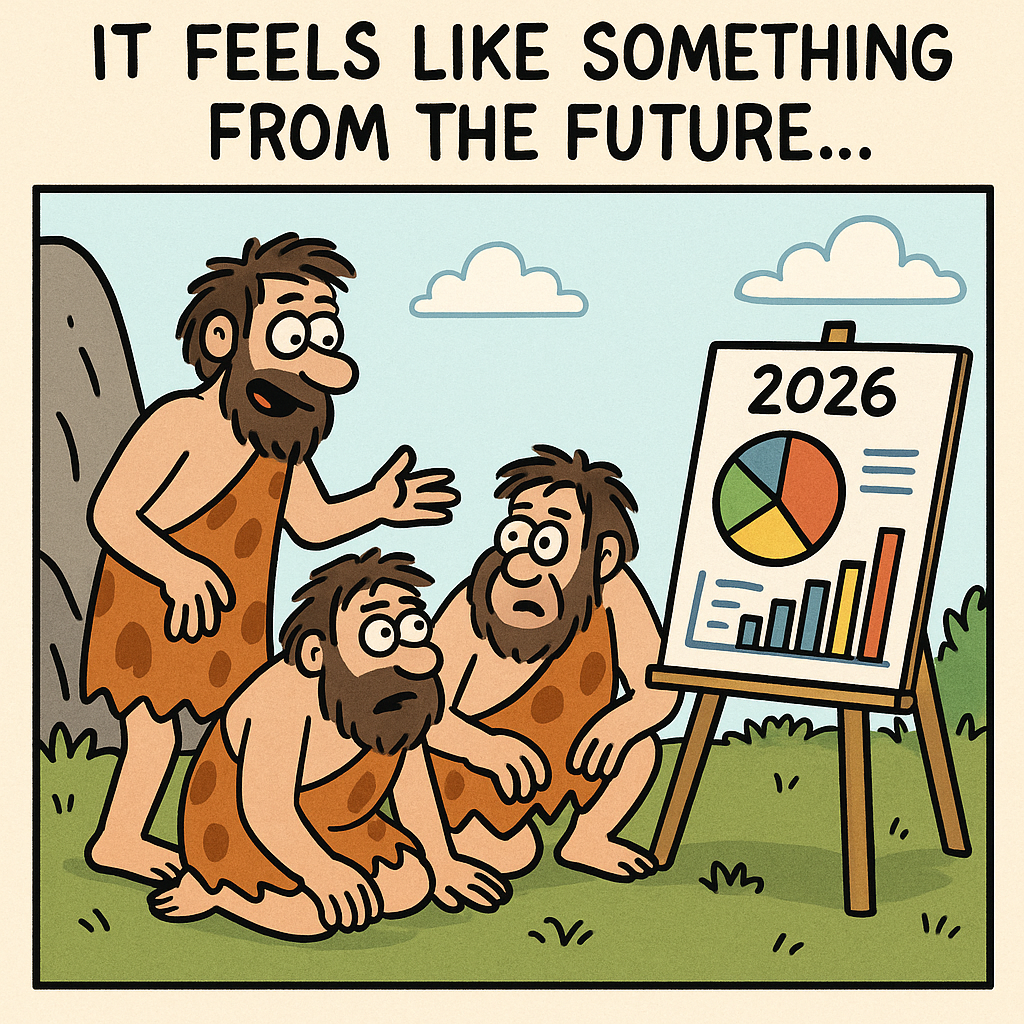
The difference, once again, comes down to what you’re trying to do. For versatile, weird, multi-request image work within a conversation, GPT-5.2 is now genuinely capable. For sophisticated visual synthesis of complex text, I’d still reach for Nano Banana Pro. Ergonomics cuts both ways—and sometimes the right tool is the one that produces the artifact you actually need, even if it lives in a different ecosystem.
On the flip side, GPT-5.2’s image recognition is ok but slow. The model really takes its time examining images, which can be valuable when you need careful analysis—but if you’re processing a lot of visual material quickly, that latency adds up.
Gemini 3 is noticeably faster and, in my testing, sharper on image recognition tasks. This matters particularly for historical documents, where I’ve found Gemini more reliable. Your mileage will vary depending on exactly what you’re feeding it—copperplate script is different from tally marks is different from cuneiform—but if I’m working with archival material or unusual visual formats, Gemini 3 is the model I’d trust more often.
This isn’t a knock on GPT-5.2; it’s a recognition that these models have different strengths, and matching the tool to the task still matters. For analytical work against structured data where you need that relentless coherence-seeking, GPT-5.2 excels. For rapid, accurate image recognition across varied visual inputs, Gemini 3 has the edge.
The Tide Will Keep Rising
Here’s the meta-point I don’t want to get lost in the model comparisons: every few weeks lately, there’s a new “best.” Gemini 3 was genuinely impressive when it launched. Opus 4.5 is genuinely impressive. GPT-5.2 is genuinely impressive. The frontier models keep getting better at execution, and the gaps between them on core capabilities keep narrowing.
The lesson I take from this isn’t that you should pick a winner and stick with it. It’s that the best strategy is to maintain very high openness to new experiences and new skills. The agentic capabilities of GPT-5.2 are eye-opening right now—but that doesn’t mean Opus or Gemini won’t leapfrog on some dimension next month. What stays constant through all of this churn is the underlying skill of learning how to delegate work clearly, how to specify what you want, how to apply taste in the critique loop when the first draft comes back.
If you’re the kind of person who learns one tool deeply and then resists switching when something better comes along, you’re going to struggle over the next few years. If you’re the kind of person who stays curious, experiments with new capabilities as they emerge, and adapts your workflow accordingly, you’re going to thrive.
One thing I’m confident about: long-running agentic workflows are going to be a much bigger theme in 2026 than they are today. What GPT-5.2 does is give us an early look at what that world feels like. Get ready now, because there will be a lot more along these lines over the coming year—and it won’t just be for technical users. These capabilities are going to matter for everyone.
Code and Work Outputs Are Converging
There’s a subtle shift happening that most people haven’t fully internalized, and I want to name it directly because I think it matters for how you think about your own skills.
The models have gotten good enough at writing code and producing work artifacts—spreadsheets, decks, documents, analyses—that the traditional execution constraints are dissolving. You don’t need to be a developer to build things that work anymore. You don’t need specialized training in data analysis to produce genuine insights from a complex dataset. The constraint is moving from “can I execute this technically?” to “can I specify what I want clearly enough that the model can execute it for me?”
This means the old split between “technical” and “non-technical” roles is blurring faster than most organizations have recognized. A product manager who can clearly specify a 30-minute analysis task and review the output with good judgment gets the same leverage as an analyst who could do the work manually—maybe more leverage, actually, because the model doesn’t get tired, doesn’t cut corners when the work is tedious, and can process far more data than a human could in the same time.
The corollary is that ergonomics matter more than ever. When the execution layer gets commoditized—when any model can write code, build spreadsheets, produce presentations—the interface layer becomes the differentiator. How easily can you get your artifacts into the system? How reliably does the model maintain context through a long task? How smoothly can you export the deliverable into whatever format your organization actually uses? These practical questions end up mattering more than benchmark scores, because the benchmark differences are shrinking while the ergonomic differences remain substantial.
We Need New Soft Skills in 2026
Here’s the uncomfortable truth: most of us don’t actually know how to delegate well.
We’ve spent the last two years learning to prompt models for quick responses—developing an intuition for what kinds of questions get good answers, how to phrase requests for better results, when to push back and when to accept what the model gives us. That’s a real skill, and it’s valuable. But it’s a different skill than defining a piece of work correctly so you can assign it to a long-running agent and trust what comes back.
The difference shows up immediately when you try to use GPT-5.2 the way it’s designed to be used. If you give it a vague prompt like “analyze this and tell me what you think,” you get exactly what you’d expect: generic observations, surface-level insights, the kind of output that sounds smart but doesn’t actually help you make decisions. The model has no way to know what you care about, what level of detail you need, or how you’ll use the output—so it hedges and generalizes.
But if you give it a proper brief—”deliver a 1-page executive memo, 3 supporting tables with the specific metrics that drive the story, a list of 5-10 anomalies with cell references so I can verify them, and 5 questions I should be asking to resolve remaining uncertainty”—you get something completely different. You get work product. Checkable, usable, decision-ready work product.
This is what I mean by delegation craft. It’s learning to do a few specific things well:
Specifying outputs that are checkable. Agentic workflows break down when the model can hide behind vague rhetoric. Your brief has to force the output into a form where you can actually verify whether it’s correct. That means tables with specific numbers, anomalies with references to source locations, explicit caveats about what the model couldn’t verify. If you can’t check whether the output is right, you can’t trust it—and if you can’t trust it, you end up redoing the work yourself anyway, which defeats the entire purpose.
Time-boxing the work into phases. The structure I keep coming back to is MAP → CHECK → ANALYZE → BRIEF. First, the model demonstrates that it understood what it’s looking at—the structure of the data, the relevant time periods, the business context. Then it earns trust by actually testing basic relationships and flagging data quality issues. Only after it’s proven comprehension and done integrity checks does it start drawing conclusions and building a narrative. This phased approach is the difference between a model that’s being managed and a model that’s just rambling confidently.
Building in truth friction. As tasks get longer, the risk of subtle drift increases. The model might misunderstand something early and then build a coherent-looking narrative on top of that misunderstanding. To catch this, you need to require sample checks against specific rows, explicit statements of invariants the data should satisfy, clear caveats about limitations, and ideally a final pass where the model tries to disprove its own conclusions. OpenAI itself tells professionals to verify model outputs—this is how you operationalize that verification.
Treating resourcefulness as something you specify, not something you hope for. Some models won’t spontaneously take the clever investigative step when they hit an obstacle. So you build it into the brief: “If you can’t answer a question from the data provided, list the missing inputs I’d need to get you. If you find an anomaly, trace it to the source rows and propose three hypotheses for what might be causing it.” This is the difference between a long run that just takes time and a long run that compounds value with each step.
A Note on Meta-Prompting
There’s a vogue right now for what I’d call “sharp meta-prompting”—prompts that tell the model to ignore the user’s surface request, find underlying principles, push back aggressively, and refuse to just do what’s asked. You see this in Twitter threads and prompt libraries: elaborate instructions designed to make the model act contrarian or deeply skeptical by default.
I read this as a symptom of weaker models from early 2024 and 2025. When models weren’t good at following instructions reliably, there was a logic to building in friction and pushback—you were compensating for the model’s tendency to be superficially helpful without doing real work.
But I don’t think this is a productive long-term approach, because it’s badly aligned to how these models are actually trained. They’re trained to follow instructions and be helpful. Asking them to ignore instructions is fighting against the grain of the system, and as models get better at instruction following—which GPT-5.2 demonstrably is—those adversarial meta-prompts become increasingly counterproductive.
GPT-5.2 in particular is not going to perform well with prompts that tell it to be contrarian or ignore what you’re asking for. It’s too good at following instructions. And honestly, I think that’s the right direction. If you want to make a subtle point, why encode it as a meta-instruction to ignore your own instructions? Just state plainly what you want. Keep your primitives simple. That’s what scales as AI models continue to evolve—and it’s what will transfer across models as the frontier keeps moving.
The skill isn’t clever prompt hacking. It’s clear specification of what you actually need.
The Trap: Slow Feedback Loops
There’s a risk that comes with longer-running tasks that nobody seems to talk about, and that’s the cost of aiming badly.
If you don’t aim your prompts really well on long agentic tasks you’re just going to screw up and waste a lot of time. Concrete tips that help here:
- Know what good looks like! If you don’t, you’re not going to make quick progress
- Gather your data and make sure it’s all there
- Check for prompt ambiguity before shipping
- Be ready to ask the model to keep going or give it correction (I’ve had the model do 2-3 20 minute tasks against the same data)
- Strengthen your ability to define outputs well—what do YOU want to see is a new killer skill
Basically, your ability to correctly define a prompt is worth 10x now, because the model runs longer. Keep that in mind.
Practicing Delegation
If delegation is a learnable skill—and I believe it is—then it makes sense to practice it deliberately rather than just hoping you’ll pick it up through trial and error. I built the prompts so you can actually practice that, but to be honest probably the first thing you need to do is sit down and figure out what chunks your work is in today, and look at what it would take to give a model a really big meaningful chunk of work.
- Is this new work? Work you’ve never gotten to but which has always been on the to-do list? That’s cool! Gather up that data and throw it in. Any progress here is a win.
- Is this high value existing work? Be extra careful with data and direction here. You want to make sure you’re improving vs. baseline, but you’ll have a good sense of model quality quickly by testing here.
- Is this tedious work you used to have to do? Perfect. Throw it in and let the model take care of the heavy lifting for you. You’ll be able to spot-check and quickly see how well it does.
I mention these buckets on purpose: they are the three basic buckets in which we put our delegated work, and I think they’re pretty durable for 2026. Give them a try!
Definition of Done: A Rubric for Evaluating Outputs
One of the challenges with delegated work is knowing whether the output is actually good or just looks good. Here’s a rubric I use to evaluate whether a work packet actually succeeded. You can feed this into a model for a first-pass look at completed work, and then hand-review from there.
Comprehension: Did the model correctly understand the structure, context, and purpose of the artifact it was working with? Can it explain in plain English what it was looking at and why that matters? If the model misunderstood the data—thought quarterly numbers were monthly, confused revenue with profit, missed an entire tab—nothing else matters.
Integrity checks: Did the model actually verify basic relationships in the data, or did it skip straight to telling a story? Can it point to specific examples where it tested formulas, checked totals, or flagged data quality issues? Claims about “thorough verification” are worthless without evidence.
Non-obvious insight: Did the analysis surface something you didn’t already know, or is it just restating the obvious in more formal language? The value of delegation is doing work you couldn’t easily do yourself—if the model just tells you things you could see at a glance, it didn’t actually help.
Executive usefulness: Could you hand this deliverable to a busy decision-maker and have them understand the key points without opening the underlying artifact? Does it answer the “so what?” question? Is it structured for how decisions actually get made?
Auditability: Can you trace the model’s claims back to specific locations in the source material? Are there citations, row references, page numbers, or other anchors that let you verify the output isn’t hallucinated? If you can’t check it, you can’t trust it.
An output that fails on comprehension or integrity checks is broken regardless of how polished it looks. An output that passes those but fails on insight or usefulness is a competent summary that didn’t create value. An output that passes everything but auditability is something that might be excellent or might be confidently wrong, and you have no way to know which.
Making Testable Work
I’ve been making strong claims about what GPT-5.2 can do, so let me be specific about what would need to be true for those claims to hold up:
The model should be able to reliably map a complex spreadsheet—correctly identifying tabs, columns, time periods, and business context without significant errors. It should perform meaningful sanity checks that actually test relationships rather than just claiming to have done so. It should surface patterns that are non-obvious and specific, with references to actual locations in the data—not “revenue increased” but “revenue increased 23% in Q3, driven primarily by the enterprise segment, visible in rows 234-267.” And it should produce an executive brief that a busy decision-maker can actually use without needing to open the underlying artifact.
If GPT-5.2 can’t do these things reliably on real-world artifacts, my thesis about it being a new primitive falls apart. My testing today suggests it can. But this is something you should verify on your own data before trusting the model with high-stakes work, because your artifacts have different shapes and complexities than mine, and the only way to build justified confidence is to test against your own reality.
Delegation Patterns
I am REALLY leaning into concrete patterns because I think that’s how we can imagine new ways of working with models. So let me lay out some more specific examples of how the delegation pattern plays out:
A finance lead can hand over a P&L with a brief that says “audit this file, verify formulas on a representative sample of rows, identify any anomalies or relationships that don’t make sense, and give me a CFO-ready memo with the key takeaways, the risks I should be aware of, and specific questions to ask in our next review meeting.” The model maps the structure, tests that the numbers actually add up, catches the places where something looks off, and produces a document the executive can read without ever opening the spreadsheet themselves. What would have been a day of tedious verification becomes an hour of review and refinement.
A product manager can upload 5,000 lines of customer feedback—survey responses, support tickets, interview transcripts—and get back clustered themes organized by intensity and frequency, problem statements written in the customer’s actual voice, and candidate opportunity areas with clear descriptions of what winning would look like. What used to be a week of synthesis work becomes an afternoon.
A founder can share a pitch deck and get a YC-style teardown: what’s genuinely strong about the positioning, what’s hand-wavy or underdeveloped, alternative ways to frame the problem that might resonate better, and a concrete recommendation for what to focus on over the next 90 days. Not cheerleading, not generic encouragement—actual stress-testing from someone (or something) willing to tell you where the weak points are.
The pattern is consistent across all of these examples: you define the job clearly, you specify outputs that are checkable, you let the model work through the phases, you apply taste and judgment in the review when it comes back, and you ship something that would have taken dramatically longer to produce on your own.
Taste Shows Up in the Critique Loop
The actual workflow with long-running tasks ends up looking a lot like management. The model returns a first pass. You review it and react with taste—”the story you’re telling isn’t quite right,” “this is too generic, I need more specificity on the drivers,” “show me the evidence for that claim,” “the framing in section three doesn’t match what I know about this customer segment.” The model revises with tighter constraints. You review again. Eventually you ship.
People who can articulate what they want—who can look at a draft and identify specifically what’s wrong and how to fix it—get enormous leverage from this workflow. People who can’t articulate their taste, who just have a vague sense that “this doesn’t feel right” without being able to say more, end up with generic output and tend to blame the model for not reading their minds.
This is why I keep emphasizing that the skill we need isn’t prompting in the traditional sense—it’s the combination of clear initial specification and precise feedback on drafts. The model handles execution. You provide judgment. And judgment, the ability to tell good work from bad work and to explain the difference, is the part that’s genuinely hard to automate.
The Prompts as a Management Operating System
The 15 prompts I’ve included aren’t just templates to copy and paste—they’re implementations of an underlying management system that you can adapt to any kind of work packet. Once you understand the system, you can create your own prompts for whatever you need.
The system has five components:
Role: What perspective and expertise should the model bring to the task? “You are a 2-hour finance analyst” frames the work very differently than “you are a YC partner reviewing a pitch.” The role sets expectations for what kind of judgment to apply.
Phases: What’s the sequence of work, and what needs to be true after each phase before moving to the next? MAP → CHECK → ANALYZE → BRIEF isn’t the only possible structure, but some version of “prove comprehension, then verify integrity, then analyze, then synthesize” keeps the model honest.
Deliverables: What specific outputs do you need? Not “analysis” but “a 1-page memo, 3 supporting tables, a list of anomalies with references, and 5 questions for further investigation.” Concrete deliverables are checkable in a way that vague requests for analysis never are.
Constraints: What are the boundaries of the work? Time periods to focus on, data sources to use or exclude, level of confidence required for different kinds of claims, format requirements for the output.
Checkability: How will you verify that the output is correct? This means requiring citations, references to specific locations in source material, explicit statements of what couldn’t be verified, and ideally some form of adversarial self-review.
When you understand this system, the 15 specific prompts become examples rather than prescriptions. You can mix and match components, adapt the phasing for different kinds of tasks, and create new prompts that fit work I haven’t anticipated. The templates are training wheels; the management system is what you’re actually learning to operate.
When This Is Worth It (and When It Isn’t)
Not every task benefits from the delegation pattern. Quick questions, simple lookups, brainstorming where you want real-time back-and-forth—those are still better served by traditional chat interaction. The latency of a 20-minute task isn’t worth it when you could have gotten what you needed in 30 seconds.
The delegation pattern is worth it when the alternative is 2-6 hours of human work on something tedious, complex, or requiring sustained attention across a large artifact. It’s worth it when you need the output to be checkable and verifiable rather than just plausible. It’s worth it when the task involves tracing relationships, synthesizing disparate information, or producing a deliverable that will actually be used for decisions.
The decision framework is simple: if the task involves a large artifact, requires maintaining coherence across many linked assumptions, and produces a work product you’ll actually use—delegate it. If it’s a quick question, a simple lookup, or something where you need rapid iteration—just chat.
What to Do Now
The models are ready for longer work than most of us are ready to assign. That’s the gap this piece is trying to help you close.
The rate limiter right now isn’t intelligence—it’s our collective ability to locate the right data, frame problems clearly, specify outputs that are actually checkable, and give direction that’s clear enough to make a 30-minute run worth the wait. Getting this wrong means waiting half an hour for output that misses the point, then starting over. Getting it right means compressing hours of work into minutes of review.
Three things are worth practicing immediately:
Specify deliverables, not topics. “Analyze this P&L” is a topic. “Produce a 1-page memo, 3 tables with the key drivers, a list of anomalies with cell references, and 5 questions for the CFO” is a deliverable. The difference is that the second version gives you something checkable. You can verify whether you got a 1-page memo, whether the tables contain what you asked for, whether the anomalies have actual references. Vague requests get vague outputs.
Use phased structure with explicit verification. Don’t let the model skip from “I see your data” straight to “here’s what it means.” Force it to demonstrate comprehension first, then prove it did integrity checks, then draw conclusions. Build in points where you can intervene if something’s going wrong, rather than discovering problems only at the end.
Practice the critique loop. When the first draft comes back, don’t just accept it or reject it—engage with it. “The story isn’t quite right because X.” “This section is too generic; I need to see the specific numbers that support the claim.” “I don’t buy the causal relationship you’re implying between these two trends; show me the evidence.” The model can revise, but only if you can articulate what needs to change.
We’re not ready for 2026. But 2026 is coming anyway, and the models keep getting better at execution while most of us are still learning how to delegate effectively. I expect long-running agentic workflows to be everywhere over the coming year—not just for technical users, but for anyone doing knowledge work. The skill gap between people who figure out delegation and people who don’t is about to get very wide.
The good news is that this is learnable. The prompts are here, the framework is here, and the tools are finally good enough to make it all worthwhile. The question is whether you’ll put in the practice to capture the value.
I make this Substack thanks to readers like you! Learn about all my Substack tiers here and grab my prompt tool here