OpenAI is launching a brand new agent builder for all of us. I have all the juicy details, plus the tips for hands-on agent building you need, plus prompts to help you plan your first build!
By Nate
Published: 2025-10-06
URL: https://natesnewsletter.substack.com/p/new-openai-is-launching-an-agent
BREAKING: OpenAI is about to launch Agent Builder—a drag-and-drop interface that lets you build AI agents without writing code.
Put simply: 800 million people are about to get the ability to build AI agents for the first time.
Based on early leaks, this build looks polished to me. You’ll drag nodes onto a canvas, connect them with arrows, define logic visually, and wire up external tools through MCP (Model Context Protocol). Very clean, very simple.
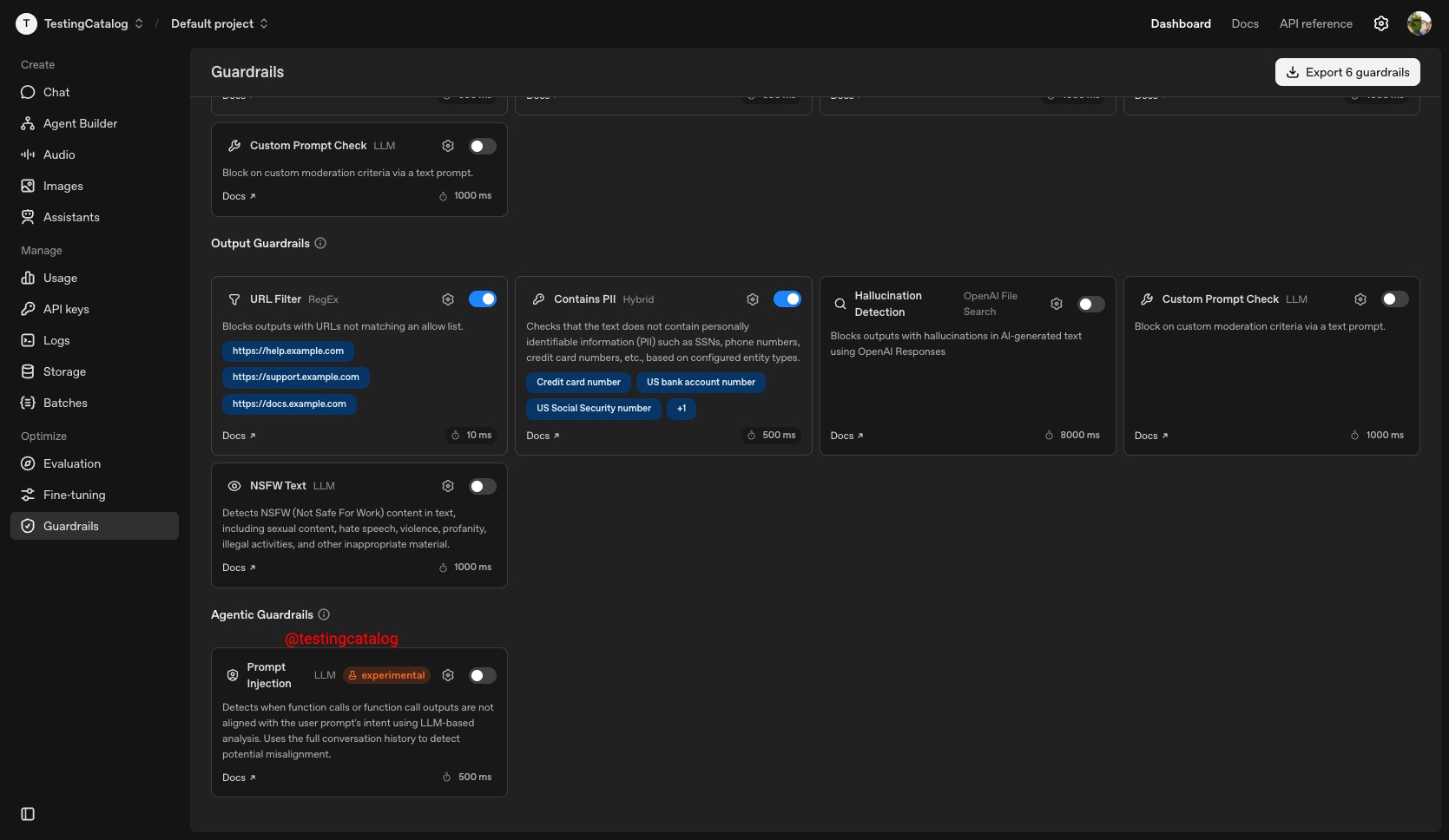
ChatGPT is adding enterprise-friendly guardrails too: prompt injection protection, content moderation, and other security features that used to require custom implementation.
At launch ChatGPT will be immediately the biggest agent builder on the planet, with 100x or more scale vs existing tools like n8n or Zapier. OpenAI knows this.
But there’s a problem OpenAI isn’t talking about. There’s a substantial gap between building an agent that works once and building one that works reliably in production.
I’ve spent the last year helping build and shepherd production agents at large companies. I’ve seen the same mistakes repeated over and over again. I don’t want you to make them, and that’s why I’m writing this piece today.
Put simply, handing everyone the hands-on power to build agents without any kind of build guidance is an invitation to chaos.
This piece is designed to close the agent knowledge gap before it becomes a crisis in your organization.
What’s inside:
- Seven hands-on principles for building production agents, based on hard-won experience at scale—and suitable for beginner builders
- A set of 12 design prompts you can use to think through your specific use case systematically, so you don’t have to figure out the build on your own
- Practical guidance on the architectural shift from workflows to agents
- Why dumber agents sometimes win (yes!)
The principles come from things I wish someone had told me before I learned them the expensive way. The prompts are structured conversations that force you to confront the right questions before you build: What does success look like? What happens when things fail? How will you know the output is correct?
Agent building is about to be democratized. What you build in the next few months will set patterns—good or bad—that scale across your organization.
Good luck with your new agent-building powers, and build thoughtfully!
Subscribers get all these newsletters!
Seven Principles for Building Production Agents
OpenAI is launching their Agent Builder product, and hundreds of millions of people are about to have drag-and-drop agent creation powers for the first time. This is a meaningful shift. What used to require engineering teams and custom code can now happen in a visual canvas with pre-built guardrails for prompt injection, content moderation, and other corporate security concerns.
We have some shots of what it looks like courtesy testing catalog.
The strategy is clear: make agent building so simple and safe-feeling that it pulls casual builders into the OpenAI ecosystem. If it’s easier to pass IT security review in ChatGPT than in Copilot or Claude, that’s where the building happens. And once people feel safe building, they build more. It becomes a virtuous loop.
But here’s what most people don’t realize yet. There’s a substantial gap between designing an agent as a weekend project and designing one that works reliably in production. I’ve spent the last year helping build and shepherd production agents at large companies, and I’ve seen the same mistakes repeated over and over. The patterns that seem obvious when you’re experimenting fall apart when you’re running 1,000 workflows a day and someone’s job depends on the output being right.
What follows are seven hard-won principles for building agents that don’t break. These aren’t theoretical. They’re the things I wish someone had told me before I learned them the expensive way.
The architectural shift with these AI agents
Before we get to the principles, you need to understand what’s actually changing with tools like Agent Builder. This isn’t just a prettier interface. It’s a fundamental shift in how agents work.
The old way: you wrote detailed instructions for every single step. Check this database, then if you find X do Y, otherwise do Z. Take that result and format it like this. Send it there. You were essentially writing a recipe that had to account for every possible variation.
The new way: you describe what you want accomplished and give the agent access to tools. The agent figures out the steps. It decides which tools to use, in what order, and how to handle problems. You’re not managing the step-by-step anymore. You’re defining the goal and the boundaries.
Think of it like the difference between giving someone turn-by-turn directions versus giving them a destination and a GPS. With turn-by-turn directions, you have to anticipate every fork in the road. With a GPS, you say where you want to go and trust the system to navigate, but you still need to be clear about the destination and any constraints (avoid highways, no toll roads).
This changes everything about how you design. Instead of asking “what are the exact steps to accomplish this?” you’re asking “what does this agent need to know to accomplish this goal on its own?” Instead of writing detailed if-then logic, you’re setting up conditions as instructions the agent interprets. Instead of manually coding what to do when things fail, you’re defining recovery strategies the agent follows.
This is why the principles below emphasize clarity, simplicity, and explicit constraints. When you’re writing the recipe yourself, you can debug each step. When the agent is figuring out the recipe, you need to be so clear about the goal and the rules that there’s no room for misinterpretation. The control has moved. Your job has changed from micromanager to architect.
Principle 1: Pick a problem that actually matters
This sounds obvious, but it’s where most people fail. When teams start with agents, they tend to pick use cases that aren’t serious. The thinking goes something like: “This is new and experimental, I don’t want to wreck anything important, so let me try something low-stakes first.”
That approach is a trap. If you pick a problem that doesn’t matter, you won’t take it seriously. The rest of your organization won’t take it seriously. You won’t prioritize debugging it when things go wrong, and you won’t care enough about whether the output is correct to build in the necessary quality checks.
You need to pick a problem where getting it right actually matters. Not recklessly high-stakes for your first build, but meaningful enough that you’ll invest the time to make it work properly. This requires some courage. It also creates the right incentives. When the outcome matters, you design better systems.
Principle 2: Start with the outcome, not the input
Most people design agents from the beginning of the workflow. They start by thinking about what triggers the agent, what the input looks like, how to parse it. Those are important questions, but starting there leads to weak designs.
Successful agent builds start with the outcome. What do you want this agent to produce? What does “done” look like in concrete terms? And critically: how will you know it’s correct?
The answer to that last question changes dramatically depending on your context. For marketing copy, correctness might mean checking reading level and doing a quick fact-check with another LLM. For healthcare operations where you’re categorizing medical information, correctness means detailed audit trails, secure storage, and zero tolerance for errors.
Think obsessively about what correctness looks like before you build anything. Then work backwards from there. This discipline forces you to confront the hard questions early: What are the stakes here? What does verification look like? How do I prove this worked?
When you adopt this outcome-first mindset, something interesting happens. You get stubborn about keeping things simple.
Principle 3: Use the dumbest agent that can do the job
This is the most counterintuitive principle, and the one that makes the biggest difference in production.
Your instinct will be to use the most powerful model available. You’ll want to juice up the reasoning power and have one smart agent handle the entire task. Resist this instinct completely.
In practice, dumb agents work better when they’re fed the right context. What you’re trying to achieve in a business setting is deterministic intelligence. You need predictability. And until we have true reasoning systems with zero hallucination risk, predictability comes from simplicity and clarity, not from raw cognitive power.
Hallucinations in a business context are more subtle than making things up. Yes, OpenAI is adding guardrails for egregious hallucinations, which helps. But those guardrails won’t catch the cases where your agent follows the process correctly but makes a different choice because the prompt was ambiguous. That’s not technically a hallucination. It’s a business logic error caused by poor design.
You avoid these errors by dumbing everything down. Your prompt needs zero ambiguity. Your data sources need to be extremely structured and organized. And the model itself should be simple and rule-following. Turn down the reasoning power. Let the agent be predictable rather than clever.
Why? Because you’d rather have multiple simple agents doing individual tasks in sequence than one superintelligent agent trying to do everything at once. The simple agents give you audit trails. You can see exactly what each step did. You can troubleshoot when something breaks. You can verify that step three made the right choice because you designed the context specifically for that decision.
The smart agent doing everything at once? You can’t audit it effectively. You can’t see how it did the work. And there will be ambiguity that comes from trying to handle the whole task in one pass.
Is this more work to set up? Yes. But it’s far less work to maintain, debug, and trust.
Principle 4: Design for clean context, not large context
One of the biggest mistakes I see is stuffing the context window with everything that might be relevant and hoping the agent figures it out. This fails in multiple ways.
First, it confuses the model. When you give an agent ambiguous instructions and a bloated context window with no clear signal about what matters, you get unpredictable results. The agent is trying to parse your ambiguous human language, and you’re making its job harder by giving it too much to work with.
Second, it burns tokens unnecessarily. Agentic systems run at volume. If you’re doing 100 blog posts a week or 1,000 health records a day, fat contexts add up fast. Every extra token costs money, and every piece of ambiguity requires more tokens to parse.
The solution is to be fanatical about context design for each step. What does this specific agent node need to know to make this specific decision? Give it exactly that information, structured clearly, and nothing more.
This connects directly to using simpler agents. When you break a workflow into discrete steps, you can design the perfect context for each step. The retrieval context for step one might look completely different from the context for step five, and that’s good. Each agent gets exactly what it needs, formatted exactly how it needs it.
Principle 5: Be ruthlessly clear about tool choice
OpenAI’s Agent Builder is launching with MCP (Model Context Protocol) as the connection layer for external tools. This is probably the widest release of MCP we’ve seen. The drag-and-drop simplicity means more people will be connecting more tools than ever before.
This creates a new failure mode: tool choice ambiguity.
Your agent needs a clean dictionary of available tools and crystal-clear guidance about when to use each one. Don’t leave the LLM to figure out which tool to use based on vague instructions. It can choose between tools, but only with explicit guidance from you.
Think about it this way: during each run, the agent reads the retrieval context, reads your prompt, selects a tool, executes it, and returns a response. Tool selection happens in the middle of that chain. If your prompt is ambiguous about when to use Tool A versus Tool B, you’ll get unpredictable behavior.
The practical advice here is to start with the smallest possible tool collection. When you see someone’s impressive setup with 20 different MCP servers, resist the temptation to copy it. That’s like giving a seven-year-old access to a full woodshop and trusting them to pick the right tool. They shouldn’t have that choice yet.
Instead, give each agent the specific tools appropriate to its task. Make sure those tools are clearly differentiated and that your prompt explains unambiguously when to use each one. Then verify that when the agent picks a particular tool, you can see in the logs that it ran successfully.
This is another place where having multiple focused agents in a chain helps. You can see exactly which agent made which tool call, and you can debug tool selection problems at the specific step where they occur.
Principle 6: One meaningful goal beats 800 mediocre ones
There’s a tension in what I’m recommending. I told you to pick a problem that matters, but I’m also about to tell you not to bite off too much. These aren’t contradictory.
Pick one goal that has real stakes and do it well. Don’t try to solve 800 tasks across the business in your first agent build. Don’t even try to solve eight.
Focus on one meaningful workflow. Build it properly using these principles. Make sure it works reliably. Then expand methodically.
The reason for this discipline is organizational, not technical. Agent building is about to become democratized in a way that custom GPTs never achieved. Custom GPTs are already somewhat chaotic in organizations - different teams with different conventions, no clear ownership, no way to manage them centrally.
Now imagine that same chaos, but for production workflows. Marketing has their own agent conventions that nobody else knows about. Product has a different approach. When Betty goes on vacation, nobody knows how to maintain her workflow because she’s the only one who understands it. And you have no visibility into which MCP servers are being accessed by which agents across your environment.
This isn’t sustainable.
The answer is to start with organizational standards before the chaos sets in. As a team, decide what your standards are for agent builds. Agree on principles. Establish what matters: using the simplest possible workflow, the cleanest possible context, the smallest necessary tool collection, prompts that have been vetted for ambiguity.
Build one high-quality example that demonstrates these principles. Then socialize it. Use it as the template for the next build. Create a culture where people care about building maintainable agents, not just agents that work once.
Principle 7: Ambiguous prompts create organizational vulnerabilities
This is the principle that ties everything together.
People load their prompts with adjectives and multiple meanings and then wonder why the agent doesn’t behave predictably. They use words that have contextual interpretations. They give instructions that could be read in different ways depending on what the agent prioritizes.
The agents aren’t magic. They’re trying to parse human language that evolved for flexible social communication, not for deterministic task execution. When you give ambiguous instructions, you get ambiguous results.
This might seem like a minor technical issue, but it becomes an organizational vulnerability at scale. An insecure agent generating production workloads that nobody monitors, that nobody can maintain when the builder is out, creates real risk.
OpenAI’s safety guardrails help. Prompt injection protection and content moderation are valuable. But they’re not sufficient. It’s the organization’s job to design policies that actually scale. It’s the team’s job to establish conventions that work for everyone, not just individuals. And it’s your job as a builder to create the most maintainable, auditable agent you can.
That means structured instructions with minimal ambiguity. It means clear definitions of what constitutes success at each step. It means thinking about the person who will need to debug this six months from now when you’ve moved to a different project.
The path forward
You’re about to have significant power. Agent building is moving from specialized engineering teams to general-purpose drag-and-drop tools. That’s genuinely exciting. I’ve seen agents do remarkable things when designed well.
But power without discipline creates problems. The most successful agent deployments I’ve seen share a common thread: they were built with production in mind from the start. Not as experiments that might become production later, but as production systems from day one.
That mindset changes everything. It makes you care about audit trails and context design and tool choice clarity. It makes you value simplicity over cleverness. It makes you think about maintainability and organizational scaling.
These seven principles are designed to help you build with that mindset. They’re meant to help you create agents that are less likely to break, easier to debug when they do, and sustainable for your team to maintain over time.
The agent revolution is here. Build thoughtfully.
Don’t build alone—prompts to help
Reading principles is one thing. Applying them to your specific use case is another. The prompts below are designed to walk you through agent design decisions systematically. Think of them as structured conversations with yourself—or with your team—that force you to confront the hard questions before you start building.
I’ve used variations of these with teams building production agents at scale. They work because they make the implicit explicit. Instead of assuming you’ve thought through error handling or tool choice or context design, they make you write it down. That act of articulation catches problems early, when they’re cheap to fix rather than expensive to debug.
You don’t need to use every prompt. Pick the ones relevant to your build. But I’d strongly recommend starting with the Core Agent Design Prompt regardless of your use case. It establishes the foundation: what triggers this thing, what does success look like, and what happens when things go wrong. Everything else builds from there.
These aren’t templates to fill out once and forget. They’re thinking tools. Come back to them when you’re debugging, when you’re expanding to a new use case, or when you’re trying to explain to someone else why your agent is designed the way it is. The discipline of working through them will make you a better agent builder.
Core Agent Design Prompt
You’re designing an AI agent using OpenAI’s Agent Builder, where agent logic and control flow execute in the API layer rather than in your application code. The agent itself—not individual chat turns—is the fundamental API unit.
Describe your agent by completing these statements:
Help me document what I want my agent to do:
1. TRIGGER: “This agent activates when...”
2. SUCCESS: “I’ll know this agent works when...”
3. TOOLS: “To accomplish its goal, this agent needs access to...”
4. DECISION: “The agent must choose between different paths when...”
5. FAILURE: “This agent should escalate to a human when...”
6. CONSTRAINT: “This agent must never...”
Now write a single paragraph that completes this statement:
“When a user [trigger], this agent [action] by [method],
resulting in [outcome], unless [exception], in which case [fallback].”
Finally, identify any weaknesses you see in my design and have a guided conversation with me about my goals for this agent and how I might address these weaknesses.
Workflow Mapping Prompt
You’re building an agent workflow using a visual canvas with drag-and-drop nodes. Describe your workflow by filling in this template:
Help me describe my workflow in detail:
START NODE:

- Trigger: [What initiates this workflow?]

- Input format: [What data does it receive?]
MAIN PATH:
For the happy path, list each node in sequence:
1. [Node type] → Does: [action] → Outputs: [data]
2. [Node type] → Does: [action] → Outputs: [data]
3. ...
DECISION POINTS:
At each branch, complete:

- IF [condition], THEN [node/action]

- ELSE IF [condition], THEN [node/action]

- ELSE [default action]
LOOPS:
For any iteration, specify:

- Loop over: [what dataset/process]

- Exit when: [condition]

- Maximum iterations: [number]
END NODES:

- Success path ends with: [final action/output]

- Failure path ends with: [final action/output]

- Escalation path ends with: [final action/output]
Now sketch this workflow using this notation:
[Start] → [Node] → {Decision?} → [Yes: Node] → [End]
→ [No: Node] → [End]
MCP Integration Design Prompt
Your agent connects to external systems via MCP (Model Context Protocol) servers.
For each integration, help me document this specification:
INTEGRATION 1:

- System name: [e.g., “Salesforce CRM”]

- MCP server exposes: [what resources/tools]

- Agent uses it to: [what purpose]

- Authentication: [method]

- Expected latency: [milliseconds/seconds]

- Failure rate: [percentage or “unknown”]

- On failure, agent should: [retry/fallback/escalate]

- Rate limits: [requests per minute/hour]
INTEGRATION 2:
[repeat above template]
Now write the agent instruction that explains when to use each integration:
“Use [Integration 1] when [scenario]. Use [Integration 2] when [scenario].
If both are needed, [sequence/priority].”
Guardrails Configuration Prompt
Define your agent’s safety boundaries by completing these rules:
Please help me document the guardrails that matter for my agent:
INPUT GUARDRAILS:
“Reject any input that...”

- [Rule 1]

- [Rule 2]

- [Rule 3]
“If user asks the agent to [forbidden action], respond with...”

- [Response template]
OUTPUT GUARDRAILS:
“Never include in responses...”

- [Constraint 1]

- [Constraint 2]

- [Constraint 3]
“Before taking [high-stakes action], always...”

- [Verification step]
OPERATIONAL GUARDRAILS:
“Stop processing and alert if...”

- [Condition 1]

- [Condition 2]
“Maximum [resource] per workflow execution:”

- API calls: [number]

- Compute time: [seconds]

- Cost: [dollars]
Now write the agent’s “refusal template”:
“When I cannot help with [category of request], I will say...”
Finally, identify any gaps you see in my design and list them in priority order.
Error Handling Strategy Prompt
For each potential failure point, specify the recovery strategy:
Please help me to document how I want my agents to fail gracefully if something should go wrong:
INTEGRATION FAILURES:
If [external API] times out:
→ Attempt: [action]
→ If that fails: [action]
→ Final fallback: [action]
If [external API] returns malformed data:
→ Attempt: [action]
→ If that fails: [action]
DATA QUALITY ISSUES:
If required field [X] is missing:
→ [action]
If data validation fails:
→ [action]
AMBIGUITY:
If user request is unclear:
→ [action]
If multiple valid interpretations exist:
→ [action]
COST/TIME LIMITS:
If approaching maximum API calls:
→ [action]
If processing time exceeds [X] seconds:
→ [action]
Now complete this statement:
“When the agent encounters an unrecoverable error, it will [action]
and provide the user with [information].”
Finally, identify any failure modes not called out above that are priorities, and document them in order for me to consider.
Human-in-the-Loop Design Prompt
Define when and how humans should intervene:
Help me to define when and how humans interact with my agent, based on these inputs:
AUTOMATIC ESCALATION:
“Transfer to a human when...”

- [Scenario 1]

- [Scenario 2]

- [Scenario 3]
APPROVAL REQUIRED:
“Before executing [action], show the user [information] and wait for...”

- [Approval type: yes/no, selection, confirmation]
CLARIFICATION NEEDED:
“When [ambiguous situation], ask the user...”

- [Question template]
TIMEOUT HANDLING:
“If human doesn’t respond within [timeframe]...”

- [Action]
ESCALATION CONTEXT:
“When transferring to a human, provide...”

- [Data 1]

- [Data 2]

- [Summary format]
Now write the handoff message template:
“Hi [human], I need help with [situation]. Here’s what I’ve done: [summary].
I need you to [specific request].”
Finally, identify any escalation opportunities you think I've missed and list them for me in priority order. Explain your thinking.
Template Customization Prompt
Use this when you have an existing flow (like an SOP document) and you want help designing a ChatGPT agent to do that flow.
Please refine this flow into an agent workflow with these modifications:
KEEPING:
From the template, I’ll use these components as-is:

- [Component 1]: because [reason]

- [Component 2]: because [reason]
MODIFYING:
I need to customize these template elements:

- [Component 1]: Change from [original] to [modified] because [reason]

- [Component 2]: Change from [original] to [modified] because [reason]
ADDING:
I need these new components not in the template:

- [Component 1]: To handle [scenario]

- [Component 2]: To handle [scenario]
REMOVING:
I’ll delete these template components:

- [Component 1]: Because [reason]
Now describe your customized workflow:
“Starting from [template], I’ve modified it to [primary change],
which allows [capability] that wasn’t possible before.”
Test Scenario Design Prompt
Design test cases for your agent:
Please design a suite of test cases for my agent based on these situations:
HAPPY PATH (3 examples):
1. User: [input] → Agent: [expected behavior] → Result: [output]
2. User: [input] → Agent: [expected behavior] → Result: [output]
3. User: [input] → Agent: [expected behavior] → Result: [output]
EDGE CASES (3 examples):
1. User: [unusual but valid input] → Agent should: [behavior]
2. User: [unusual but valid input] → Agent should: [behavior]
3. User: [unusual but valid input] → Agent should: [behavior]
ADVERSARIAL CASES (3 examples):
1. User attempts: [malicious/problematic input] → Agent should: [behavior]
2. User attempts: [malicious/problematic input] → Agent should: [behavior]
3. User attempts: [malicious/problematic input] → Agent should: [behavior]
SYSTEM FAILURES (3 examples):
1. [External system] fails → Agent should: [behavior]
2. [External system] fails → Agent should: [behavior]
3. [Data issue] occurs → Agent should: [behavior]
SUCCESS METRICS:
I’ll measure agent quality by:

- [Metric 1]: Target [value]

- [Metric 2]: Target [value]

- [Metric 3]: Target [value]
Complete Agent Specification Prompt
Write a complete agent specification by filling in this template:
AGENT NAME: [Name]
PURPOSE: This agent [verb] by [method] so that [outcome].
SCOPE:

- In scope: [what it handles]

- Out of scope: [what it doesn’t handle]
TOOLS & INTEGRATIONS:
[List each MCP connection and its purpose]
WORKFLOW:
[Describe the main path in 3-5 sentences]
DECISION LOGIC:
[Describe the key conditional branches]
GUARDRAILS:
[List the top 3 safety constraints]
HUMAN OVERSIGHT:
[When does a human get involved?]
SUCCESS CRITERIA:
[How do you know it’s working?]
Now write the system prompt for this agent:
“You are [role]. Your job is to [purpose]. You have access to [tools].
When [scenario], do [action]. Never [constraint]. If [condition], escalate to a human.”
Use-Case-Specific Design Prompts
Customer Support Agent
Design a research agent by completing:
INTAKE: “When a customer contacts us, first...”
DIAGNOSIS: “To understand their issue, I need to determine...”
RESOLUTION: “For [issue type], the agent resolves it by...”
ESCALATION: “Transfer to human support when...”
TONE: “This agent should sound...”
Now write a sample conversation:
User: [complaint]
Agent: [response]
User: [follow-up]
Agent: [response + action]
Result: [outcome]
Data Enrichment Agent
Design a research agent by completing:
INPUT: “Starting with [data type], the agent...”
SOURCES: “For each input, fetch data from...”
1. [Source]: To get [fields]
2. [Source]: To get [fields]
3. [Source]: To get [fields]
ENRICHMENT RULES:

- If [condition], use [source priority]

- If data conflicts, resolve by [method]

- If source unavailable, [fallback]
COMPLETENESS: “A record is complete when...”
OUTPUT: “The enriched record includes...”
QUALITY CHECKS: “Before saving, verify...”
Research Agent
Design a research agent by completing:
QUERY INTAKE: “When given a research question, first...”
SEARCH STRATEGY: “Find information by...”
1. [Method]: For [type of info]
2. [Method]: For [type of info]
SOURCE EVALUATION: “Prioritize sources that...”
SYNTHESIS: “Combine findings by...”
CITATION: “Format sources as...”
REPORT STRUCTURE:
1. [Section]: Contains [content]
2. [Section]: Contains [content]
3. [Section]: Contains [content]
CONFIDENCE: “Only include claims when...”
Use these prompts in order, or pick the ones relevant to your specific agent design. Keep in mind the principles in the article above apply regardless of use case. These prompts help you apply them to yours.
Good luck!
I make this Substack thanks to readers like you! Learn about all my Substack tiers here