OpenAI rolled out prompt pack for pros. What a disaster. 200 prompts so bad they could get you fired. So I fixed it for them: I built a guide for training teams + 12 truly 10x prompts you can grab now
By Nate
Published: 2025-10-01
URL: https://natesnewsletter.substack.com/p/i-tested-openais-200-prompt-templatestheyre
OpenAI’s new prompt pack is so bad I feel like I have to write this guide.
And I’m not kidding when I say I worry about teams following cheap-and-easy guides like the new 200 prompt pack and getting fired. That’s how bad the prompts are.
But this is part of a larger pattern.
I’ve been watching teams waste their AI potential for months now, and it’s been frustrating. Not because people are lazy or uninterested—but because they’re being told that AI adoption is like rolling out Slack or Zoom. Learn the basics, tick the box, move on.
When OpenAI released their enterprise prompt pack last week, I saw it as the perfect example of what’s going wrong with AI education. Two hundred prompts that treat AI like it’s just better Google search. Generic templates that miss the entire point of what this technology can do.
So I built an alternative. Twelve workflow-driven prompts that show what happens when you start with the actual pain points in your work instead of starting with AI capabilities.
This isn’t a hit piece on OpenAI. They’re building incredible technology. But someone needs to say clearly: if you think AI education is one-and-done, you’re going to wake up in 2026 wondering why you’re left behind while others are 10x more productive.
I care about this because I see the gap. I work with teams that are sitting on 80-90% of untouched AI opportunity. They’re using ChatGPT for emails while their engineers grind through 4-hour code reviews and their sales teams make gut-based pipeline calls. The capability is there. The understanding of how to use it isn’t.
This post is my attempt to fix that. To show you what workflow-first AI education actually looks like. And to give you twelve working examples you can customize and use today.
Here’s what you’re getting:
- The core problem with current AI education – why treating AI like one-and-done software adoption will leave your team behind as capabilities advance exponentially
- The workflow-first methodology – a step-by-step approach to building AI into your actual work processes (not just “using AI more”)
- 12 production-ready prompts by job family:
- 3 engineering prompts (technical debt prioritization, incident analysis, API reviews)
- 2 product prompts (requirements extraction, competitive analysis)
- 2 sales prompts (pipeline risk assessment, discovery prep)
- 2 marketing prompts (content gap analysis, campaign briefs)
- 2 customer success prompts (account health assessment, onboarding plans)
- 1 operations prompt (budget variance analysis)
- Real examples of the difference – side-by-side comparisons showing why longer, context-rich prompts save 2-10 hours per week while generic templates waste time
- Customization framework – how to take these prompts and adapt them for your specific industry, process, and constraints
- Implementation guidance – what to do this week to start building workflow-first AI into your team’s actual work
- The continuous learning approach – why AI education never ends and how to keep pace with exponential capability growth
Each prompt is built to solve a specific workflow problem where teams currently waste hours grinding without results. They’re longer than OpenAI’s templates because they can do more. They include your context, your process, your constraints, and they’re designed to evolve as AI capabilities advance.
The difference between generic prompts and workflow-first prompts is the difference between getting analysis you could have gotten from Google in 2019 and getting decisions you can act on today.
If you’re serious about AI adoption—not the checkbox kind, but the kind that actually transforms how your team works—this is for you.
Let’s get into it.
Subscribers get all these newsletters!
First, grab those 12 prompts for work here
TL;DR: I built 12 workflow-driven prompts as an alternative to OpenAI’s generic templates. Each one solves a specific pain point where teams waste 2-10 hours per week: engineering (technical debt prioritization, incident analysis, API reviews), product (requirements extraction, competitive analysis), sales (pipeline risk assessment, discovery prep), marketing (content gaps, campaign briefs), customer success (account health, onboarding plans), and operations (budget variance analysis).
They’re longer than OpenAI’s prompts because they can do more—they include your context, your process, your constraints, and they’re built to evolve as AI capabilities advance. The difference: OpenAI’s prompts give you what Google could provide in 2019. These give you decisions you can act on today.
And yes, they’re in Notion because that makes copy-and-paste much much easier than either Substack or Google Docs. Thanks Notion!
OpenAI Released 200 Prompt Templates. Here’s Why They Won’t Work—And What Will.
OpenAI just released a prompt pack for enterprise teams. It is bad. It is basically a bunch of 2 sentence questions anyone could yeet into Google.
That’s it. That’s what they think prompt engineering looks like. Reddit had opinions:
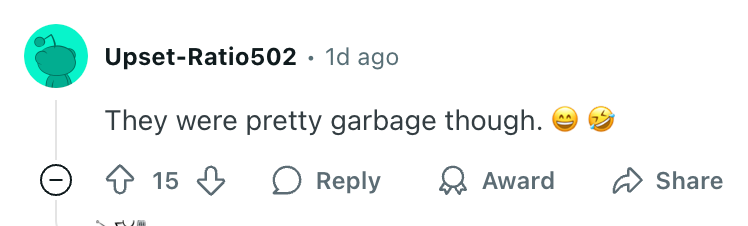
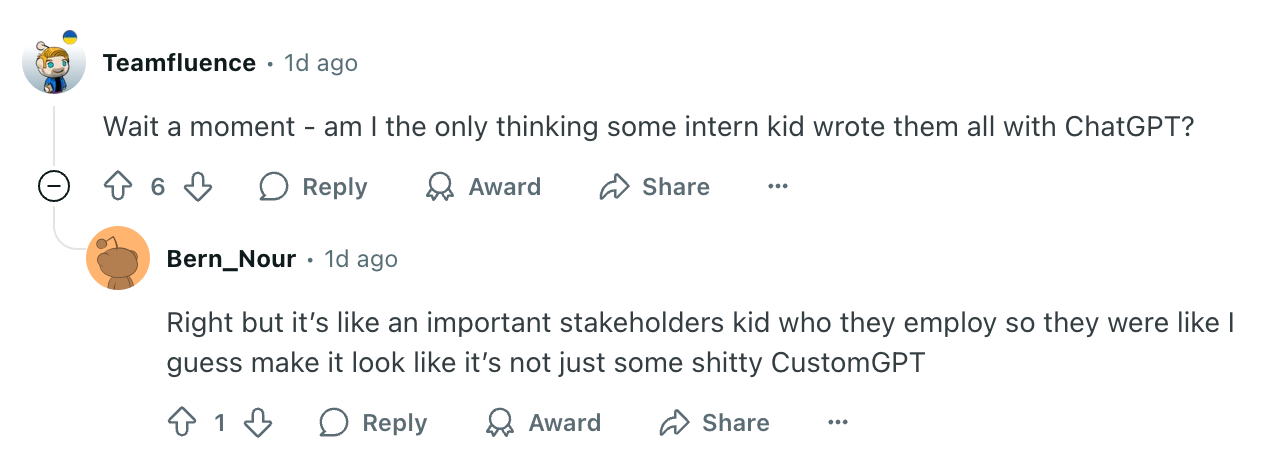
Ok ok enough Reddit. Here’s an actual real sample prompt in their engineering section. I picked it because it is for technical stakeholders. Sarcasm intended.
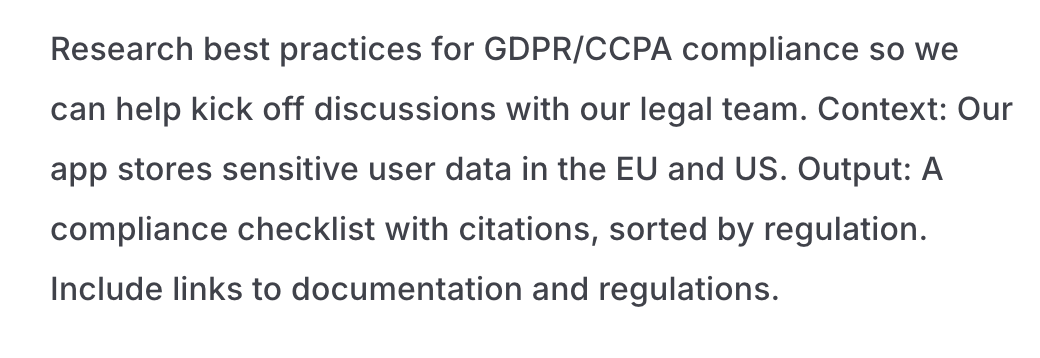
Look at what’s missing here. There’s no data schema—what types of user data are we even talking about? Email addresses? Health records? Payment information? The compliance requirements are completely different for each type.
“EU and US” doesn’t mean anything specific. Which EU countries? Which US states? California has CCPA. Virginia has VCDPA. Colorado has CPA. Each one’s different. And in the EU, you need to know which data protection authority has jurisdiction.
There’s nothing about your current stack. Are you on AWS? GCP? Azure? What’s your data retention policy look like today? How do you handle deletion requests? Where are the actual gaps?
No mention of processing activities. What do you actually DO with this data? Because using it for analytics versus marketing versus product features—those all have different legal implications.
And there’s no risk prioritization. Which compliance gaps could result in fines? Which are just nice-to-haves? What’s the difference between a must-fix and something you can address later?
When has engineering ever kicked off discussions with legal? And when did we need AI to give us a checklist with citations? That’s what Google is for. That’s not what intelligence is for.
Here’s why this matters to me:
This is AI education treated as one-and-done software adoption. Download the template pack, roll it out to your teams, tick the box, move on. You’re done with AI training. AI is actually MUCH better than this, but these prompts would never give you that idea.
TLDR: AI isn’t software you learn once and use for years. It’s exponential technology on a moving train.
As an example, Sonnet 4.5 just did 30 hours of continuous coding and rebuilt Slack in one session—11,000 lines of working code. I took a screenshot of a financial report last night and it generated a complete Excel model with formulas, formatting, and insights. Thirty minutes of work in thirty seconds.
I tried the same thing with ChatGPT-5. It failed.
That was last night. By the time you’re reading this, there will undoubtedly be new capabilities neither of us knows about yet (something something Sora 2).
Your “AI training” from six months ago? Already obsolete. The capabilities you don’t know about are doubling every few months. That’s not me being dramatic—that’s the actual pace of model releases, feature launches, capability expansions happening right now.
Teams that think they’ve “adopted AI” with template prompts are going to wake up in 2026 wondering why they’re left behind. They’ll be surprised when people come along and say “I one-shotted an entire financial analysis” or “I automated 15 hours of pipeline review work.”
This is my biggest fear for 2026: a generation of knowledge workers trapped in the messy middle of AI adoption. They use ChatGPT for emails. They think they “know AI.” Meanwhile, they’re sitting on capability they don’t know exists, missing 80-90% of the AI opportunity in their work.
And I see this everywhere I look. Teams using AI for summaries and email drafts while their engineers spend 4 hours on code reviews that AI could compress to 45 minutes. Sales teams making gut-based pipeline calls when AI could give them risk-scored recommendations with historical pattern matching. Product teams spending 8 hours extracting requirements from stakeholder chaos when AI could structure it in 90 minutes.
The capability is already there. The understanding isn’t.
What Actually Works
I’ve been thinking about this differently. Instead of starting with “how do we use AI?”, I start with “where are we wasting time grinding without results?”
Because that’s where the real opportunity is.
Your sales team spends 80 minutes every week on pipeline reviews that are still guesswork. Your engineers spend 4 hours per code review catching the same issues over and over. Your product team spends 8 hours turning messy stakeholder input into clean requirements.
That’s where you start. Not with AI capabilities. With the pain points where people are burning hours and still not confident in the results.
Let me show you what I mean with that sales pipeline review.
Here’s what it looks like today:
You pull the CRM data—15 minutes of exporting from Salesforce, wrangling fields, making sure deal stages are current, checking that close dates aren’t sitting there from three months ago. Just cleaning the data so you can actually work with it.
Then you build Excel pivots—20 minutes creating the views you need. Pivot by stage. Pivot by rep. Pivot by close date. Format it so leadership can read it. Make sure the numbers add up.
Then comes the hard part: 30 minutes staring at numbers trying to find patterns. Which deals are stalled? Which reps are behind? Where’s the risk? This is where you’re supposed to be strategic, but you’re mostly just tired from data wrangling. So you rely on gut feel and hope you’re not missing something obvious.
You make your calls—5 minutes flagging the deals that feel risky. You hope you’re right. You know you’re probably missing something because you can’t see patterns across 50 deals in your head.
Then you write the update email—10 minutes summarizing what you found, trying to sound confident about calls you’re not actually confident about. You send it to leadership and hope the deals you flagged as risky are actually risky.
Total: 80 minutes of work. Low confidence in the result.
Here’s what it could look like:
The data pull is automated—script runs every Monday morning. Pulls fresh data, cleans the fields, flags issues. It’s ready before you start.
AI does the risk analysis in 2 minutes. You feed it the data along with your historical close patterns. It analyzes activity levels, last contact dates, stage duration, stakeholder coverage. It calculates risk scores based on what actually predicts deal slippage in your pipeline, not generic best practices.
You spend 5 minutes reviewing the scored recommendations. Looking at the AI’s risk assessment. Reading its reasoning. Checking if it makes sense against what you know about these deals. You override if you have context it doesn’t. But now you’re reviewing recommendations, not generating them from scratch.
AI drafts the update in 30 seconds. You ask it to write the email using its analysis. It includes specific risk factors, quantified probabilities, recommended actions. You edit for tone and add any human context. Done.
Total: 8 minutes. High confidence.
And here’s what matters: The AI can see patterns across all 50 deals simultaneously. It can compare this month to the last 12 months. It can identify that deals with no activity in 14 days and only one stakeholder engaged have an 80% slip rate in your specific pipeline. Not because some best practice guide says so—because that’s what your actual data shows.
That’s workflow-first prompting.
Not “use this template.” But “solve this specific problem in your actual work process.”
The prompt you build will be longer than OpenAI’s templates. Good. That’s because it can do more. It has your context, your process, your constraints, your decision criteria. It knows what “at risk” actually means in your pipeline based on your historical data, not generic industry benchmarks.
And it evolves. When new AI capabilities launch next month, you test them against your workflow. You refine your prompts. You keep learning because the technology keeps advancing.
This isn’t training. This is capability building.
And here’s the thing—even if you’re stuck with Copilot in your org (and by the way, Claude is now in the Office family, that’s why Microsoft’s been bragging about “the best Excel model”), you can still solve real problems with this approach. The gap isn’t the model. The gap is knowing how to use it for your actual work.
I Built 12 Examples
So I built 12 prompts using this workflow-first approach. Let me show you what they look like.
For Engineering:
Technical debt prioritization—not “research best practices,” but a structured framework that takes your backlog, your team capacity, your roadmap, and gives you a prioritized plan with effort estimates and business impact.
Root cause analysis for production incidents—not “create a checklist,” but a systematic investigation that maps the timeline, identifies contributing factors, and produces prevention measures based on your specific system architecture.
API design review with standards compliance—not “analyze this code,” but a comprehensive evaluation against your team’s standards with specific fixes for each issue found.
Each one takes what used to be 4 hours of work down to about 45 minutes. And gives you decisions, not just analysis.
For Sales:
Pipeline risk assessment with historical pattern matching—what I just described. Turns 80 minutes of guesswork into 8 minutes of data-driven decisions.
Discovery call prep from CRM data and company research—pulls everything you know about an account, maps their stakeholders, predicts objections, and gives you a structured call plan. Takes 45 minutes of prep down to 10.
Deal prioritization with coverage analysis—looks at your entire pipeline, identifies where you’re missing stakeholders, where engagement is low, where deals are likely to slip. Tells you where to focus your time.
Each one turns guesswork into data. Saves hours per week. Actually helps you close deals.
For Product:
Requirements extraction from messy stakeholder conversations—takes the chaos of meeting notes, Slack messages, email threads, customer feedback, and gives you structured user stories with acceptance criteria. Eight hours of work down to 90 minutes.
Competitive analysis with strategic gap identification—not just “here’s what competitors have,” but “here’s where you’re behind, here’s where you’re ahead, here’s what to build next and why.”
Feature prioritization with quantified business impact—scores your backlog by actual impact, not opinion. Ties each feature to revenue, retention, or strategic goals with numbers.
Each one solves the broken telephone problem. Turns chaos into clarity.
For Marketing:
Content performance analysis with specific optimization actions—looks at what’s working, what’s not, and tells you exactly what to fix. Not “write more content,” but “update these 5 pieces, retire these 3, create these 2 new ones.”
Campaign brief development from business goals—takes your high-level objectives and creates an executable campaign plan with channels, tactics, budget allocation, and success metrics.
Gap identification with audience-mapped opportunities—shows you what content you’re missing for each stage of the buyer journey and each persona. Prioritized by impact.
Each one stops you from creating content nobody needs. Shows you what actually moves metrics.
For Customer Success:
Account health assessment with churn prediction—scores every account by risk level, tells you specifically what’s going wrong, gives you actions to take before they churn.
Onboarding plans with 90-day success milestones—customized onboarding for each customer based on their goals, with specific milestones and success criteria.
Expansion opportunity identification with revenue potential—finds the accounts ready to expand, quantifies the opportunity, tells you exactly what to pitch.
Each one catches problems before they become churn. Finds revenue you’re leaving on the table.
For Operations:
Budget variance analysis with corrective action plans—looks at where you’re over or under budget, explains why, and gives you specific actions to get back on track. Three hours of analysis down to 30 minutes.
That’s 12 prompts. Each one solves a specific workflow problem. Each one saves 2-10 hours per week. Each one includes context, format, constraints, and edge case handling. Each one is built to evolve as AI capabilities advance.
Here’s the difference between generic and workflow-first:
Not this: “Analyze our sales pipeline and provide insights.”
But this: “You are a sales operations analyst conducting pipeline health analysis. Analyze the data below. For each deal: calculate risk score based on activity patterns, last contact date, stage duration, and stakeholder coverage. Flag high-risk deals with specific next actions. Prioritize by (deal size × close probability) ÷ days remaining. Output format: [specific table structure with risk factors, recommended actions, and forecast adjustments]. If data is incomplete: state exactly what’s missing and why it matters for the forecast.”
One gives you generic analysis you could have gotten from a business analyst in 2019. The other gives you decisions you can act on today.
The first one is short because it does less. The second one is longer because it can do more.
Here’s What I’d Do
If I were starting this today, here’s what I’d do this week:
Pick one workflow that wastes 2+ hours per week. Just one. Map it out step by step—what actually happens today? Where does information come from? Where does it go? What decisions get made? Where do you get stuck?
Then identify where AI actually helps. Not everywhere—be specific. Is it in the data gathering? The pattern recognition? The first draft of the output? The decision support?
Build a prompt for your specific process. Not a generic template. A prompt that knows your context, your constraints, your decision criteria.
Test it with three real scenarios. Not invented examples. Actual work from last week.
Refine it based on what you see. What’s missing? What’s wrong? What needs more context?
Measure the time saved. You’ll know within a week if this is working.
That’s workflow-first AI education.
Then if you want to see how I did this, get the 12 prompts I built. They’re not templates to copy-paste blindly. They’re examples of workflow-first prompting that you customize for your context.
Each one includes the specific pain point it solves, the workflow it integrates with, customization points marked [LIKE THIS], success metrics so you know it’s working, and implementation guidance for your team.
You take the prompt. You fill in the [BRACKETS] with your industry, your process, your constraints. You test it. You refine it. You measure impact.
And I’ll keep updating these. New AI capabilities launch constantly—Sonnet 4.5’s image analysis, GPT’s reasoning improvements, tool use, computer control, analysis features.
I test them. I update the prompts when new capabilities make them better. I share what works.
Because this isn’t one-and-done. This is continuous learning to keep pace with exponential technology.
The Choice
Look, I see two paths here.
Path 1: Roll out OpenAI’s template prompts. Think you’re done with AI training. Fall behind as capabilities advance. Wake up in 2026 wondering why your team is struggling while others are 10x more productive.
Path 2: Build workflow-first prompts. Measure impact, not usage. Evolve continuously as AI advances. Stay on the moving train.
Most managers have no idea how much AI opportunity is sitting untouched in their teams. I see it everywhere I look—80-90% of the potential just sitting there because nobody knows it exists or how to use it.
You’re not using Copilot for emails and calling it AI adoption. You’re not asking ChatGPT to “research best practices.” You’re building AI into your actual workflows where manual cycles waste time without producing results.
The gap isn’t AI. The gap is people. The gap is people not being willing to train continuously. The gap is people thinking a little bit of training is enough.
OpenAI released a prompt pack that says “here’s your training, you’re done.” Reddit ripped it apart. The professionals who are serious about AI rejected it immediately. They know what I know: if you learn two or three lines in a prompt and think you’ve got it, you’re already in the left-behind contingent.
We need better AI education. We need better understanding of where AI opportunities actually exist in our work. We need to retain our curiosity and learn with AI as it scales.
And we’re not getting that from resources like OpenAI’s prompt pack.
So here’s my plea: If you’re a model maker, invest in real education. Clear on-ramps, yes. But also clear progression. Help people understand principles that scale with exponential technology.
And if you’re on a team trying to adopt AI: Start with pain points. Build into workflows. Measure impact. Keep learning.
That’s how you do AI education right.
Built for professionals who refuse to treat exponential technology like linear software.
I make this Substack thanks to readers like you! Learn about all my Substack tiers here