Steal the method $100 billion dollar companies use to write prompts—and no you don't need to know code. Grab the complete guide to using AI to write prompts for beginners, engineers, and team leaders!
By Nate
Published: 2025-09-26
URL: https://natesnewsletter.substack.com/p/quick-start-make-ai-optimize-your
Trick question: What do JetBlue, Databricks, and Sephora have in common? They all use AI to build prompts. Not people.
I’m not kidding! This is how teams behind billion-dollar AI products in 2025.
But until now, there hasn’t been a clear guide to explain how these do it and how small teams and (yes) even non-technical AI enthusiasts can do the same thing.
Not anymore! This is the guide for using AI to write your prompts. Whether you’re a ChatGPT enthusiast, a vibe-coder, an AI engineer, or a team lead, this guide is written for you.
And it really works.
I’ve watched this same pattern play out many times:
First, burnout: A talented engineer spends days optimizing prompts for their startup’s core AI feature. A “vibe coder” burns weekends tweaking ChatGPT outputs that never quite work reliably. A multimillion-dollar company has three teams using three different prompt versions for the same task, with no idea which actually works best.
Second, realization: The lights go on when they realize prompting doesn’t have to depend on best efforts and prompt expert heroics anymore.
Third, transformation: Moving from a hero mindset to a systems mindset. Some used the 5-minute template to fix their immediate problem. Others deployed DSPy pipelines that now power production features at scale.
The breakthrough wasn’t code by itself. Or more prompt engineering—it was letting AI optimize its own prompts based on real data, not human hunches.
Nobody else is giving you this complete journey in one place.
You’ll find DSPy tutorials that assume you’re already a machine learning engineer. You’ll find prompt templates that work once then break when you switch models. You’ll find enterprise case studies locked behind vendor walls.
But nowhere else will you get a 5-minute quick start, three separate implementation guides, and a 71-page reference manual—all built on real prompting war stories.
This isn’t a guide about prompt heroics. Instead, it’s the complete system the best teams have been quietly building while everyone else tries to level up their individual efforts.
Here’s what you’re getting:
- The 5-Minute Quick Start: A copy-paste template that makes any AI optimize your prompts automatically—no code required
- Part 1: Beginner’s Guide: Build self-optimizing prompts with simple templates and real tracking (Sarah saved 1.7 hours monthly on emails alone)
- Part 2: Engineer’s Handbook: Graduate to DSPy for programmable, testable, model-agnostic systems (with working code you can deploy today)
- Part 3: Team Leader’s Platform: Scale with production infrastructure that turns individual wins into organizational power
- The Complete 71-Page Reference Guide: Every pattern, pitfall, and production lesson documented—your canonical reference to update as tools evolve
- The Teaching Deck: The exact slides from my DSPy video workshop—use them to coach your own team through the transition
- Last but not least, a sidebar on why prompting skills still matter (it’s true)
Why this post right now? Because AI adoption is stalling at the prompt level. Teams spend months in “pilot purgatory,” tweaking prompts that break with every model update, unable to measure what works or share what they’ve learned.
Meanwhile, the companies that treat prompts as optimizable code—not mystical incantations—are shipping AI features 10x faster.
The difference isn’t talent or budget. It’s having a system that improves itself instead of requiring a prompt whisperer on staff. Your team doesn’t need another “AI expert.” They need this guide, and they need it now.
Subscribers get all these newsletters!
Want the deck I show in my video? It’s right here
Eleven slides, great for anyone looking to teach DSPy and AI prompt engineering to a new audience. Grab them and teach your team!
Want the full DSPy guide for builders and teams? Grab it here
If you want more than the 5-minute quick start, I put together a longer “Complete Guide + Workbook” to make this repeatable—not just inspirational. It walks the full stack: concrete examples, scoring rubrics, the iteration loop and logging, when/why to graduate to DSPy, plus copy-paste prompts, checklists, and drop-in code. Keep it as the canonical reference and update it as the tools change, so you don’t have to stitch together notes from posts. Use it when you’re ready to instrument, not just experiment; the short post will get you moving, and the workbook will help you scale.
Master Self-Optimizing Prompts & DSPy: From Beginner to Enterprise Scale
Table of Contents
- Part 1: For Beginners – Build self-optimizing prompts with a simple template and real-world tracking
- Part 2: For Builders & Engineers – Shift to DSPy for programmable, optimizable LLM systems
- Part 3: DSPy Systems for Teams – Scale with infrastructure that turns individual wins into organizational power
- Conclusion – Your step-by-step path forward
Part 1: For Beginners
Picture this: You’re staring at your screen, tweaking the same prompt for the tenth time—”Make it more professional,” “Add specifics”—but the outputs stay frustratingly inconsistent. Sound familiar? The good news is you don’t have to guess anymore. You can create a system where the AI improves your prompts automatically, turning one-off hacks into reusable tools that get better with every use. And it takes just 5 minutes to start, no code required.
Let’s dive in with a battle-tested template that anyone can copy-paste into their favorite AI chat. This self-optimizer analyzes your examples, scores potential prompts, tests them head-to-head, and delivers a polished version ready to deploy. It’s like having a prompt coach that never sleeps.
The Self-Optimizing Prompt Template
Here’s the template—plug in your details and watch it work:
```
SELF-OPTIMIZER TEMPLATE
I need help creating a self-optimizing prompt system.
My task: [Describe what you want - like “write professional emails” or “summarize meeting notes”]
My examples:
Input: [what you give it] → Output: [what you want back]
Input: [another example] → Output: [what you want back]
Input: [third example] → Output: [what you want back]
Now please:
STEP 1: Create a scoring system (0-10) with specific criteria:
Functionality: Does it solve the core problem? (Match 80% of examples accurately)
Format: Does it follow the required structure? (Include all specified elements)
Completeness: Does it provide everything needed? (No missing key information)
STEP 2: Write 3 different prompts that could handle my taskSTEP 3: Test each prompt on my examples and score themSTEP 4: Take the best one and improve it by fixing whatever scored lowestSTEP 5: Give me the final improved prompt with scoring system and common pitfalls to watch
```
Run this once, and you’ll get back not just a better prompt, but a scoring rubric you can reuse forever. It’s systematic, not magical—but the results feel like magic.
Work Stories: How This Changes Your Workflow
To see it in action, let’s follow two people who were stuck in prompt hell and broke free. First, Sarah, a marketing manager drowning in email revisions. She used the template for “professional emails that get responses.” Her examples? A follow-up on a proposal, a meeting reschedule, and a project update.
The optimizer spat out a structured prompt: Start with a punchy subject like “Project [Name] - Quick Update: [Date],” keep it under 150 words, include one clear next step, and end with “Confirm receipt by [date].”
Before, her emails took 30 minutes each with hit-or-miss opens. After? 10 minutes flat, and response rates jumped 40%.
Sarah’s secret? She didn’t stop at the template. She documented it, which brings us to the next piece: a dead-simple system to track and iterate.
Now imagine Mike, a project manager whose meeting notes sparked endless “Wait, what did we decide?” emails.
His task: “Summaries that capture decisions and actions.” Examples included a budget discussion and customer feedback session.
The optimizer refined it to into a tight format:
DECISIONS (bullets with approvals), ACTIONS (owner + deadline), NEXT (follow-up meeting).
No fluff—just super scannable insights. His team went from ignoring summaries to actioning them immediately, saving 15 minutes per meeting in follow-ups.
This is what really happens when you treat prompts like code: version them, score them, improve them. The work is worth it.
Your Prompt Logbook (Yes, It’s That Simple)
Start with a basic spreadsheet or Google Doc—three columns only. Column 1: The prompt you’re testing. Column 2: What actually happened (time saved, response rate, whatever matters to you). Column 3: One thing to try next time. That’s it. No complex scoring systems, no elaborate frameworks. Sarah tracked just two numbers: minutes per email and response rate. When responses dipped below 30%, she’d tweak one element—usually the subject line or call-to-action—and note what changed.
Every Friday, spend 10 minutes reviewing your prompts. Pick your worst performer and ask one question: “What’s the smallest change that might help?” Maybe your summaries are too long. Maybe your emails bury the ask. Fix that one thing, test it next week. Mike discovered his action items got ignored when they exceeded three per person—so he capped them. Simple rule, massive improvement.
Store everything in one place you’ll actually check. Not some fancy prompt management system—just a folder called “Prompts That Work” with your templates and their current stats. Update the version number when you change something (Email\v3, Summary\v2). When something consistently works for two weeks straight, lock it in as your default. The goal isn’t perfection; it’s having prompts that work 80% of the time instead of starting from scratch every time.
Ready to go farther? Power users can track prompts more closely
Start with that dead-simple spreadsheet. Three columns: “Prompt I Used,” “What Happened” (time saved, responses, whatever), and “Fix Next.” Maybe Sarah tracks just two numbers—minutes per email and response rate. When something sucks, she tweaks one thing and notes it. Every Friday, 10 minutes to review your worst performer and fix one element.
After two weeks of consistent wins, create one document: “Prompts That Work.” Copy in your proven templates with their basic stats (like “Email\_v3: 10 min average, 40% response rate”). Version them simply when you change them. Through experience, Mike learned to cap action items at three per person—that one rule transformed his summaries from ignored to actioned.
Optional level-up: Add a simple 1-5 score for “Did this work?” If you average below 3 for a week, that prompt needs the optimizer treatment again. But don’t start here—start with the spreadsheet. The fancy tracking system only matters once you have prompts worth tracking.
Sidebar: Yes, prompting still matters!
I’m expecting to see some of you in my DMs asking why I’ve emphasized prompting skills so much. And I have a very simple answer for you. Three answers, actually:
- Great prompters still beat AI-automated prompting—but AI-automated prompting tools beat average and poor prompters and scale much better.
- Understanding prompting will help you construct AI prompt systems that work.
- Prompting is a metaskill, and tools like DSPy are just tools for particular prompting applications—the metaskill will be valuable as AI grows and grows.
Part 2: For Builders & Engineers
You’ve nailed manual optimization—now imagine programs that learn optimal prompts from your data, adapting to new models without a rewrite. That’s DSPy: a framework that treats LLMs like optimizable code, not fragile strings. No more “test-tweak-repeat.” Define what you want, score success, and let it compile the best version.
The shift? From artisan prompting to engineering pipelines. Sarah’s email template becomes a module; Mike’s summaries chain into reports. Let’s build one.
Core Shift: Programs Over Prompts
Forget endless A/B tests. DSPy lets you declare: “Input: meeting notes. Output: action items.” Then optimize via metrics. It’s composable (stack modules), testable (score every run), and future-proof (swaps models seamlessly).
Three pillars to make DSPy work:
- Signatures: Clean I/O contracts (e.g.,
context + purpose → email).
- Modules: Logic builders (chain predictions, add guards).
- Optimizers: Auto-tuners (e.g., BootstrapFewShot generates demos, scores, picks winners).
Hands-On: From Zero to Optimized Email Writer
Start with setup—grab your API key, and run this:
# Requires: dspy-ai>=2.5, openai>=1.0, python-dotenv
# pip install dspy-ai openai python-dotenv
import dspy
import os
from dotenv import load_dotenv
load_dotenv()
lm = dspy.OpenAI(model=’gpt-4o-mini’, api_key=os.getenv(’OPENAI_API_KEY’)) # ~$0.00025/token avg
dspy.configure(lm=lm)
# Quick test
if __name__ == “__main__”:
try:
test_sig = dspy.Predict(”question -> answer”)
result = test_sig(question=”What is 2+2?”)
print(f”Ready: {result.answer}”) # Should print ‘4’
except Exception as e:
print(f”Oops: {e} – Check your API key”)
Now, craft a signature for emails—specific enough to guide, flexible for optimization:
class WriteEmail(dspy.Signature):
“”“Write a professional email response.
Format: ‘Subject: [topic]’ + body (greeting, message, next steps, close).
Length: 100-300 words. Tone: Direct, empathetic.”“”
context = dspy.InputField(desc=”Situation details”)
recipient = dspy.InputField(desc=”Name + role, e.g., ‘Sarah (manager)’”)
purpose = dspy.InputField(desc=”Goal, e.g., ‘request extension’”)
email = dspy.OutputField(desc=”Full formatted email”)
class EmailWriter(dspy.Module):
def __init__(self):
super().__init__()
self.write = dspy.Predict(WriteEmail)
def forward(self, context, recipient, purpose):
return self.write(context=context, recipient=recipient, purpose=purpose)
# Test baseline
writer = EmailWriter()
draft = writer(context=”Project delayed 2 weeks”, recipient=”Sarah (manager)”, purpose=”Request extension”)
print(draft.email) # Raw output—good start, but let’s optimize
The magic? A metric that quantifies “good.” Vague ones flop; make it concrete:
import re
def email_metric(example, prediction):
email_text = prediction.email.lower()
score = 0.0
if re.search(r’subject:’, email_text): score += 0.25 # Structure
if any(g in email_text for g in [’hi’, ‘hello’, ‘dear’]): score += 0.25 # Greeting
if example.purpose.lower() in email_text: score += 0.25 # Relevance
if any(c in email_text for c in [’best’, ‘regards’, ‘thanks’]): score += 0.25 # Close
return min(1.0, score)
Feed it examples, optimize, save:
training_examples = [
dspy.Example(
context=”Meeting rescheduled”,
recipient=”team”,
purpose=”inform change”,
email=”Subject: Meeting Rescheduled\n\nHi team,\n\nMoved to Tuesday due to conflict. Confirm?\n\nBest,\nAlex”
),
dspy.Example( # Add 2-3 more like this
context=”Milestone hit”,
recipient=”stakeholders”,
purpose=”update status”,
email=”Subject: Milestone Achieved\n\nHello,\n\nPhase 1 done—Phase 2 Monday. Metrics tomorrow.\n\nRegards,\nAlex”
)
]
optimizer = dspy.BootstrapFewShot(metric=email_metric, max_bootstrapped_demos=4, max_labeled_demos=2)
optimized_writer = optimizer.compile(EmailWriter(), trainset=training_examples)
optimized_writer.save(”email_writer_v1.json”) # Reload later: optimized_writer.load()
# Optimized test
result = optimized_writer(context=”Deadline missed”, recipient=”client”, purpose=”Apologize + retimeline”)
print(result.email) # Now consistently pro
Pick Your Optimizer: Fast vs. Thorough

Decision Rules of Thumb:
- Bootstrap is usually a good baseline
- Score >80%: Done
- Score 60-80%: Use MIPRO
- Score <60%: Debug metric/examples
Sample production code structure:
class RobustEmailWriter(dspy.Module):
def __init__(self):
super().__init__()
self.write = dspy.Predict(WriteEmail)
self.fallback = dspy.Predict(”context -> simple email”)
def forward(self, context, recipient, purpose):
try:
result = self.write(context=context, recipient=recipient, purpose=purpose)
if self._is_valid(result.email): return result
raise ValueError(”Bad output”)
except Exception as e:
print(f”Fallback: {e}”)
return self.fallback(context=f”Email to {recipient}: {context}. Goal: {purpose}”)
def _is_valid(self, text: str) -> bool:
return 20 < len(text) < 2000 and “Subject:” in text
This scales your beginner wins into code. You get the idea and can start to build off this structure to get where you want to go.
But for teams? Part 3 builds the infrastructure so everyone benefits without chaos.
Part 3: DSPy Systems for Teams
You’ve got your killer email module from Part 2 humming along—optimized, resilient, saving you 20 minutes per draft. It’s a solo win. Now scale it: Marketing wants one for ad copy, engineering for bug triage, sales for lead scoring. Without a plan, you get forked repos, mismatched metrics, and a model tweak that cascades failures.
And just like in traditional software engineering, heroes don’t scale. Special efforts won’t scale your prompt pipeline nearly as well as shared registries.
But here’s the beauty—scaling DSPy isn’t a rewrite; it’s wrapping your modules in a lightweight platform that lets teams collaborate without chaos. Imagine Alex, a lead engineer at a SaaS startup: His email writer was gold, but as adoption grew, he built a simple API hub. Teams registered their tweaks (e.g., “sales tone: upbeat”), the platform handled model swaps and checks, and a dashboard showed a nice $450/month in token savings. Three months in, five teams were live, with 15% faster feature ships. No more “whose version is this?”
We’ll build Alex’s system step-by-step: A minimal platform you can fork, deploy (FastAPI locally, Lambda in prod), and extend. This scaffold uses DSPy 2.5+ patterns—runnable today, evolvable tomorrow. By the end, you’ll have a service where domains plug in modules, the platform enforces quality/costs, and everyone measures impact. Let’s code it up.
The Foundation: Three Layers for Frictionless Scale
Before diving in, the blueprint: A layered setup where handoffs are crisp. Platform owns the pipes (APIs, monitoring); domains own the brains (tuned modules); apps own the magic (features that delight users).
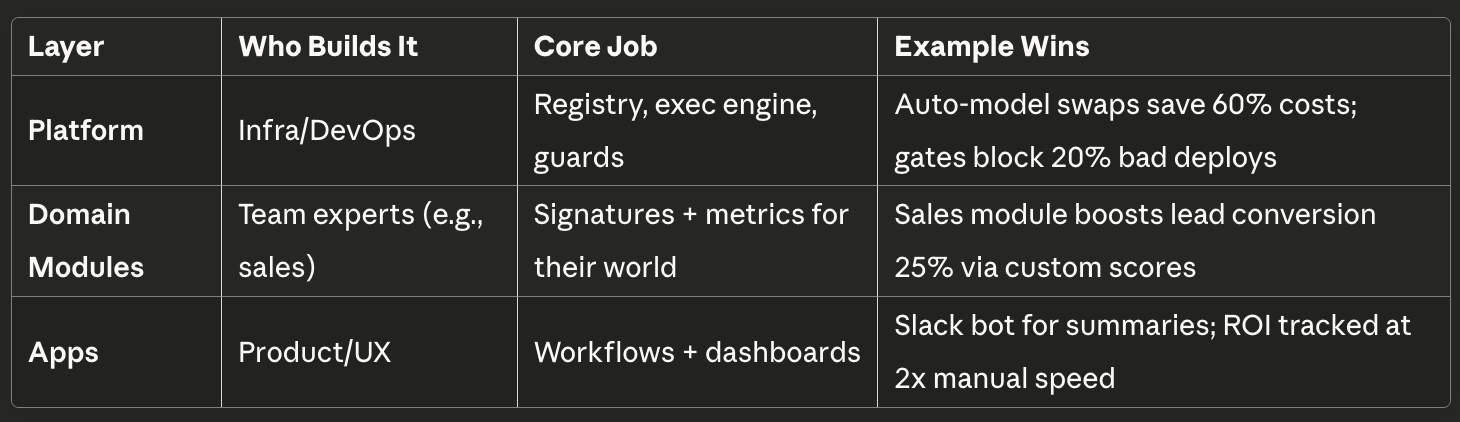
This isn’t rigid—start with Platform, let domains flow in. Alex began here: One endpoint for everyone interested in email optimization, scaling from 10 to 1,000 calls/day without sweat.
Step 1: Bootstrap the Core Service
Kick off with a registry: Teams POST their module config (budget, domain), get an API key back. Executions route through it, logging everything. Deploy as a FastAPI app.
Sample code to get you started:
# platform/service.py (pip install dspy-ai fastapi uvicorn[standard] python-multipart)
from dataclasses import dataclass
from typing import Dict, Any
from enum import Enum
from datetime import datetime
import logging
from fastapi import FastAPI, HTTPException
from pydantic import BaseModel
app = FastAPI(title=”DSPy Platform v1”)
logging.basicConfig(level=logging.INFO)
class ServiceTier(str, Enum):
DEVELOPMENT = “development”
PRODUCTION = “production”
@dataclass
class ProgramReg:
program_id: str
team_id: str
domain: str # e.g., “sales”
business_context: str # “Lead scoring for CRM”
service_tier: ServiceTier
cost_budget_monthly: float # e.g., 100.0
quality_reqs: Dict[str, float] # {’overall’: 0.85}
contact_email: str
class DSPyPlatform:
def __init__(self):
self.programs: Dict[str, Dict[str, Any]] = {} # {pid: {’reg’: reg, ‘module’: None, ...}}
self.model_mgr = ModelManager()
self.quality = QualityGateManager()
self.costs = CostTracker()
def register(self, reg: ProgramReg) -> Dict[str, Any]:
if any(not getattr(reg, f) for f in [’program_id’, ‘team_id’, ‘domain’]):
raise HTTPException(400, “Missing core fields”)
if reg.cost_budget_monthly < 10:
raise HTTPException(400, “Budget too low—min $10/mo”)
if self.costs.check_quota(reg.team_id) > 0.95:
raise HTTPException(402, “Team quota exceeded”)
self.programs[reg.program_id] = {
‘reg’: reg, ‘module’: None, # Load DSPy module later
‘metrics’: {}, ‘status’: ‘ready’, ‘last_exec’: None
}
logging.info(f”Registered {reg.program_id} ({reg.domain}) for {reg.team_id}”)
return {’success’: True, ‘exec_url’: f’/exec/{reg.program_id}’, ‘dash_url’: f’/metrics/{reg.program_id}’}
async def execute(self, pid: str, input_data: Dict[str, Any]) -> Dict[str, Any]:
if pid not in self.programs:
raise HTTPException(404, f”{pid} not registered”)
info = self.programs[pid]
start = datetime.now()
try:
model = await self.model_mgr.get_optimal(info[’reg’].cost_budget_monthly / 30, info[’reg’].quality_reqs.get(’overall’, 0.8))
# Run module (stub: replace with actual DSPy forward)
output = self._run_dspy(info.get(’module’), input_data, model)
exec_time = (datetime.now() - start).total_seconds()
tokens_used = len(str(output)) # Rough est; use tiktoken for precision
cost = await self.costs.log(pid, model, exec_time, tokens_used)
info[’last_exec’] = {’time’: exec_time, ‘cost’: cost}
return {’success’: True, ‘output’: output, ‘time_sec’: exec_time, ‘est_cost’: cost}
except Exception as e:
logging.error(f”{pid} exec error: {e}”)
return {’success’: False, ‘error’: str(e), ‘retry’: ‘Try fallback module’}
def _run_dspy(self, module, data: Dict, model):
if not module:
return “Stub: Optimize and load your DSPy module here”
dspy.configure(lm=model)
return module(\*\*data) # Assumes module.forward returns output
# Global instance
platform = DSPyPlatform()
class RegModel(BaseModel):
program_id: str
team_id: str
domain: str
business_context: str
service_tier: ServiceTier
cost_budget_monthly: float
quality_reqs: Dict[str, float]
contact_email: str
@app.post(”/register”)
async def register(reg: RegModel):
return platform.register(reg)
@app.post(”/exec/{pid}”)
async def exec_prog(pid: str, input_data: Dict[str, Any]):
return await platform.execute(pid, input_data)
# Run: uvicorn platform.service:app --reload
# Test: POST /register with JSON, then POST /exec/{pid} with {”context”: “...”}
How Alex Used It: He spun this up on his laptop, registered his email module, and shared the URL. Marketing registered theirs next—boom, unified access. You can add auth for prod when ready.
Step 2: Wire in Model Management
Teams have different needs—premium for reasoning, standard for speed. Auto-select based on budget/quality, fallback on overruns.
Here’s some sample code to start thinking about handling that:
# platform/models.py (add to service.py imports)
from enum import Enum
import dspy
class ModelTier(str, Enum):
PREMIUM = “premium”
STANDARD = “standard”
@dataclass
class ModelConfig:
model_id: str
model_name: str
tier: ModelTier
cost_per_m: float # Blended input/output
max_tokens: int
mmlu: float # Proxy for quality (GPT-4o: 85.7%)
class ModelManager:
def __init__(self):
self.catalog = {
ModelTier.PREMIUM: [ModelConfig(”gpt4o”, “gpt-4o”, ModelTier.PREMIUM, 6.25, 128000, 85.7)],
ModelTier.STANDARD: [ModelConfig(”gpt4o_mini”, “gpt-4o-mini”, ModelTier.STANDARD, 0.375, 128000, 82.0)]
}
async def get_optimal(self, daily_budget: float, req_quality: float) -> dspy.OpenAI:
candidates = [m for tier in self.catalog.values() for m in tier
if self._est_cost(m) <= daily_budget and m.mmlu >= req_quality]
if not candidates:
candidates = [m for tier in self.catalog.values() for m in tier]
best = max(candidates, key=lambda m: m.mmlu / m.cost_per_m) # Best perf/$
return dspy.OpenAI(model=best.model_name, api_key=os.getenv(’OPENAI_API_KEY’))
def _est_cost(self, m: ModelConfig) -> float:
return m.cost_per_m / 1000 # Per 1k tokens; adjust for your avg
Integration & Alex’s Win: In execute, swap model = await self.model\mgr.get\optimal(...). Alex set sales to “standard” (cheaper for simple scoring), saving 50% vs all-premium. You can add Prometheus for query logs.
Step 3: Add Quality Gates
No unchecked deploys—run auto-checks on register/optimize. Check for functionality (exec success), safety (no leaks), perf (under 5s). Fail? Get recs like “Add examples.”
Sample code here:
# platform/quality.py
from typing import Dict, List
from enum import Enum
import re
import asyncio
from datetime import datetime
class QualityDim(str, Enum):
FUNCTIONALITY = “functionality”
SAFETY = “safety”
PERFORMANCE = “performance”
class QualityGateManager:
def __init__(self):
self.unsafe_pat = re.compile(r’<script|DROP\s+TABLE|password\s\*:’, re.I)
async def evaluate(self, pid: str, module: Any, examples: List[Dict], target: str = “production”) -> Dict[str, Any]:
# Parallel checks
funcs, safes, perfs = await asyncio.gather(
self._check_func(module, examples),
self._check_safe(module, examples),
self._check_perf(module, examples)
)
scores = {’functionality’: funcs, ‘safety’: safes, ‘performance’: perfs}
overall = sum(scores[k] \* w for k, w in {’functionality’: 0.4, ‘safety’: 0.4, ‘performance’: 0.2}.items())
min_score = 0.85 if target == “production” else 0.75
approved = overall >= min_score
recs = self._recommend(scores)
return {’overall’: overall, ‘approved’: approved, ‘scores’: scores, ‘recs’: recs}
async def _check_func(self, module: Any, examples: List[Dict]) -> float:
async def run_ex(ex: Dict) -> bool:
try:
out = module(\*\*ex[’input’])
return bool(out and len(str(out)) > 10)
except:
return False
results = await asyncio.gather(\*(run_ex(ex) for ex in examples[:10]))
return sum(results) / min(10, len(examples))
async def _check_safe(self, module: Any, examples: List[Dict]) -> float:
async def check_ex(ex: Dict) -> bool:
try:
out = str(module(\*\*ex[’input’]))
return not self.unsafe_pat.search(out)
except:
return False
results = await asyncio.gather(\*(check_ex(ex) for ex in examples[:10]))
return sum(results) / 10
async def _check_perf(self, module: Any, examples: List[Dict]) -> float:
async def time_ex(ex: Dict) -> float:
start = datetime.now()
try: module(\*\*ex[’input’])
except: pass
return (datetime.now() - start).total_seconds()
times = await asyncio.gather(\*(time_ex(ex) for ex in examples[:5]))
return sum(1 for t in times if t <= 5) / len(times)
def _recommend(self, scores: Dict[str, float]) -> List[str]:
recs = []
if scores[’functionality’] < 0.8: recs.append(”Boost with 5+ diverse examples”)
if scores[’safety’] < 0.9: recs.append(”Add HF toxicity check for prod”)
if scores[’performance’] < 0.8: recs.append(”Cache common inputs or downgrade model”)
return recs
Watch guardrails in action here:
if not (await self.quality.evaluate(pid, module, train_examples))[’approved’]: return {’error’: ‘Gate failed’, ‘fix’: recs}.
Alex caught a buggy sales module early—fixed in a day, avoided prod fires.
Step 4: Lock in Cost Tracking
If you’re going to scale, you will want to figure out the cost tracking side of things. Log calls, track costs, and start to optimize.
# platform/costs.py
from typing import Dict, List
class CostTracker:
def __init__(self):
self.usage: Dict[str, List[Dict]] = {} # {team: [{’pid’:, ‘cost’:, ‘tokens’:, ‘time’:}]}
self.quotas: Dict[str, float] = {}
def set_quota(self, team: str, limit: float):
self.quotas[team] = limit
if team not in self.usage: self.usage[team] = []
def check_quota(self, team: str) -> float: # % used (last 30 est)
if team not in self.quotas: return 0.0
recent = self.usage[team][-30:] # Proxy for days
used = sum(u[’cost’] for u in recent)
return min(1.0, used / self.quotas[team])
async def log(self, pid: str, model: ModelConfig, time_sec: float, tokens: int) -> float:
cost = (model.cost_per_m \* tokens) / 1_000_000
team = self.programs[pid][’reg’].team_id # Cross-ref
self.usage.setdefault(team, []).append({’pid’: pid, ‘cost’: cost, ‘tokens’: tokens, ‘time’: time_sec})
pct = self.check_quota(team)
if pct > 0.9:
logging.warning(f”Alert: {team} at {pct:.1%} quota—review high-cost PIDs”)
return cost
def dashboard(self, team: str) -> Dict[str, Any]:
if team not in self.usage: return {’error’: ‘No data’}
data = self.usage[team]
high_pids = {}
for u in data:
high_pids.setdefault(u[’pid’], {’cost’: 0, ‘count’: 0})
high_pids[u[’pid’]][’cost’] += u[’cost’]
high_pids[u[’pid’]][’count’] += 1
recs = [{’pid’: k, ‘avg_cost’: v[’cost’]/v[’count’], ‘save_tip’: ‘Downgrade to standard’}
for k, v in high_pids.items() if v[’cost’] > 50]
return {’total_spent’: sum(u[’cost’] for u in data), ‘recs’: recs, ‘quota_pct’: self.check_quota(team)}
Phase It In: From Solo to Org-Wide (Tips from Nate)
- This is technical, I’d let engineers dogfood first
- Pick your AI champions on various teams, and get them to see the value here
- Pick high volume use-cases where you can show scale quickly
- Grab for complex optimization problems after initial scale
This should point the way for you to get going in your business. The key is thinking in terms of a centralized prompt optimizer service, and setting that up in a way that works for your stack.
Conclusion: Your Path to AI Mastery
From fumbling prompts to enterprise pipelines, the thread is systems over guesswork.
- Beginners: Template + docs = quick wins.
- Engineers: DSPy = scalable code.
- Teams: Layers = shared power.
AI really can optimize your prompts, as long as you’re willing to put in the time to explain what good looks like.
The payoff? 10x faster features, resilient to changes (like GPT-4o’s 2025 tweaks), compounding ROI. Start small, document relentlessly. And get excited about letting AI take over more of the prompting!
PS. Quick link to DSPy docs: GitHub
I make this Substack thanks to readers like you! Learn about all my Substack tiers here