A battle-tested playbook to map, plan, vibe-code, debug, review, and ship—six workflows that future-proof your stack, slash dev time, and outlast every AI hype cycle
By Nate
Published: 2025-07-28
URL: https://natesnewsletter.substack.com/p/the-complete-52-page-guide-to-ai
Every once in a while, technology hits an inflection point so powerful that it transforms how we build, how we create, and how we deliver value. AI-powered coding tools are exactly that kind of breakthrough—an inflection point reshaping the core practice of software development. But beneath the hype and the overwhelming flood of new tools, real clarity about how to actually use AI effectively has been hard to find. Until now.
Over the past year, I’ve immersed myself in the messy, exciting reality of building software with AI. I’ve written about it. I’ve closely observed how top industry leaders—from indie hackers rapidly spinning up MVPs, to seasoned engineering managers guiding teams at scale—are practically integrating these tools into their daily workflows. What I’ve discovered is that the most successful AI users aren’t those chasing the latest shiny tool, but rather those who’ve adopted durable, battle-tested patterns. Patterns that consistently deliver real results, survive hype cycles, and meaningfully accelerate their development work.
The problem is no one has been actually naming those patterns as a durable basis for AI-powered development. Until now.
This guide is a comprehensive synthesis of everything I’ve learned. At its heart are six proven workflows that I’ve seen deliver repeatedly across teams, companies, and projects. You’ll get clear explanations of each pattern, real-world examples of how industry leaders are putting them into practice, and honest explorations of the pitfalls they’ve faced along the way. To make it immediately useful, I’ve also included extensive notes on which tools excel at specific tasks, where tools tend to fail, and practical guidelines for avoiding common traps.
I didn’t just research this—I lived it. Each insight and recommendation you’ll read comes from hands-on experimentation and from hundreds of hours of observing, questioning, and learning directly from builders at the forefront. You’ll get a peek at their workflows as well as my own experiences, along with a comprehensive 52 page guide covering AI-powered development traps, pitfalls, and success patterns at all scales (from indie hacker to enterprise).
For AI consultants: this one is big! So many companies are wondering how to configure and set up their AI development workflows. This guide is intended to be a foundational guide for that work.
My goal is straightforward: to equip you with the clearest, most actionable resource available on effectively using AI coding tools right now, in mid-2025. Whether you’re a seasoned engineer aiming to scale productivity, a product leader looking for competitive leverage, or someone completely new to AI and wondering where to start, you’ll find proven strategies and clear pathways to immediate value here. And the workflows I base these on aren’t going anywhere! If ChatGPT-5 comes out this week, we’ll just slot that right into the workflows we’ve already established here.
We’re standing at a pivotal moment. AI is a practical developer reality reshaping what’s possible. In particular, I want to call out that the leaders whose work I am diving into as an example show what’s possible in the age of AI—they are not all (or even mostly) trained CS engineers. Some are. Some are not. All of them have been able to ship and deliver with AI.
My hope is that this guide serves as a useful compass, helping you confidently navigate through the noise (regardless of your experience level) toward real productivity and innovation. Let’s dive in and explore how these durable workflows can supercharge your development, save you time, and open up entirely new creative possibilities.
And I hope this gets you excited to build! It has never been a better time to build…
Subscribers get all these newsletters!
Comprehensive Synthesis of AI Coding Tools: Usage, Pitfalls, and Proven Work Patterns
First, how this works:
I’ve created a complete 52 page guide to give you a reference for AI-powered development in mid-2025. In addition, I’ve gone above and beyond to coalesce all this learning into six durable workflows. Those won’t change, even as tools come in and out of fashion (or hype).
So I spend most of the article below talking about those workflows and leaders you can follow to learn more about how to work with AI tooling (yes even if you’re new). And the 52 page guide? That’s right there as a Google doc whenever you want to dive deep. It includes comprehensive tool profiles across roughly a dozen AI powered development tools, extensive pros and cons, and my own notes from playing with all these tools.
You can get the 52 page guide in Google Docs here
Overall, my goal has been to create the most comprehensive, actionable guide available on how industry leaders actually use AI coding tools to create value. This isn't theoretical—it's based on real workflows, documented pitfalls, and battle-tested patterns that deliver measurable results. My goal is to give you everything you need to understand the principles, see specific tools and examples, recognize the traps, and apply these insights directly to accelerate your own development work.
Still reading? Here’s how I've organized this Substack guide for maximum usefulness:
- Part 1: Proven Work Patterns – Six battle-tested approaches that consistently deliver results, complete with real examples from industry leaders, integrated pitfalls to avoid, and step-by-step application principles. This shows you exactly how these patterns work in practice.
- Part 2: Leader-Specific Workflows and Pitfalls – Detailed breakdowns of how specific leaders use these tools, organized alphabetically. You'll see their exact workflows, understand why they work, learn from their mistakes, and understand the scale they operate at. This gives you proven playbooks to adapt.
- Part 3: Tool-Specific Overviews – A practical cross-reference table of all the major tools, showing their strengths, weaknesses, and optimal use cases based on real-world experience. This helps you choose the right tool for your specific needs.
- Part 4: General Principles and Application Guide – Distilled wisdom (like a cheat sheet) that you can implement immediately, including essential cautions and a reality check on what AI can and cannot do for your coding workflow.
And of course, if you want to go deeper there’s always that 52 page report!
Every detail comes from documented real-world experience. Where relevant, I connect patterns to specific leader examples and tie pitfalls to particular tools and workflows so you understand the full context.
Examples I give from other leaders are from their public-facing statements—I’m pulling them all together into one handy resource, and I’d encourage you to give them all a follow! Together they are a great crowd to learn from when it comes to AI-powered development. Leaders are linked where first referenced, except Mckay Wrigley, who has produced so many great YouTube guides I figured it made sense to call him out here.
Part 1: Proven Work Patterns
These six patterns represent battle-tested approaches from the past year (up to 2025), focusing on boosting velocity while maintaining quality. Each includes: description, strengths, examples from leaders, integrated pitfalls, tools involved, and application principles. Patterns are not autopilot—human oversight is essential, as evidenced by cautionary tales of slowdowns from poor implementation (e.g., 19% development slowdown in one mid-size company due to lack of guidelines).
Pattern 1: Codebase Mapping & Onboarding
Description: Use AI to quickly understand existing codebases, generating maps, summaries, or graphs for onboarding or legacy dives. Treat AI output as a starting point for refinement.
Strengths: Accelerates onboarding from weeks to days; extracts high-level context fast; useful for non-engineers.
Examples from Leaders:
- Claire Vo uses Devin for initial repo analysis and refactor assessment in production codebases, generating PRs/tests with ~80% success on first try, chaining to Cursor for local edits.
- CJ Zafir loads PRD/plans into Cursor's .cursorrules for persistent context, using Gemini 2.5 for scanning large codebases.
- Eric Provencher primes Claude Code with RepoPrompt's /onboard for context, enabling structured XML edits.
- Gergely Orosz uses Claude Code/Codex CLI for session context in large projects.
- Melvin Vivas uses Windsurf's Cascade for auto-context in large/proprietary codebases.
- Simon Willison uses Claude Code's /onboard for GitHub Actions context.
Pitfalls: AI won't grasp every nuance (e.g., Windsurf's poor context for interconnected codebases per Orosz); double-check findings to avoid trust erosion (e.g., Cursor's hallucinations in monorepos per Zafir). General sources note context length limits causing inconsistencies in large projects (e.g., Replit AI loops errors).
Tools Involved: Claude Code (excels at architectural summaries), Aider (grep/questions), Devin (repo analysis), Cursor (persistent rules), Windsurf (Cascade).
Application Principles: Point AI at repo; prompt for summaries/graphs; refine manually. Start with small repos; update context files regularly. For teams, share AI-generated docs for collaborative onboarding.
Pattern 2: Planning-First Development
Description: Use AI as an "architect" to outline plans (functions, logic, edge cases) before code generation; approve/refine then proceed. Simulates pseudocode or design docs.
Strengths: Prevents tangential outputs; ensures coherence/maintainability; doubles as documentation.
Examples from Leaders:
- CJ Zafir asks Cursor for approaches/plans, generates action lists, builds in chunks; uses o3-mini for 40-step plans.
- Dan Shipper sets up opponent processors in Claude Code for parallel sub-agents with opposing goals, synthesizing outputs in long runs.
- Eric Provencher delegates planning to o3 via chat, then Claude applies edits.
- Gergely Orosz uses Plan Mode in Claude Code/Codex CLI for roadmaps, sub-agents for parallel tasks.
- Peter Yang demos 3 agents in Claude Code with custom commands like "think ultra hard" for quality plans.
- Riley Brown uses Cursor Composer for planning/diagram phases (e.g., 3min planning).
Pitfalls: Without planning, outputs can be verbose/wrong (e.g., Claude's throttling in high-load per Shipper); model refusals (e.g., Claude quirks per Provencher). Zafir notes Windsurf breaks after initial steps.
Tools Involved: Claude Code (built-in Plan Mode), Cursor (action lists), o3 (detailed plans), Windsurf (planning mode with rules).
Application Principles: Prompt for breakdown first ("sketch solution design"); approve before coding. Use for complex features/refactoring; feed plans into other tools. Enforce via tool modes or habits to avoid backtracking.
Pattern 3: NL-Driven Coding ("Vibe Coding")
Description: Prompt in natural language for code generation; iterate for refinements. Ideal for prototypes/scripts/exploration.
Strengths: Speed for rapid drafts; zero-setup in some tools; enables non-coders.
Examples from Leaders:
- Riley Brown uses Cursor for 100% AI workflow (e.g., YouTube analytics tool in 1h via prompts for APIs/styling); Replit AI for idea-to-deploy (e.g., CRM UI in one prompt).
- Melvin Vivas prompts Windsurf for deploys/PRs, switching to Gemini for UI.
- Peter Yang types app descriptions in Claude Code for agent builds.
- CJ Zafir prompts Cursor for tweaks, v0 for UI.
Pitfalls: Ambiguous prompts lead to off-base/insecure code (e.g., Replit's overkill client/server per general sources); style mismatches without guidelines. Vo notes Windsurf's bugs in agent mode post-acquisition.
Tools Involved: Replit AI (Ghostwriter for CRUD), Lovable (multi-agent canvas), Cursor (inline edits), Claude Code (prompt-based).
Application Principles: Describe clearly ("create Express.js app with..."); review for security/style. Start small; iterate prompts. Pair with planning for larger tasks to avoid over-engineering.
Pattern 4: AI-Augmented Debugging & Testing
Description: Involve AI when issues arise; analyze errors, suggest fixes, loop until resolved. Automates fix-run cycles.
Strengths: Spots obvious bugs fast; generates tests; reduces root-cause time.
Examples from Leaders:
- Claire Vo uses Devin for debugging with Datadog, generating tests with human review.
- Riley Brown uses Cursor's terminal access for API setups, fixing via diffs.
- Simon Willison reviews commits file-by-file in Claude Code.
Pitfalls: May introduce regressions (e.g., hardcoded fixes per document caution); logical bugs need humans (e.g., Windsurf stopping mid-session per Zafir). General sources note Devin underperforms in messy repos.
Tools Involved: Cursor (Bug Fixer diffs), Devin (autonomous loops), Claude Code (error explanations).
Application Principles: Paste error traces; prompt "suggest fix"; apply diffs cautiously. Sandbox for automation; verify with tests. Use for syntax/data issues; escalate architecture to humans.
Pattern 5: AI-Assisted Code Reviews & Refactoring
Description: Use AI as pre-PR reviewer; prompt for feedback/improvements; automate refactors with oversight.
Strengths: Catches low-hanging issues; accelerates migrations; reduces human burden.
Examples from Leaders:
- Claire Vo chains Devin to ChatPRD for PRs, Cursor for surgical changes.
- Gergely Orosz uses Cursor/Windsurf for inline edits in rollouts.
- Simon Willison commits file-by-file after review in Claude Code.
Pitfalls: Blind trust causes regressions (e.g., Cursor edits outside scope per Zafir, removing params 300 lines away); complexity leads to untangling (document example of week-long fixes). Orosz notes hallucinations in edits.
Tools Involved: Claude Code (diff reviews), Devin (migrations), Cursor (refactors).
Application Principles: Prompt "review this code"; keep refactors small. Integrate with CI bots; human final-sign. Ideal for style/consistency; test thoroughly post-refactor.
Pattern 6: Context Engineering & Consistency Enforcement
Description: Maintain AI-readable files (e.g., CLAUDE.md, .cursorrules) with guidelines; prepend to prompts for on-target outputs.
Strengths: Reduces drift/hallucinations; reinforces best practices; compounds benefits.
Examples from Leaders:
- CJ Zafir uses .cursorrules in Cursor for style/do's-don'ts.
- Eric Provencher uses CLAUDE.md in RepoPrompt for priming.
- Gergely Orosz uses MCP for context limits.
- Melvin Vivas uses Cascade for auto-context.
Pitfalls: Neglect leads to inconsistencies/security mistakes (e.g., Claude forgetfulness after breaks per Provencher); extra maintenance work. General sources note context loss in long sessions.
Tools Involved: Cursor (.cursorrules), Claude Code (CLAUDE.md), Windsurf (Cascade).
Application Principles: Create root files with principles/examples; update regularly. Sync across tools; treat AI like a team member. Monitor for drifts; invest for sustained gains.
Note on the Launch of Claude Code Subagents: In June 2025, Anthropic launched subagents for Claude Code (now part of Claude Projects), enabling multi-agent workflows like opponent processors or parallel task agents directly in the interface. This builds on prompt-based setups (e.g., Shipper's and Yang's examples), adding native support for compounding agents with shared context, reducing manual orchestration. Early adopters report improved handling of complex tasks but note increased costs and occasional synchronization bugs in beta.
Part 2: Leader-Specific Workflows and Pitfalls
This is a second view of the tool-focused view above, focused on per-leader notes. Keep in mind these leaders themselves are publicly evolving their stacks as AI changes, so don’t be surprised to hear about updates as they begin to shift where they focus. As an example, a number of them have shifted publicly from Cursor to Claude Code recently. Notice the same workflows remain, it’s just the tools that shift!
Claire Vo (CPO at multiple ventures; scales async teams; hybrid flows)
Tool: Devin (with ChatPRD and Cursor)
- Workflow Details: Starts with Devin for repo analysis/refactor, generates PRs/tests (~80% success), chains to ChatPRD for PRDs/Linear tickets, then Cursor for local edits/branches. Why works: Reduces async friction, cancels junior hires. Example: Debugging with Datadog. Scale: Multi-venture delegation in hours.
Tool: Windsurf
- Pitfalls Details: Backed off due to post-acquisition (Cognition, July 2025) chaos—talent drain, IP uncertainties, bugs in agent mode (stopping mid-session, resets), inconsistent context in large repos. Why fails: Prioritizes Devin integration. Example: Throttling/lag under load. Scale: Erodes trust for production, delays roadmaps.
CJ Zafir (Independent developer; scales rapid MVPs; benchmarks)
Tool: Cursor (with v0 and Claude Code)
- Workflow Details: Loads PRD into .cursorrules, asks for plans/actions, builds/tests/commits in chunks; chains v0 for UI, Claude for docs; Gemini 2.5 for scanning. Rated 8/10 for MVPs. Why works: Context reduces errors 85-90%, o3-mini for plans. Example: Landing pages/micro-SaaS. Scale: 18+ MVPs with verification.
- Pitfalls Details: Hallucinations with prompts (nonsense, edits outside scope like removing params 300 lines away), more errors than Windsurf, token drains (<1 day Pro), forgetfulness in monorepos. Why fails: Model quirks (GPT-4 verbose, Claude refuses), lags VS Code updates.
Tool: Windsurf
- Workflow Details: Cascade for auto-context, planning with rules, Gemini 2.5 for analysis/cleanup. Rated 4/10, strong indexing. Why works: Better for large repos, MCP for context. Scale: Precision in web/UI.
- Pitfalls Details: Breaks after steps (nonsensical, errors), poor long sessions (stopping/reset). Why fails: Context engine bugs, lag under load. Example: Simpler answers with errors vs. Cursor.
Dan Shipper (Co-founder/CEO of Every; scales long tasks; agentic experiments)
Tool: Claude Code
- Workflow Details: Opponent processors—parallel sub-agents with opposing goals for synthesis (e.g., auditing expenses). Why works: Compounds for better results, MCP for connections. Example: 19h runs with 19/20 high scores. Scale: Complex auditing.
- Pitfalls Details: Throttling/lag in high-load, no full project memory, inconsistencies in chained retrievals. Why fails: Cost ($200/mo Max), 1-line input annoying (Alt+Enter). Example: Overly verbose/wrong like Gemini CLI.
Eric Provencher (Founder of RepoPrompt; scales prompt optimization; hybrid flows)
Tool: Claude Code (with o3 and RepoPrompt)
- Workflow Details: Primes with /onboard or CLAUDE.md, delegates planning to o3 for plans/pseudo-code, Claude edits/verifies with MCP; o3 via desktop videos, auto mode. Why works: Second-order prompting, cheaper drivers. Example: Structured XML edits. Scale: $20/mo optimizations.
- Pitfalls Details: Forgetfulness after breaks, no persistent memory, lacks monorepo comprehension. Why fails: Model refuses requests, throttles under load. Scale: Pricing barrier for hobbyists.
Gergely Orosz (Engineering manager/author; scales enterprise insights; reality checks)
Tool: Claude Code and Codex CLI
- Workflow Details: Groups as similar for agentic: Plan Mode for roadmaps, sub-agents for parallel (frontend/backend), iterative docs; filter:replies min\_replies:10 for patterns. Why works: Negate filters, MCP for limits. Scale: Surveys 1000+ engineers, 41% adoption.
- Pitfalls Details: Stripped-down (Codex lesser), no transparency when stuck, context limits for large, error loops. Why fails: Refuses offensive language, not monorepos. Example: Mediocre on Bubble.io.
Tool: Cursor and Windsurf
- Workflow Details: Rollout: Cursor for inline/composer in VS Code, Windsurf for Cascade in large repos; min\_faves:10 for patterns. Why works: Training maximizes 30% human input, open-source customization. Scale: 41% adoption with oversight.
- Pitfalls Details: Lags VS Code updates/bugs (keybindings/sync), poor context for interconnected, hallucinations. Why fails: Not production-ready, pricing barrier. Example: Cursor more errors, Windsurf better for large but cheaper.
Melvin Vivas (AI backend builder; scales courses; model switching)
Tool: Windsurf (with Gemini)
- Workflow Details: Fixes UI with Gemini when Sonnet fails, Cascade for context, workflows for deploys/PRs. Why works: Affordability, indexing prevents hallucinations. Example: Styled PRs. Scale: Courses for 1000s, non-web to phone with Expo.
- Pitfalls Details: Unusable post-price hike (converts to Python, awful auto-complete), insufficient cascade (500/month). Why fails: Queue awful, agent stopping. Scale: Fails long sessions.
Tool: AmpCode
- Workflow Details: In VS Code/Cursor/CLI with $10 credits for context edits, pay-per-use. Why works: Versatile, transparent no subs. Scale: Integrates with Warp for full-stack planning/commit.
Peter Yang (Product at Roblox; scales PM; agentic tutorials)
Tool: Claude Code
- Workflow Details: Demos 3 agents: manager/team with slash commands (/onboard, ultrathink), start simple. Why works: Compounding saves hours, MCP for connections. Example: App builds in 30min. Scale: 125K readers learn agentic.
- Pitfalls Details: 1-line box annoying (Alt+Enter), high cost ($200/mo). Why fails: Throttling high-load, no persistent memory. Scale: Fails long-term.
Riley Brown (Podcast host; scales non-coder apps; wrappers/prototypes)
Tool: Cursor (with terminal)
- Workflow Details: 100% AI: Composer for multi-file, terminal for APIs (SupaData/SerpAPI/Firebase), Deepseek for cheap; planning/diagram chapters. Why works: Overcomes fear, Replit template forked 11K+. Example: YouTube tool in 1h. Scale: Zero-code full-stack.
Tool: Replit AI
- Workflow Details: Agent mode for deploy (ElevenLabs app <5min), Firebase/Expo for mobile/DB. Why works: Template/web view, no code. Example: CRM UI prompt. Scale: Wrappers for phone-based.
- Pitfalls Details: Stability downhill (error loops), billing unexpected (refunds). Why fails: Transparency lack, context loss in large. Scale: Beyond advanced setups (secrets/multi-service).
Simon Willison (Creator of Datasette; scales open-source; automation)
Tool: Claude Code
- Workflow Details: GitHub Actions: /onboard for context, ultrathink for tasks, commit file-by-file; --dangerously-skip-permission with cautions. Why works: MCP for tools, thoughtful design. Scale: "In the zone" despite rustiness.
- Pitfalls Details: Unintuitive newline (Alt+Enter wastes time), cost barrier. Why fails: Verbose/wrong, forgetfulness. Example: Terrible if alt-enter heavy.
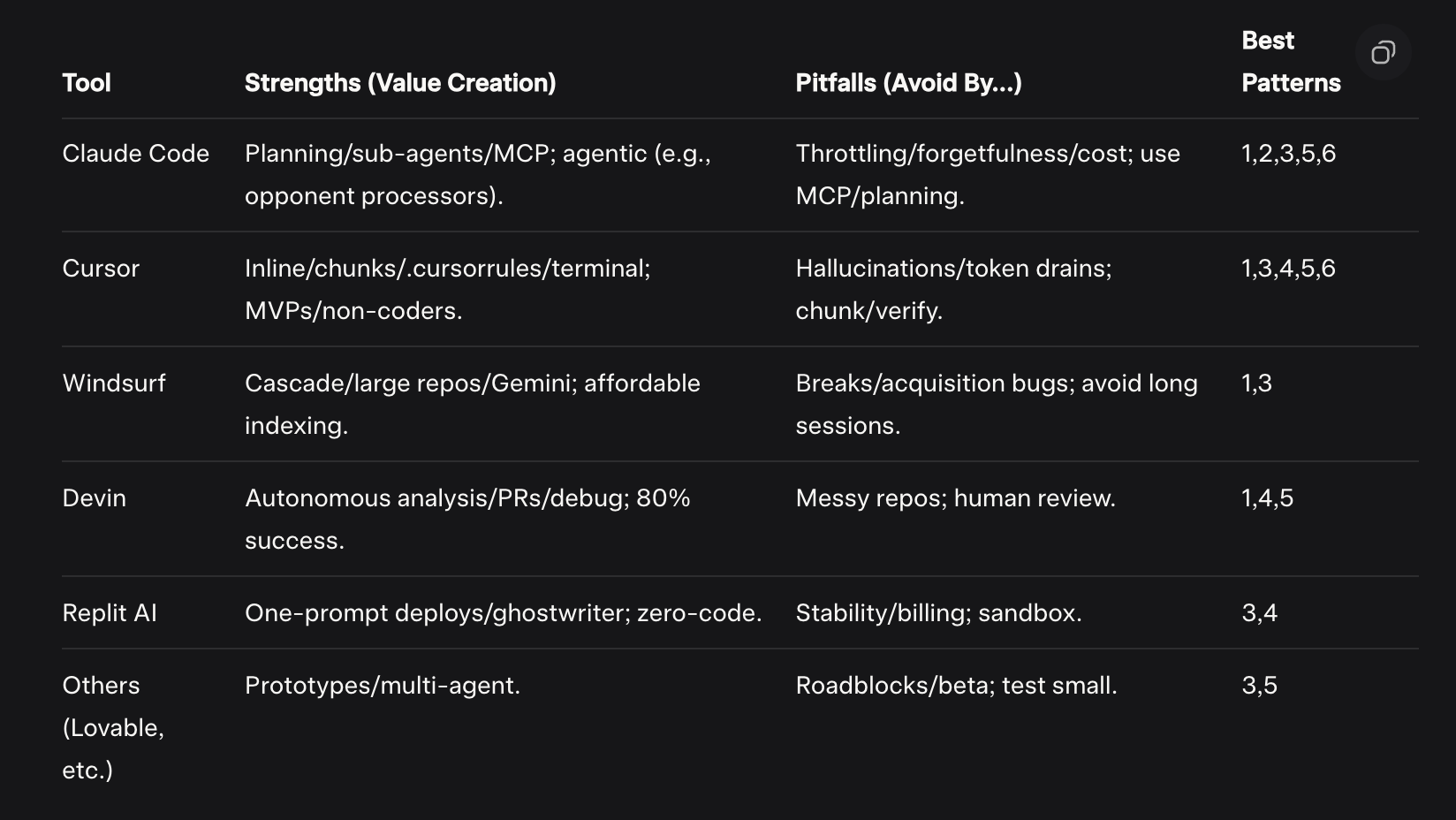
Part 3: Tool-Specific Overviews
This cross-references usages and pitfalls for quick reference.
Part 4: General Principles and Application Guide
New to coding? Here’s a cheat sheet:
First, Select Patterns: Match to needs (e.g., onboarding for legacies, vibe for prototypes).
Then, Choose Tools: Based on scale (Cursor for MVPs, Claude for planning).
Keep in Mind Key Principles Across All Flows:
- Human in loop (review/30% input)
- Context files (.cursorrules, CLAUDE.md)
- Start small/iterate
- Measure velocity (e.g., 8-12x refactors)
Avoid Anti-patterns:
- No guidelines (leads to slowdowns)
- Blind trust (causes regressions)
Extra Tips for Value Creation:
- Chain tools (e.g., Devin → Cursor)
- Benchmark like Zafir
- Reality-check like Orosz
- Invest in context engineering
- Monitor for drift and refine
Reality Check on AI's Role
AI coding tools act as "junior developers" or "compasses"—they accelerate grunt work and provide direction, but require human oversight for quality, security, and architectural decisions. That’s not changing tomorrow. In fact, more advanced tools mean more advanced thinking around systems design. That’s why I’ve chosen to highlight durable workflows here. When ChatGPT-5 comes out (perhaps this week) you may upgrade a tool in the stack here, but you’ll still fundamentally be grappling with upgrading the same 6 workflows. That won’t change.
My two cents: if you’re just getting started, look for specific scalable use-cases and nail those first. Try something small in even one of these six workflows and play with it until you start to see it add real value. Then scale across.
Wrapping Up
As we wrap up, remember that the core value of AI isn’t found in the transient hype of any one tool, but in the durable, battle-tested workflows we’ve explored here. Tools will come and go—what endures are patterns grounded in real experience, validated by those on the front lines of innovation. The six workflows I’ve detailed are your compass in navigating the rapidly evolving landscape of AI-powered development. My hope is that you’ll take these insights and experiment boldly, iterate relentlessly, and scale confidently.
More than anything, this guide is an invitation: start small, trust yourself to learn, and don’t hesitate to pivot as you find your rhythm with AI. The industry leaders I’ve cited didn’t reach mastery overnight—they embraced experimentation, encountered pitfalls, and emerged stronger through each iteration. This synthesis of knowledge is meant to spare you unnecessary setbacks and fast-track your journey from AI-curious to AI-confident.
Ultimately, the human element is irreplaceable. AI can augment your capabilities, amplify your productivity, and unlock creative avenues previously unimaginable—but it’s your intuition, oversight, and strategic thinking that turn potential into reality. I’m excited to see the value you’ll create, the patterns you’ll refine, and the insights you’ll contribute back to our growing community of builders. Here’s to writing the next chapter of AI-powered coding together.
I make this Substack thanks to readers like you! Learn about all my Substack tiers here