I'm putting sunlight on my own process working with AI to figure out voice of customer for PromptKit. Along the way I show you how I think about MVP design and how I use AI to analyze data!
By Nate
Published: 2025-05-16
URL: https://natesnewsletter.substack.com/p/how-to-do-voice-of-customer-in-the
So I launched PromptKit a couple days ago, and I thought it would be a good time to sunlight how we build in the age of AI. The concept of PromptKit is pretty simple—prompts aren’t being treated as seriously as code, so maybe we should build a tool that takes that seriously.
And yes, there are a number of third party tools out there that I’ve looked at that play in the prompt space to some degree, and I think there’s a distinct value wedge here (and room for multiple winners, since org prompting workflows are highly individual).
This note is focused specifically on voice of customer for PromptKit. It’s one of those jobs that would have taken hours or days before and is now possible in just a few minutes with good analysis and an anonymized data set for an LLM.
One of the ideas that’s been rattling around in my head is that there’s a lot of value in just exposing how intensive AI users use AI for real tasks, so that’s some of the concept here. I want you to get an idea for how you could use AI differently by reading this post.
As an aside, it’s somewhat amusing that my entire job earlier in my career is now just done by python tooling in o3 with proper prompting. Wild. Anyway, read on for how we’re thinking of building and a glimpse into how I used o3 to start to get a grip on MVP narrowing for a real AI product.
Oh and sweet tidbit—this is not just vaporware. It’s in code, and so far 60% of code is written by LLM (we’ll see how that holds up as we near launch). Anyway, to get all the juicy deets read on…
Subscribers get all these posts!
Y’all signed UP lol
Seriously I did not expect to be looking at this many signups already. Which is great! Shows a bit of validation for the problem space anyway, but it definitely generated some downstream challenges around analyzing the data. Here’s what happened so far:
During the past two days I’ve reviewed early sign-up comments, traded notes with an engineer at a large (unnamed) company, had multiple conversations with potential users, and otherwise pressure-tested the rough cut of PromptKit I shared a couple of days ago.
Every conversation circled the same frustrations: prompt text and workflows are scattered across chats and repos; no one can run a quick, trustworthy test before hitting “deploy”; a bad edit can’t be rolled back without copy-pasting scraps from browser history; invoices might balloon when giant context windows slip through; and, for anyone in health, finance, or client services, legal is asking for a paper trail that doesn’t exist.
PromptKit is meant to close that infrastructure gap. You paste a prompt—or any text-based snippet—into a browser workspace, upload some sample inputs, click Run Checks, and the system automatically tests the change, records an immutable version hash, trims excess context to keep costs sane, and stores the entire trace locally so nothing leaves your machine unless you choose. In other words, it’s the DevOps safety net that sits between quick experimentation and production traffic—without locking you to OpenAI, Anthropic, or any single model vendor. Because we live in a multi-model world! And it packages all of that into a workspace where you can have prompt folders, etc. to keep things organized.
The sections that follow lay out what we learned from users in detail, how those lessons map one-to-one to the five features shipping in the MVP, and why discovery moves differently when large-language models let you prototype ideas in hours instead of weeks.
What we learned from the first 158 voices
We had a lot more signups than commenters (as usual) but 158 of you spoke up! Which is great.
The most striking discovery was how quickly early enthusiasm for “AI magic” turns into operational anxiety once teams move beyond tinkering. Nearly every respondent had a version of the same story: the first demo lands, stakeholders cheer, and then the seams start to show.
The first seam is sprawl. Prompts, helper snippets, and even entire workflow files end up buried in Slack channels, Replit projects, or half-remembered Google Docs. One consultant described spending an afternoon hunting for “summary-FINAL-reallyFINAL\_v4.txt” while a client waited on Zoom. That kind of scavenger hunt isn’t just annoying; it slows iteration to a crawl because no one is sure which version is safe to modify.
Next comes the evaluation void. Builders told us, almost verbatim, “Evals are impossible right now.” They can eyeball a handful of outputs, but the moment they need to prove—objectively—that version two of a prompt is better (or at least not worse) than version one, they hit a wall. Without that evidence, every change feels like a gamble, which leads directly to the third pain: rollback dread. One bad deploy can flood a help desk with hallucinated answers or botched summaries, yet restoring the last good state usually means frantic copy-pasting from browser history.
Overlaying these workflow pains are two hard constraints. First, model neutrality: nobody wants to stake their roadmap on a single provider when new models appear monthly and pricing shifts weekly. Second, cost discipline: once prompts start hauling entire knowledge bases into the context window, token invoices double overnight. Finance teams notice, and the experimentation budget freezes.
Finally, consultants, healthcare startups, and legal teams surfaced a compliance layer we hadn’t fully appreciated: they need an audit trail—a clear, queryable record of who changed what prompt, when, with what result. Without that, every client deliverable or regulatory review becomes a scramble to piece together evidence after the fact.
Taken together, these interviews paint a clear picture: the community doesn’t need another prompt playground. They need a light but reliable layer of DevOps—versioning, testing, rollback, cost control, and logging—built specifically for language-model workflows. The next section shows the actual breakout out of o3 across all this customer voice.
What the wait-list tells us
Here we go—analysis of 158 substantive responses. I worked with o3 to tag each line against ten recurring themes (a comment could hit more than one).
Sidebar: if you’re wondering how I got o3 to do this, the key is an anonymized CSV, and being extremely specific with my expected output format and expectation to read the ENTIRE spreadsheet. o3 (like a lot of other LLMs) has a tendency to undercut long lists, so I had to be clear about my expectations for a full trued-up count. Once I got that across in the prompt it was relatively easy to close out.
Here’s what shook out:
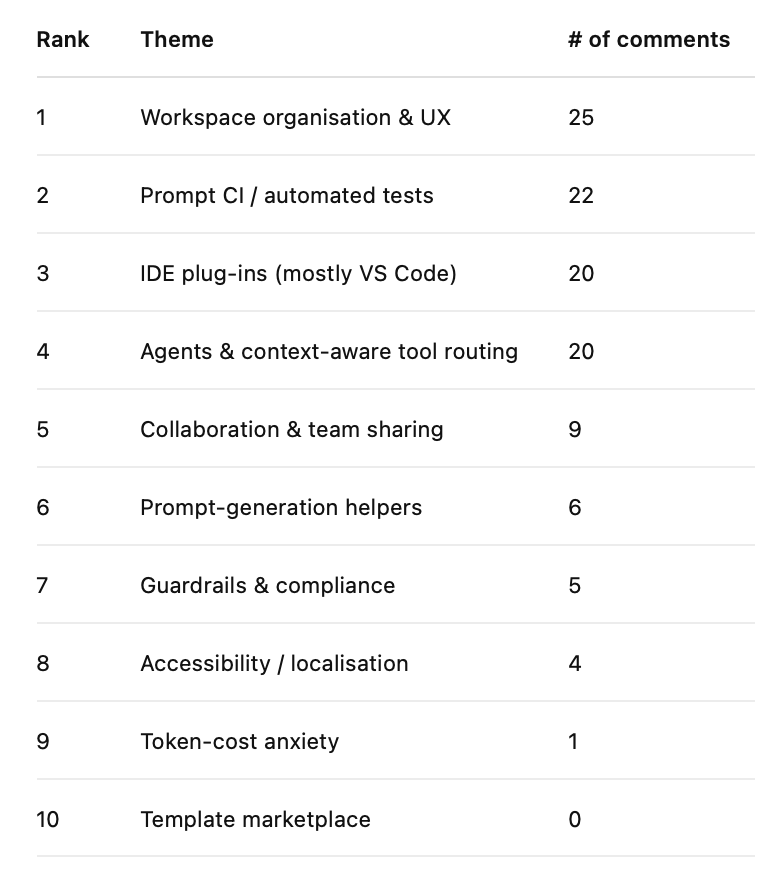
(46 additional comments were too vague to classify.)
What stands out
- Workspace pain is the loudest signal. “Folders,” “catalogs,” “import,” and “drag-and-drop” requests top the list. People need a single place to park prompts and workflow JSON before they even worry about testing or sharing.
- CI/testing frustration is real. Twenty-two comments still plead for an easy “Did this break?” harness. Evaluation remains the blocker to confident deploys.
- IDE integration demand is stronger than expected. A lot of builders want PromptKit to show up inside VS Code, not just the browser.
- Token-cost is low-ish. Only one explicit mention. The router’s efficiency gains still matter, but we might downshift our messaging here.
How this affects v1
We already folded Import & multi-artifact support into the Workspace after a couple of initial conversations; the new numbers confirm that move. The rest of the MVP stays as planned:
- Workspace for single-source-of-truth.
- CI Runner + guardrails for the eval gap.
- Version Store & rollback for safety.
- Context Router α for smart context (efficiency messaging toned down).
- Runtime Log for traceability.
IDE plug-ins and team sharing move up the post-MVP roadmap, but nothing new forces a scope change. The data says we’re pointed more or less the right direction with the thesis, and now we have to go out and deliver.
How feedback translates into the MVP we’re shipping
Every feature in PromptKit’s first release traces straight back to the user pains you just saw tallied. The product is deliberately small—five pieces that work together rather than a buffet of half-done tools. This is the concept we’re working from (a few details may shift here and there as we get into alpha).
Workspace
The most common frustration was losing track of “which prompt is live.” The Workspace is a simple file tree in the browser. You can drag in a prompt, a chunk of JSON from a workflow builder, or a Markdown note and tag it Draft or Ready. That alone eliminates the scavenger hunt across Slack threads and Google Docs. Import is frictionless—paste or drag a file and it lands exactly where it belongs.
CI Runner with Guardrails
Twenty-plus respondents asked for an easy way to know whether v2 is safer than v1. The Runner is that test harness. Click Run Checks and PromptKit fires a small set of examples at your artifact, then applies guardrails for PHI/PII, jailbreak strings, and length limits. If it passes, you see a green bar; if not, the failing text is highlighted. No coding required.
Version Store & One-Click Rollback
Rollback dread ranked third in the feedback. Every green build is stamped with an immutable hash and added to history. If a new prompt pushes garbage to customers, one click moves the pointer back to the last good hash. No copy-paste, no guesswork.
Context Router α
While only a few users mentioned cost directly, many asked for smarter context routing and agent-style tool calling. The Router trims unused chunks before they ever reach the model, which keeps latency predictable and invoices from spiraling. “Smart context” is the headline benefit; lower token spend is the side effect.
Runtime Log
Consultants and regulated teams need an audit trail. PromptKit writes a local log of every run—input, output, guardrail status, and token count—for fourteen days. That satisfies client reviews and becomes raw material for new test cases.
These five components cover the top pains without wandering into territory that belongs in a later release (full RBAC, graphical workflow builders, or a public prompt marketplace). The result should feel less like yet another “prompt playground” and more like the safety net you wish you’d had the first time a small edit took a production system offline.
How it works in practice
Work with PromptKit starts in the Workspace. You paste or drag a prompt file into a folder, tag it Draft or Ready, and it sits alongside every other prompt you care about—no more digging through Slack threads or Notion pages to find “the live version.” From there you press Run Checks. The CI Runner with its built-in guardrails pushes stored example inputs through the prompt and scans the output for PII/PHI, jailbreak patterns, and length violations. A single green bar means the change is good; a red bar lists the exact lines that failed so you can fix them before anyone outside your browser sees the mistake.
When a prompt passes, PromptKit stamps it with a SHA hash and records it in the Version Store. Clicking Promote flips production to that hash; if the new version misbehaves, Rollback instantly re-points the prod pointer to the previous green hash—no copy-paste heroics, no late-night guesswork. With the prompt live, every call flows through the Context Router α. The router’s only job at this stage is to strip out unused context before the request reaches the model, keeping latency steady and token costs predictable without introducing any agent logic or orchestration complexity.
Each production run writes a short line to the Runtime Log: the redacted input sample, the output text, guardrail pass/fail status, and the token count after routing. Logs stay local for fourteen days and export to CSV if you need them for a client review or a compliance check. That closed loop—organise, test, promote, trim, and observe—covers every pain users raised in the first round of research without straying beyond the exact scope of the MVP.
What building with LLMs does to product discovery
The past two days of research underscored a new rhythm: speed is no longer the bottleneck, focus is. With ChatGPT and its siblings, I can turn a sketch into a working prototype during the same Zoom call in which the idea emerges. That immediacy is exhilarating, but it also tempts you to pile on features faster than you can validate them.
The antidote is discipline. Instead of month-long survey cycles, every conversation, email thread, and wait-list comment became a mini-dataset. Quick tagging and counts replaced guesswork about which problems were “big.” When those counts said artifact sprawl and evaluation gaps sat at the top, I resisted the lure of shiny agent designers or team collaboration. The data didn’t support it.
Speed also flips the usual order of operations. Before LLMs, you proved desirability first because feasibility took months. Now feasibility is a given—you can glue a prompt to an API in an afternoon—so reliability becomes the real test. Users asked “Does it break? Can I undo it?” long before they cared about dashboards or aesthetics. That’s why PromptKit ships with a test harness and rollback button before it ships a visual workflow builder.
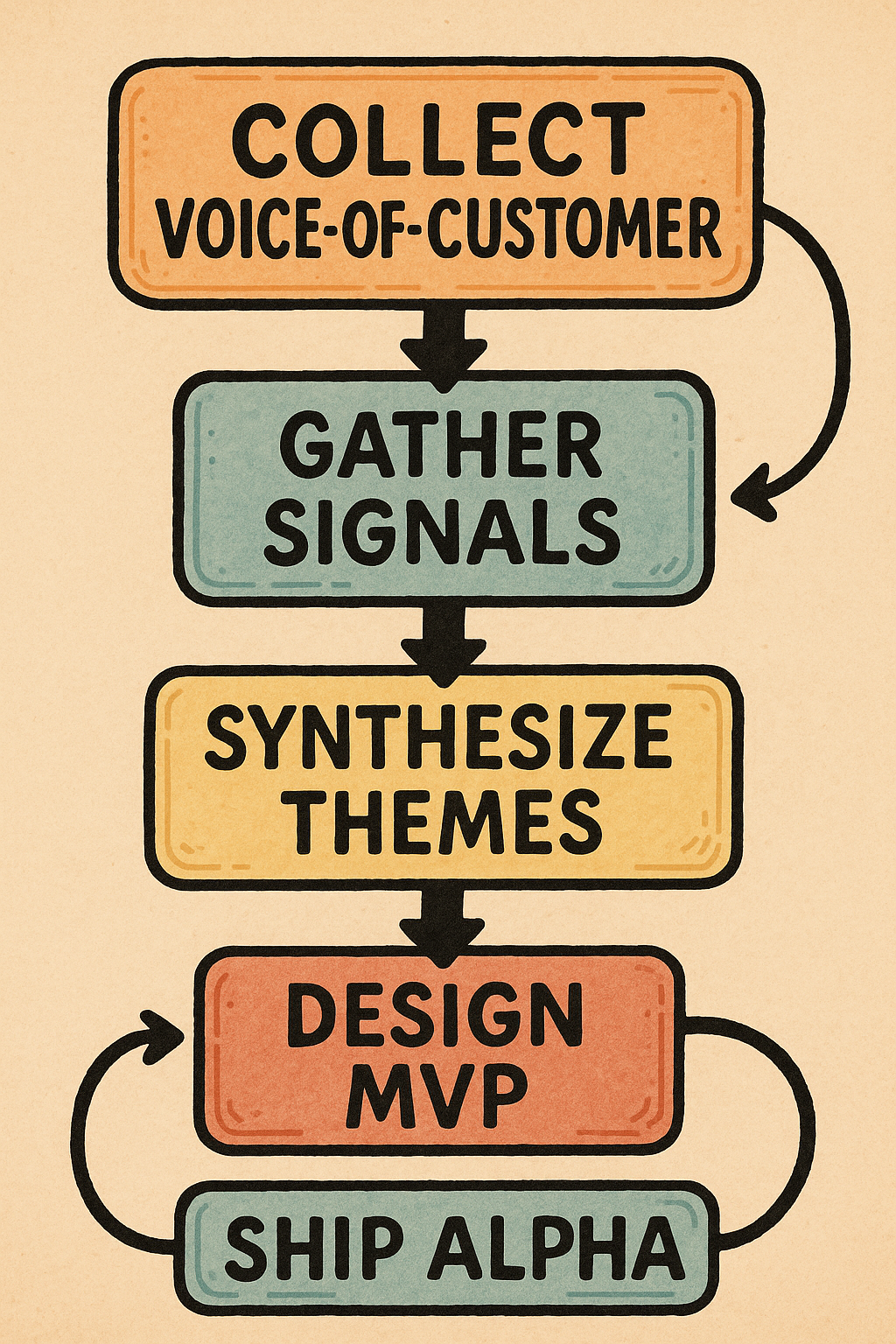
Rapid prototyping forces a stricter definition of “done.” Each MVP feature had to neutralize a ranked pain with no extra surface area. If a widget didn’t kill a top-three frustration, then really why keep it? The discovery loop shrank to hours: gather feedback, prototype instantly, re-validate, and keep only the pieces that solve the loudest problems. It’s a pace that feels more like a relay sprint than a marathon—and right now, that’s where the best signal lives.
What’s next
We’re working on the alpha now; the moment it’s stable we’ll invite the next wave of testers. If the pains outlined here sound familiar—or if you just want a closer look—add your name to the wait-list and drop a note about the biggest workflow headache you face. Your feedback will land directly and I promise we’ll look at it!
👉 Sign up here: https://www.promptkit.pro (no payment, just an email)
Expect the first invites to go out soon. I’ll share progress—and any course corrections—back on this feed as we go.
For more on AI, subscribe and share!
\Voice of Customer still matters!\