Yes for real! You can use custom one-word callouts in ChatGPT for common prompts you care about—I'll share how it works, and you can use it for you and your whole team in like 10 minutes
By Nate
Published: 2025-05-09
URL: https://natesnewsletter.substack.com/p/how-to-prompt-with-wake-words-in
So this was an unexpected gift. I learned something new in prompting this week. I didn’t expect it. And I am absolutely delighted.
This is a technique that lets you quickly and easily create what are effectively macro shortcuts for prompts in ChatGPT. And yes, they really work. And yes, they are as simple as typing a wake string or word of some kind into ChatGPT.
And that’s it. You don’t have to call the whole prompt. ChatGPT just knows it.
And best of all it’s easy to use this across chats (ChatGPT does it automatically) and it’s super easy to share this with colleagues, so teams can use it too. I’ll show you how in this post, and I promise you can do this in like 10 minutes, even if you’re a beginner!
Subscribers get all these posts!
How I figured this out
Dan Shipper tossed off a line on X that instantly reframed how I think about ChatGPT: “You can install prompts like programs by writing them to memory.” [Link]
Yes I know you all think I know everything about ChatGPT, but I don’t. And what’s more interesting is nobody does. These are emergent systems (video about that yesterday).
For me, until I saw Dan’s tweet I’d been mentally bracketing the memory tab as a quirky place for personal trivia—favorite authors, timezone, whatever. It was a complete concept flip for me to think of it as a prompt locker: store a micro-instruction once, summon it later with a unique wake-word, and the model applies the rule only when you ask. No plug-ins, no wrappers, just disciplined conversation.
What’s great is I could test the idea in 30 seconds: saved a five-line rule called SNACK, fired the word, and watched ChatGPT spit a perfect five-word summary on command. That tiny demo convinced me we’re under-using the feature—and over-typing ourselves to death—because we haven’t systematized how to load, name, and prune these wake-word “programs.”
In the rest of this piece I’ll show you exactly how the mechanism works, the anatomy of a durable micro-rule, and a step-by-step audit to discover wake-words tailored to your own workflow.
Start in 60 seconds
Here’s the fastest way to feel the prompt-locker trick in your own hands—think of it as a 60-second espresso shot for skeptics.
- Open a fresh ChatGPT chat and paste the five-line rule below, ending with “Please remember this.”
Wake-word SNACK → Return a five-word summary of any text that follows. Only five words, no extras.
- Wait for ChatGPT to answer “Got it!” and tell you the memory was saved. That reply is your install confirmation—no “Got it,” no brick.
- Fire a test with a brand new chat:
SNACK: “Hello, world! Today is beautiful.”
The model should spit back something like: Hello world beautiful day—exactly five words, zero chatter.
You just saved an instruction once and executed it on demand, zero copy-paste, zero re-explaining. I’m thinking of these little macros as Lego bricks. That tiny demo—thirty seconds, tops—is like a memory lego brick. Name it, watch it snap into place, and click it into a conversation whenever you want it.
Next up, I’ll open the casing and show why the Lego brick stays quiet until summoned, how wake-words chain, and what keeps your normal chats from turning into accidental command storms.
How does this work?
A memory brick is essentially a system-prompt fragment you write once and mount on a tripwire. Under the hood it works like this:
- Tokenizer hit-check – When ChatGPT receives a message, it looks at the very first token. If that token matches any wake-word string stored in your memory, the model sees the memory hit and invokes the context tokens around that memory.
- Silent splice – Before generating a reply, the service prepends the saved instruction text out of memory to its internal system prompt. Think of it as hot-patching the runtime: the brick’s rules now sit above anything you just typed.
- One-turn scope – The splice lives for exactly one completion. Because the wake-word isn’t re-sent on the next round, the brick’s influence disappears unless you invoke it again. That’s why your everyday chats stay untouched.
When bricks beat other prompting moves
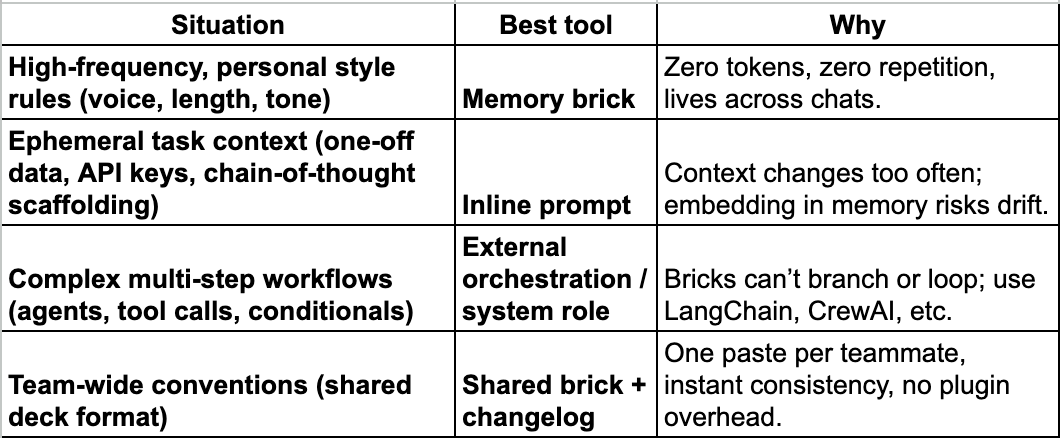
One paste per teammate, instant consistency, no plugin overhead.
Why not just stuff it in custom instructions?
Look, I think Custom Instructions are cool. I wrote about them here. But this does a different job. Custom Instructions persist for every chat. What I’m calling memory bricks here are persisted, free, and opt-in—they trigger only when you want them. They’re the sweet spot between verbose copy-paste templates and heavyweight universal instructions.
Safe limits & gotchas
- Cap active bricks at a reasonable number to avoid collisions; overlapping length rules are the fastest path to garbled output.
- Overwrite, don’t append—multiple versions of the same brick create instruction soup.
- If you’re nervous about accidental invocation, use a non-English string or leading symbol (:TRIM, ⚡SPEC) to dodge accidental triggers.
Next, we’ll mine your own chat history to surface the instructions you repeat most and convert them into bricks that pay rent rather than gather dust.
Discovering Your Wake-Words
Most people start by directly copying a skill to learn it. That doesn’t work well here. If you copy SNACK it will gather dust. A brick only pays rent if it automates a chore you repeat. Here’s a five-step audit that turns personal friction into durable wake-words.
Mine your chat history (10 minutes).
Scroll the last week of conversations and look at chats where you re-typed an instruction—anything like “explain in plain English,” “flag assumptions,” or “format as Jira.” My favorite is “ffs stop answering in tables” to o3 lol—if it shows up three times or more, drop it into a scratch pad.
Group by outcome, not wording.
Merge near-duplicates. “Tighten copy,” “remove fluff,” and “be concise” all collapse into a single job: Trim language. This pruning keeps your eventual brick list short enough to remember without a cheat sheet.
Draft micro-guides in a table.
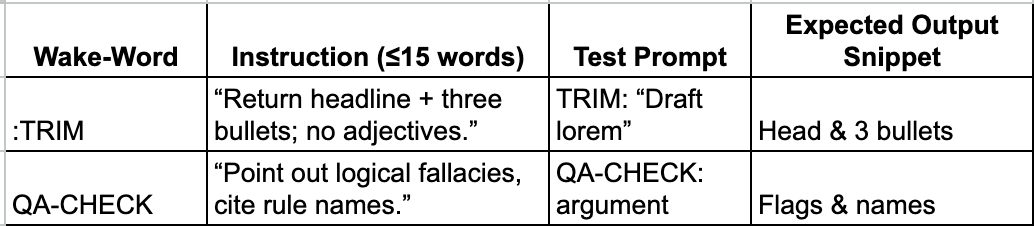
Keep each instruction atomic—tone or length or structure, never all three. Atomic bricks click together without fighting. This is one case where long prompts don’t help, so don’t try to put a massive amount of weight here.
Stress-test the names.
Type a normal paragraph and make sure none of the words match your wake-word. If “TRIM” appears in everyday prose, prepend a symbol (:TRIM) or switch to something weird (⚡SNIP). Accidental triggers are the fastest path to chaos.
Install, validate, prune.
Paste one brick at a time with “Please remember this.” Wait for “Got it!” and fire the test prompt from your table. If output wobbles, edit the instruction and overwrite the old brick—never stack revisions. Review weekly: keep the bricks you used, delete the rest.
Look I don’t know what the best total is but something like 10ish active bricks is maybe a healthy ceiling; beyond that the mental lookup cost outweighs the keystroke savings.
Complete this audit once and you’ll have a bespoke set of wake-words that map perfectly to your day-to-day muscle memory—no more boilerplate copy-paste, no more style drift between meetings.
Next, we’ll cover the guardrails: how to avoid accidental activation, overlapping rules, and memory bloat so your shiny new bricks don’t turn into technical debt.
How does this actually get used?
I’m learning this with you, but here are a few examples that seem pretty obvious to me.
Product manager — SCOPE
I type SCOPE: then dump a fuzzy feature idea. The brick rewrites it into a crisp user story—actor, outcome, acceptance tests—ready for Jira. No scavenging old tickets for format; the spell handles the boilerplate.
Growth marketer — TUNE
TUNE: this headline returns three variants, each locked to a 45-character limit and framed for curiosity clicks. It even bolds the power verb because I told the brick to. A/B copy is now a key-press, not a calendar block.
Staff engineer — EDGE-SCAN
Paste a function, whisper EDGE-SCAN, get back a bullet list of failure modes the happy-path review missed—null inputs, timeouts, race risks. Faster than posting in Slack for drive-by feedback.
Content creator — QUOTE-HUNT
Feed a 1,000-word draft with QUOTE-HUNT: the brick surfaces two pull-quotes under 100 characters, formatted for Twitter cards. Social snippet creation goes from ten minutes to ten seconds.
Founder-CSO — RISK-MAP
RISK-MAP plus a new AI feature yields a three-column table—regulatory, security, brand—plus one mitigation per cell. Perfect prep for the board call.
I think you can brainstorm some more from here. We’re barely scratching the surface.
Common Misfires & Guardrails
Even the slickest brick set can derail your workflow if you ignore a few failure modes. Here’s the short list of gotchas I’ve seen—and the fixes I now bake in.
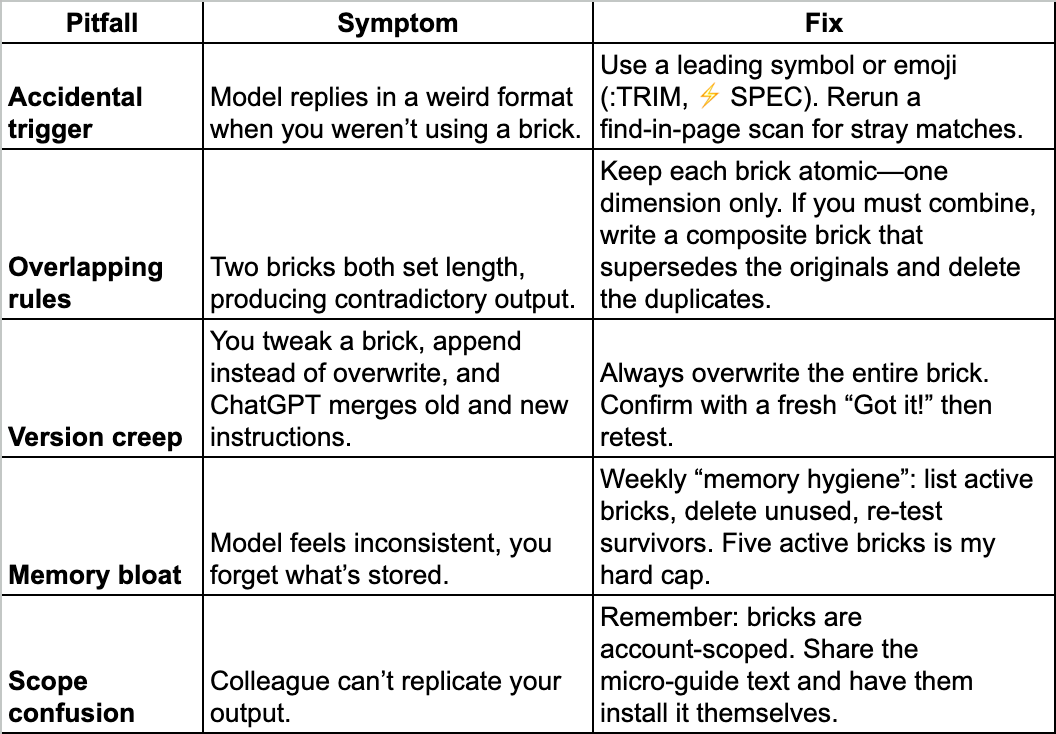
Remember: bricks are account-scoped. Share the micro-guide text and have them install it themselves.
Guardrail checklist (run before you close a chat):
- Search the draft for any wake-word you didn’t mean to fire.
- Confirm the brick count ≤ 5.
- Re-run your test prompt; output should be identical to install day.
Keep these rails in place, and your bricks stay a productivity boost—not another layer of prompt tech debt.
Next, I’ll show how to package and share bricks with a team so everyone writes in the same voice after a single copy-paste.
Team-Scale Sharing
A single brick can tame your inbox, but shared bricks align an entire org’s voice in one afternoon—no plug-ins, no style guides nobody reads. Think of it as cloning your best prompt muscle memory across the team.
Post the micro-guides.
Dump each brick’s text into Slack, Notion, or an internal wiki. Example:
Please remember:
Wake-word EXEC-DECK →
Return slide-ready bullets: insight, implication, call-to-action. Max 45 words total.
One-time install per teammate.
Everyone opens a fresh ChatGPT chat, pastes the brick, waits for “Got it!”—done. Five minutes covers the whole department.
Maintain a tiny changelog.
Store version notes right below the brick:
v1.2 – EXEC-DECK now bolds verbs.
v1.3 – Raises word cap to 60.
When the log updates, teammates overwrite the brick (never append) and fire the test prompt to confirm parity.
Enforce a brick budget.
Org-wide cap: X active bricks (probably under 10). Too many macros and someone will inevitably trigger the wrong one mid-proposal.
Measure the win.
Before rollout: tally average review cycles per deck. After rollout: repeat. One way to think about it: how many revisions did you cut for that doc? How quickly are you turning drafts? You get the idea.
Why not a plug-in?
Bricks are free, instant, and vendor-agnostic; nobody has to request IT approval or learn a new UI. They also degrade gracefully—forget a brick and you’re back to normal chat, not blocked by a missing extension.
With a shared brick set, drafts, strategy docs, and investor updates leave the building in a single recognizable voice—giving stakeholders one less reason to nit-pick and one more reason to focus on the ideas.
Next we’ll wrap with a concrete challenge: build your first brick tonight, share it, and see how many keystrokes you save tomorrow.
Your Five-Minute Challenge
Ready to convert theory into muscle memory? Here’s tonight’s mini-sprint:
- Audit – Scroll your last ten chats, spot the instruction you repeated most.
- Draft – Turn it into a one-sentence brick: Wake-word WRANGLE → “Flag every unsupported claim and suggest one citation.”
- Install – Paste it into a new chat, add “Please remember this,” wait for Got it!
- Test – Fire the wake-word on a sample prompt; tweak until the output is perfect.
- Share – Post the micro-guide on X with #WakeWordBrick and drop the link in this Substack’s comments. I’ll riff on the best ones in a follow-up.
Tomorrow, see how many times you used that wake word—then decide which brick earns the next slot in your personal wall.
Closing Reflection
Keyboard shortcuts shave milliseconds; wake-word bricks reclaim attention, the currency that actually limits builders like us. By off-loading our rote style checks to memory, we turn ChatGPT from a reactive chatbot into a ready workstation: one word, one snap-in instruction, zero mental context switches. That matters because the big problems—architecting a new data model, mapping a product’s moat, deciding whether to pivot—aren’t solved in the slivers between meetings; they need uninterrupted cognition.
Bricks won’t replace serious agent frameworks or fully scripted workflows, but they close a practical gap: the vast middle ground where you still think for yourself yet refuse to babysit the AI. Install the handful that match your highest-frequency chats and you’ll feel the difference tomorrow: fewer “ffs don’t use tables,” more forward motion.
Adopt them, refine them, prune them—then get back to work that only a human with context, judgment, and taste can do. If that sounds minor, look at your screen-time stats next Friday; those vanished minutes add up to the headspace where new ideas bloom.
Thanks for making it this far. Drop what you’re using this for below. I’m eager to see the bricks you invent—and even more curious to see what you build with the cognitive slack they buy you.
For more on AI, subscribe and share!
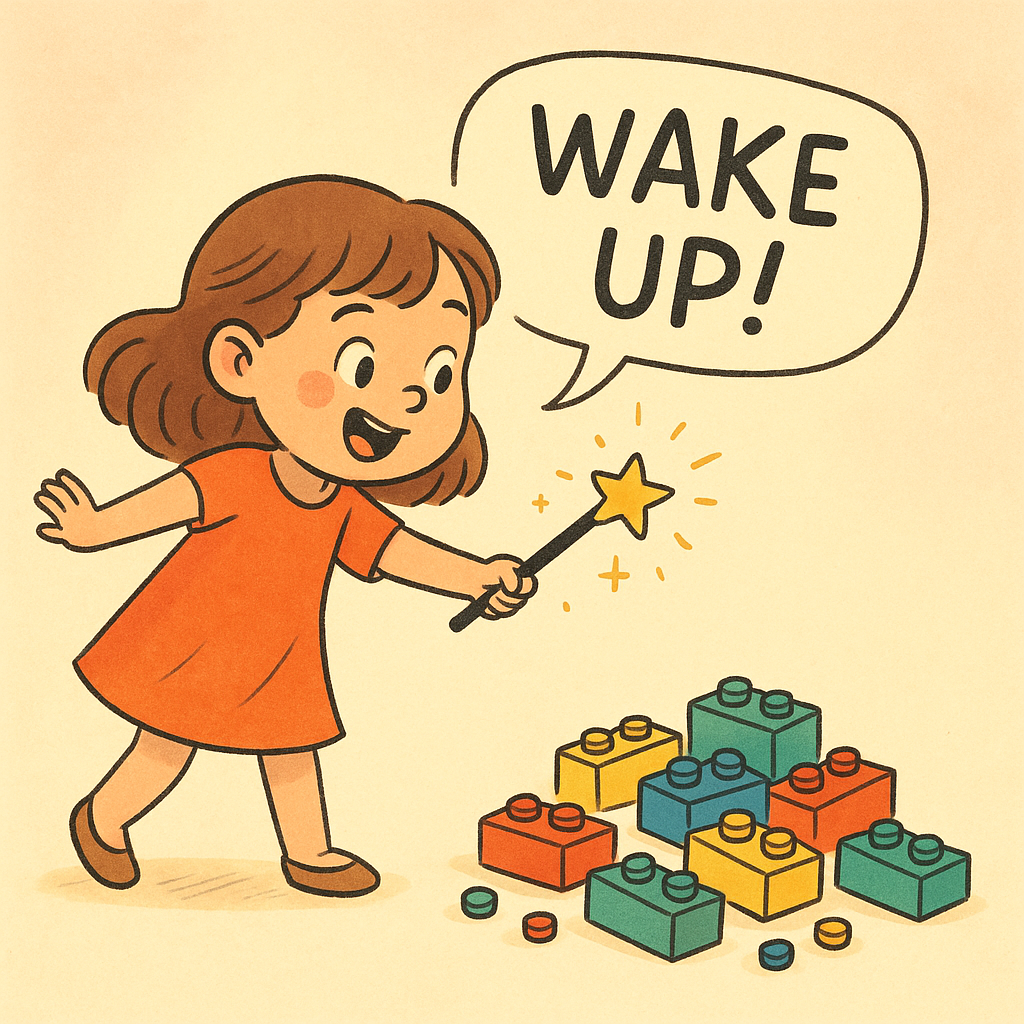
\Despite my best efforts as a child, my Legos never came to life\