A lean, role-by-role playbook for turning Custom Instructions into permanent productivity boosters—without clogging your context window or derailing casual chats!
By Nate
Published: 2025-05-06
URL: https://natesnewsletter.substack.com/p/write-once-save-100-prompts-mastering
This post is all about one of the trickiest parts of the ChatGPT interface: Custom Instructions.
People think this is easy, and I find they often fill in LOTS of stuff about their lives, their personal preferences, the company’s priorities—stuff that ends up confusing and tricking the model into giving unhelpful responses to day-to-day work.
The answer isn’t to avoid Custom Instructions (CI), it’s to learn what they are for, where they slot in the prompt priority stack (there is one!), and to learn how to write an excellent Custom Instruction that actually simplifies your life.
And yes, this post includes lots of examples of real CI prompts, a punch list to get started, and pitfalls to avoid. As a bonus, I also call out where to use Custom GPTs vs Custom Instructions, since those are frequently confused.
Net net, this should give you an actual guidepost to what to do with those mysterious CI boxes.
Subscribers get all these posts!
Custom Instructions - oh my oh my
You’re about to spend a few minutes learning when (and when not) to touch the “Custom Instructions” panel—the two 1500-character boxes that quietly shape every ChatGPT reply you get. This guide is for three overlapping groups:
- Explorers who hop between recipe tweaks and grant proposals and wonder why the assistant sometimes answers like a corporate intern.
- Power-users who live in the prompt window drafting PRDs, marketing copy, or customer emails and crave voice consistency and speed.
- Builders/educators who ship prompts to teammates, students, or API endpoints and need guard-rails that survive hand-offs.
Up front, a confession: leaving those boxes blank is often the smartest move. If your work swings wildly from legal disclaimers to movie recommendations, hard-coded defaults can do more harm than good—consuming tokens, leaking jargon into casual chats, and aging into silent bugs. The payoff only appears when your workflow is both high-frequency and stable (think: weekly release notes, daily customer replies, recurring grant abstracts).
Look here are some blank boxes…
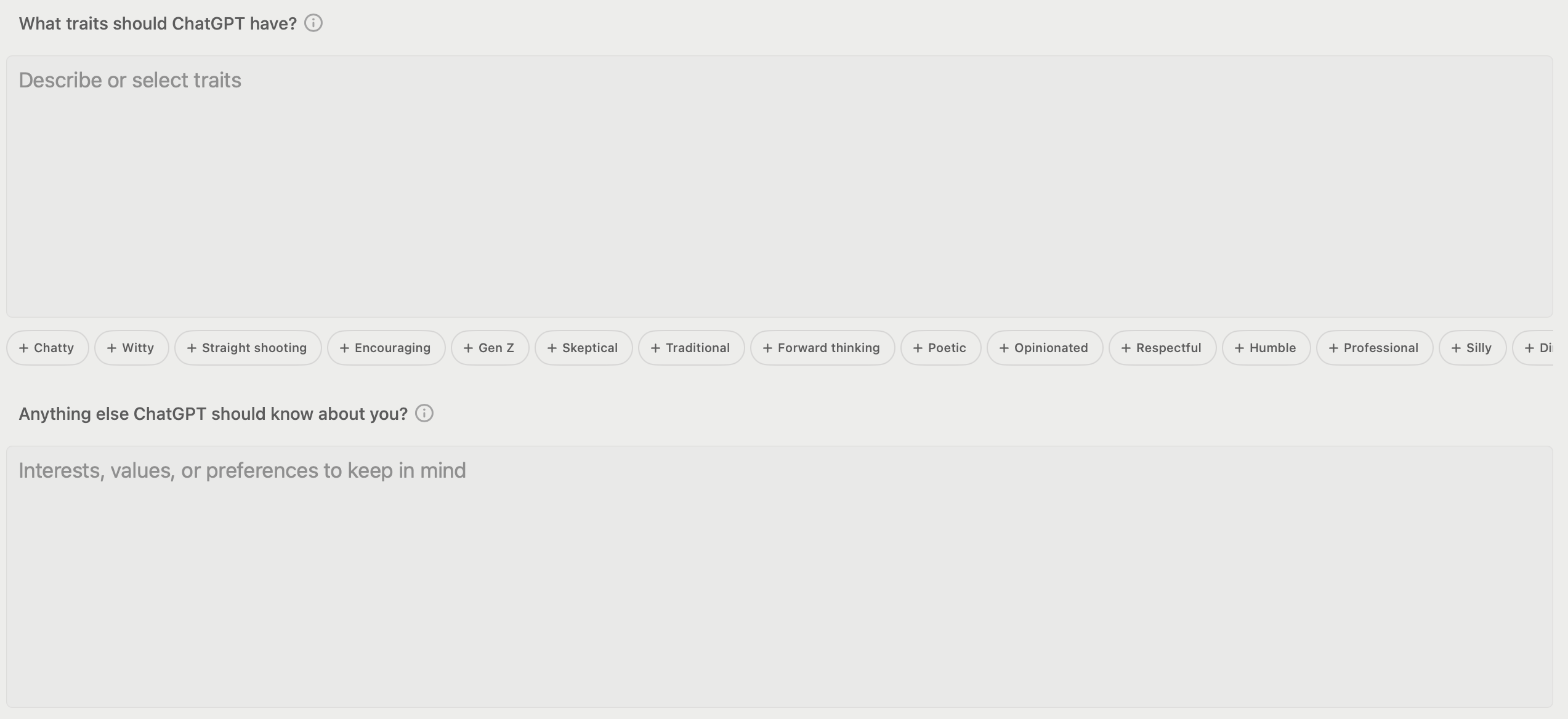
The rest of this article walks you through the instruction stack that governs ChatGPT, a decision grid for picking between giant task-specific prompts and evergreen Custom Instructions, concrete role-based templates, and quick tactics to prevent a PRD style guide from hijacking your Friday-night film debate. By the end you’ll know exactly what belongs in those boxes—and just as importantly, what doesn’t.
First—How ChatGPT’s Instruction Stack Actually Works
Before you decide whether to shoe-horn a style guide into Custom Instructions or leave the boxes empty, you need to see the plumbing. Every request you send to ChatGPT is really a bundle of five instruction layers, passed to the model in strict top-down order:
Policy (global, immutable)
└─ System message (GPT builder or API)
└─ Custom Instructions (your two-box panel)
└─ Developer message (optional in GPT/API)
└─ User prompt (what you type)
1. Policy – the invisible ceiling
OpenAI’s content and safety rules ride above everything else. You can’t read them in full, you can’t override them, and they will nullify any downstream request that conflicts. Think of Policy as the electrical code in your city: every design decision you make must fit inside it, whether you’ve read the handbook or not.
2. System message – the voice of the app, not the user
When you open a public Custom GPT or an app that calls the OpenAI API, a System message is injected before your chat even starts. It defines the assistant’s identity (“You are a math tutor…”) and tool permissions. Because it sits just below Policy, it outranks anything you write later—including your personal Custom Instructions. If a System line says “Respond only in French,” every English phrase you add in the two boxes becomes a polite suggestion, not a command.
3. Custom Instructions – your sticky defaults
These are the two panels you can edit in ChatGPT’s settings. They fire on every conversation you start while you’re signed-in. Crucially, they also consume tokens on every turn: 500 characters in each box equals roughly 100 tokens, which lowers the working memory available for long source docs and, in metered API land, costs real money. They are perfect for evergreen, low-risk rules (tone, empathy framework, disclaimers) and dangerous for volatile or mutually exclusive ones.
4. Developer message – a scoped override
If you share a Custom GPT or build a SaaS feature on the API, you can slip an extra “developer” layer beneath the user’s login. It inherits your Custom Instructions but outranks the user prompt. That lets you freeze behaviour for end-users (“Always cite sources”) without forcing the rule on yourself in other chats.
5. User prompt – the moment-to-moment ask
Everything you type in the chat window lands at the bottom of the stack. It’s the most specific instruction but also the weakest: any contradiction with the four layers above is automatically resolved in favour of the higher layer. That’s why the assistant sometimes seems to ignore you—because it is obeying something you can’t see.
Precedence in action
Suppose your Custom Instructions demand “no emojis,” but a public Custom GPT you open has a System line, “Respond with a friendly emoji at the end of each paragraph 😊.” Emojis win (and btw I hated the emoji update). And yep, if you blank out your boxes and instead paste “never use emojis” inside the user prompt each time, the GPT still sprinkles smiles—System beats User.
The token-budget reality
All five layers are concatenated into a single prompt fed to the model. Every extra line shrinks the remaining space for your source text. That’s why the decision to preload defaults should come before you fuss over wording: sometimes the cheapest, safest move is to start with empty boxes and let each task carry its own context.
With the hierarchy—and its trade-offs—clear, we can now tackle the practical question: when do Custom Instructions save time, and when do they create hidden debt? The next section walks through a simple decision grid that answers exactly that.
Next — Decide First: Default, Giant Prompt, or Custom Instructions?
You now know where Custom Instructions sit in the stack. The next step is to decide whether they’re the right tool at all for the work you put through ChatGPT. Two factors dominate this call:
- Frequency – How often you repeat the same deliverable pattern.
- Volatility – How often the rules for that deliverable change (or clash with other tasks you do).
Put them on a 2 × 2 grid and the best strategy falls out:
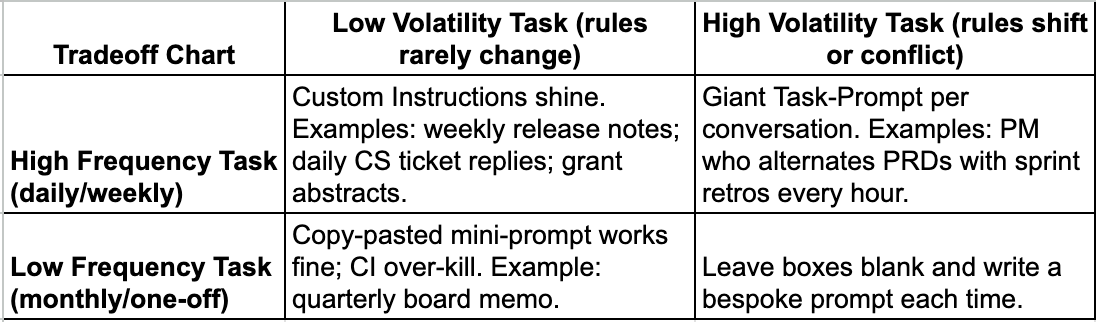
The two-question litmus test
- Will the rule ever be wrong for another task I run from this account?
Yes → keep it out of Custom Instructions.
- Does this deliverable represent more than ~50 % of my ChatGPT usage this month?
Yes → consider Custom Instructions; No → stick with a reusable task-prompt.
If you answer “no” to both, the safest, cheapest path is a blank panel and a purpose-built prompt whenever you need it.
Quick examples
- Content marketer drafting five LinkedIn posts a day in the same brand voice: High-Frequency/Low-Volatility → Custom Instructions pay off.
- Product manager who flips between PRDs, roadmap debates, and personal movie picks: High-Frequency/High-Volatility → keep brand rules in a giant PRD prompt and leave the boxes empty.
- Founder polishing a seed-round pitch once: Low-Frequency/High-Volatility → bespoke prompt, blank defaults.
With the decision logic clear, the next section walks role-by-role through where the leverage really appears—and where hidden debt piles up.
Role-Based Examples & Red Flags
Custom Instructions (CI) are valuable when the task involved is both routine and rule-driven. Sure that’s easy to say, but what does it mean? In practice? Below, I walk through four common knowledge-work personas, outlining (a) where CI deliver real leverage, (b) where they quietly become sand in the gears, and (c) the one-line “skip if …” sanity check you should run before pasting anything into the panel.
Product Manager
A PM’s week is littered with templated artifacts—PRDs, Jira stories, release notes, stakeholder FAQs. Each follows the same skeletal structure: problem → scope → acceptance criteria → risks. Embedding that skeleton once in Box 2 (“Open with a one-sentence ‘why,’ close with explicit exit criteria, adopt first-person plural, no emojis”) means every fresh PRD draft arrives 80 % formed, and you never again groan at “As a user …” boilerplate.
Where CI backfire is context-switching. The same PM might spend the afternoon spit-balling brand-new feature names or planning a team off-site. The PRD voice—concise, formal, risk-obsessed—can suffocate blue-sky brainstorming. Worse, hard-coded words like “acceptance criteria” can leak into an innocent hotel-venue comparison. If your day swings that wildly, keep the style guide in a giant PRD prompt and leave the boxes blank.
Skip CI if: more than a third of your ChatGPT time is ad-hoc ideation or non-product life admin.
Content Marketer
Few roles benefit more from immutable defaults. Brand voice, banned adjectives, CTA length, US vs UK spelling—these are commandments that hold whether you’re outlining a white-paper or dashing off a LinkedIn carousel. A lean Box 2 (“Energetic but authoritative tone, headline ≤ 60 chars, CTA starts with a verb, never use ‘synergy’ or ‘world-class’”) lets you rip through ten assets in an afternoon with much lighter prompting guardrails.
CI turn toxic in two scenarios. First, when you ghost-write for multiple brands: the same cheerful SaaS cadence will ruin copy for a serious non-profit client. Second, during a re-brand—suddenly your evergreen defaults are yesterday’s lipstick, and every reply needs re-editing. In both cases, spin up a separate ChatGPT thread (or better, a dedicated Custom GPT) per brand and leave your personal boxes minimal.
Skip CI if: you routinely write for more than one brand voice in the same account.
Customer-Success Rep
A CS rep answers a zoo of questions, but three ingredients never shift: brand empathy, legal boiler-plate, and escalation triggers. Those belong in CI. With Box 2 enforcing an Acknowledge → Reassure → Solve script and auto-appending “Information provided is for reference only…,” you eliminate the risk of forgetting the disclaimer on call #37. Ticket-specific facts—SKU bugs, promo codes, outage times—stay in the live prompt, so they die when the issue dies.
CI become dead weight if the rep supports multiple products with different disclaimers or if policy language changes monthly; the overhead of updating the boxes outweighs the type-once advantage. In fast-changing environments, a saved “macro prompt” inside the help-desk tool is safer.
Skip CI if: legal text or escalation rules change faster than once a quarter.
Academic / Grant Writer
Grant abstracts, NIH biosketches, and JAMA-style summaries share unforgiving formats: word limits, section headers, AMA citation style, mandatory funding acknowledgment. Coding those constraints into CI lets you focus on science, not commas. Box 2 can even insist, “Flag sample-size limits in a separate paragraph,” saving the revision loop with your PI.
Problems arise when the same researcher also blogs for the lab website, drafts conference slides, or submits to journals that switch between AMA, APA, and IEEE. The hard-wired citation rule collides with each format, and the model starts apologising for “insufficient evidence” in a casual blog post. In that case, move the strict guidelines into a reusable grant-prompt and keep CI limited to neutral tone preferences.
Skip CI if: you publish across multiple citation styles in the same ChatGPT account.
Bottom line: I think you’re starting to get it. Custom Instructions pay rent when your role’s deliverables live on a stable assembly line. The moment your workflow demands frequent costume changes—different voices, policies, or formats—you’re better off with per-task prompts or brand-specific Custom GPTs. Next we dive into how to write CI that stay evergreen, lean, and bleed-proof.
Build Lean, Evergreen Instructions
The temptation when you first open the “Custom Instructions” boxes is to pour in every nuance of your personality and process. Resist it. Each character you add (a) consumes working memory on every request, and (b) becomes technical debt the moment your workflow changes. The art is to capture only what is durable, unambiguous, and broadly useful. Everything else belongs in a task-specific prompt or a knowledge-base article you paste when needed.
Choose the evergreen layer—nothing more
Ask of every candidate sentence: Will this still be correct six months from now and for 90 percent of the conversations I start?
- “Respond in first-person plural and use US spelling” — yes, evergreen.
- “Mention the Spring 2025 discount code ‘SP25’ in every reply” — no, that expires.
Evergreen content typically falls into four buckets:
- Tone & voice — formality, point of view, emoji policy.
- Empathy or structure frameworks — e.g., “Acknowledge → Reassure → Solve → Next-step.”
- Standing disclaimers or legal clauses — text that must appear everywhere.
- Jargon translation maps — how to render internal acronyms in plain language.
If a rule doesn’t fit one of those buckets, keep it out.
Write imperatives, not memoirs
The model is a literalist; it obeys crisp verbs and stumbles over narrative prose. Compare:
Memoir style:
“I work in a fast-moving SaaS company and like to sound friendly but not too casual, because our customers are professionals.”
Imperative style:
“Use a friendly-professional tone. Contractions ok. No emojis.”
The second version is half the tokens and twice as reliable.
Compress ruthlessly: ≤ 600 characters per box
A good heuristic is to stay under 600 characters (≈ 120 tokens) in each box. That gives you the benefit of defaults without crowding out long quotations or data tables you may paste later. It’s also a good forcing function to keep only what’s essential in those two boxes. Shorten by:
- Folding multiple preferences into one clause:
“Full paragraphs, no listicles, no emojis, ≤ 150 words unless asked.”
- Deleting obvious context the model can either infer or doesn’t need to know (e.g., “I live in City X”).
- Replacing verbose caveats with a single conditional (“only when I mention ‘PRD’”).
Use conditional clauses for bleed-prone rules
If you must include a pattern that applies only to specific documents, gate it explicitly:
“Apply the following PRD sections—Problem, Scope, Acceptance Criteria—only when the prompt references ‘PRD’ or ‘Product Requirements’.”
The IF-condition prevents that skeleton from leaking into unrelated chats.
Treat instructions like code: version externally
Because CI fire on every conversation, a stale line can sabotage you silently. Keep a dated copy of each box in a notes app or Git repo. When brand voice or policy changes, edit the master outside ChatGPT, paste the new version, and archive the old. Never append “v2 – 2025-05-05” inside the box; the model will read it as literal output text.
Final smell-tests before you hit “Save”
- Contradiction scan: Could any line conflict with another or with future tasks?
- Token audit: Paste a long source document into a blank chat—does it still fit?
- Role-play probe: Ask an unrelated question (“What film should I watch tonight?”). If the reply contains your legal disclaimer or product-manager cadence, you’ve left something non-evergreen inside; trim or gate it.
Follow these constraints and your Custom Instructions become a silent ally—always on, never in the way—rather than a verbose shadow you have to wrestle before every session. The next section covers pitfalls to avoid, and then we’ll get to those pastable templates.
Stopping Cross-Contamination
Even a perfectly-pruned set of Custom Instructions can misfire if it shows up where it shouldn’t. Here’s my favorite as a PM: you spend the afternoon refining a PRD skeleton, then ask, “What film should I watch tonight?”—and the answer opens with Problem Statement and Acceptance Criteria.
I do not need acceptance criteria for Tokyo Vice thank you.
Anyway before this becomes film criticism, here are three containment strategies, ordered from least to most separation. Pick the lightest one that works for your workflow.
Add “When / Unless” Gates Inside Custom Instructions
Because the model parses your instructions literally, a single conditional clause can quarantine specialist rules:
ONLY apply the following PRD structure
• Problem
• Scope
• Acceptance Criteria
• Risks
IF AND ONLY IF the prompt includes “PRD”, “Product Requirements”, or “acceptance criteria”.
Everything outside those trigger words bypasses the skeleton, so your Friday-night cinema query returns a normal conversational answer.
When to use: your non-PRD chats are infrequent but you’d like to keep a single running thread open all day.
Risk: you must remember to include a trigger word each time you do want the template.
Spin Up Tiny, Purpose-Built Custom GPTs
For rock-solid isolation, move the specialist guidance out of your account-level Custom Instructions and into the System layer of a dedicated Custom GPT. Name it “PRD-Assistant” or “CS-Reply-Builder.” Use vanilla ChatGPT for general chatter and the custom bot only for its niche.
When to use:
- You support multiple products—each with unique disclaimers—on the same login.
- You share prompts downstream (students, teammates) and need their sessions locked to the same guard-rails.
Extra benefit: the System layer outranks every user prompt, so junior colleagues can’t accidentally strip out the legal footer.
Pattern for Customer-Success Reps (Example)
How does this all come together? What does a useful snippet + prompt combination look like? Let’s explore a CS scenario where we need to get the model to handle ticket responses appropriately.
First, we start with our CI layer.
Box 2 (evergreen layer)
TONE & STRUCTURE
• Friendly-professional; second-person “you”; no emojis.
• Empathy formula: Acknowledge → Reassure → Solve → Next Step.
• Replies ≤180 words unless user requests detail.
LEGAL & ESCALATION
• If reply is addressed to a customer, append:
“This information is provided for reference only and does not amend your contract with Acme.”
• If customer message shows intent to pursue legal action or payment dispute
(keywords: refund, chargeback, dispute, lawyer, lawsuit), THEN:
1) Add: “I’m escalating this to our Tier-2 team for specialised review.”
2) End your reply with the tag: [TIER-2_ESCALATION].
FAIL-SAFE
• If uncertain about next step, ask ONE clarifying question rather than guessing.
Great, but we still need to get specific with our prompting or this won’t work. This means we need to socialize the following prompt with the team.
Per-ticket prompt (pasted when you start the chat)
TICKET FACTS
• Invoice #4431 double-billed on 2025-05-02.
• Customer wants upgrade from Basic → Pro and prorated charge.
REPLY GOAL
1) Apologise for billing error and explain refund timeline.
2) Outline upgrade steps and prorated cost.
Why this works
- Keyword scope is broadened but still explicit.
- Escalation tag gives humans/automation a reliable signal.
- Footer only shows in outward-facing replies, not internal memos or personal chats.
- Volatile ticket data stays in the per-prompt block and vanishes when the chat closes.
Bottom line
Custom Instructions can absolutely anchor tone, empathy, and compliant language for CS teams—but they must:
- Use wide-net conditional phrasing, not brittle single keywords.
- Guard against over-exposure (footers or disclaimers everywhere).
If your environment still feels too dynamic (promo codes, evolving policies), consider pushing all mutable logic into your help-desk platform or a dedicated Custom GPT, leaving the account-level CI box to handle only the timeless basics.
Take-away
Contamination isn’t a flaw in Custom Instructions; it’s a routing problem. Decide early which of the two boundaries—conditional clause or dedicated GPT—is cheapest to maintain in your environment. Tight boundaries keep your PRD playbook from critiquing movie choices and your empathy script from sneaking into a technical code review, letting each conversation inherit only the rules it actually needs.
Short can be a feature—but only if it still covers every “always-true” rule.
The templates I gave are intentionally compact because:
- Token economy. Everything in the two boxes is injected on every turn. Even in the consumer UI that squeezes how much source text the model can juggle; in the API it also costs money.
- Maintenance. Anything you hard-code becomes technical debt. Longer boxes drift out of date faster, and you rarely notice until a response goes sideways.
- Hierarchy. The boxes should hold only rules that apply to >90 % of your usage. The rest belongs in a task-prompt or a system message inside a dedicated Custom GPT.
That said, “lean” still has to be complete for its purpose. If Nate (or any power user) feels the templates leave out a non-negotiable rule, we should add it. Below are “maximal-lean” versions—still under the 1 500-character ceiling per box, but fleshed out with extra precision, conditionals, and guard-rails that advanced users often want.
Expanded Templates
Ok, this is where we get out the examples! I’m going to present several here, but I think you’ll get the idea enough to write your own from these.
Product Manager (PRD-Heavy)
Box 1 (≈ 820 characters)
• I’m a senior product manager at [name] B2B-SaaS, shipping analytics features to growth-marketing teams.
• Core deliverables: PRDs, Jira epics ↔ stories, release notes, stakeholder FAQs.
• Internal jargon → customer terms: MRR→monthly fee, TTV→time-to-value, cohort-table→customer-segment view.
• Company voice: concise, first-person plural, US English, no emojis.
• Stakeholders expect explicit trade-offs, risk visibility, and scope squeeze warning.
• When I reference “RICE” scores, assume Reach in weekly active workspaces, Impact in % uplift to retained revenue, Confidence as decimal 0-1, Effort in eng-days.
• Tool stack I discuss: Figma for UX, Snowflake for querying, Amplitude for metrics—treat those as given, don’t waste space explaining them unless asked.
Box 2 (≈ 880 characters)
GENERAL
• Default tone: confident but neutral; contractions allowed; no hype adjectives.
• Structure every “ask” into: TL;DR (≤2 sentences) → Deep Dive → 3-Bullet Action List.
• Cite external facts inline (format: “(Source: Gartner 2024)”).
PRD-SPECIFIC (trigger words: “PRD”, “Product Requirements”, “acceptance criteria”)
• Output H2 sections in this exact order: Problem, Users, Scope, Out-of-Scope, Acceptance Criteria, Risks, Open Questions.
• Acceptance Criteria must be unambiguous, testable, one per bullet, tagged <AC-#>.
• Call out top-3 Risks with mitigation.
• Cap each section at 180 words.
FAIL-SAFE
• If info is missing, ask \*one\* clarifying question before drafting.
• If asked something non-product (movie night, recipe, travel), ignore all PRD rules and answer conversationally in ≤150 words.
Customer-Success Rep (Multi-Issue Tickets)
Box 1 (≈ 760 characters)
• CS agent for [name] Analytics-SaaS; user base ranges from ops analysts to CFOs.
• Core tasks: billing disputes, feature troubleshooting, upgrade guidance, data-privacy queries.
• SLA: first reply within 1 h, resolution 24 h; escalate P1 incidents within 10 min.
• Terms to translate: ARR→annual fee, Workspace→company account, Schema→data table layout.
• Compliance: GDPR + US state data-privacy laws; always flag “Right to be Forgotten” requests.
• Standing disclaimer text: “Information provided is for reference only and does not modify your contract with [name].”
• VIP tiers: Gold = ARR >$500 k (priority routing), Silver = $100–500 k.
• Internal note: current promos—APRIL20 (20 % off), UPGRADE-PLUS (pro-rated upgrade); these rotate monthly.
Box 2 (≈ 940 characters)
EVERGREEN RULES
• Empathy formula: 1) Acknowledge emotion, 2) Reassure, 3) Solve, 4) Next Step.
• Tone: friendly-professional, second-person “you”, no emojis.
• Append the standing disclaimer verbatim.
• Word count ≤180 unless user requests details.
ESCALATION & COMPLIANCE
• If user mentions “refund”, “chargeback”, “fraud”, or “legal advice”, ask clarifying Q, then recommend Tier-2 escalation.
• If user invokes GDPR rights, outline next steps and tag “GDPR-TRACK”.
• Flag P1 outage keywords (“data loss”, “system down”) for on-call Eng.
PROMO / POLICY VARIABILITY
• Reference promo codes only if user signals intent (“upgrade”, “coupon”, “discount”).
• Mention current SLA metrics \*only\* when asked.
FAIL-SAFE
• When faced with multiple issues, solve in numbered blocks.
• If uncertain, ask one clarifying question rather than guessing.
Content Marketer (Single Brand Voice)
Box 1 (≈ 790 characters)
• I’m the senior content marketer for [name] Ad-Tech Co., publishing case studies, blog posts, newsletters, and LinkedIn carousels.
• Audience: C-suite marketers & growth leads who value data-backed insight over hype.
• Brand voice: ambitious yet plain-spoken; US spelling; contractions OK; avoid “synergy”, “world-class”, “revolutionary”.
• KPI focus: CAC, ROAS, LTV, Payback Period. Cite benchmarks from Gartner, Forrester, or our Data Lab reports.
• Asset lengths: blog 1 000–1 400 w, newsletter 350–500 w, LinkedIn carousel 7–9 slides (≤45 words/slide).
• Visual tone cues: title-case headlines, H2 sub-heads every 250 w, single data-viz or pull-quote per 400 w.
• Current brand narrative pillars: “Precision Targeting”, “Incrementality Proof”, “Privacy-Safe Data”. Reference at least one pillar per asset unless I write “pillar-free”.
Box 2 (≈ 880 characters)
GENERAL
• Default structure: 1-sentence hook → Data Insight → Story/Example → CTA (verb-led, ≤15 w).
• Tone: confident, concrete, never fluffy; no emojis.
• Cite stats inline (format: “(Source: Gartner, 2024)”); if proprietary, write “(Ad-Tech Co. Data Lab, 2025)”.
• Use short paragraphs (≤3 s), varied sentence length, zero passive voice unless unavoidable.
ASSET-SPECIFIC TRIGGERS
• If prompt includes “LinkedIn” OR “carousel”:
– Limit to 9 slides, ≤45 w each.
– End with CTA slide titled “Next Step”.
• If prompt includes “newsletter”:
– Add preview text ≤90 chars and subject line ≤60 chars.
• If prompt includes “case study”:
– Include Customer, Challenge, Solution, Result (metric-backed), Quote.
FAIL-SAFE & REVIEW
• If requested word count exceeds limits, ask which sections to truncate.
• Never repeat banned words; if asked to use them, suggest alternates first.
• If information is missing, ask one clarifying Q before drafting.
Academic / Grant Writer (AMA-Style Abstracts & NIH Grants)
Box 1 (≈ 800 characters)
• I’m a neuro-immunology researcher drafting NIH R01 grants, JAMA abstracts, and conference posters.
• Citation style: AMA; target journals include JAMA Neurol, Nat Med; abstracts hard-capped at 300 w.
• Data sources: PubMed, ClinicalTrials.gov, NIH Reporter, our lab ELISA datasets.
• Funding disclosures: NIH R01-AI-123456 (primary), ALS Assoc Pilot Grant 2024.
• Common abbreviations allowed without definition: CNS, BBB, ELISA, PBMC.
• Ethical compliance: animal protocols approved under IACUC #2023-17; human cohorts under IRB #22-041.
• Draft components: Objective, Methods, Results, Conclusion, Limitations, Funding. Include participant n, p-values, and CI where relevant.
• Required disclaimers: “Preliminary data; not yet peer-reviewed” on posters and preprints.
Box 2 (≈ 930 characters)
GENERAL OUTPUT RULES
• Begin with 1-sentence Objective.
• Use H2 headings: Methods, Results, Conclusion, Limitations, Funding.
• Hard cap total length at 300 words for abstracts; 6 000 w for full grant sections (warn if over).
• Cite every quantitative claim with PMID or DOI; if none, write “(no primary source)”.
• Report stats as mean ± SD; p-values to three decimals; CI 95 %.
• Append “Preliminary data; verify before clinical use.” unless the prompt states “final manuscript”.
CONDITIONAL CLAUSES
• If prompt includes “poster” OR “slide”:
– Bulletise Results, max 40 w per bullet.
– Include one figure caption placeholder.
• If prompt includes “NIH Specific Aims”:
– Output Aims page: 1-paragraph Significance → Aim 1 & Aim 2 (≤150 w each) → Overall Impact.
– Add one sentence on Innovation.
FAIL-SAFE
• If sample size or control group is missing, ask 1 clarifying Q.
• Refuse off-label treatment advice with policy-compliant disclaimer.
• If conflicting citation styles requested, prioritise AMA unless prompt overrides explicitly.
The Five-Minute Implementation Checklist
This is your “commit‐and‐ship” routine. Block five uninterrupted minutes, open a fresh ChatGPT window, and walk through the steps below in order. The goal is to validate that your new Custom Instructions improve real tasks without introducing hidden costs or tone creep.
1. Paste and personalise your template (60 sec).
Copy the Box 1 and Box 2 text that matches your role, drop it into the Customize ChatGPT panel, and replace every placeholder—company name, banned words, citation style—with real data. Save.
2. Spin up a disposable test chat (30 sec).
Start a brand-new conversation titled “CI-Smoke-Test”. Fresh threads keep earlier memory and context out of the equation, so any weird behavior you see now is the direct result of your instructions.
3. Run the domain probe (60 sec).
Ask ChatGPT to produce the deliverable you create most often—one PRD section, one support reply, one grant abstract. Skim the output:
- Does the structure match your template?
- Are disclaimers present (or absent) exactly where you expect?
- Is the tone on-brand without extra coaching?
4. Run the contamination probe (60 sec).
In the same thread, pivot hard: “Recommend a feel-good movie for tonight.” If your PRD headings, empathy boiler-plate, or AMA citations sneak into the answer, you have bleed-through. Either tighten your conditional clauses (Section 5.1) or move that specialist content into a dedicated Custom GPT.
5. Audit the token budget (30 sec).
Select both boxes, paste them into a token-counter (ChatGPT can do a rough count if you ask: “How many GPT-4 tokens is this?”). If you’re pushing much beyond ~150 tokens combined, trim hedging language or duplicate verbs; every surplus token reduces the space for long source text and hikes API spend.
6. Check policy edge-cases (30 sec).
Ask for something that brushes against your compliance boundary—“Explain how to calculate tax depreciation,” “Summarise an off-label drug study,” or “Tell me the refund policy.” Confirm the reply both follows your new defaults and respects higher-level policy. If it refuses where it shouldn’t, you may have written a contradiction that the model resolves in favour of caution.
7. Schedule a maintenance reminder (30 sec).
Open your calendar, jump exactly 30 days ahead, and drop a five-minute event: “Review ChatGPT Custom Instructions—still accurate?” Rules that feel evergreen can rot invisibly; this nudge forces a quarterly refactor rhythm without relying on memory.
Your Custom Instructions are now live, lean, and future-proof—tested against your core job, against an unrelated query, and against policy limits, with a maintenance loop baked in. Everything past this point is incremental polish; the heavy lift is finished, and you can get back to working with ChatGPT rather than wrestling against it.
Advanced Moves
The Role Box
We haven’t talked about the role box. It’s sort of obvious. If you have one role, stick it in there. If you mix personal and business, I’d avoid it. If you have a side gig, I’d avoid it. Pretty simple, right?
Memory ≠ Custom Instructions
OpenAI’s Memory feature accumulates facts (project names, child’s birthday) gradually and is appended below your Custom Instructions. Use it for ephemeral, person-specific tidbits you don’t want stamped onto every first reply. Leave policy, tone, and disclaimers up in the CI boxes; let Memory remember that your flagship account just renewed yesterday.
Org-Level Policies
Team / Enterprise admins can enforce an additional policy layer that outranks your Custom Instructions. If your drafts suddenly adopt a new disclaimer you never wrote, check with IT before debugging your boxes—there may be a new org rule sitting above you in the stack.
Tool Directives
In Custom GPTs or API calls you can pin tool usage (e.g., “always call the web tool for live facts”) inside the System layer. Putting that same instruction in Custom Instructions is risky: consumer ChatGPT may ignore it or, worse, try to browse when you’re offline. Reserve tool mandates for System prompts where you control the runtime.
Template Libraries via Snippets
If you need half-a-dozen long “giant prompts” (PRD, sprint retro, launch tweet-storm), store them in a snippet manager—not in Custom Instructions—and paste on demand. That keeps the CI lean while giving you one-keystroke access to heavyweight context.
The TLDR
Custom Instructions are the cheapest form of automation most knowledge workers will ever touch: forty lines of plain English that run in the background of every ChatGPT session. But leverage is conditional. If your workflow is high-frequency and low-volatility, CI slash your prompt overhead and enforce brand or compliance guard-rails effortlessly. If your day jumps from grant abstracts to holiday recipes, they become silent saboteurs—eating tokens, leaking tone, and aging into bugs.
Your playbook:
- Understand the stack. Policy → System → CI → Developer → User.
- Decide with the grid. High-frequency × low-volatility → use CI; otherwise default or giant prompt.
- Write lean, evergreen rules. Imperatives, ≤ 600 chars per box, conditional gates for specialist templates.
- Contain bleed-through. Conditional clauses, separate threads, or purpose-built Custom GPTs.
- Smoke-test, token-audit, calendar-review. Five minutes today prevents five hours of drift later.
Drop me a comment and let me know what you’re using Custom Instructions for!
For more on AI, subscribe and share!
\The owl knows what’s up\