Chain-of-Refinement prompting is the most effective way to produce complex outputs with a reasoning model, but most of us aren't using it. This guide has five sample prompts to get you going!
By Nate
Published: 2025-04-30
URL: https://natesnewsletter.substack.com/p/dont-just-think-focusunlock-the-magic
Yes I know we just got done introducing Chain-of-Thought prompting as a concept a few months ago, and now we’re moving on. Welcome to AI!
Why is this not Chain-of-Thought (CoT) all dressed up? Well, the idea behind CoT was always that you could teach a non-reasoning model to simulate reasoning and that could lead to better outcomes in many cases. Great! So far so good.
But now there is widespread access to reasoning models, particularly o3, o4-mini-high, and Gemini 2.5 Pro. And those models do better without being reminded to think. They already know how.
Something popped out to me though—these models know how to think, but we don’t have a common language for telling them how to direct their thinking, how to aim their thinking in ways that are useful to us.
I’ve touched on some of the prompting steps I’ll outline here in a couple of previous posts, but I realized that the power of Chain-of-Refinement (CoR) was sort of slipping by most folks. How is it different than Chain-of-Thought again? Why bother? Is it worth it?
I’ll cut to the chase: It’s the kind of thing that saves you hours of editing and yelling about “AI slop.” It’s absolutely worth it. And no, it doesn’t take away your thinking powers.
You need extra precision and refinement of thinking to guide this process, because you’re essentially guiding a step above where you would normally be thinking—you are meta-prompting. You’re asking the model to move a concept you have through latent space and re-process it in multiple steps that are useful to you with checkpoints along the way…
The only way it will get all that right is if you have thought deeply about what you want, and if you’ve framed your input materials carefully. In other words, this is not an invitation to turn off your brain!
If this seems abstract, don’t worry. I have five sample prompts below that make it concrete, plus guardrails and specific use-cases where this kind of approach helps. Once you grasp the idea, it’s super easy to apply and it really can help save you hours a week (and clear the calendar) as you work through complex thinking tasks more quickly.
Most importantly, it focuses your brain where it should be focused—on the gaps and challenges in your thinking line, and how to close them most usefully. Read on to turn the lead (of meetings and slow process) into gold (quicker turns, less back-and-forth in slack, smarter thinking).
Subscribers get all these pieces!
Teaching the model to argue with itself
You already ask ChatGPT for summaries and rewrites, but you may have missed its real super-power: it can argue with itself, fast. Give the model permission to think, then critique its own work, then refine the draft—and you swap half-day meetings for a two-pass loop that takes about as long as topping up your coffee.
This isn’t generic “AI writing.” It only clicks when the model can hold a deep reasoning chain. In practice that means OpenAI o3 and o4-mini-high, or Google’s Gemini 2.5 Pro. With careful chain-of-thought prompting you can coax similar behaviour from other LLMs, but smaller or heavily-guarded models tend to drop the thread.
Why does the loop feel almost unfairly fast? Because many product tasks—root-cause analyses, OKR drafts, build-vs-buy matrices—already live in neat, labeled buckets. Feed those “tokenizable” chunks in, let the model interrogate its own output, and the gaps light up immediately. The trick isn’t replacing human thinking; it’s packaging your thinking so the model can sprint instead of shuffle.
Stick around for four minutes and I’ll show you the exact prompts, the model settings that matter, and the red-flags to watch for when the loop goes off the rails.
How “Tokenizable Thinking” Turns a Model into Its Own Editor
Large language models reason in tokens—chunks of text they manipulate one step at a time. When your task is already broken into named fields (timeline, metric, owner, hypothesis …), each field becomes a tidy container the model can grab, inspect, and improve without losing track of the rest. That’s what I mean by tokenizable thinking: you hand the model structured information instead of a wall of prose, and it can move through the reasoning like cells in a spreadsheet rather than paragraphs in a novel.
Here’s why that matters for the Think → Critique → Refine loop:
- Think – The model fills every field once, producing a first-pass artifact (a PRD, a risk matrix, a 5-Whys table). Because the schema is explicit, it knows where each idea belongs.
- Critique – You ask the same model to evaluate its own draft field by field: “Which goals are vague?” “Which risks lack owners?” The structured view lets it pinpoint gaps instead of waving at “overall clarity.”
- Refine – Armed with that checklist, the model rewrites only the sections that failed inspection, leaving the solid parts untouched. The schema keeps it from rearranging the furniture.
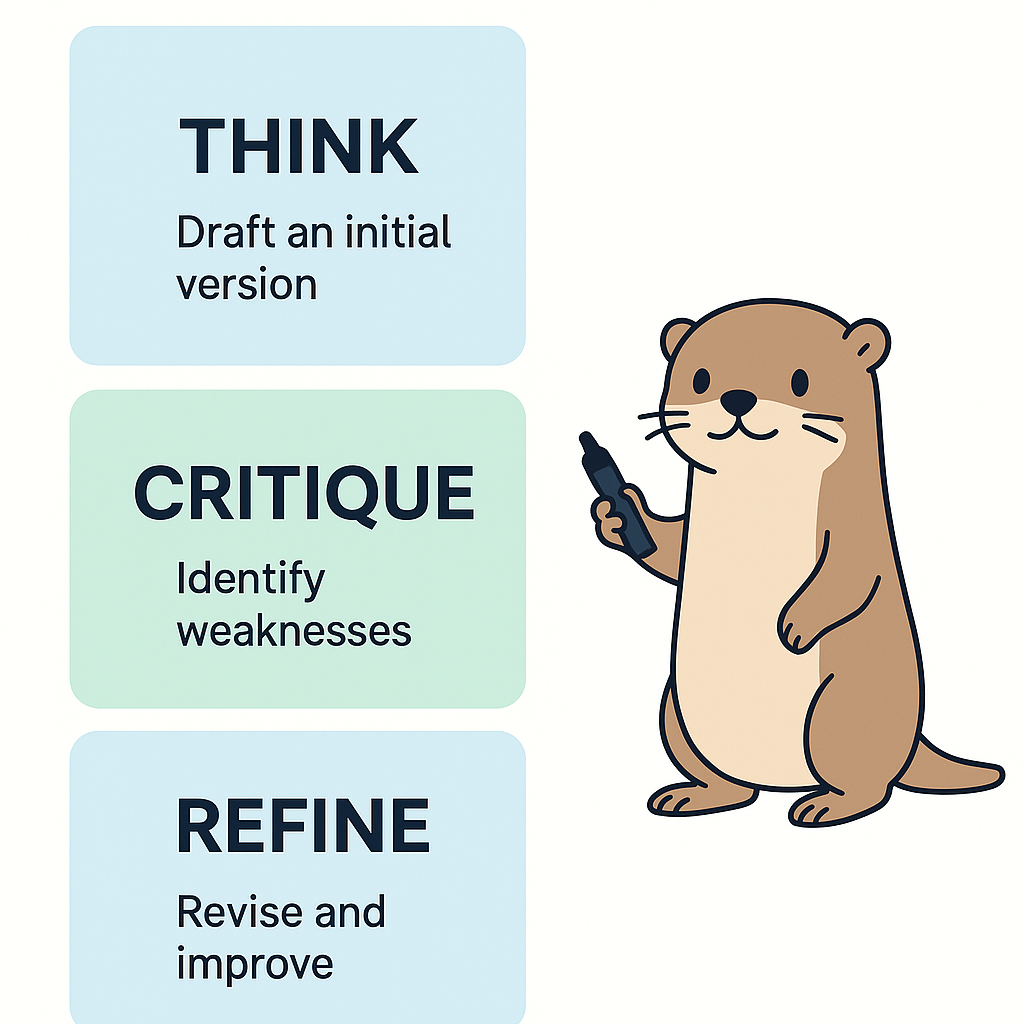
\You can print out this cute visual for the desk as a reminder\
The net effect is velocity: the model doesn’t wander or forget context, so two passes usually reach publish-ready quality. But speed depends on how clearly you frame the problem. Feed sloppy notes, get sloppy gaps; mask your real goal behind fuzzy verbs, and the loop stalls. Think of the model as a turbocharged assistant—brilliant at sorting and iterating, useless at guessing what you forgot to mention. Provide the structure, and it will do in seconds what used to take you a meeting and a half.
Picking the Right Model (and Rescuing the Rest)
The Think → Critique → Refine loop leans hard on a model’s ability to hold a detailed chain of thought without getting lost or throttling itself. In practice, three current models clear that bar with room to spare:
- OpenAI o3 – The “reasoning-first” version of GPT-4o. It keeps long logical threads intact, so the critique pass doesn’t dissolve into platitudes, and the refine pass lands specific fixes instead of rewrites-from-scratch—often in under ten seconds.
- OpenAI o4-mini-high – Slightly slower but with a deeper context window and tighter factual precision, useful when your input bundle is pages of logs or a multi-table trade-off matrix.
- Google Gemini 2.5 Pro – Comparable context length, plus painless JSON output for the structured artifacts this loop thrives on; especially handy if you prefer the PaLM-style “reason step-by-step (don’t show your work)” prompt pattern.
Could you run the loop on something smaller—GPT-3.5 Turbo, Mistral-8x7B, Claude Haiku? Yes, but expect friction. These models either truncate their own reasoning or decline to critique themselves honestly. Your best workaround is to break the loop into separate calls:
- Draft call – model produces the artifact.
- Critique call – you feed that artifact into a fresh prompt that instructs explicit, numbered feedback.
- Refine call – you pass both the original and the feedback back in for fixes.
The triple-call pattern costs a few cents more and doubles latency, but it restores most of the quality—provided you keep the task narrow (≤ 300 tokens input, ≤ 1 k tokens total context) and supply a crystal-clear schema.
Two practical tips when you’re testing models:
- Hide the chain of thought. Most providers forbid showing raw reasoning in the final answer. Wrap it in internal instructions (“Think step-by-step, then present only the revised artifact”).
- Anchor the schema. Paste a tiny example table or JSON block in every prompt. Without it, smaller models drift; even o3 benefits from the visual cue.
Bottom line: if you have o3, o4-mini-high, or Gemini 2.5 Pro at your fingertips, the loop feels like cheating. If you don’t, you can still get 80 % of the benefit—just be ready to hold its hand a little more and keep the problems bite-sized.
Five High-Leverage Product Moments (and the Three Prompts That Unlock Each One)
Below are the places in a tech org where Think → Critique → Refine yields the biggest payoff. For every moment you’ll see (a) why it matters, (b) what makes the input “tokenizable,” and (c) a copy-paste prompt triplet you can test immediately on o3, o4-mini-high, or Gemini 2.5 Pro.
One-Page PRD—Scope on Rails
A Product Requirements Doc already divides neatly into Problem, Goal, Success Metrics, Constraints, Stakeholders. That structure lets the model spot blank cells in seconds.
SYSTEM
You are a Staff-level Product Strategist and succinct technical writer.
OBJECTIVE
Create a ONE-PAGE PRD (≤300 words) with these sections:
1. Problem 2. Goal 3. Success Metrics 4. Users / Personas 5. Constraints 6. Key User Stories 7. Open Questions 8. Stakeholders & Next Steps
INPUTS (verbatim after this prompt)
{{MEETING_NOTES}}
{{DESIGN_CONSTRAINTS}}
{{TECH_CONSTRAINTS}}
{{TIMELINE}}
{{OTHER_CONTEXT}}
GUIDELINES
• Grade-8 reading level, crisp active voice.
• Each numbered section ≤40 words.
• Use bullet or numbered lists when clearer.
• Tag any quantitative claim with a source in brackets, e.g., [Notes #17].
OUTPUT FORMAT (show every stage)
## 1 DRAFT_PRD
<first pass PRD>
## 2 REASONING
For each PRD section, list: • Key assumption(s) • Why the wording/metric fits.
## 3 CRITIQUE
Enumerate weaknesses: vague goals, missing metrics, unstated constraints, etc.
## 4 REFINED_PRD
Rewrite only the flawed parts; keep total length ≤300 words; preserve numbering.
THINK → CRITIQUE → REFINE INSTRUCTIONS
1. Draft PRD.
2. Explain reasoning per section.
3. Critique the draft.
4. Rewrite to address every critique point.
5. Stop; DO NOT hide chain-of-thought—output all four blocks exactly as specified.
END-OF-PROMPT
Typical save: 30–40 min of back-and-forth before the kickoff meeting.
Root-Cause Analysis—No More “Human Error”
Outage timelines, error logs, and 5-Whys chains are numbered by nature—perfect fuel for self-inspection.
SYSTEM
You are a Senior Site-Reliability Engineer writing a post-incident Root-Cause Analysis (RCA).
OBJECTIVE
Produce an RCA (≤350 words) with these sections:
1. Incident Summary
2. Impact & Scope
3. Timeline (UTC)
4. 5-Whys Table
5. Primary Root Cause
6. Contributing Factors
7. Corrective Actions (short-term)
8. Preventative Measures (long-term)
INPUTS (verbatim below this prompt)
{{INCIDENT_TIMELINE}}
{{ERROR_LOGS}}
{{MONITORING_DATA}}
{{ON-CALL_NOTES}}
{{OTHER_CONTEXT}}
GUIDELINES
• Grade-8 reading level, active voice.
• Each numbered section ≤50 words; Timeline may list up to 8 events.
• 5-Whys table: columns = Step #, Why, Evidence, Proposed Fix.
• Cite lines from inputs in brackets, e.g., [Logs #112].
• No blame language; focus on systems and process.
OUTPUT FORMAT (show every stage)
## 1 DRAFT_RCA
<first-pass RCA>
## 2 ANALYSIS
For each RCA section, list assumptions and why the wording/metric fits (2-3 bullets per section).
## 3 CRITIQUE
Enumerate weaknesses: vague causes, missing evidence, over-broad fixes, etc.
## 4 REFINED_RCA
Rewrite only the flagged parts; preserve numbering; keep total ≤350 words.
THINK → CRITIQUE → REFINE LOOP
1. Draft RCA.
2. Record ANALYSIS per section.
3. Critique the draft.
4. Rewrite to address every critique point.
5. Stop; output all four blocks exactly as specified.
END-OF-PROMPT
Typical save: 1–2 hours of war-room debate, plus a tighter action list.
Build-vs-Buy Matrix—Money and Quarters on the Line
Cost, time-to-market, strategic fit, and risk already form columns; the loop keeps scores honest.
SYSTEM
You are a Staff Product-Ops analyst tasked with deciding whether to BUILD in-house or BUY a vendor solution.
OBJECTIVE
Create a Build-vs-Buy Decision Brief (≤400 words) with these sections:
1. Decision Context
2. Option Matrix (columns: Option, One-time Cost, Annual Cost, Time-to-Market, Strategic Fit, Technical Risk, Maintenance Burden)
3. Qualitative Advantages & Drawbacks
4. Recommendation (single sentence)
5. Next Steps & Owners
INPUTS (verbatim after this prompt)
{{BACKLOG_REQUIREMENTS}}
{{VENDOR_QUOTES}}
{{ENGINEERING_CAPACITY}}
{{ARCHITECTURE_CONSTRAINTS}}
{{FINANCE_GUIDELINES}}
{{OTHER_CONTEXT}}
GUIDELINES
• Tone: concise business memo, grade-9 reading level.
• Cite numbers with source tags like [Quotes #3] or [Arch #7].
• Matrix may list up to 3 options. Keep each numeric cell short (e.g., “$95 K”).
• Recommendation must reference the strongest scoring dimensions.
• Avoid jargon—spell acronyms on first use.
OUTPUT FORMAT (deliver ALL stages)
## 1 DRAFT_BRIEF
<initial decision brief>
## 2 ANALYSIS
For each section above, provide 2-3 bullets stating: key assumptions made, why each metric or statement fits the input data.
## 3 CRITIQUE
Enumerate issues: missing data, unclear trade-off weightings, unsupported claims, or subjective language.
## 4 REFINED_BRIEF
Rewrite only the flagged content, preserve numbering, keep total ≤ 400 words, ensure matrix cells align under columns.
THINK → CRITIQUE → REFINE LOOP
1. Draft the brief (DRAFT_BRIEF).
2. Write ANALYSIS bullets per section.
3. Run CRITIQUE on the draft.
4. Produce REFINED_BRIEF addressing every critique point.
5. Output all four blocks exactly as labeled—no additional commentary.
END-OF-PROMPT
Typical save: a week of slide churn distilled to one annotated table.
Quarterly OKRs—Stop the Vague Goals
Each Objective pairs with a Key Result, baseline, target, and owner. If any part is fuzzy, the model can flag it instantly.
SYSTEM
You are a Senior Product-Ops Strategist creating next-quarter OKRs.
OBJECTIVE
Deliver a Q{QUARTER_NUM} OKR document (≤300 words) with these sections:
1. Objective (1 aspirational sentence)
2. Key Results Table — columns: KR#, Metric, Baseline, Target, Owner, Confidence (H/M/L)
3. Risks & Assumptions (bulleted)
4. Alignment Note (which company OKR this ladders to)
INPUTS (verbatim below this prompt)
{{ROADMAP_EPICS}}
{{METRICS_DASHBOARD}}
{{COMPANY_OKRS}}
{{RESOURCE_CONSTRAINTS}}
{{OTHER_CONTEXT}}
GUIDELINES
• Plain, active language; grade-8 reading level.
• 3–5 Key Results; each metric must be directly measurable.
• Baseline & Target are numeric (%, $, #).
• Owner = role, not individual name.
• Confidence = High / Medium / Low.
• Tag data sources like [Metrics #4].
OUTPUT FORMAT (deliver ALL stages)
## 1 DRAFT_OKRS
<initial OKR doc>
## 2 ANALYSIS
For each KR: • Assumptions made • Why metric & target fit inputs.
## 3 CRITIQUE
List issues: vague verbs, missing baseline, unrealistic targets, absent owners, or mis-alignment.
## 4 REFINED_OKRS
Rewrite only flagged items, keep good rows intact; keep total ≤300 words; preserve table columns.
THINK → CRITIQUE → REFINE LOOP
1. Draft the OKR doc (DRAFT_OKRS).
2. Record ANALYSIS bullets per KR and section.
3. Run CRITIQUE on the draft.
4. Produce REFINED_OKRS addressing every critique point.
5. Output all four blocks exactly as labeled—no extra commentary.
END-OF-PROMPT
Typical save: 60–90 minutes of leadership ping-pong per quarter.
Customer-Journey Pain Map—Align Product × UX × CS
Stage, User Goal, Friction, Evidence, Opportunity Size: a ready-made schema that surfaces missing proof.
SYSTEM
You are a Senior Product Designer mapping customer-journey friction points.
OBJECTIVE
Create a Journey Pain-Point Map (≤350 words) with these columns:
Stage • User Goal • Friction • Evidence • Opportunity (1–5) • Quick-Win Idea
INPUTS (verbatim below this prompt)
{{INTERVIEW_NOTES}}
{{ANALYTICS_SNIPPETS}}
{{CS_TICKETS}}
{{SURVEY_DATA}}
{{OTHER_CONTEXT}}
GUIDELINES
• Tone: clear, concise, grade-8 reading level.
• Include 5–8 journey stages max.
• Evidence may cite line numbers, e.g., [Interview #12].
• Opportunity score: 1 = low impact/effort, 5 = high impact/low effort.
• Quick-Win Idea ≤12 words, actionable.
OUTPUT FORMAT (deliver EVERY stage)
## 1 DRAFT_MAP
<initial table, Markdown format>
## 2 ANALYSIS
For each row, list: • Assumptions • Why friction is real • Why opportunity score is chosen.
## 3 CRITIQUE
Enumerate gaps: missing evidence, weak opportunity rationale, duplicate stages, vague quick wins.
## 4 REFINED_MAP
Rewrite only the flagged rows; leave good rows as is; keep total ≤350 words; maintain column order.
THINK → CRITIQUE → REFINE LOOP
1. Draft the map (DRAFT_MAP).
2. Write ANALYSIS bullets per row.
3. Run CRITIQUE on the draft.
4. Produce REFINED_MAP addressing every critique point.
5. Output all four blocks exactly as labeled—no additional commentary.
END-OF-PROMPT
Typical save: one workshop and several follow-up emails—condensed to two prompt cycles.
Using Smaller Models?
If you’re limited to GPT-4o or are using another non-reasoning model, break each loop into three separate chats. You’ll keep most of the quality; you’ll just wait a few extra seconds, and you’ll have to adjust your prompting a bit depending on how the model outputs. You may need to mix some Chain-of-Thought prompting in to get the model to actually reason through each step.
Making It Stick: Why Framing and Source Material Trump Raw Model Power
A strong “Think → Critique → Refine” loop is never a shortcut around human judgment—it’s an amplifier of the clarity you feed it. Hand the model scattered thoughts and you’ll get polished-looking nonsense. Hand it a well-labeled bundle of facts and constraints and it will surface blind spots faster than any whiteboard session.
Start with structure. Every prompt in the last section begins by pinning down fields (metric, baseline, owner) or table columns (Stage, Goal, Friction). That scaffolding turns free-form ideas into tokens the model can reason over one by one. Skip the scaffolding and the model is forced to guess what matters, usually badly.
Next, give it ground truth. Paste the relevant excerpts—meeting notes, logs, survey quotes—right under the prompt, and cite them in the instructions (“use bracket tags like [Notes #12]”). When the model critiques its own draft, those tags anchor each claim to a real line of evidence, making hallucinations obvious and easy to fix.
Finally, check the instruction hygiene. Vague verbs (“improve,” “optimize,” “shorten but keep detail”) pull the loop off course. Instead, tell the model exactly which tests to run on itself: “flag any metric that lacks a baseline,” “highlight duplicate stages,” “mark confidence High / Medium / Low.” If you can’t specify a rule in plain English, refine your own thinking first—the loop will only move as fast as the problem is framed.
In practice, teams that adopt this discipline see two clear signals of success: (1) the critique section turns up clearer and more interesting gaps, because inputs arrive cleaner and more complete, and (2) the refine pass provides really useful options for addressing those thinking gaps. At that point you’re no longer wrestling with drafts; you’re accelerating through a normal team refinement process in less than 12 parsecs, and you’re laser focused on the gaps in your thinking and inputs—and how to close them. That’s real leverage.
Guardrails That Actually Matter
The loop’s speed is seductive, but it only pays off when you bracket it with disciplined inputs and a clear destination. In practice these three guardrails are enough to keep you aimed in the right direction as you start practicing CoR on your own.
1. Curate the source, don’t dump the junk.
Feed the model the cleanest slice of reality you can: the definitive incident timeline, not the full Slack flame-thread; the final design constraints, not half-baked Figma comments. If the input reads like a rummage drawer, the model’s critique phase will waste tokens pointing out obvious mess instead of surfacing real blind spots. A minute of human triage up front is worth dozens of passes later.
2. Frame the problem before you press “send.”
Think through what success looks like—metrics, scope, stakeholders—before you ask the model to draft anything. The loop amplifies clarity; it will not conjure clarity from thin air. If you can’t write a single guiding sentence (“We need a PRD that locks scope to v1 mobile only, measures MAU uplift, and calls out design debt explicitly”), pause and decide that first. Otherwise the critique step will mirror your own vagueness right back at you.
3. Lock the output shape to your real workflow.
End every prompt with an explicit schema or template that matches how the artifact will be consumed—a one-page PRD, a six-column risk table, a markdown journey map. The refine pass can only steer toward a destination you define; if the structure drifts, stakeholders will reject the doc no matter how polished the prose. When the model’s final output drops cleanly into the next tool—Jira ticket, RFC repo, slide deck—you know the loop has done its job.
Hold these three rails and the rest takes care of itself. The model becomes an accelerant for well-prepared thinking, not a replacement for it—and that, ultimately, is the leverage you’re after.
Wrap-Up & Challenge
The playbook is simple: pick a “token-ready” task, feed in curated facts, and let a reasoning-strong model Think → Critique → Refine inside the schema you’ll actually use. o3, o4-mini-high, or Gemini 2.5 Pro will tear through a PRD, RCA, trade-off matrix, OKR sheet, or journey map in the time it used to take you to spin up a meeting invite—provided you respect the three guardrails: clean inputs, clear problem frame, locked output shape.
Your next step is equally simple:
- Grab the PRD prompt above (or whichever artifact hurts most this week).
- Slot in real notes and constraints—nothing extra, nothing missing.
- Hit run, watch the model argue with itself, and skim the refined draft.
- Count the minutes you just reclaimed.
Post your before-and-after time delta—or the sharpest critique the model surfaced—in the comments. Personally, I always like the critiques the model gives—if I asked it for hard thinking and refinement it will throw up all sorts of interesting stuff if my inputs are clean.
Three prompts, one loop, and your calendar just got lighter.
For more on AI, subscribe and share!
\When it works, it really does feel like alchemy\