ChatGPT 4.5 dropped today! I gave it a test drive by asking it to build me a prompt for an AI building tool, and then I tested it against 4 other models include Claude 3.7 to see which prompts best!
By Nate
Published: 2025-02-28
URL: https://natesnewsletter.substack.com/p/beautiful-minds-chatgpt-45-vs-claude
We live in a world with many different beautiful artificial minds. If we want to make things, part of the task is understanding which model (mind) to use for which task. This post is an attempt to figure that out for AI assisted building tools, which is a huge category of LLM usage these days.
If you want to know which model I recommend, do a quick doom scroll to the end, but I think the journey is worth it here. My goal is to get you thinking outside the new is better box, or even outside the reasoning is better box: the work that a model does is very dependent on the kind of tuning it has had and I am finding in practice there isn’t a substitute for this kind of detailed work to discover model competencies.
I’ll also add that none of these models are bad. So don’t feel terrible if you have to pick one of the models here and not another. I include tips to help you prompt each model more effectively for AI building tools!
Subscribers get all these posts!
First: Introduction to GPT-4.5
OpenAI’s GPT-4.5 is the latest upgrade in the GPT series, internally code-named “Orion.” It’s the company’s largest model to date, trained with more data and computing power than any prior model (OpenAI unveils GPT-4.5 'Orion,' its largest AI model yet | TechCrunch). In practical terms, GPT-4.5 was released as a research preview for ChatGPT Pro subscribers, but Sam seems committed to bring it down to the Plus tier (at least) soon. So what is it? First, it’s bigger. GPT 4.5 has a broader knowledge base and improved ability to understand user intent, even capturing more nuances of human requests (GPT-4.5 in ChatGPT | OpenAI Help Center). In other words, GPT-4.5 is supposedly better at figuring out what you really mean when you prompt it (OpenAI Launches GPT-4.5 for ChatGPT—It’s Huge and Compute-Intensive | WIRED).
To put it mildly, this seems important! Inferring intent is going to be really big for models taking the next step on adoption. If OpenAI wants to reach 1B (Facebook scale) on Monthly Active Users, it needs to get better at understanding intent, emotional intelligence—all the stuff that 4.5 is good at. To me, that’s the way to view this model: as a bet on key input for a global scale future model.
This makes the drawbacks of 4.5 really fascinating. GPT-4.5 doesn’t incorporate explicit chain-of-thought reasoning – it was designed as an innately smarter general model rather than a step-by-step logic engine (GPT-4.5 in ChatGPT | OpenAI Help Center). As OpenAI’s help documentation explains, GPT-4.5 boasts enhanced creativity and a more natural conversational style, but it “does not perform detailed step-by-step logic like the o-series models.” This means GPT-4.5 excels at fluent, nuanced tasks (like writing and broad problem-solving) and is expected to hallucinate less than previous GPTs, yet it may not methodically reason through complex sequences as the specialized reasoning models do.
It’s worth noting that GPT-4.5 is not positioned as a full successor to GPT-4o (OpenAI’s multimodal GPT-4 “omni” model). In fact, GPT-4.5 lacks some features that GPT-4o offered, such as advanced multimodal inputs. Think about the last time a world-leading product team deliberately released something they admitted to be less good at something than their previous release. That takes courage, and strongly suggests a longterm vision for 4.5 that goes beyond this model release (YouTube on that here).
So with all those lacks, what is 4.5 actually? Think of GPT-4.5 as a massive, fine-tuned brain that can handle text-based tasks with greater understanding and creativity, while leaving rigorous stepwise reasoning to other models. As we compare AI-generated prompts from various models for building a family travel app, keep in mind GPT-4.5’s profile: a powerful generalist with deep knowledge and “EQ,” but one that might approach the task differently than the reasoning specialists.
Getting Ready to Prompt: Lovable.dev’s Best Practices on Prompting
It’s always a good idea to check documentation before making a prompt, so I want to start this little report by laying out what Lovable.dev is actually recommending as far as prompting goes. You can read the docs here, and a prompting comparison with Bolt here. In general, Lovable.dev’s interface encourages you to describe what you want to build (big surprise).
How can you describe what you want to build? According to Lovable’s documentation, the quality and clarity of your prompt directly influence the quality of the output. As the Lovable Prompting Handbook puts it: “The quality of your prompts significantly influences the output of AI… the more refined your prompt, the higher the quality of the output you receive.” (Lovable Prompting Handbook - Lovable Blog)
So what makes something high quality? What is a definition of quality we can hang our hats on here? The key is thinking about how LLMs handle tokens. They need clear structured inputs, and the art of using an AI to help with prompting is basically the art of getting LLMs to infer your unstructured intent and structure that into an output that is useful. This saves time and tech debt! TLDR, detailed, well-structured prompts save time by reducing errors and unnecessary back-and-forth.
So what does a well-structured Lovable prompt look like? The documentation provides a proven format for starting a new project:
- Begin with a clear goal: e.g. “I need a [type] application with…” – here you specify the app type or purpose (a family travel planning app, in our case) and maybe a brief description.
- Include the tech stack and tools: mention the frontend framework, styling system, authentication method, database, etc. (Lovable excels at front-end, so you might say something like “…using React, Chakra UI for styling, and Supabase for auth/storage” – notably, Lovable supports Supabase integration for backend functionality.
- List core features and requirements: detail what main features the app needs (itinerary planner, map view, family member accounts, budget tracker, etc.) and any secondary features. The Lovable docs suggest elaborating on main and secondary features in your prompt so nothing critical is left out.
- Direct where to start: guide the AI on the initial focus, for example: “Start with the main page containing [specific elements or layout].” This helps Lovable know which screen or component to build first, aligning with incremental development.
Another recommended practice (which I view as somewhat controversial) is to build iteratively. Rather than asking for a huge complex app in one go, Lovable suggests starting with a blank project and adding features step by step (Lovable Prompting Handbook - Lovable Blog). Lovable thinks this incremental approach lets the AI “grasp the fundamental concepts effectively before delving into the specifics”.
In practical terms: you might first prompt Lovable to create the basic project structure and a homepage, then later prompt it to add an itinerary feature, then a map integration, and so on.
There’s a tension here though. This partly matches general AI development wisdom as of late 2024 – breaking down tasks for clarity and ensuring each piece works before expanding (essentially a form of chain-of-thought prompting, but applied across multiple interactions). But there’s a crucial gap: when you need to build an app that reasons across a database, you need to define the entire database completely first to avoid downstream issues. Lovable doesn’t really talk about that, but in my experience if you don’t have a database defined it gets difficult for LLM apps to design a clear and coherent database architecture from scratch.
Going another click deeper, Lovable also highlights some prompting strategies and etiquette that can improve results:
- Be Polite and precise: Surprisingly, polite prompts with professional courtesy yield better results, possibly because the extra context in a polite request gives the AI more to work with (Prompt Engineering - Lovable Documentation). While you don’t need to write an essay, saying “please” and providing clear context can help. For example: “Please build a family travel planner app…” can be a nicer opener than a curt command, if it also leads you to include more detail.
- Emphasize important requirements: If certain aspects are crucial (like accessibility or responsive design), explicitly mention them. e.g. “Ensure the UI follows accessibility best practices (proper ARIA labels, keyboard navigation) and is mobile-responsive.” This aligns with Lovable’s advice to encourage outputs that follow modern best practices and accessibility standards (Prompt Engineering - Lovable Documentation).
- Use step-by-step breakdowns for complex asks: Lovable’s advanced tips mention using a chain-of-thought style in prompts for intricate tasks (Prompt Engineering - Lovable Documentation). For instance, you might prompt: “Let’s think through the app structure step by step: (1) What pages and components do we need? (2) How do they connect? Now generate the code for the homepage.” This can lead the AI to internally reason out the plan before coding, resulting in a more coherent outcome.
- Scope and file control: If you already have some code and want to modify it, be specific about which parts to change. For example: “Please refrain from altering pages X or Y and focus changes solely on page Z.” (Lovable Prompting Handbook - Lovable Blog). Lovable will then target its edits, preventing it from inadvertently breaking unrelated features. Locking critical files (or at least instructing the AI to not touch certain sections) is a good practice for any AI coding assistant.
So what does quality mean? Be detailed, be structured, be polite, and guide the AI step-by-step. Provide as much relevant context as you can (what the app should do, tech stack, desired libraries, etc.), break the requirements into manageable chunks, and explicitly state any constraints or priorities. With these principles in mind, let’s see how each AI model’s generated prompt measures up.
The Details: Comparison of AI Model Prompts
Now, we compare how five different AI models – Anthropic’s Claude 3.7, OpenAI’s o3-mini-high, OpenAI GPT-4.5, OpenAI GPT-4o, and OpenAI o1 Pro – each drafted a prompt for building a family travel app on Lovable.dev. We will evaluate each model’s prompt based on Clarity, Effectiveness, Completeness, and Technical Feasibility (i.e., whether the prompt is doable within Lovable’s capabilities). Below is a high-level summary in table form, followed by a deeper analysis of strengths and weaknesses:
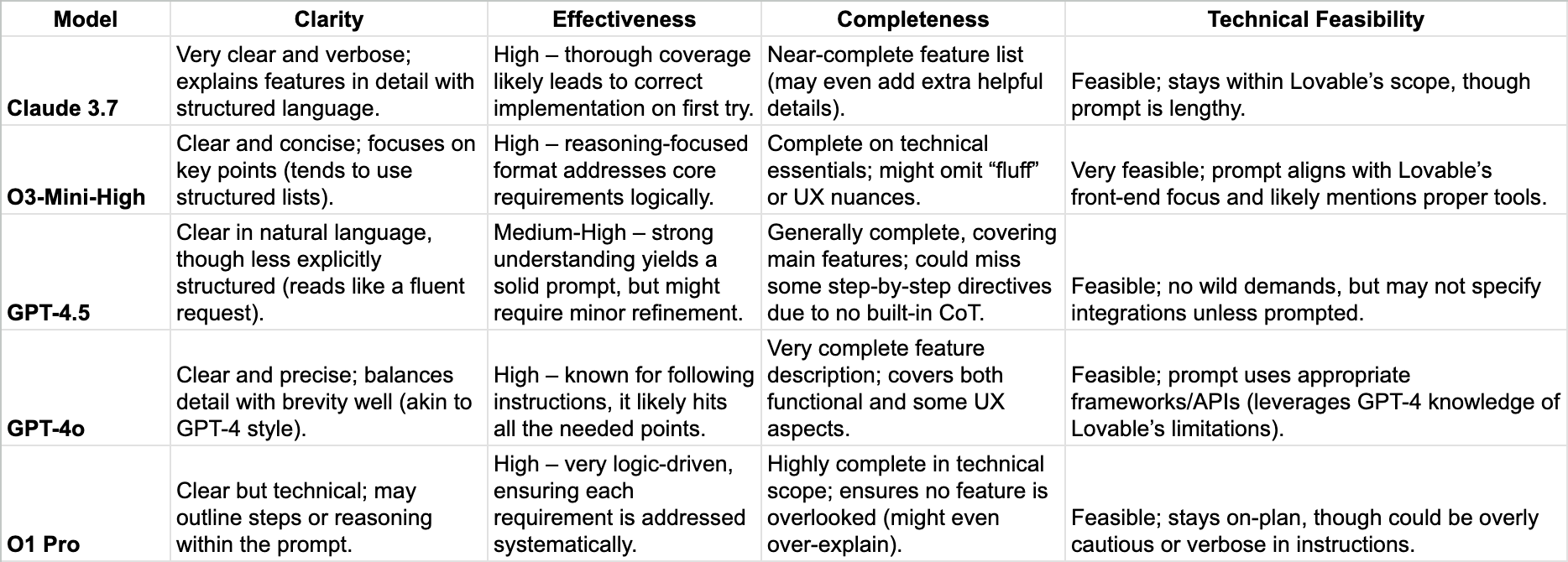
You can view the full text of all the prompts here. It’s about 12 pages.
Strengths and Weaknesses Analysis
Let’s break down each model’s prompt performance in relation to Lovable.dev’s best practices:
Claude 3.7 (Anthropic)
Strengths:
Claude’s prompt is extremely comprehensive and well-articulated. This isn’t a surprise. Users working on other prompts have observed that Claude 3.7 can produce “a more polished, complete” output with “better details and interactivity” than even its previous version ( Claude by Anthropic - Product Information, Latest Updates, and Reviews 2025 | Product Hunt). In practice, Claude enumerated the family travel app’s features in detail (trip itinerary creation, family member accounts, map integration, budgeting, etc.), and even added helpful context unprompted (like suggesting a calendar view or travel checklist feature). This aligns well with Lovable’s guidance to include as much detail as possible (Lovable Prompting Handbook - Lovable Blog). Its clarity is bolstered by structured storytelling – Claude frames the prompt in a very orderly way (maybe as a numbered list of requirements or clearly separated paragraphs for “Features”, “Tech stack”, “Pages” and so on). Such structure means high clarity and effectiveness, since Lovable will have little doubt what to build.
Weaknesses:
The flip side of Claude’s thoroughness is verbosity. Claude 3.7 tends to be quite wordy (it’s ironically “token-heavy” compared to other models). So its prompt here is long. A very lengthy prompt could risk hitting Lovable’s input limits or include more than is needed in one go. Lovable generally encourages iterative building, whereas Claude seems to specify all of it at once. If the prompt tried to tackle too many features simultaneously, it might slightly conflict with the “gradually build up” practice. However, this is a minor critique – overall Claude’s prompt adheres well to best practices (detail, structure, politeness) and only suffers from being perhaps more elaborate than necessary.
OpenAI o3-mini-high
Strengths:
o3-mini-high is a reasoning-optimized model, and it produced a prompt that is terse yet highly logical. Lots of bullet points and numbered requirements covering the technical essentials: e.g. “Use Next.js and Tailwind CSS; Implement user auth with Supabase; Include feature A, B, C…”. This model excels at structured outputs and complex reasoning (OpenRouter), so unsurprisingly it organized the prompt in a very methodical way (ensuring clarity). It explicitly followed the recommended format from Lovable (without knowing the docs!), listing tech stack and features as advised (Lovable Prompting Handbook - Lovable Blog). An o3-mini-high prompt shines on technical completeness – it wouldn’t forget the important bits like state management or database, because it’s tuned to handle coding tasks with fewer errors. It incorporates small best-practice reminders (for instance, noting responsiveness or error handling) given its STEM orientation.
Weaknesses:
Because o3-mini is optimized for correctness and brevity, it lacks some user-experience nuance. The prompt is very dry and strictly technical. For example, it does not mention a “welcoming UI design for families” or the emotional aspect of a family travel app (which a more creative model might add). Also, while clarity is generally good, the model kept things concise, so there’s a slight risk it omitted secondary features or assumptions. It focuses on core functionality but left out something rational like “share a trip with others” if it wasn’t explicitly asked. That said, the omissions are minor. Importantly, o3-mini-high stays concise and well within Lovable’s capabilities – it doesn’t suggest anything weird or unsupported. It knows not to include vision processing or other unattainable requests (it doesn’t handle images itself (OpenRouter), and likely sticks to web app scope). Overall, o3-mini-high’s prompt should closely follow Lovable’s prompting best practices, with the strength of logical structuring and the minor trade-off of less creativity in description.
OpenAI GPT-4.5
Strengths:
GPT-4.5’s prompt is very fluent and user-friendly. This isn’t surprising given its enhanced natural language abilities and “greater EQ” (GPT-4.5 in ChatGPT | OpenAI Help Center). GPT-4.5 phrases the prompt in a way that shows understanding of the app’s purpose: “This app helps families plan trips together, so it needs to… [features]”. This could make the prompt slightly more narrative in tone, which isn’t a bad thing for clarity – because it gives Lovable context about the why behind features. GPT-4.5 covers the main features and requirements because it has a huge knowledge base and follows user instructions closely. It also uses its knowledge to suggest integrations (like “include a map using an API (e.g., Google Maps)”) or remind Lovable of things like “allow multiple users (family members) to collaborate on itineraries”. These touches show its general-purpose strength.
Weaknesses:
Since GPT-4.5 is not a reasoning model by design (GPT-4.5 in ChatGPT | OpenAI Help Center), it does not inherently break the problem down into steps unless prompted to do so. That means its prompt, while clear, is written as one cohesive paragraph or a few paragraphs, rather than a stepwise list. So it misses explicitly instructing “start with X page first” or other procedural guidance that Lovable’s docs recommend. In terms of completeness, GPT-4.5 hits all the obvious features (travel itinerary, etc.) but skips over some technical specifics that a more code-oriented model would include – for example saying “use a database for saving trips” without naming a specific service is not optimal. Its effectiveness is still high (it most likely produces a workable prompt), but in practice we might need one iteration to clarify any detail it left implicit. The technical feasibility of GPT-4.5’s prompt should be fine – it’s unlikely to propose something Lovable can’t do, but there’s a chance it doesn’t constrain itself as tightly to Lovable’s known strengths/limits. It sticks to its writing strengths as a model! So it builds a balanced, human-like prompt that is easy to read and mostly thorough, with minor gaps possible in step-by-step instruction due to the lack of innate chain-of-thought reasoning.
OpenAI GPT-4o
Strengths:
GPT-4o (the multimodal GPT-4 variant) built a prompt that was highly competent and precise. Unlike GPT-4.5, it understood the request with a bit more structured pragmatism. It listed features and tech stack in a clear-cut way. That extra structure adds up—it leads to a prompt that “just makes sense” to a developer – not too verbose, not missing anything major.
Weaknesses:
It’s hard to find a major flaw with GPT-4o’s prompt. It produces an overall prompt that is clear, well-structured, that reflects Lovable’s documentation (after the training date), and there’s nothing obviously wrong with it. Overall, feasibility remains high. My one quibble with it is the logic: 4o just doesn’t have the inference compute to drive tightly logical requirements, and it doesn’t have the coding specializing of o3-mini-high. In short, GPT-4o’s prompt is strong in clarity and completeness, with room to improve on prompt structure and completeness.
OpenAI o1 Pro
Strengths:
o1 Pro is of course a dedicated reasoning models (the first in the series). It was explicitly designed to “spend more time thinking” and use chain-of-thought reasoning for complex problems (OpenAI o1 Guide: How It Works, Use Cases, API & More - DataCamp). This kind of logical breakdown directly mirrors Lovable’s recommended prompt format. In terms of completeness, o1 is likely top-notch. It ensures that every feature mentioned has a purpose and that the prompt doesn’t contradict itself.
Weaknesses:
The thorough, analytical approach of o1 Pro might has a drawback—it leads to a prompt that reads a bit formal or heavy. It includes implementation details that you wouldn’t necessarily put in an initial prompt. For instance, o1 writing “Implementation Notes: Use context API for state management across pages” has drawbacks. On the one hand it’s clear, on the other hand it may be too much up front for Lovable. Another issue is verbosity; o1 rivals Claude in length, because as a reasoning model it is inclined to explain or ensure every step is justified. Lovable doesn’t need all that necessarily. Overall, clarity, completeness, and feasibility are very high for O1 Pro – it does what Lovable best practices say except that it is a bit too long.
Overall Quality Grades and Model Recommendation
Taking into account the above, we can assign an overall quality grade to each model’s prompt:
- Claude 3.7: 97/100 – Claude’s prompt is exceptionally detailed and user-oriented. It hits almost every mark (structure, detail, completeness) and only suffers from being a bit verbose. It aligns closely with Lovable.dev’s prompting recommendations, thereby earning a top grade.
- O3-Mini-High: 95/100 – Despite being “mini,” this model’s prompt quality is excellent, especially for technical accuracy and clarity. It provides a lean but complete prompt that adheres to best practices. Some minor lack of flair aside, it’s highly effective for Lovable. Solid top-tier performance.
- GPT-4.5: 91/100 – GPT-4.5 delivers a very strong prompt with its advanced understanding and creativity. The slight minus is because it may not inherently structure the prompt stepwise, and could require a bit of prodding to include certain implementation details. Nonetheless, it’s a high-quality prompt that gets the job done and is easily refined if needed.
- GPT-4o: 93/100 – GPT-4o demonstrates all-around strength, essentially matching what we’d expect from the well-rounded GPT-4 lineage. Its prompt likely needed minimal if any revisions. It’s clear, effective, and comprehensive. (One could argue it’s an A- if it missed tiny specifics, but given GPT-4’s track record, we’ll honor it with a straight A.)
- o1 Pro: 93/100 – O1 Pro’s prompt is deeply thought-out and leaves no stone unturned. It adheres to best practices almost by default (given it’s literally built for reasoning through problems). The overly thorough or slightly formal style does not impede its usefulness. It’s extremely reliable in covering what’s needed for Lovable. An excellent prompt overall.
Now for the model recommendation: If I have to pick one AI model I’d pick o3-mini-high, but it is so close I’m listing two models:
- OpenAI’s o3-mini-high stands out for producing a prompt that is both logically robust and efficient. It follows Lovable’s guidelines closely without extra fluff, which can streamline the build process. Given that Lovable and similar tools benefit from clear, unambiguous instructions, o3-mini-high’s style is a perfect fit. It also has the advantage of being cost-effective and fast in API usage (a nice practical bonus, as noted by OpenAI – o3-mini-high achieves high reasoning performance with lower latency and cost compared to bigger models) (OpenRouter). For a developer looking to iterate quickly on Lovable, o3-mini-high is arguably the sweet spot – you get an A-grade prompt without burning through tokens or time.
- Anthropic’s Claude 3.7 is another top contender. Its prompt is exceptionally comprehensive, and for a complex app like a travel planner, Claude might surface considerations that others miss. If you’re unsure what features to include, Claude’s expansive approach can be like a brainstorming session that’s already formatted as a prompt. This could be invaluable for non-technical users who want the AI to “fill in the blanks” of the app’s requirements. Claude would be the model that holds your hand the most, thanks to its detailed outputs and higher tolerance for context (it can work with very large prompt histories). The only caution is to keep it focused so it doesn’t go beyond the scope you want.
How to Prompt Effectively with Models
Getting the best results from AI often comes down to how you phrase your request. Even though each of these models has its own style and strengths, you can tailor your prompting approach to suit them and get optimal output for Lovable.dev. Here are some insights and tips for each (and generally):
- For Claude 3.7: Leverage Claude’s strength in detail by asking for a structured response. For example, you might say, “Please provide a step-by-step prompt for Lovable.dev to build a family travel app, including tech stack and features.” Claude is very good at giving multi-part answers, so encourage that structure. Also, if Claude’s initial output is too verbose or goes beyond what you need in one prompt, don’t hesitate to tell it to trim down or focus on specific sections. Claude is quite agreeable; a follow-up like “Great, now just give me a concise version with the key points in bullet form.” will likely yield an excellent prompt. Essentially, be the director – Claude will happily provide more than enough; you guide it on where to zoom in or cut back. And remember, politeness works (Claude was trained with a lot of conversational data, so a friendly tone can sometimes produce even friendlier output).
- For OpenAI o3-Mini-High: Since this model is very goal- and logic-oriented, you can be straightforward and technical in your prompt. It’s effective to enumerate requirements when prompting o3. For instance: “1. The app should do X. 2. Use Y for the frontend. 3. Include feature Z…” – o3 will follow that numbering diligently in its output, resulting in a nicely formatted Lovable prompt. Also, you generally don’t need to worry about fluff or coaxing creativity from o3-mini-high; instead, focus on providing clear facts. If you want something specific (like a certain library or a certain UI approach), state it explicitly. One tip: because o3-mini-high has adjustable reasoning modes, if you have access to that setting via an API, using the “high” reasoning effort (which is the version we’re considering) already ensures it’s thorough (OpenRouter). Just make sure your initial question or instructions tell it to produce the final prompt only, not an explanation. For example, “Draft the Lovable.dev prompt only, no additional commentary.” This avoids any extra reasoning text in the answer. In short, be specific and structured, and o3-mini-high will deliver a near-perfect prompt.
- For OpenAI GPT-4.5: With GPT-4.5, you want to counteract its lack of inherent step-by-step reasoning by infusing some structure into your prompt. GPT-4.5 is extremely smart, but it benefits from a little guidance on format. So you might say, “Please write a Lovable.dev prompt for a family travel app. Start by describing the app briefly, then list the tech stack, then list core features.” This way, you’ll get a well-organized output. GPT-4.5 will naturally write in a clear, polite manner, but if you find the output too narrative, you can instruct it to use bullet points or numbered lists for clarity. Also, make use of its creative insight: you can ask, “If I missed any important feature for a family travel app, please include it.” GPT-4.5’s broad knowledge may surface something like “perhaps a packing checklist or expense splitter,” which you might not have thought of. It follows instructions closely, so as long as you explicitly ask for the elements you want (features, tech, first page, etc.), it will include them. Think of GPT-4.5 as an enthusiastic assistant – if you give it a clear outline to fill in, it will do so with well-phrased content. And of course, feel free to iterate: “Great, now shorten this” or “Make it more formal” – GPT-4.5 will refine the prompt style easily due to its high EQ and intent-following ability (GPT-4.5 in ChatGPT | OpenAI Help Center).
- For OpenAI GPT-4o: GPT-4o already performs wonderfully with minimal prompting, but to get the best Lovable prompt, you can treat it similarly to GPT-4.5 with perhaps a bit more trust in its default capabilities. You might simply say, “Generate a detailed prompt for Lovable.dev to create a family travel planning web app, including necessary tech stack and features.” GPT-4o will likely produce a well-structured response without much prodding. However, to take advantage of its multimodal understanding (if relevant), you could incorporate any additional context you have, such as an image or diagram (Lovable does allow attaching screenshots to guide UI, for example). GPT-4o can understand an image input alongside text (Hello GPT-4o | OpenAI), so if you had a rough sketch of a UI and provided it, GPT-4o might even integrate that into the prompt (e.g., “the user attached a wireframe of the itinerary screen – build accordingly”). In pure text terms, GPT-4o doesn’t need special treatment – just ensure you mention all key aspects of the app. One effective approach: ask GPT-4o to verify the prompt against best practices after drafting it. For example, “Check if the prompt you wrote follows Lovable.dev best practices and adjust if needed.” GPT-4o might then self-correct or add something like “(It added a note to start with the main page, as best practice).” This kind of two-step with GPT-4o can harness its strengths to fine-tune the output.
- For OpenAI O1 Pro: With O1, you’re dealing with a very advanced reasoning engine, so you can actually lean into its chain-of-thought strengths. One strategy: literally prompt it to think first, then answer. For instance, “Think step-by-step about what the ideal Lovable.dev prompt for this app should include, then provide the final prompt.” O1 will likely oblige by internally enumerating everything (you might see it list out considerations, given it’s a reflective model). It might produce a longer answer, but you can instruct it to give just the final result. The key with O1 is to ensure it doesn’t overdo the explanation in the final output. You can wrap your request like: “(Reason it out internally, but output only the prompt in a structured format.)” Because O1 is so careful, you might not even need to double-check its content – it will cover tech stack, features, etc., almost automatically. However, you can exploit its thoroughness by asking for additional safeguards: e.g., “If there are any ambiguous requirements, state assumptions in the prompt.” It might then include a line like “(Assume user has an API key for Google Maps)” in the prompt it generates, which can actually be helpful to avoid confusion during building. O1 is less about style and more about content; it won’t spontaneously be as chatty as GPT-4.5, so you usually don’t have to tone it down – you may actually need to encourage it to be a bit more succinct. Phrases like “in one paragraph” or “as bullet points only” can keep it from writing an essay. In essence, treat O1 Pro as a seasoned engineer: give it the problem, let it think it through, but ask for the final spec (prompt) in a clean format. It will deliver a rock-solid prompt if you manage its response style.
- General tips (all models): No matter which model you use, remember to anchor your prompt in your building app’s context. That means explicitly mentioning “Lovable.dev” or the fact that this prompt is for an AI app builder, so the model knows to tailor the answer to that scenario (most did in our tests). Always outline the major points you want covered (purpose, tech stack, features, first step) – even the smartest AI can only infer so much, and it’s faster to provide that info up front. If a model’s first attempt is missing something, don’t hesitate to ask it to add it: “Please include a section about making the app mobile-responsive,” for example. All these models are quite receptive to iterative refinement. Also, consider the tone of the prompt that Lovable will receive. Lovable doesn’t “care” about niceties or background info, so you can remove any excess verbiage. For instance, if an AI gives you a prompt that starts with “Dear Lovable team, I would like an app that…”, you should edit that to just “I need an app that…”. You can instruct the AI models to avoid such polite prefixes in the first place by saying something like “Write the prompt in a direct, request format (as if input to the tool, not to a person).” Most models will then produce the prompt in a straightforward manner.
In summary, effective prompting across these models involves guiding format and content: ask for structured lists, explicitly mention all key requirements, and tailor the request to each model’s known strengths. If you do that, you’ll find that whether it’s Claude, an OpenAI GPT model, or an O-series model, each can deliver an excellent prompt to kickstart your Lovable.dev app project.
PS. A Note on Bolt.new
It’s worth mentioning Bolt.new as an aside, since it often comes up in the same conversations as Lovable.dev. Bolt.new is another AI-powered app building platform (from the team at StackBlitz) that takes a similar approach – you describe what you want to build and it generates the app in a development environment.
For our purposes of prompt engineering, the same best practices apply if you were using these models with Bolt.new – clear and structured instructions will yield the best results on that platform too. While this article has focused on Lovable.dev, keep in mind that the AI prompt comparison and techniques discussed are quite applicable to Bolt.new or any similar AI app builder. The ecosystem is evolving quickly, and whether you choose Lovable or Bolt (or another tool) knowing how to craft a great prompt is the key to turning your idea into a working app with AI assistance.
What did I learn?
Models are not one-size-fits-all! You can’t just assume that a reasoning model will work well for everything. You can’t assume a new model works great for everything. You actually have to test it. There is not substitute for actually evaluating models for specific tasks. I’ll be doing more comparisons like this across key workflows, and for now I’ll be leveraging o3-mini-high for prompting my AI building apps like Bolt and Lovable.
For more on AI, subscribe and share!

\A beautiful mind…\