Use this prompt to turn messy meeting notes into beautiful slides in less than five minutes.
By Michael Crist
Published: 2026-04-23
URL: https://michaelcrist.substack.com/p/chatgpt-images-2
Five minutes from now, you’ll be able to paste messy meeting notes into ChatGPT and get back slides so beautiful it’ll make your boss sit up straight and ask, “wait... who made these?”
That wasn’t true a week ago.
A week ago, image models couldn’t render clean text or numbers, and you were right to ignore them.
Then ChatGPT Images 2.0 showed up.
While the feed is still full of people using the upgrade to make comic strips of their cat, I’ve been focusing the useful stuff…
And the results are AMAZING.
We finally have an image generation model capable of real knowledge work.
And below, I’ll give you the prompt for free.
Knowledge workers have been right to ignore this until now
Honestly, non-technical professionals have been right to sleep on image generation models for two years.
The old models just couldn’t render text reliably.
You’d ask for a deck slide and get back garbled text in the header, or a chart where 34% came back as 3A% and nobody could read half the numbers.
That was the real blocker the whole time.
But now...
FINALLY...
The models are good enough to produce real assets you can present to your boss or colleagues.
That’s the thing that’s changed.
Which means the cheap-looking demo content flooding your timeline right now is itself the signal.
Most people are still treating this like a party trick, which is what leaves the high-value unglamorous use cases wide open for anyone willing to treat it like a work system instead.
The prompt
This is the prompt I’ll keep on standby for the exact moment somebody in the team chat says, “can you just make this into a slide?”
Paste in your messy meeting notes, specify the format, and drop in a brand style.
The framework is called ICS (I picked it up somewhere along the way).
It stands for:
- Image type - What you want it to be. Landscape, 16:9, executive summary slide for a deck.
- Content - Your raw notes. Messy is fine. Out-of-order bullets, side asks, half-finished thoughts, question marks, all of it.
- Style - The brand anchors. Colors, fonts, vibe. If you don’t have a brand yet, tell it to make one up.
You fill the same three slots every time you use it.
Here is the loose version I used. Paste this into ChatGPT Images 2.0 right now and you will get something usable back on the first try.
Turn these notes into a executive summary slide for a deck. Image - Landscape, 16:9, executive summary slide Content - See raw notes pasted below Style - Use [COMPANY NAME] brand style with [brief style anchors: colors, vibe, corporate or startup, etc.]. Include a "Quarter at a Glance" stats panel on one side, an Executive Summary section on the other, and a callout box for the biggest win. Notes: [paste raw notes here. No need to clean them up first.]
Ta-da!
It’s that simple.
What happens when you run it
I pulled a page of real-feeling messy meeting notes. Q1 QBR for a made-up scraper company called Munder Difflin.
If the name rings a bell, it’s because I am a dork.
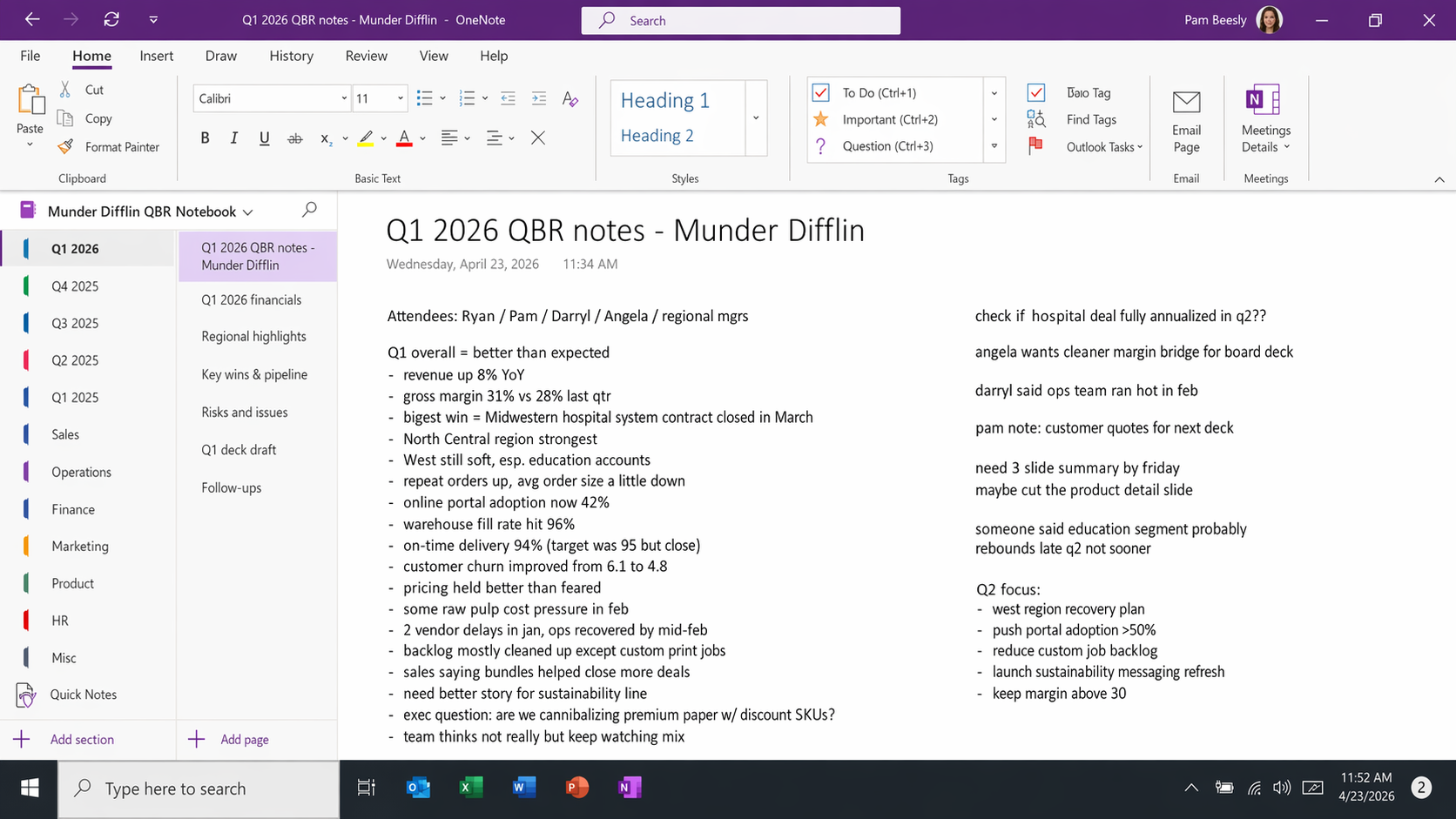
Genuine meeting mess.
Revenue up 8%, a hospital contract closed in March, Angela asking for a cleaner margin for the board deck, you get the flavor. Question marks, side asks, the whole thing.
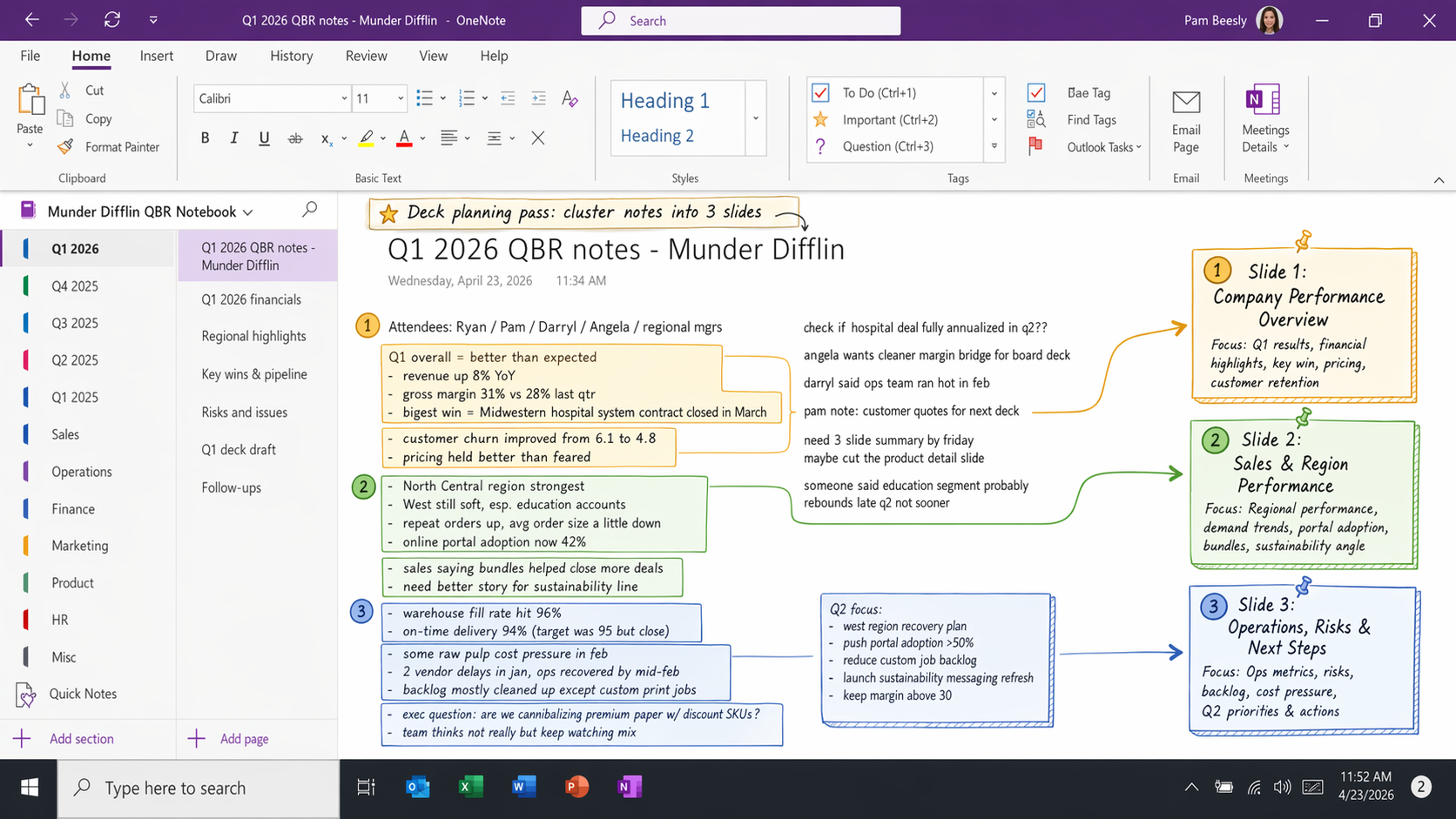
Step one is to read the notes and cluster them into slide concepts. You can do this, or AI can do this.
I ended up with three slide concepts:
- Company Performance Overview (Q1 results, financial highlights, the big win)
- Sales and Region Performance (regional trends, portal adoption, bundles)
- Operations, Risks, and Next Steps (ops metrics, risks, Q2 priorities)
Here is what that clustering pass looked like. I just dropped a screenshot into ChatGPT and asked it to annotate right on top of the notes:
Step two is the prompt.
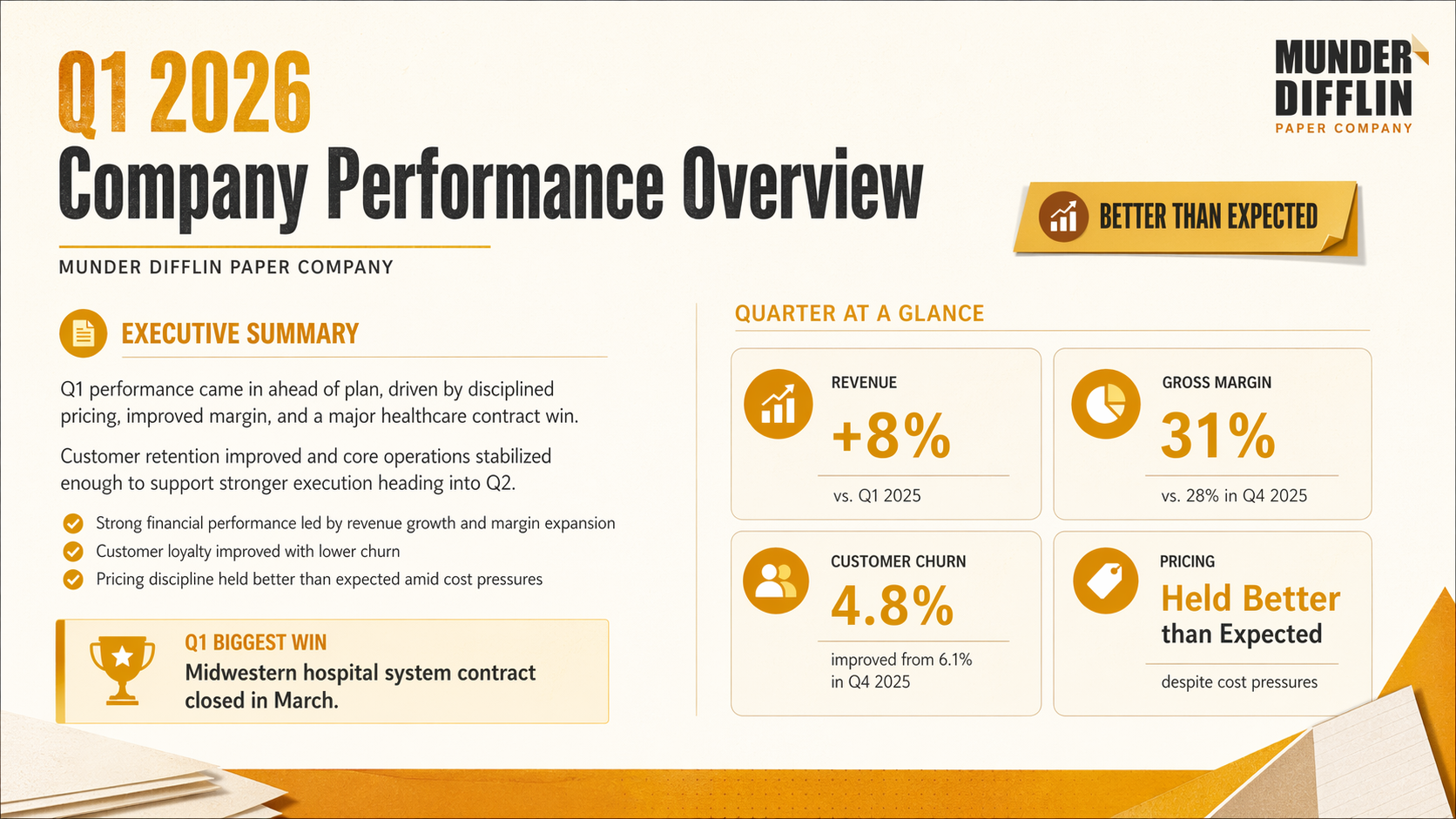
I ran the loose version above three times, once per slide concept.
Here were the results:
Slide one.
Slide two.
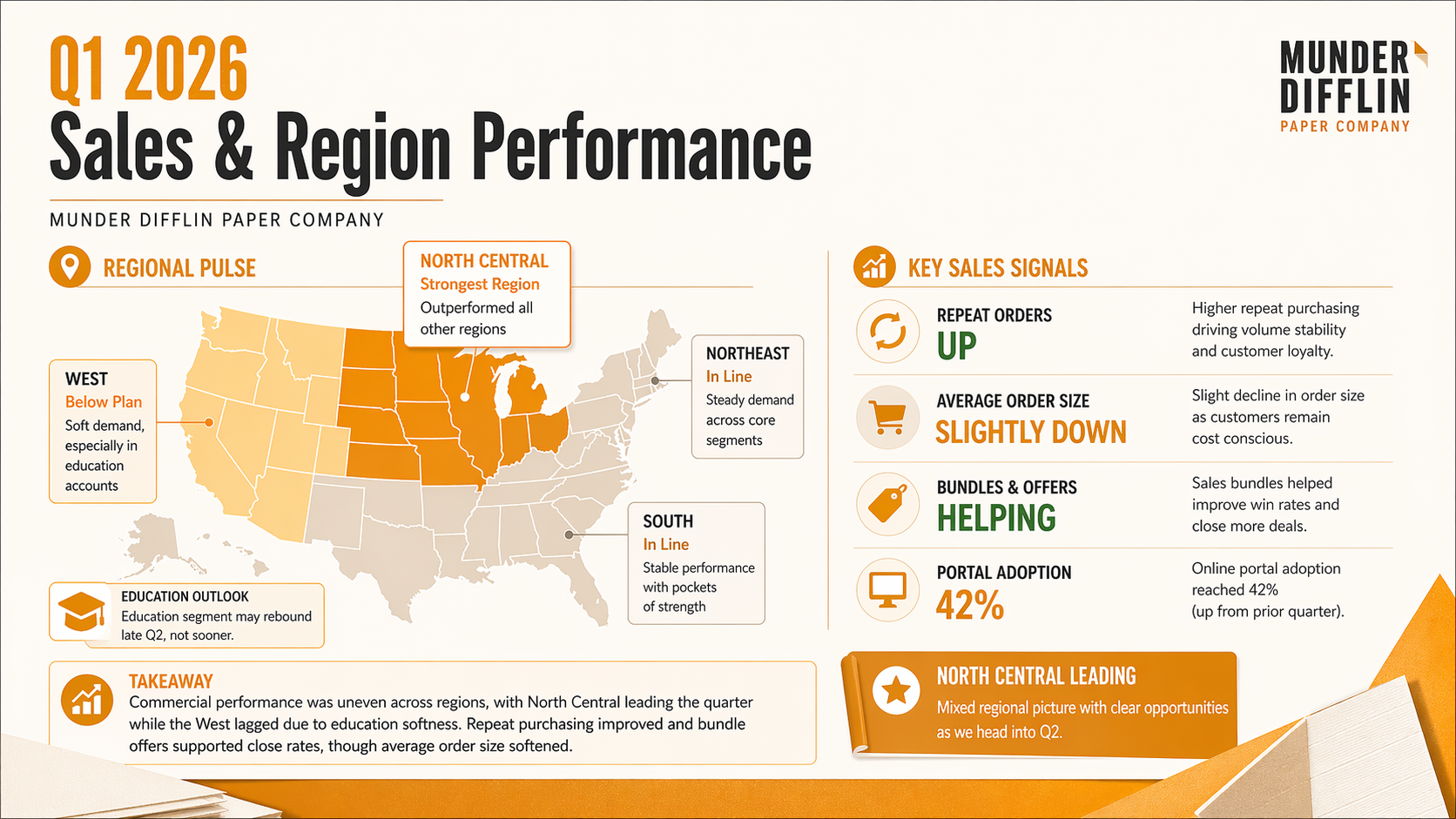
Heads up on this one: The first generation mislabeled the strongest region as the Northeast. I re-ran it with one extra sentence telling the model which region was leading and it fixed on the second try. That’s the “read it before you ship it” part. The model is fantastic, but not infallible.
Slide three.
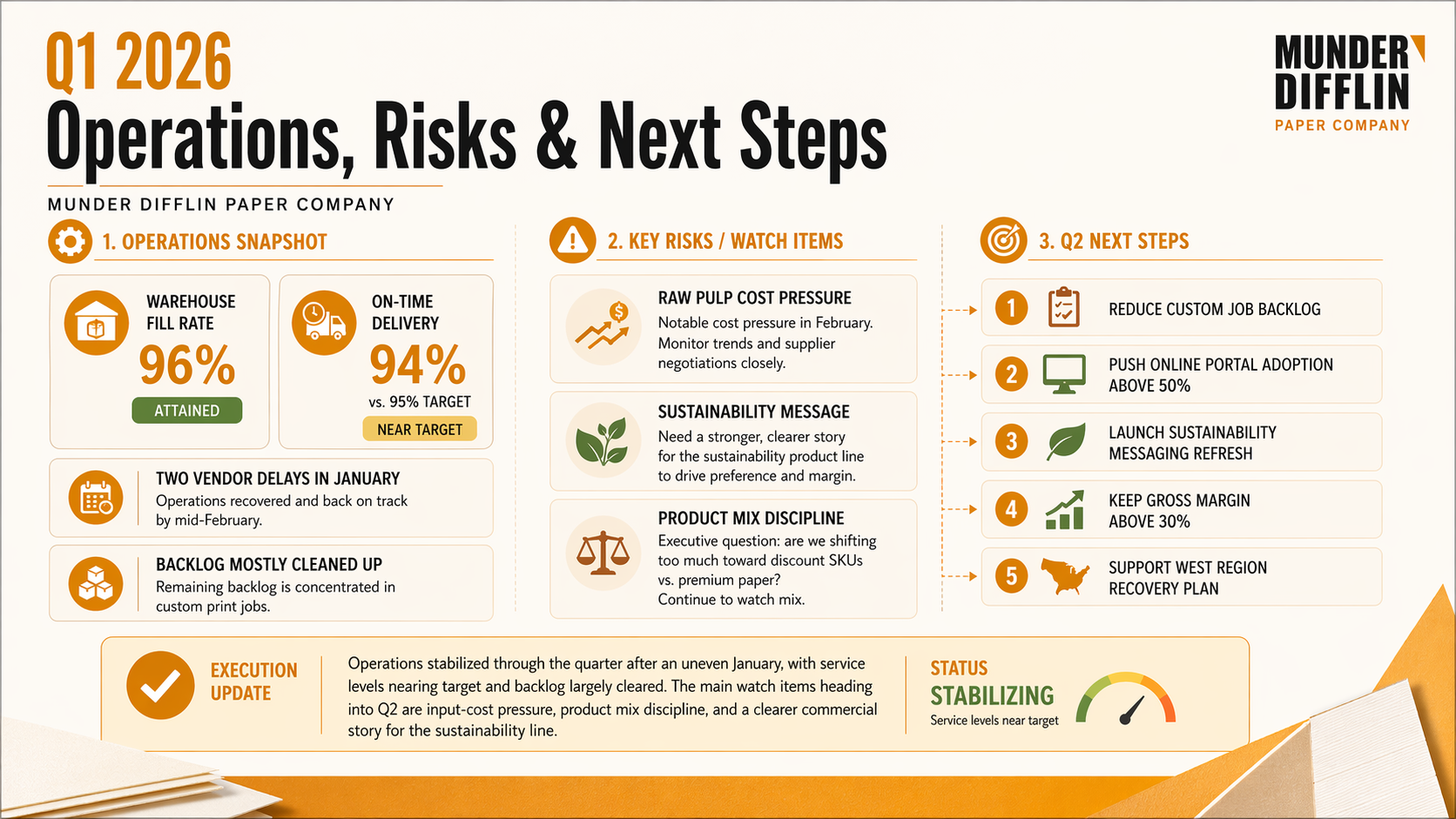
My gut check on these says they’re good enough that I would send them to a real Monday morning exec meeting as-is.
Total time, start to finish, maybe fifteen minutes.
Most of it was the human synthesis pass. The slide generations themselves were seconds apiece.
The bottleneck flipped
Now the interesting part.
Until yesterday the bottleneck was the tool.
Image models couldn’t render clean text, so knowledge workers stayed away and they never got the reps.
Now the tool works, and the bottleneck moves.
From here on out, what’s left is noticing, and knowing which prompts produce work-worthy output on the first try.
The compounding advantage this quarter goes to whoever notices first.
Where else ICS works
Here are a few other jobs the same ICS pattern handles with small tweaks:
- Meeting recap visuals - Same structure, swap “executive summary slide” for “recap graphic.”
- Status dashboards - Replace the Quarter at a Glance panel with your weekly metrics.
- Whiteboard cleanup - Photograph a whiteboard, drop the photo into the Content slot, ask for a clean digital version.
- Annotated screenshots for UI change review - Four people in a meeting can draw something together, or one of you can paste it into Images 2.0 and move on with your afternoon.
Wrapping up
This is one of five prompts I have in rotation right now. Slides is the one I love enough to walk you through in public today.
The other four (SOPs, process diagrams, data charts, UI mockups) are coming later this week.
The boring visual work is one more place where AI image tools earn their keep for knowledge workers.
The people who figure that out this quarter will look a lot more polished than the people still booking time with the design team.
Hope you found this helpful.
Take care & see you in the next one, Michael ✌️
P.S. If you found this useful, it’d mean the world to me if you subscribed, re-stacked, or dropped a comment. All of that’s free for you but a huge boost for me, and I’d really appreciate it 🙏