Your AI has persistent memory. Now make it proactive. Automate content ingestion from Gmail, auto-publish to platforms, and let Claude process everything in between.
By Raghav Mehra
Published: 2026-02-03
URL: https://cashandcache.substack.com/p/build-an-autonomous-content-system
You gave your AI persistent memory in Part 1. Claude Code reads your Notion database, remembers your content strategy, and picks up where you left off across sessions.
But it’s sitting there waiting for you to ask questions—like having a car in the garage while you take the bus to work.
Your AI brain is powerful but passive. Content ideas still require you to manually save them. Finished content still requires you to manually post it. You’re the bottleneck in your own system.
The goal isn’t to work with AI. It’s to design systems where AI works for you.
Where we left off:
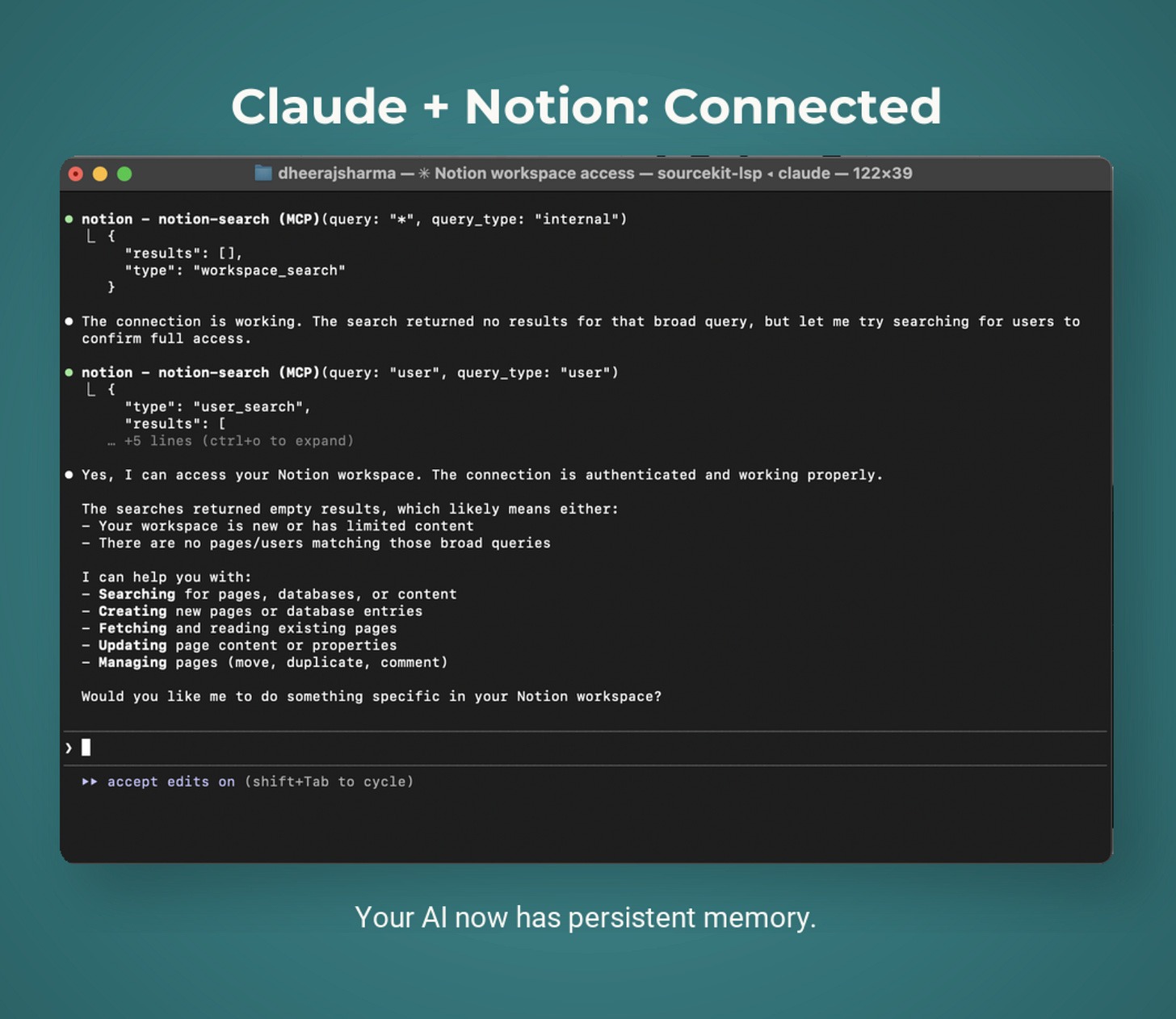
In Part 1, you connected Claude Code to Notion via MCP. In case you missed it 👇 :
You built a content database that Claude can read and write across sessions. Your AI finally has persistent memory.
What we’re building today:
Content ideas flow IN automatically via n8n. Your Notion database stores everything. Claude Code processes and writes when needed. Finished content flows OUT automatically to your platforms.
You review and approve. You don’t push buttons.
walks you through the complete setup: n8n for peripheral integrations (Gmail triggers, platform posting), Claude Code for intelligent processing (via MCP to Notion), and the human-in-the-loop checkpoints that keep quality high while automation runs 24/7.
Let’s add the nervous system to your AI brain. Over to Dheeraj.

The Full Architecture
Before we build the automation, let’s see how all the pieces fit together because the biggest mistake is automating the wrong thing.
Here’s the complete system:
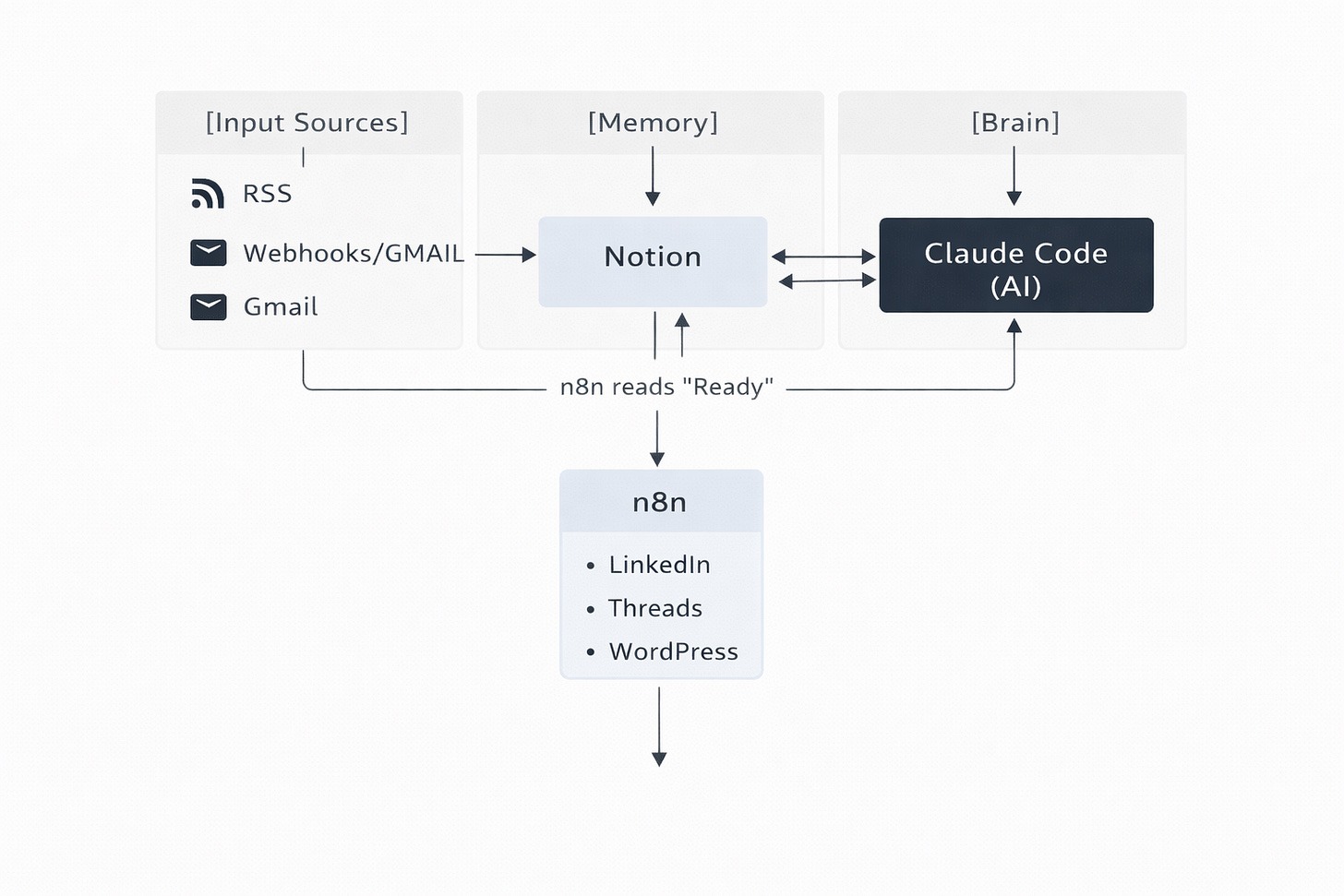
Each tool has a specific job:
- n8n is the hands. It moves data between systems. It watches for triggers. It posts to platforms. It doesn’t think, it just executes.
- Notion is the memory. It stores your content database. It tracks status (Inbox, In Progress, Ready, Published). It’s the single source of truth.
- Claude Code is the brain. It reads from Notion via MCP. It processes ideas, writes drafts, makes recommendations. It thinks but it doesn’t move data.
The key insight: don’t make n8n try to write content. Don’t make Claude try to post to Instagram or LinkedIn or fetch from Gmail account. Each tool does what it’s best at, and nothing else.
Workflow 1: Auto-Feed Content Ideas
Now that you understand the architecture, let’s build the input side first: getting content ideas into your system without lifting a finger.
The problem this solves:
You find interesting articles but forget to save them. Content ideas scatter across browser tabs, Apple Notes, random bookmarks. Nothing flows into your system automatically. By the time you sit down to write, you’ve forgotten half of what inspired you.
Here’s the workflow:
Step 1: Choose your trigger
Pick one input source to start with:
- Newsletters you have subscribed coming to your Gmail inbox
- RSS feed from blogs you follow
- Webhook from Readwise or Pocket
- Scheduled scrape of specific sources
- Manual webhook (forward from Slack or email)
You can start simple. RSS is the easiest most blogs still have feeds, and n8n has a native RSS trigger node.
In this example, we will use Gmail inbox where I have subscribed to some newsletter already.
Step 2: Build the n8n flow
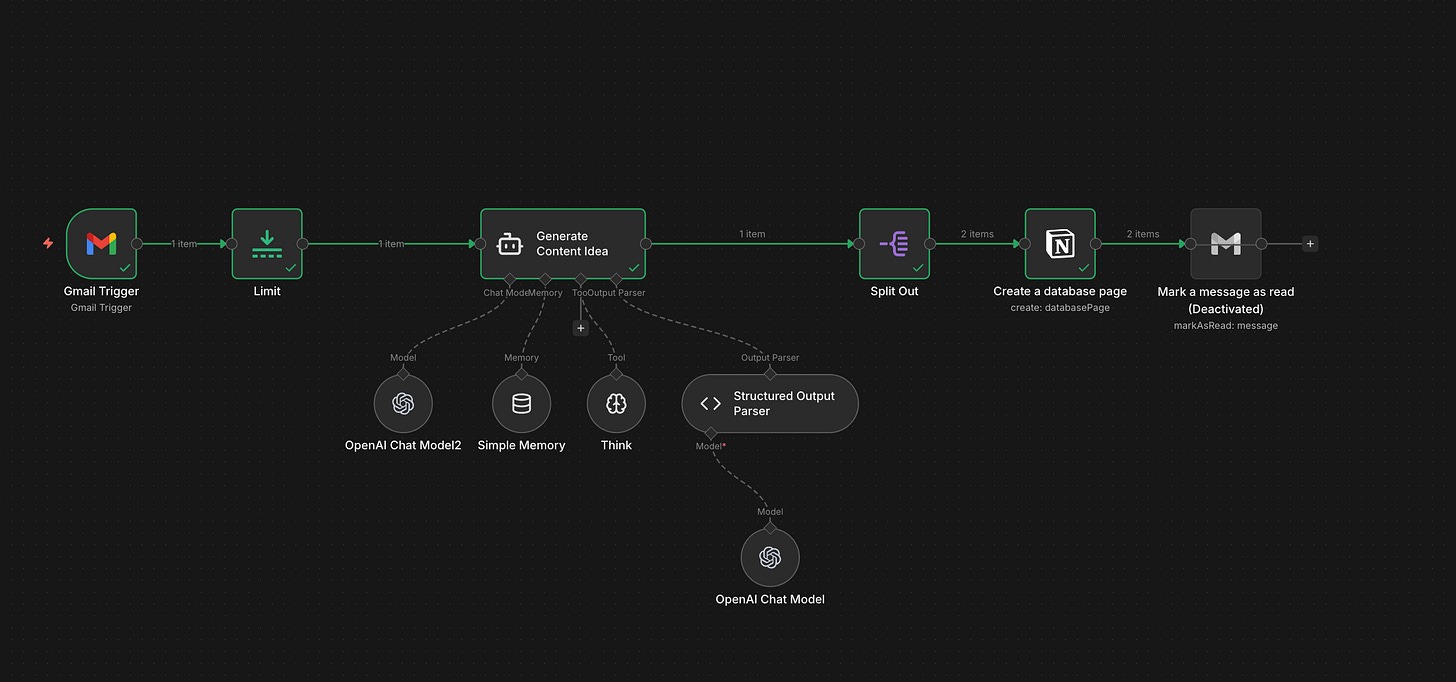
Open n8n and create a new workflow as shown. Add these nodes:
Gmail Trigger: Point it at your inbox where you have newsletters subscribed. Fetch new emails on a schedule (hourly, daily, whatever fits your reading pace).
Limit: Process one email at a time. This prevents rate limits and keeps costs predictable.
AI Agent (Generate Content Idea): Analyzes the newsletter against your brand context. Uses a Structured Output Parser to return clean JSON. Attach your preferred LLM (OpenAI, Anthropic, etc.).
Split Out: The AI returns an array of content ideas. This node splits them into individual items so each idea becomes its own Notion entry.
Notion Create Page: Maps each content idea to your database fields (Title, Status, Type, Content, Platform).
Mark as Read (Optional): Marks processed emails so they don’t get analyzed twice. Useful if you run this on a schedule.
The flow looks like this:
Step 3: Configure the Notion node
In the Notion node settings:
Database: Select your content database (e.g., “Example Content System”) Title: Map to {{ $json.title }} Status: Map to {{ $json.status }} (select field) Type: Map to {{ $json.type }} (select field) Content: Map to {{ $json.content }} (rich text, toggle OFF) Platform: Map to {{ $json.platform }} (multi-select field) Created: Map to {{ $now.format(’MMMM dd, yyyy’) }} (date field)
Save and activate the workflow.
Note: The Platform field accepts an array directly from the AI output. Make sure your Notion database has matching options (Blog, LinkedIn, Twitter, Newsletter) or the node will error on unrecognized values.
What happens next:
On your schedule, n8n checks your Gmail for new newsletters. Each one gets analyzed against your brand voice by AI.
Content ideas land in your Notion database with Status = “Ready”. No action required from you.
Now here’s where the human stays in the loop:
You open your content database once a day or whenever you have time. You scan the new ideas. You pick the ones worth developing.
The AI already did the heavy lifting: reading newsletters, matching them to your audience’s pain points, and suggesting specific angles. You just decide yes or no.
For the ideas you approve, change the status to “In Progress” and start drafting. Or queue them for later.
The result: raw material flows in automatically. You spend zero time hunting for ideas or reading every newsletter word-by-word. Your creative energy goes to writing and improving, not ideation from scratch.
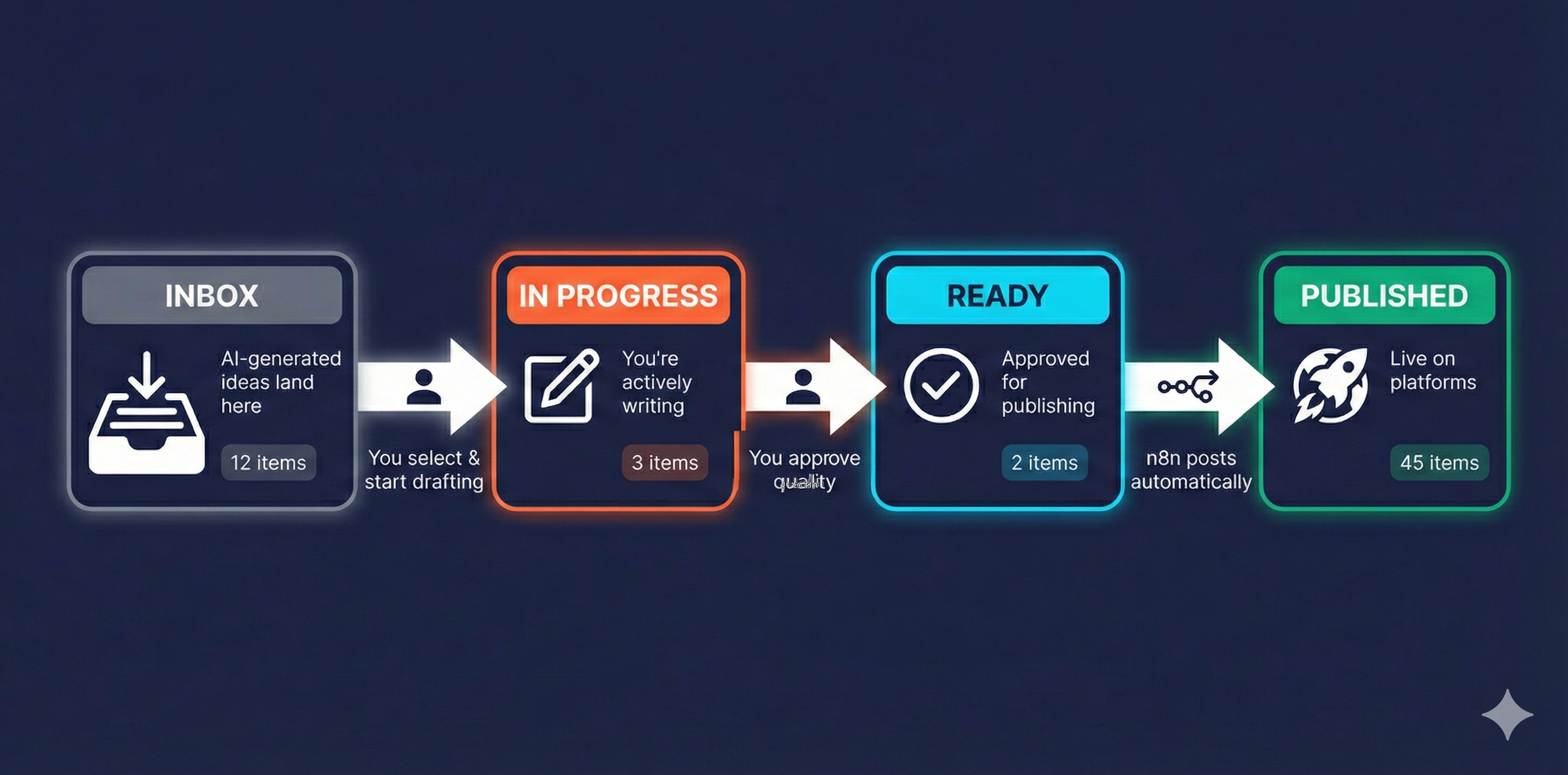 \Content Status Pipeline - From Inbox to Published: Ideas flow in automatically (Inbox). You decide what to develop (In Progress) and approve (Ready). Automation handles publishing.\
Workflow 2: Publish Ready Content
Content flows in automatically. Now let’s make sure it flows out the same way. Finished content that never gets published is just expensive journal entries.
The problem this solves:
You’ve got posts sitting in your Notion database with Status = “Ready”. But they never actually get published. You manually copy-paste to each platform.
LinkedIn has different formatting than WordPress. Twitter needs shorter versions. You spend 20 minutes per post just reformatting and posting.
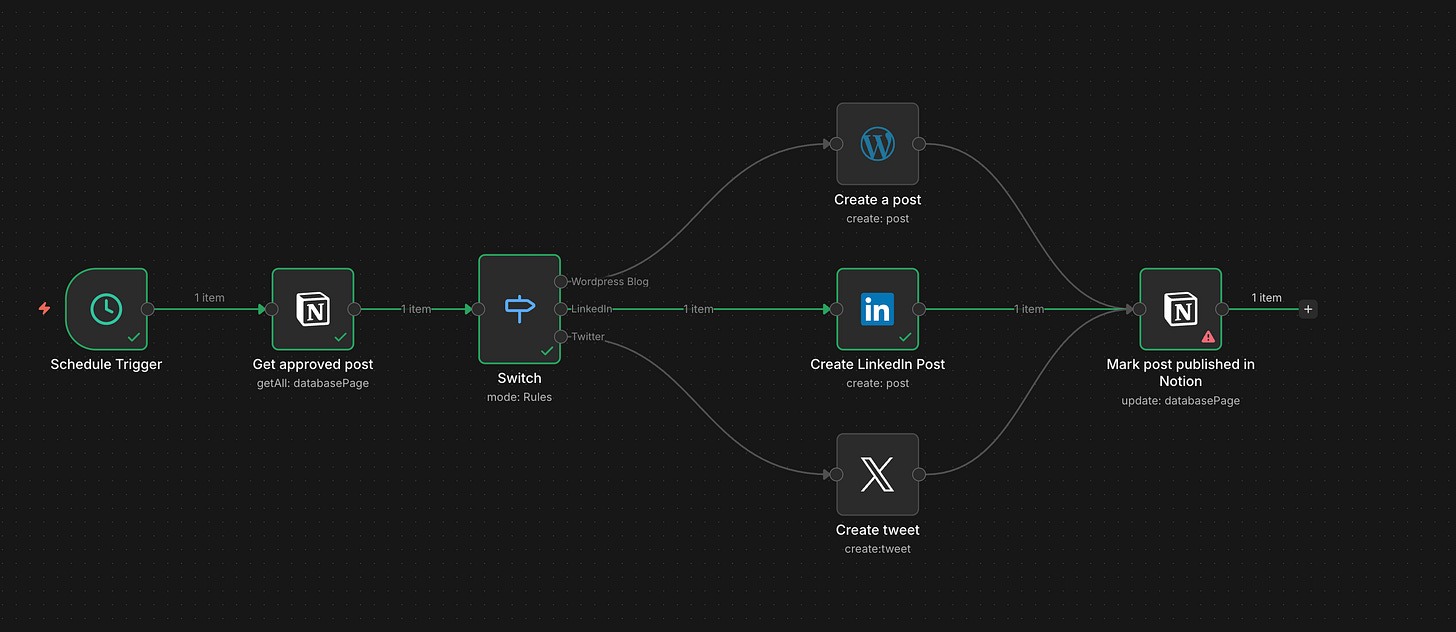
Here’s how to automate it:
Step 1: Set up the Schedule Trigger
In n8n, create a new workflow. Add a Schedule Trigger node that runs on your preferred cadence (daily, twice daily, whatever fits your publishing rhythm).
Step 2: Pull approved posts from Notion
Add a Notion node configured to:
- Operation: Get All (Database Page)
- Database: Your content database
- Filter: Status equals “Ready” (or “Approved”)
This pulls only content you’ve explicitly marked as ready to publish.
Step 3: Build the platform routing
Add a Switch node to route content based on the Platform field. Set mode to “Rules” and create branches for each platform:
- WordPress Blog → Posts marked for your blog
- LinkedIn → Posts marked for LinkedIn
- Twitter → Posts marked for Twitter/X
Each branch goes to its respective platform node.
Step 4: Configure each platform node
WordPress: Create a post node with title and content mapped from Notion.
LinkedIn: Create post node with your content. Keep it under 3,000 characters.
Twitter/X: Create tweet node. Content auto-truncates, but consider a Code node to create a shorter version with a link back to the full post.
Step 5: Update status after publishing
After each platform node, add a Notion Update node to change Status to “Published”. This creates your audit trail.
What happens next:
On your schedule, n8n checks your Notion database for posts marked “Ready”.
It pulls them, routes each to the right platform based on your tags, and publishes.
Status changes to “Published” automatically. No action required from you.
Now here’s where the human stays in the loop:
You write and refine content on your own time. When it’s good enough to ship, you change the status to “Ready” and pick the platforms. That’s it.
The automation handles the tedious part: logging into each platform, reformatting, posting, and tracking what went where. You just decide when something is ready.
For posts that need a specific publish time, add a “Publish Date” field to your Notion database. Adjust the Notion filter to only pull posts where Publish Date equals today.
The result: content moves from draft to published without you touching three different apps. Your creative energy goes to writing, not distribution logistics.
Connecting the Intelligence
You’ve got automatic input and automatic output. The critical question: Where does Claude Code actually fit in this loop?
There are two approaches, and which you choose depends on your risk tolerance:
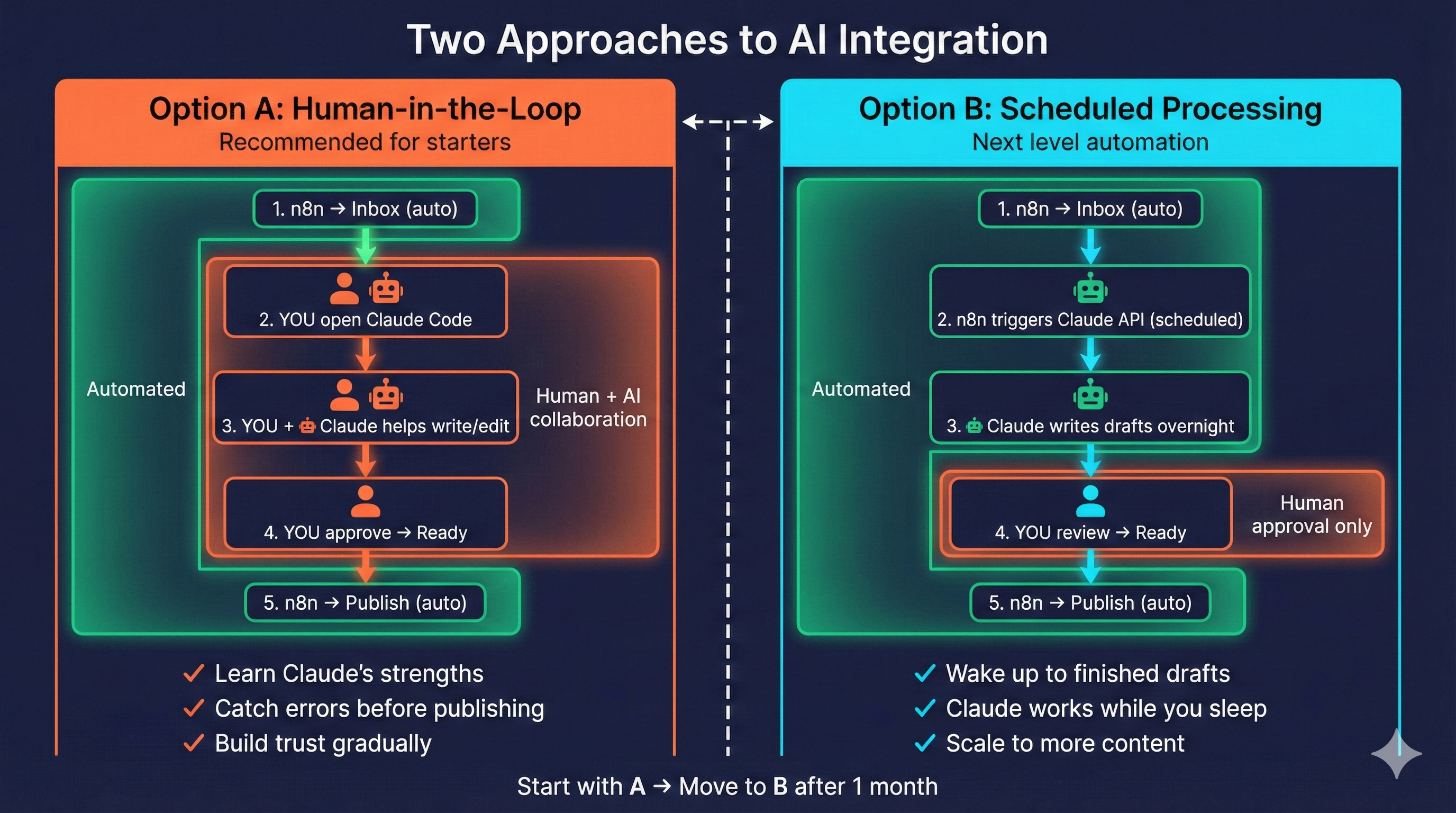
Option A: Human-in-the-Loop (recommended for starters)
This is the factory assembly line approach. Think of it like this: raw materials (content ideas) come in automatically via n8n. Machines (Claude) do the heavy processing. But before anything ships, a human checks quality. You’re not building widgets, you’re checking them.
The flow:
- n8n feeds your Inbox automatically
- YOU open Claude Code to review and process
- Claude helps write and edit based on your Notion context
- You approve and mark “Ready”
- n8n publishes automatically
Auto-in → [Human + Claude Code review] → Auto-out
Why this works: you learn what Claude does well (and what it doesn’t). You catch mistakes before they go live. You can gradually automate more as trust builds. The work happens without you, but nothing goes out without your approval.
Option B: Scheduled Processing
This is the next level. Once you’ve run Option A for a few weeks and trust Claude’s output on specific tasks, you can schedule those automatically.
n8n triggers Claude API calls on a schedule using n8n’s built-in Anthropic node (found under AI nodes in the editor). Claude processes Inbox items automatically, writes drafts, and marks them “Ready for Review” (not “Ready” for publishing).
Quick setup: Add the Anthropic node, connect your API key from console.anthropic.com, and configure the prompt to process your Notion inbox items.
The flow:
- n8n feeds your Inbox automatically
- n8n triggers Claude API every evening
- Claude processes items and writes drafts
- YOU review drafts and mark “Ready”
- n8n publishes automatically
Auto-in → [Scheduled Claude processing] → [Human approval] → Auto-out
You still review before publishing, but Claude does its work overnight. You wake up to drafts instead of blank pages.
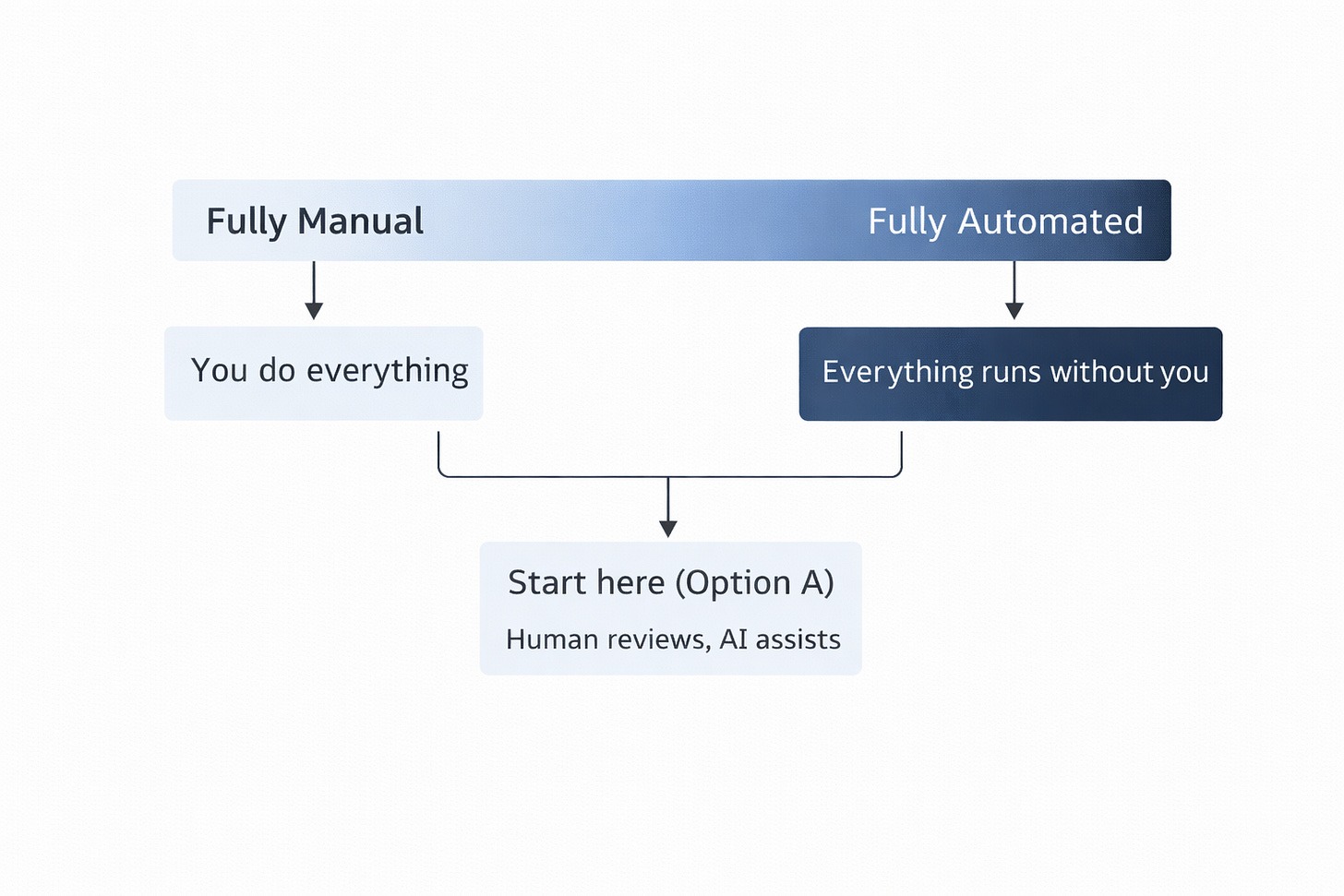 \The spectrum of automation\
Start with Option A. Run it for a month. Notice which tasks Claude handles perfectly every time. Those are candidates for Option B. Notice which tasks still need your judgment. Keep those in Option A.
Example: After a month, you might notice Claude writes solid first drafts for “how-to” posts but struggles with opinion pieces. Automate the how-to drafts (Option B). Keep opinion pieces in Option A.
Conclusion
You’ve built something deceptively simple: a content pipeline that runs without you being the engine.
The architecture:
- n8n handles the hands work—moving data in and out of systems without thinking
- Notion is the persistent memory—storing context, tracking status, serving as single source of truth
- Claude Code handles the brain work—processing ideas and writing content via MCP
The goal isn’t full automation. It’s selective automation of the parts that don’t need your creative input.
📽️ Watch the full workflow in action
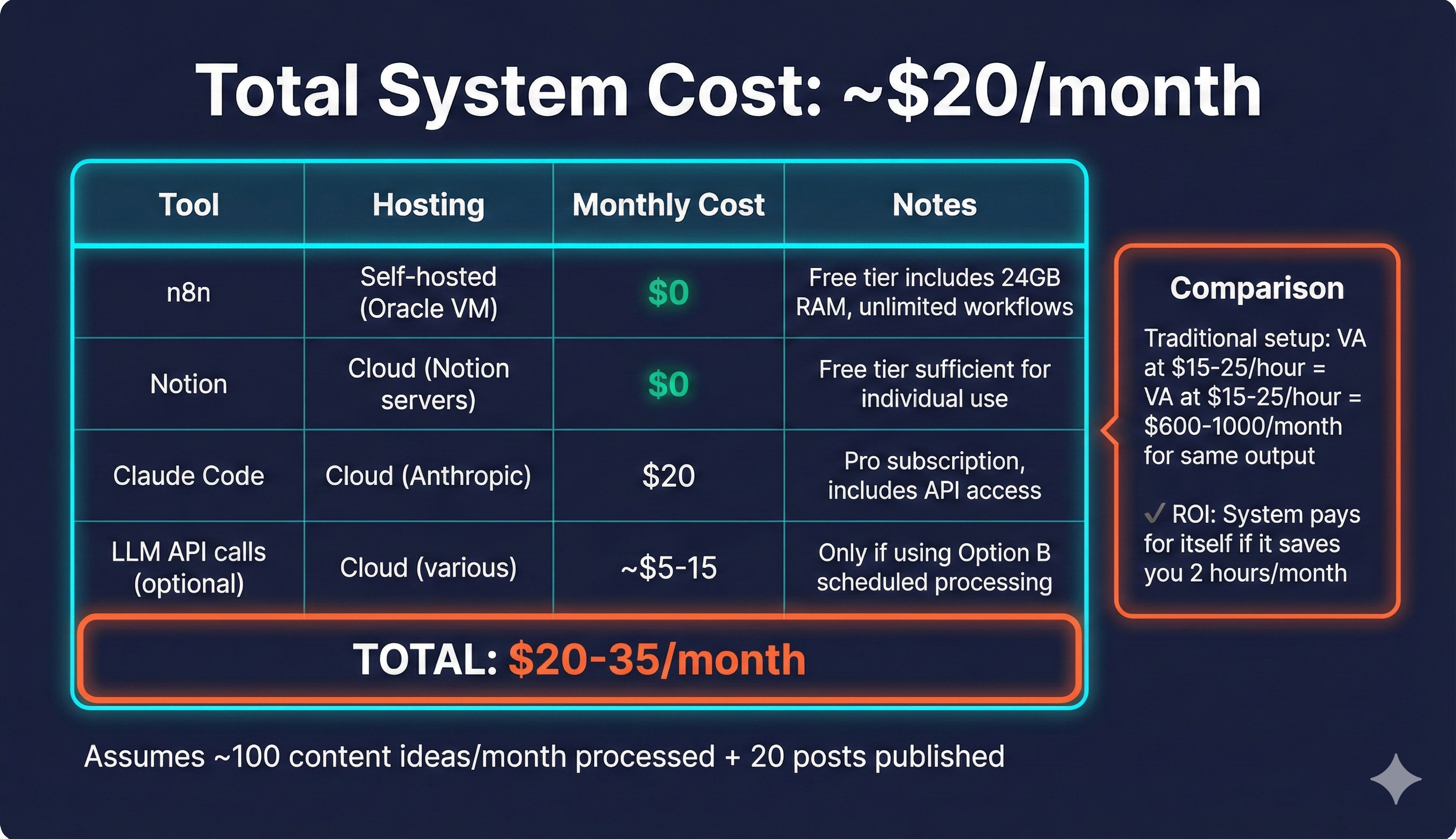
Ashwin and I recorded a walkthrough with Dheeraj covering this entire system—from Gmail triggers to Claude processing to automated publishing. We break down costs (n8n self-hosted for free, Notion free tier, Claude subscription at $20/month), maintaining brand voice across automated content, and where to keep the human in the loop.
🔗 The n8n workflow files are available in exportable format HERE. Import them directly into your instance and adapt to your setup.
A big thanks to for building this out. For more AI automation guides and n8n workflows, check out GenAI Unplugged.
[ GenAI Unplugged
Simple AI automation systems for solopreneurs who are done doing everything by hand.
By Dheeraj Sharma](https://genaiunplugged.substack.com?utmsource=substack&utmcampaign=publicationembed&utmmedium=web)
⚙️ What changed from Part 1 to Part 2:
You went from re-explaining context every session to persistent memory. Then from manually triggering everything to autonomous content flow. All of this at a total monthly cost in the range of $20-35. Compare this to hiring a VA at $600-1000/month for equivalent output!
System pays for itself in saved time.
Close your laptop on Friday. Come back Monday. New content ideas are in your database. Drafts are ready for review. Approved posts are already live.
Content flows through your system with you as quality control, not the engine. Your AI doesn’t just remember anymore—it works while you sleep.
🤔 Which automation are you building first? And what's your biggest benefit or hesitation about letting AI work without you triggering it? Curious to learn what AI users think about this.
🚨 Enjoying deep dives into AI and its implementation cases like these? Cash & Cache explores the intersection of AI and tech for founders, VCs, and leaders. If you’re building in this space and want to reach our audience of 800+ readers,
check out our sponsorship options on Passionfroot or click below.
💡 If you’ve been enjoying this article or other ones exploring the implementation guides for your favorite AI tools, consider pledging? It keeps us motivated to cover and write around AI.
🤝 We’re always open to thoughtful collaborations and fresh ideas around AI and business innovation. If that’s your space, let’s connect.