Prompts Included
By Mike Thomson
Published: 2026-04-28
URL: https://aisolopreneurhub.substack.com/p/the-5-levels-of-claude-skills-a-blueprint
You know that feeling when you find a shortcut so good that you almost do not want to share it?
That is what Claude Skills feels like right now.
But here is the thing. Most Substack creators have no idea this feature even exists. And the ones who do know about it are treating it like a basic template tool. That is a waste.
This newsletter is about to change that.
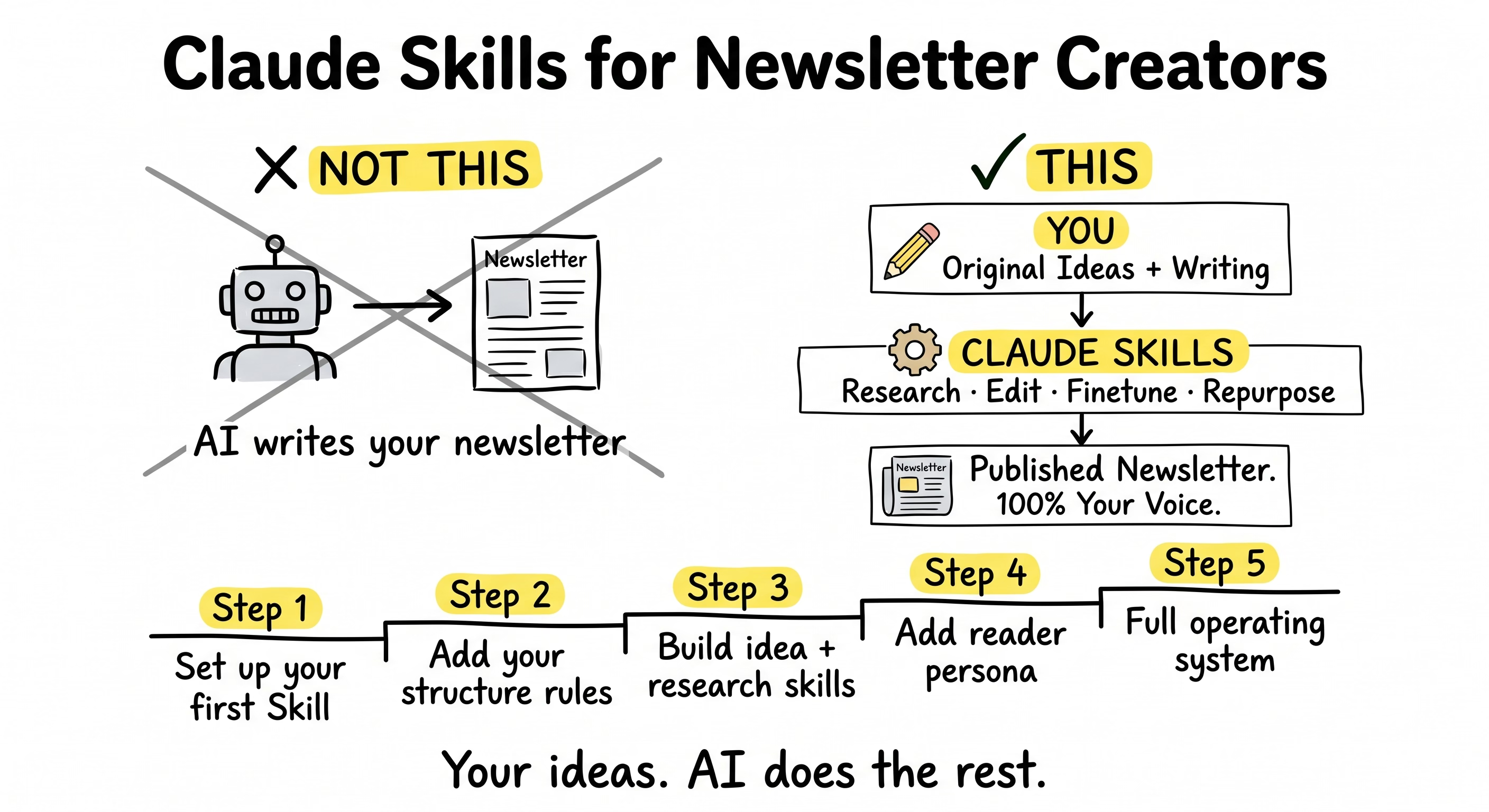
We are going to go from “what even is a skill” to “I now have a custom AI writing assistant trained on my newsletter voice” in one read.
Let us get into it.
What Is a Claude Skill? (And Why Should You Care as a Newsletter Creator?)
Think of a Skill as a standing instruction set that lives inside Claude permanently.
Not a prompt you type every time. Not a template you copy-paste. A Skill is a folder with a special file inside it called skill.md. Claude reads that file and knows exactly how to behave, what rules to follow, and what workflow to run, every single time you ask it to do something related to that skill.
For Substack creators specifically, this solves the number one problem we all face: Claude forgets everything between sessions. You write a great prompt, Claude produces something in your voice, and then next week you start from scratch again. Skills fix that. Permanently.
What Makes Skills Different From Other Claude Features?
This is the part most people skip. They see “Skills” and think it is just another name for a saved prompt. It is not. Let me break down the differences clearly.
Skills vs. Prompts
A prompt is something you type each time you open Claude. It lives in your head, maybe in a Notion doc, and you manually paste it in. It requires effort every session. A Skill is automatic. Claude loads it without you asking. You write a newsletter, Claude already knows your rules before you say anything.
Skills vs. Projects
Projects in Claude let you attach files and give context to a conversation. Think of a Project as your research folder. A Skill is your operating procedure. The Project holds your raw material. The Skill tells Claude what to do with it and how to behave. You use both together. Projects = context. Skills = behavior.
Skills vs. Custom Instructions
Custom instructions in Claude.ai give you a general “always behave like this” setting. It is broad. A Skill is specific and specialized. You can have a “Write my newsletter intro” skill that behaves differently from a “Repurpose my newsletter for LinkedIn” skill. One Claude account, multiple specialized behaviors depending on the task.
Skills vs. MCP Tools
MCP tools connect Claude to external apps like Notion, Gmail, and Substack. They give Claude the ability to take actions in other software. Skills do not connect to apps. Skills train Claude on how to think and write. Different jobs. Most power users end up using both.
The Five Levels of Using Claude Skills as a Substack Creator
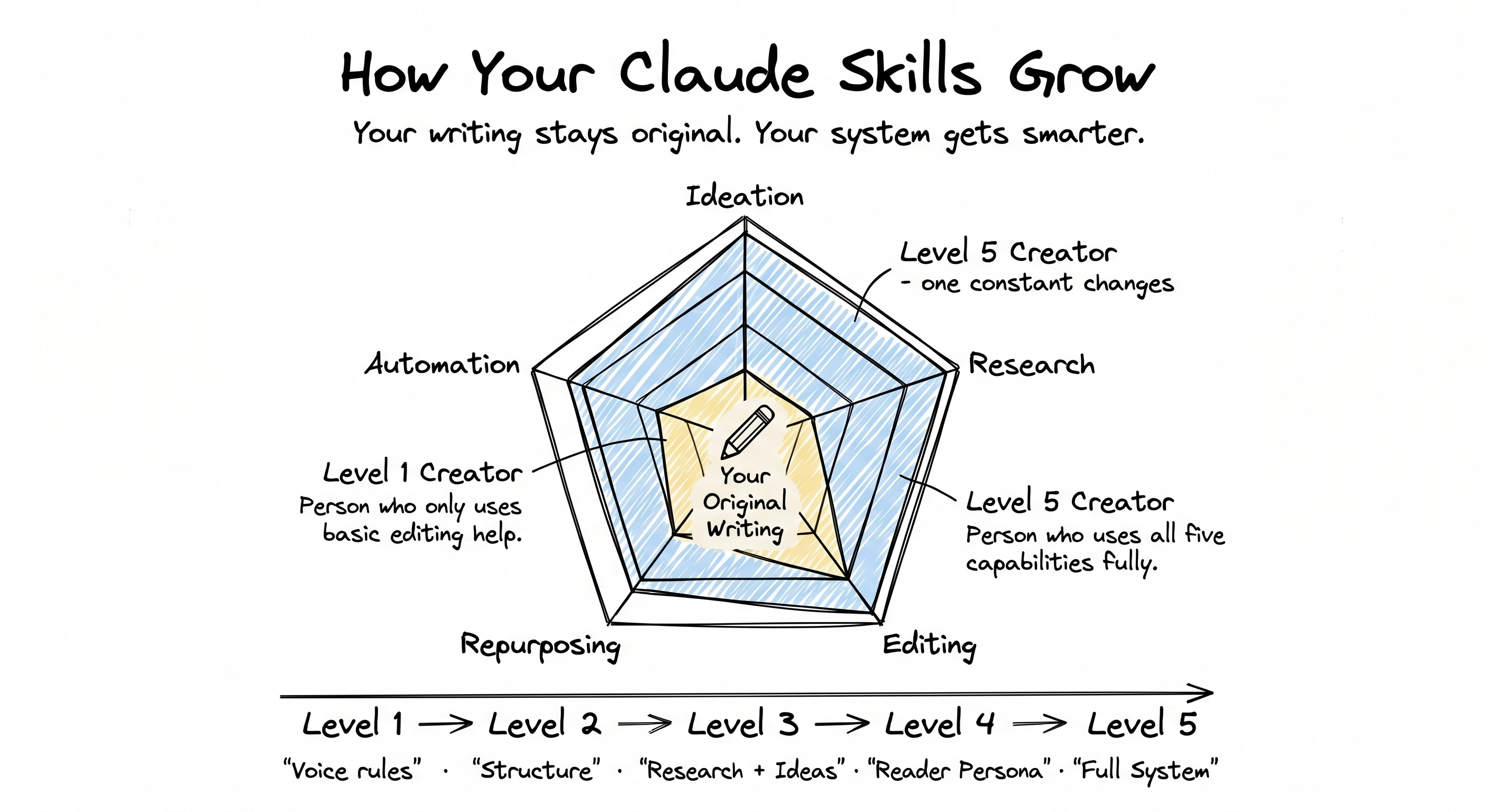
Here is where we get into the real meat. I designed this as a progression. Start at your level, not at Level 1 if you are already advanced.
Level 1: You Just Discovered Skills (Total Beginner)
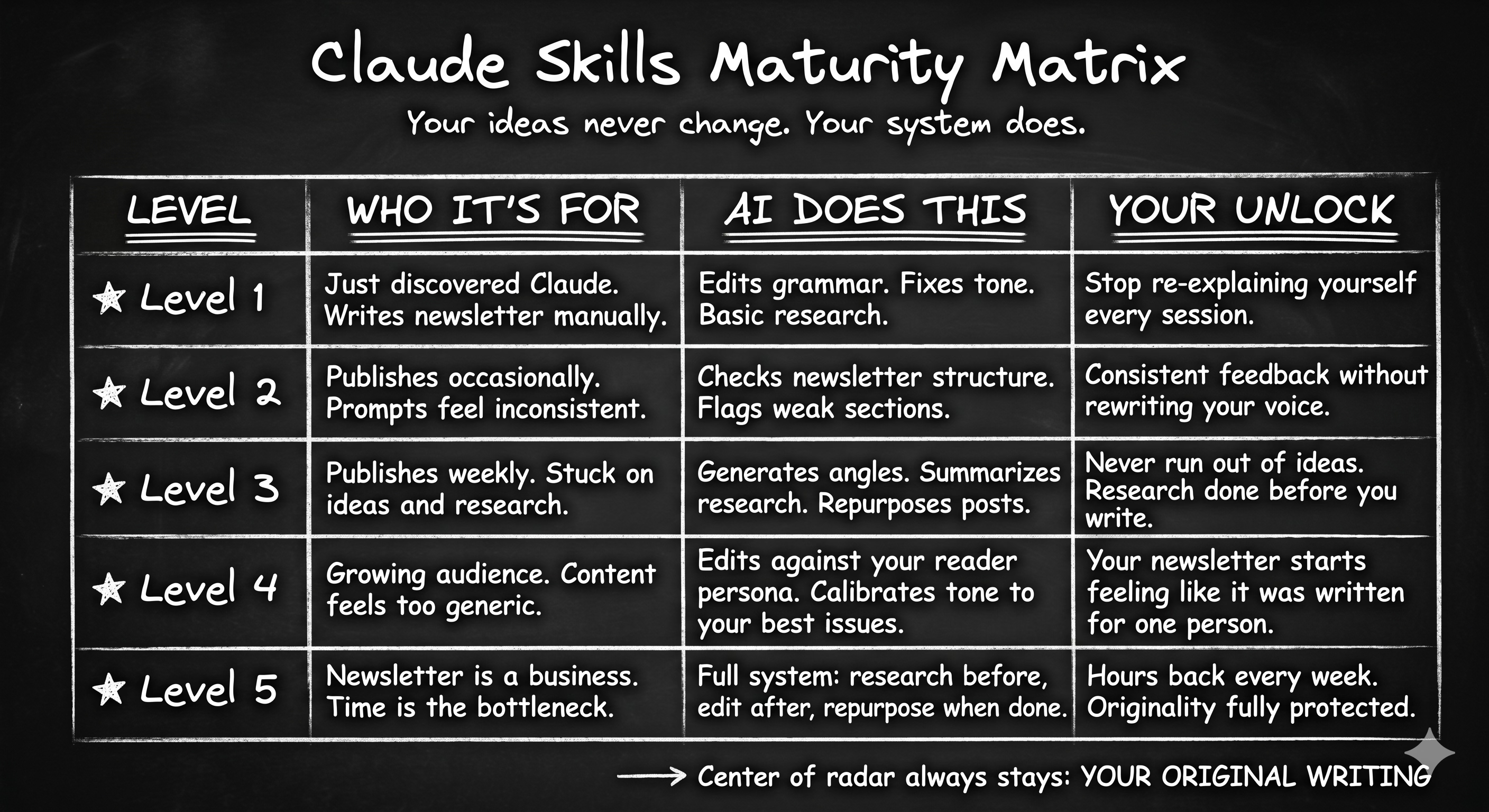
Who this is for: You are new to Claude, maybe new to AI tools in general. You write your newsletter yourself but want help with research, grammar, and making your drafts tighter.
Your current problem: Every time you open Claude, you spend five minutes re-explaining who you are, what your newsletter is about, and what you want Claude to help you fix or research.
What to do at this level:
Start by creating your very first Skill. Do not overthink it. Open a text editor. Create a file called SKILL.md. Paste this exact structure into it:
name: my-newsletter-assistant
description: Research, edit, and finetune my newsletter drafts without rewriting them
My Newsletter Assistant
I write a newsletter called [YOUR NEWSLETTER NAME] for [YOUR AUDIENCE].
Your job is NOT to write my newsletter for me. My ideas, stories, and arguments are original and mine.
Your job IS to:
- Research topics I give you and surface the most relevant insights for my audience
- Edit my drafts for grammar, clarity, and flow without changing my voice
- Suggest where a section feels weak or unclear
- Generate newsletter topic angles when I ask for ideation help
My writing style:
- Conversational, like I am talking to a friend
- Short sentences. No jargon.
- I never use bullet points as a crutch. I explain things properly.
- I do not use em-dashes or phrases like “it’s worth noting”
My audience is: [DESCRIBE THEM]
When editing, preserve my phrasing wherever possible. Suggest changes, do not impose them.
What you will notice: Claude stops trying to rewrite everything and starts acting like a sharp editor who respects your voice. The feedback feels useful instead of intrusive.
Level 2: You Know the Basics, Now Make It Work for Your Workflow
Who this is for: You have used Claude a few times. You know what prompts are. You want to stop doing repetitive setup every session.
Your current problem: You write your newsletters yourself, but your editing sessions with Claude are inconsistent. Some weeks the feedback is sharp. Other weeks Claude starts rewriting your sentences and it loses your tone completely.
What to do at this level:
Build a newsletter-specific editing skill. This goes beyond general rules. It teaches Claude the structure of your newsletter so it can give structural feedback, not just line-level feedback.
Here is what to add to your SKILL.md:
My Newsletter Structure
Every newsletter I write follows this format:
- HOOK (2-3 sentences): A personal observation, a surprising fact, or a bold statement. Never start with “In today’s issue.”
- BRIDGE (1 paragraph): Connect the hook to the main topic. Make the reader feel like this is about them.
- MAIN CONTENT: Structured with Level headings. Each section solves one specific problem or teaches one thing. No fluff.
- CALL TO ACTION: One ask. Never more than one. Either reply, share, or upgrade.
When I share a draft, check if it follows this structure. Tell me where it breaks down. Do not rewrite sections. Point out what is missing and why.
What you will notice: Your editing sessions get tighter. Claude tells you exactly which section is weak and why, instead of just producing an alternative draft you did not ask for.
Level 3: You Are Publishing Consistently, Now Scale the Output
Who this is for: You publish weekly or bi-weekly. You have a clear niche. You are starting to feel the content pressure of keeping up with ideas, research, and writing.
Your current problem: Writing is not the bottleneck. Ideation and research are. You run out of angles. You spend more time figuring out what to write about than actually writing. And when you do write, you spend another hour cleaning up the draft instead of improving the ideas inside it.
What to do at this level:
Build separate skills for separate jobs. This is the key insight most creators miss. One skill for everything is like having one tool for every job in your kitchen. You need the right tool for the right job.
Skill 1: Idea Generator This skill knows your niche, your past topics, your audience, and generates 10 newsletter angles based on what is happening in your space. It does not write the newsletter. It gives you a menu of angles and you pick the one that excites you most. The excitement you feel about a topic is what makes it original. Claude just helps you see the options faster.
Skill 2: Research Summarizer You feed it a long article, a podcast transcript, or a thread. It extracts the three most useful insights for your specific audience. It filters noise. It saves you an hour of reading so you can spend that hour forming your own opinion on what the research actually means.
Skill 3: Draft Editor and Polish Skill You write your newsletter. Then you drop it into Claude with this skill active. It checks grammar, flags sentences that are unclear, tells you where you buried your best point, and suggests where to cut. Your words. Your ideas. Just tighter.
Skill 4: LinkedIn/Twitter Repurposer Dan Koe’s whole strategy is built on this idea: one piece of original content powers everything else. After you publish your newsletter, this skill turns your original writing into LinkedIn posts, tweets, and short video scripts. You wrote the original. Claude just repackages what is already there.
Practical setup for each skill: Each one is a separate folder. Each folder has its own SKILL.md. Each SKILL.md has a specific description that tells Claude when to activate it automatically.
What you will notice: You stop being the bottleneck. Ideas keep flowing. The research is done before you sit down. The editing is faster after you finish. The only thing left is the part only you can do: writing the actual thing.
Level 4: You Have a Growing Audience, Now Personalize at Scale
Who this is for: You have hundreds or thousands of subscribers. You have a consistent publishing record. You are thinking about paid subscriptions, products, or services.
Your current problem: Your newsletter is good, but it feels like it is written for everyone, which means it is really written for no one. You want it to feel more specific, more targeted, more like you are talking directly to one person.
What to do at this level:
Build a reader persona skill. This is advanced but straightforward once you understand the concept.
Go through your last 20 reply emails from subscribers. Look for patterns in what they struggle with, what they thank you for, what questions they ask. Distill this into a document. Call it reader-persona.md.
Then add this to your SKILL.md:
My Reader
Before editing or researching anything for me, read the reader-persona.md file I have attached.
My ideal reader is not a beginner and not an expert. They know enough to be dangerous but are frustrated because they are not seeing results yet.
When editing my drafts, flag any section where I am talking over their head or where I am explaining something they already know. When generating research or ideas, filter everything through this person’s specific situation.
Also at this level: build a tone-calibration skill.
Pull the three newsletters where subscribers replied the most. Add them to your skill context with this note: “These are my best issues. Study the sentence length, the word choice, the emotional tone. When you edit my drafts, use these as the benchmark. Do not make my writing sound different from these. Make it sound more like them.”
What you will notice: Your editing sessions get more precise. Claude starts catching the exact moments where your draft drifts away from your best work, because it now has a real benchmark instead of a vague description. Your open rates improve because the content is sharper, more targeted, and still entirely yours.
Level 5: You Are Running a Content Business, Now Automate the System
Who this is for: Your newsletter is a business. You have paid subscribers, a product, or a service attached to it. You are thinking about leverage and systems, not just content.
Your current problem: You write everything yourself, which is correct. But the support work around your writing, the research, the editing, the repurposing, the grammar checks, all of that still takes hours every week. You are spending creative energy on tasks that do not need creativity.
What to do at this level:
Build a full newsletter operating system using Skills. This system does not write for you. It handles everything that surrounds your writing so you can spend every creative hour on the thing only you can do.
Here is what that looks like in practice:
The System:
voice.mdfile: Your complete writing identity. Every stylistic rule you have ever identified. Claude uses this when editing to make sure it never pushes you away from your own style.
structure.mdfile: Your newsletter format, section by section. Claude references this when reviewing your drafts for structural gaps.
past-issues/folder: Your last ten newsletters as reference material. This is Claude’s benchmark for what good looks like in your world.
reader.mdfile: Your subscriber persona based on real feedback. Claude filters all research and editing suggestions through this person.
content-calendar.mdfile: Your upcoming topics and angles. Claude uses this to prepare relevant research before your writing sessions.
repurpose.mdfile: Exact instructions for turning your finished newsletter into social content after you publish.
All of this lives in one Skills folder. Claude loads all of it at once. You show up, write your newsletter, and the entire support system is already running.
How to Set Up Your First Skill: Step-by-Step
No theory. Just the exact steps.
Step 1: Open any text editor. Create a new folder on your desktop. Name it something like my-newsletter-skills.
Step 2: Inside that folder, create a file called SKILL.md.
Step 3: Paste this template and fill it in:
name: newsletter-assistant
description: Helps research, edit, and finetune my newsletter without writing it for me
Newsletter Assistant Rules
What You Are Here For
You do NOT write my newsletter. My ideas and content are always original and come from me.
You ARE here to:
- Research topics I give you before I write
- Edit my finished drafts for grammar, flow, and clarity
- Flag structural weaknesses in my drafts without rewriting them
- Generate topic angle ideas when I ask for ideation
- Repurpose my finished newsletters into social content
My Voice
[Describe your writing style in 3-5 sentences. Be specific. “Conversational” is not specific. “Like I am explaining to a smart friend over coffee, no jargon, no filler words” is specific.]
My Structure
[Paste your newsletter format here so Claude can check if your drafts follow it]
What to Avoid When Editing
- Replacing my phrasing with cleaner but generic alternatives
- Em-dashes
- Phrases like “it’s worth noting” or “dive deep”
- Bullet points as a substitute for real explanation
- Making it sound like an AI wrote it
My Audience
[One clear paragraph about who reads your newsletter and what they want]
Step 4: In Claude Cowork or Claude Code, open Settings. Find the Skills section. Add your folder path.
Step 5: Start a new Claude session. Try one of these:
- For research: “I’m writing a newsletter about [topic]. Research the top 5 angles my audience would care about most.”
- For editing: “Here is my draft newsletter. Edit for grammar and flag any section that feels weak or unclear. Do not rewrite. Just point out what needs fixing and why.”
That is it. You are now using Skills.
Final Thought
The best newsletter creators are not better writers than you. They just protect their writing time better than you. They spend their hours on original ideas and let systems handle everything else.
Skills gives you that system. Your ideas go in. Everything around them gets handled.
Start with Level 1 this week. Spend 20 minutes on your SKILL.md. The key line to write carefully is the “What You Are Here For” section. That is the line that keeps Claude in its lane. Come back next week and tell me how your editing sessions changed.
I will be watching my inbox.
Thanks for reading The AI Solopreneur! Subscribe for free to receive new posts and support my work.